Rocus
Organize saved links, notes, and files in a private AI knowledge graph
Gallery
About Rocus
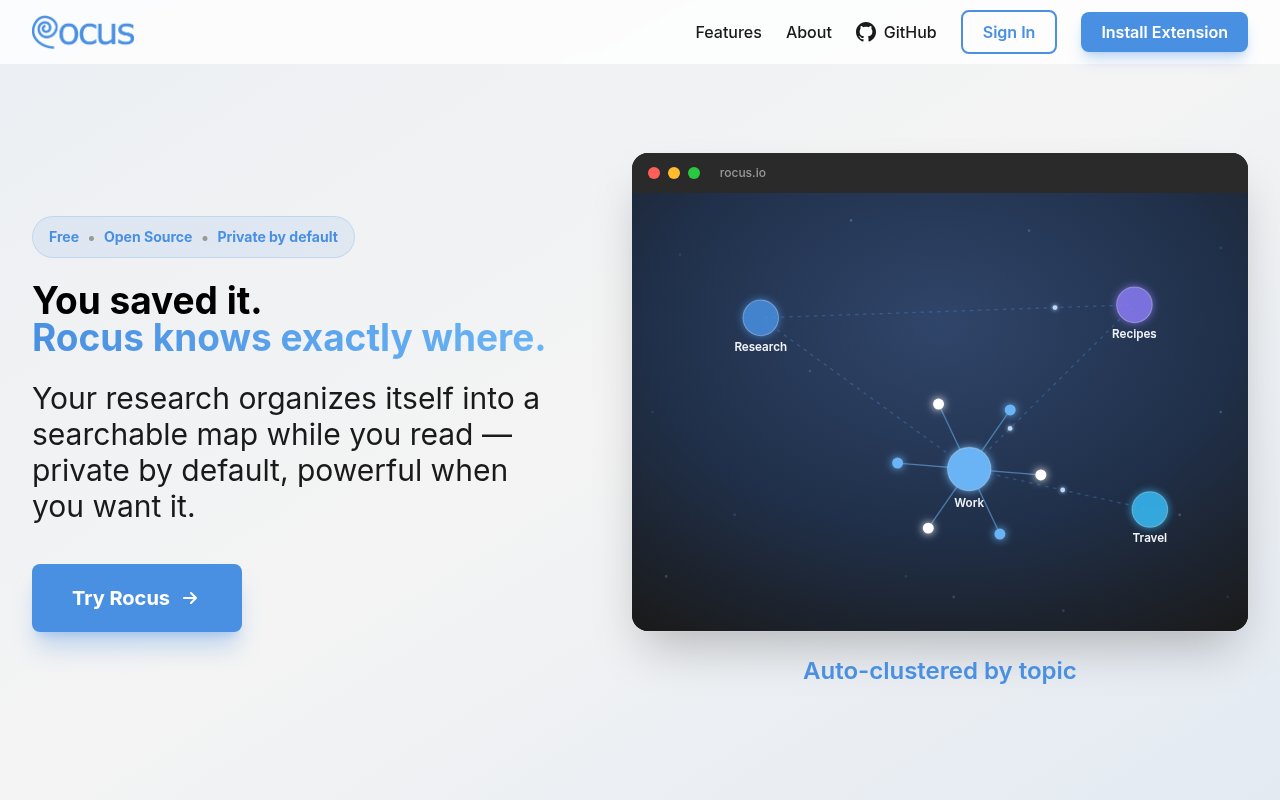
Rocus is a browser-based bookmark and research organizer that turns saved websites, notes, and files into a visual knowledge graph. Its premise is that the hard part of saving information isn't capturing it, but finding it again once browser bookmarks, open tabs, documents, and half-written notes have piled up. Instead of asking users to maintain a careful folder tree, Rocus uses AI to cluster, label, and connect material as it enters the collection. The resulting map is meant to show related topics and bring an old source back within reach through search or graph exploration.
People can save a web page, write a note, or upload a file. PDFs and documents join the same graph as web links, with their contents extracted so they can be organized alongside other research. Notes also connect themselves to a relevant topic when the system finds a match, or land in a shared notes area until their place becomes clearer. A Chrome or Firefox extension adds one-click capture from the page someone is reading. Users can choose an album during capture or use quick add and let Rocus sort the item. This reduces the filing decision that often turns a useful bookmark system into another chore.
The graph is more than a visual index. Rocus says it can surface related pages, hidden connections, and trending material based on the relationships already present in a user's own map. That makes it useful for research that develops over time, where a newly saved paper may connect back to an article or note collected weeks earlier. The interface presents all of these items as one evolving body of knowledge rather than separate bookmark, document, and note silos. Automatic organization won't remove every judgment call, but it changes the default from manually naming folders to reviewing connections the system has already proposed.
That model sets Rocus apart from a conventional bookmark manager whose main organizing unit is a folder or tag. A folder can show where a user put something, but it doesn't naturally expose that a saved article, an uploaded paper, and a rough note discuss the same topic. Rocus makes those relationships the primary interface and uses a person's existing map to recommend related sources. The benefit grows when a collection spans many sessions and formats. The tradeoff is that people need to be comfortable reviewing an AI-built structure rather than deciding every category themselves before saving.
Rocus also supports collaborative research. An album can be shared with a live link, collaborators can be invited, changes sync in real time, and participants can see who is online. A team collecting market examples, academic sources, design references, or project research can work in one shared graph instead of trading screenshots and duplicate link lists. The combination of individual capture and live albums makes the product relevant to students, researchers, product teams, and anyone who repeatedly assembles source collections with other people. It remains a focused knowledge organizer rather than a general document editor or task manager.
Privacy is a central part of the product's pitch. Rocus can run summarization and embeddings inside the browser using local models, with processing on the device by default. The product also offers cloud AI for higher-quality results on demand. Those choices matter because they have different privacy implications. Someone choosing local processing can keep analysis on the device, while cloud processing gives up the strictest version of that local-only posture. The frontend source is public, giving technically inclined users a way to inspect an important part of the application rather than relying only on a privacy claim.
Rocus uses a freemium model and requires a free account. Local processing is available without a paid subscription, and everyone gets a free daily allowance of cloud-powered processing. Rocus Premium adds unlimited cloud processing, though the official add-on listing doesn't publish a price. Users can export their data at any time. Buyers should still weigh the tradeoffs of a young browser-based product. Local model speed will depend on browser and device capability, and automatic clustering may need human correction for mixed collections. For people who want a conventional nested bookmark list, Rocus may be more structure than necessary. For people who save across formats and want relationships, search, and private local AI in the same workspace, its graph-first approach is the more meaningful distinction.
Key Features
- Automatic knowledge graph organization
- Website note and file capture
- Chrome and Firefox extensions
- Real-time shared albums
- Related website discovery
- Local or cloud AI
Pros & Cons
What we like
- Organizes mixed research without manual folder upkeep
- Runs AI locally for stronger privacy
- Combines personal capture with live collaboration
- Public frontend code supports inspection
Room for improvement
- Local AI performance depends on the device
- Unlimited cloud processing requires Premium
- Automatic clustering may need occasional correction
- Younger project with a small ecosystem
Frequently Asked Questions
What is Rocus?
Does Rocus send data to a server?
Can teams use Rocus together?
Is Rocus free?
Best For
Featured in
Alternatives to Rocus
View all
CalendHub
Smart scheduling and calendar management for teams
Kevin Gabeci Toolkits
Seven AI toolkits for writing books, making music, cutting video, and building agents.

Eased Into AI
Learn AI from zero. No jargon, no hype, just steps that work.

Fix It Gently
Calm, plain-English fixes for everyday tech problems.
Reviews (0)
Badge builder
Add Rocus to your website
Choose a badge style and size, preview it here, then copy the generated HTML. Badge images are self-contained SVGs and do not require an external script.

<a href="https://toolindex.net/tools/rocus?ref=badge" target="_blank" rel="noopener">
  <img src="https://toolindex.net/badge/rocus/medium.svg" alt="Rocus - Listed on Tool Index" width="180" height="50" />
</a>How to use the badge
- 1. Pick the style, size, and theme that fit your layout.
- 2. Copy the generated HTML from the code block.
- 3. Paste it into your footer, homepage, or press page.
Standard badge available
The standard listing badge is available now. Score and circle badges are limited to tools currently ranked in the top 10 of a category.
Badge clicks return visitors to this profile with a referral tag so the source remains identifiable.
Related Tools

Confluence
Atlassian's long-running team wiki that anchors many enterprise knowledge stacks
Asana
Project management for teams that live in projects, tasks and dependencies
Kevin Gabeci Toolkits
Seven AI toolkits for writing books, making music, cutting video, and building agents.

Logseq
An open-source outliner notes app where every bullet is a first-class block
Work on Rocus? Request listing access or correction