
RSScal
Monitor feeds and web pages, filter the news, and forward what matters
Gallery
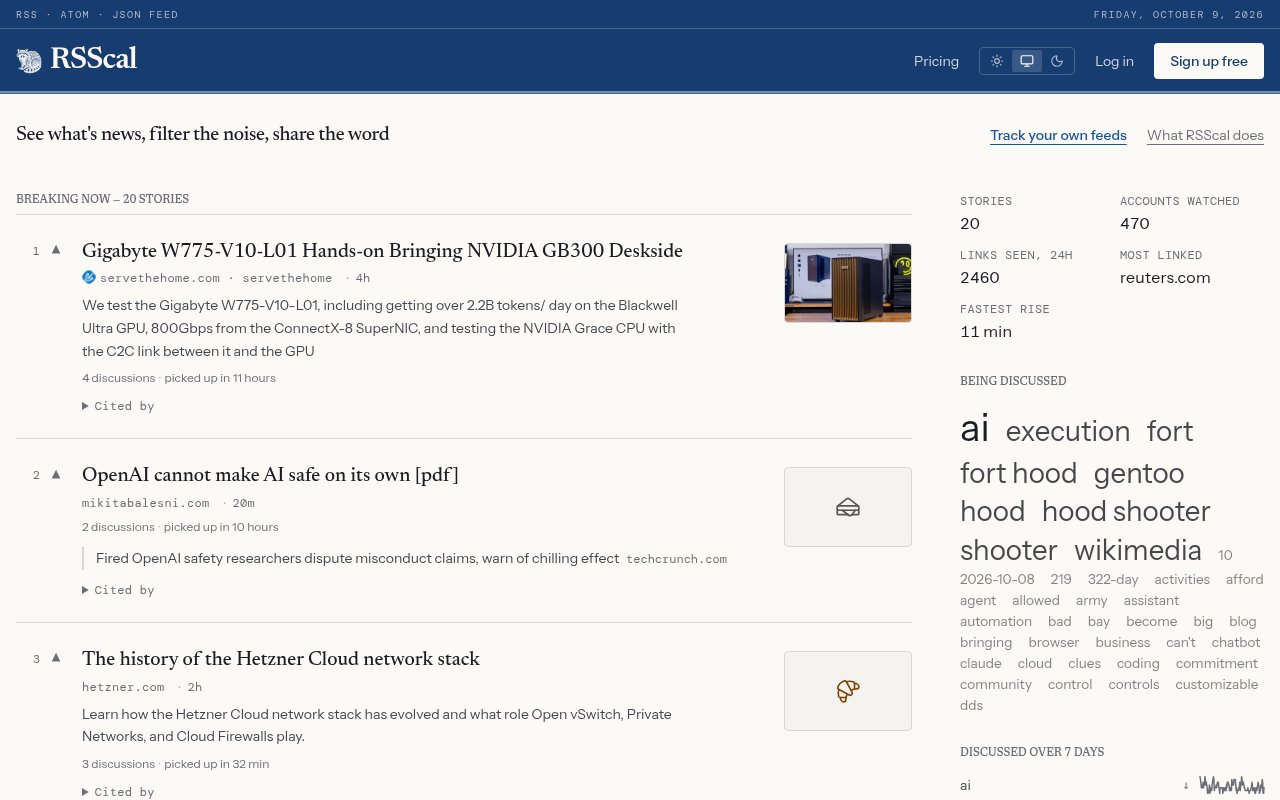
About RSScal
RSScal is a web application for monitoring recently published information without surrendering the reading experience to an algorithmic feed. It brings RSS, Atom, and JSON Feed sources into a chronological view, then adds filters, saved notes, forwarding, archives, and lightweight publishing. The product is aimed at journalists, researchers, communications professionals, job seekers, investors, and anyone who repeatedly scans the same sources for a small number of relevant developments. Instead of building an endless unread queue, readers choose a window from the last hour through the last three days and see what appeared during that period.
Subscriptions can be grouped under preset or custom labels and viewed together in publication order or by source. Keyword filters can narrow individual feeds, while paid matching rules test item titles, URLs, or both and automatically save matching stories to Notes. Rules support compound AND and OR expressions, whole-word matching, and limits by feed category or personal label. RSScal performs background matching for a limited period that renews when the reader visits the main view. This approach suits active monitoring, where the goal is to catch a developing subject, rather than maintaining a traditional long-term inbox of every item a site has ever published.
Notes is both a reading list and an automation queue. A reader can save items manually or let a rule collect them, then send selected items to an Archive, email address, Slack workspace, or webhook. Scheduled dispatch can turn a batch into a list, an attachment, or an AI-written digest. Webhook deliveries use JSON and include an HMAC signature so receiving systems can verify the request. If an endpoint is unavailable, queued items remain in Notes for a later attempt. The Archive supports search, adjustable retention, and export as CSV, text, or a Markdown bundle. On paid accounts, RSScal also saves readable article text, making a story searchable even after the original page changes or disappears.
The monitoring scope goes beyond sites that already publish feeds. Pro users can ask RSScal to build a synthetic feed from a supported webpage or watch a page for text changes. A page watch checks at least every fifteen minutes, ignores common navigation and script noise, and can be narrowed with a CSS selector. Each detected revision produces an alert and enters the archive, with up to fifty versions retained per watch. Rate limits keep frequently changing pages from overwhelming email, and RSScal reports when a watched page becomes unreachable or a selector stops matching. Pages rendered entirely in JavaScript may not work, which the preview step helps reveal before the watch is saved.
AI is optional rather than the basis of the reader. Paid accounts can summarize a linked page, extract entities, or generate a digest using the included service allowance. Supported external providers include ChatGPT, Claude, Gemini, and OpenRouter, and a user can supply a provider key instead of using the built-in quota. This makes the AI layer useful for triage while leaving ordinary chronological reading, keyword matching, and saving available without it. The published limits are 30,000 included tokens per day and 350,000 per month, so heavy summarization will reach the monthly ceiling before a full month of daily maximum use.
RSScal also includes a small publishing workflow for people who curate links for others. A user can select three to ten feed stories, arrange them in one of three layouts, add a title and short blurbs, and publish a temporary page lasting an hour, a day, or a week. The page uses an unguessable link and is not indexed itself, although eligible pages may be surfaced through the public Community area unless a paid user opts out. Free accounts can publish one page per day and paid accounts can publish ten. This is handy for a short news briefing or reading packet, but it isn't intended to replace a newsletter platform or permanent publishing system.
The free plan covers up to 100 feeds, two custom labels, Notes, an archive of 100 items, and curated link sets. It requires manual page refresh and leaves automation, private feeds, page-derived feeds, AI, and external dispatch to Pro. The Pro plan costs $6 per month and raises capacity to 1,000 feeds, six custom labels, and 1,000 archived items while adding matching rules, background monitoring, automatic refresh, scheduled digests, Slack, email, and webhook forwarding. That is a clear and inexpensive upgrade path for a focused individual workflow. Teams needing shared workspaces, very large permanent archives, or sub-minute monitoring will find the product deliberately narrower.
Key Features
- Chronological feed monitoring
- Keyword matching rules
- Web page change watches
- Notes and searchable archive
- Email Slack and webhook dispatch
- Optional AI article processing
Pros & Cons
What we like
- Keeps recent reading bounded by time
- Combines feed reading with practical automation
- Can monitor pages without native feeds
- Free plan supports up to 100 feeds
Room for improvement
- Free accounts require manual page refresh
- Matching rules are limited to five
- JavaScript-rendered pages may resist page watches
- Archive capacity tops out at 1,000 items
Frequently Asked Questions
What is RSScal?
Can RSScal monitor a page without an RSS feed?
Is RSScal free?
Which AI providers work with RSScal?
Best For
Featured in
Alternatives to RSScal

CalendHub
Smart scheduling and calendar management for teams
Kevin Gabeci Toolkits
Seven AI toolkits for writing books, making music, cutting video, and building agents.

Eased Into AI
Learn AI from zero. No jargon, no hype, just steps that work.

Fix It Gently
Calm, plain-English fixes for everyday tech problems.
Our take
Tool Index Editorial · Oct 2026· 4.0/5
RSScal combines a chronological feed reader with keyword rules, page watches, archives, and delivery to email, Slack, or webhooks. We found the time bounded reading view especially sensible for researchers and journalists who need to know what changed recently without building an endless unread pile. Optional AI processing stays secondary to the feed workflow.
The free plan supports 100 feeds and a 100 item archive. Pro costs $6 a month and raises those limits while adding automation, page derived feeds, scheduled digests, and external delivery. JavaScript heavy pages may resist monitoring, the paid archive stops at 1,000 items, and this isn't a team newsroom or permanent research repository. For individual monitoring, though, the price and feature set are unusually well matched.
Editorial opinion from the Tool Index team, written from the public product pages. Not a user review.
Reviews (0)
Badge builder
Add RSScal to your website
Choose a badge style and size, preview it here, then copy the generated HTML. Badge images are self-contained SVGs and do not require an external script.

<a href="https://toolindex.net/tools/rsscal?ref=badge" target="_blank" rel="noopener">
  <img src="https://toolindex.net/badge/rsscal/medium.svg" alt="RSScal - Listed on Tool Index" width="180" height="50" />
</a>How to use the badge
- 1. Pick the style, size, and theme that fit your layout.
- 2. Copy the generated HTML from the code block.
- 3. Paste it into your footer, homepage, or press page.
Standard badge available
The standard listing badge is available now. Score and circle badges are limited to tools currently ranked in the top 10 of a category.
Badge clicks return visitors to this profile with a referral tag so the source remains identifiable.
Related Tools

Confluence
Atlassian's long-running team wiki that anchors many enterprise knowledge stacks
Asana
Project management for teams that live in projects, tasks and dependencies
Kevin Gabeci Toolkits
Seven AI toolkits for writing books, making music, cutting video, and building agents.

Logseq
An open-source outliner notes app where every bullet is a first-class block
Work on RSScal? Request listing access or correction