
Sageling
A free local AI assistant for Apple silicon Macs that keeps every conversation and file on the device
Gallery
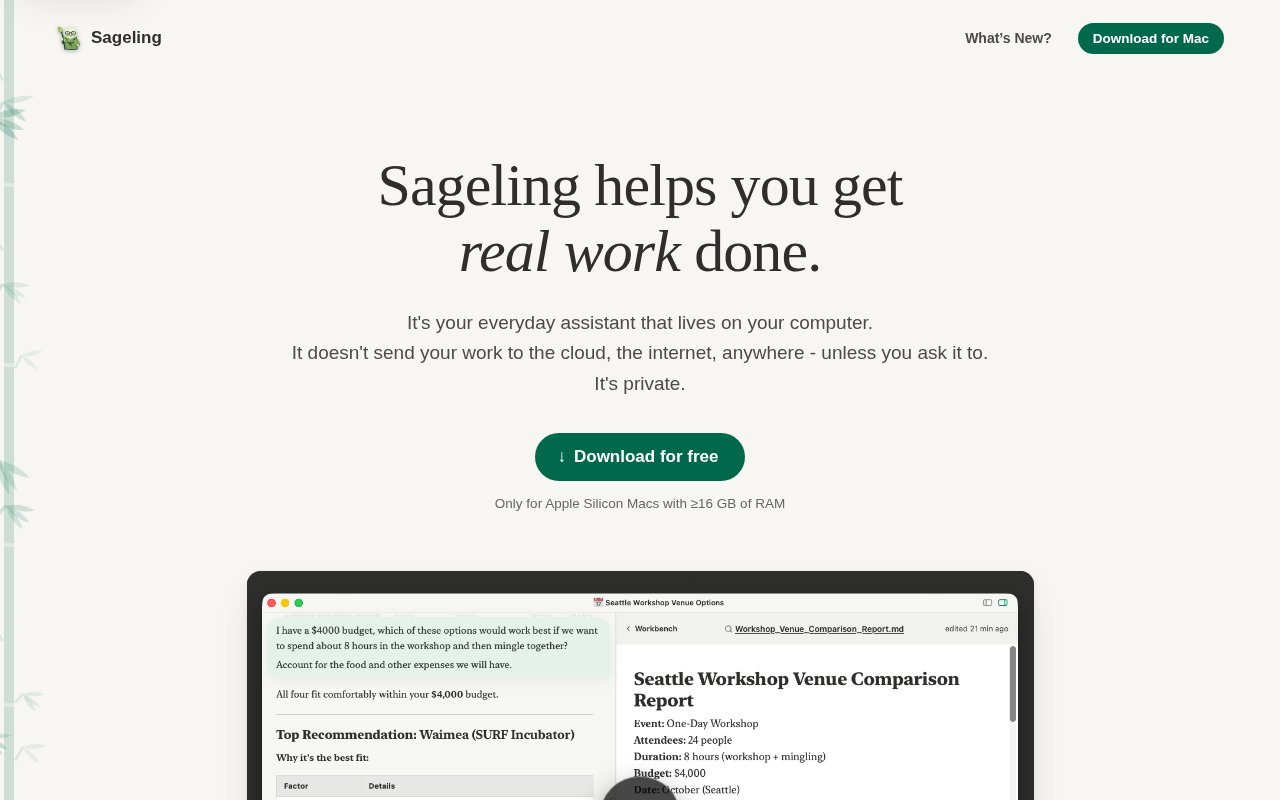
About Sageling
Sageling is a free AI assistant for the Mac that runs entirely on the machine. It downloads a model of about 8 GB the first time it starts, then handles transcription, note-taking, grading, document reading and everyday research without sending a conversation or a file anywhere. It's pitched at people with real work to get through rather than at developers, and the whole design rests on the idea that work shouldn't leave your Mac.
The problem it's built for is the gap between what cloud assistants can do and what many professionals are allowed to give them. A therapist can't paste session notes into a hosted chatbot, a teacher shouldn't upload student essays, and a lawyer risks privilege the moment a third party sees a draft. Sageling keeps everything on the device, and the FAQ answers those cases directly. It says a HIPAA-covered practice can use it with a compliant setup, that student work stays on the machine for FERPA purposes, and that no third party is involved in privileged material.
In use it's a chat window with an agent behind it that can actually do things with your files. The changelog for version 0.1.5, dated September 2026, lists reading PDF, Word, PowerPoint and Excel files, transcribing audio and video, downloading web files up to 25 MB, and searching laws and regulations through GovInfo. Each conversation gets its own workspace, file paths in the transcript are clickable, memory compacts itself automatically with visible progress markers, and there's conversation search with a keyboard shortcut. Thumbs-up and thumbs-down ratings are optional and user-initiated, and along with web requests and downloads they're the only network traffic the app describes. Getting started is a download and a wait. The app fetches its model on first launch, keeps itself updated afterwards, and from then on works like a chat window that can be handed files. Drop in a recording and ask for a transcript and a summary. Hand it a spreadsheet and ask what's in it. Point it at a regulation and ask what applies. The changelog also mentions math verification indicators on answers and a fix that makes long sessions behave on 16 GB machines, both signs of a product being tuned against real use rather than a demo.
The examples the site leads with give a sense of the intended day. Transcribing a therapy session and drafting the patient note. Grading a stack of student work. Hiring a videographer. None of it is exotic, which is the point, it's the repetitive work that eats an afternoon, done locally by an assistant that remembers what it learned without training on it, since memories are stored on the machine and the model isn't trained on your data.
It's for healthcare staff, educators, legal teams and anyone else whose work is confidential enough that a cloud assistant is off the table, and for people who simply prefer their notes to stay theirs. It's not aimed at engineers, and there's no API, no SDK and no scripting surface mentioned anywhere on the site.
What sets it apart from the crowd of local model front ends is that it's a finished assistant rather than a model runner. You don't pick a model, quantise anything or set up a server, you download an app that updates itself. The cost of that simplicity is hardware. It needs an Apple silicon Mac with at least 16 GB of memory on macOS 13 or later, the model download is large, and a single on-device model will be slower and less capable than a frontier model in the cloud. It's also early, with a 0.x version number and a changelog that's still fixing 16 GB edge cases, so it's worth treating as a young product. Compared with the two alternatives, a cloud assistant or a do-it-yourself local setup, Sageling takes a clear position. The cloud assistant is smarter and faster but can't be used for the confidential work that fills a clinic's, a school's or a law office's day. The local setup keeps the data home but expects you to choose a model, run a server and live with a bare interface. Sageling makes the second option feel like the first, at the price of needing a recent Mac with enough memory. For the people it's aimed at, that's a trade they'd take.
Access is free. There's no paid tier, no account and no usage limit on the site, just a download link, a changelog and a support address at support@sageling.ai. Nothing about the model's name or license is stated on the site, so anyone who needs those details for a compliance review should ask before rolling it out to a team. The changelog is public, and version 0.1.5 shipped on 4 September 2026.
Key Features
- Fully on-device inference on Apple silicon
- Reads PDF, Word, PowerPoint and Excel
- Audio and video transcription
- Law and regulation search via GovInfo
- Per-conversation workspaces and local memory
- Self-updating Mac app
Pros & Cons
What we like
- Conversations and files never leave the Mac
- Free with no account or usage limit
- Built for non-technical daily work
- FAQ addresses HIPAA, FERPA and privilege directly
Room for improvement
- Needs Apple silicon and 16 GB of memory
- 8 GB model download on first run
- Single local model, slower than cloud frontier models
- Early 0.x release with a short track record
Frequently Asked Questions
What is Sageling?
Is Sageling free?
Does Sageling send my data to the cloud?
What Mac do I need for Sageling?
Best For
Featured in
Alternatives to Sageling
View all
Apatero AI
The creator studio for AI image, video, audio, 3D, and avatars, now at apatero.ai.

SoloDevStack
A solo developer blog built on head-to-head tool comparisons, 580+ posts deep.
Apatero Studio
Creator studio for AI image, video, audio, 3D, and avatars. Every model worth using, in one workspace.

Melodex
Turn your idea into an AI-generated music video
Our take
Tool Index Editorial · Sep 2026· 3.5/5
Sageling is a free local AI assistant for Apple silicon Macs, aimed at people working with private documents, recordings and routine office tasks. It reads common document formats, transcribes audio and video, and keeps conversations, files and memories on the Mac rather than calling an outside model. We found the therapist workflow especially concrete because it emphasizes consent, review and saving final notes in the existing record system.
There is no subscription or usage cap, but the hardware floor is an M1 or newer Mac with at least 16 GB of memory. The app is also very young, with version 0.1.5 current on the captured changelog. Local processing is a real advantage, not proof that every workplace can deploy it without review. Clinics, schools and legal teams still need to check their own policies, storage and consent requirements. For Mac users who value privacy over frontier-model speed, it is an appealing early product.
Editorial opinion from the Tool Index team, written from the public product pages. Not a user review.
Reviews (0)
Badge builder
Add Sageling to your website
Choose a badge style and size, preview it here, then copy the generated HTML. Badge images are self-contained SVGs and do not require an external script.

<a href="https://toolindex.net/tools/sageling?ref=badge" target="_blank" rel="noopener">
  <img src="https://toolindex.net/badge/sageling/medium.svg" alt="Sageling - Listed on Tool Index" width="180" height="50" />
</a>How to use the badge
- 1. Pick the style, size, and theme that fit your layout.
- 2. Copy the generated HTML from the code block.
- 3. Paste it into your footer, homepage, or press page.
Standard badge available
The standard listing badge is available now. Score and circle badges are limited to tools currently ranked in the top 10 of a category.
Badge clicks return visitors to this profile with a referral tag so the source remains identifiable.
Related Tools
Apatero AI
The creator studio for AI image, video, audio, 3D, and avatars, now at apatero.ai.
Kevin Gabeci Toolkits
Seven AI toolkits for writing books, making music, cutting video, and building agents.

Warp
The modern terminal reimagined with AI and collaboration

Bolt.new
Prompt-to-deployed full-stack app inside the browser
Work on Sageling? Request listing access or correction