
Scrolling Text Generator
Create scrolling tickers, credit rolls, and overlays in a browser
Gallery
About Scrolling Text Generator
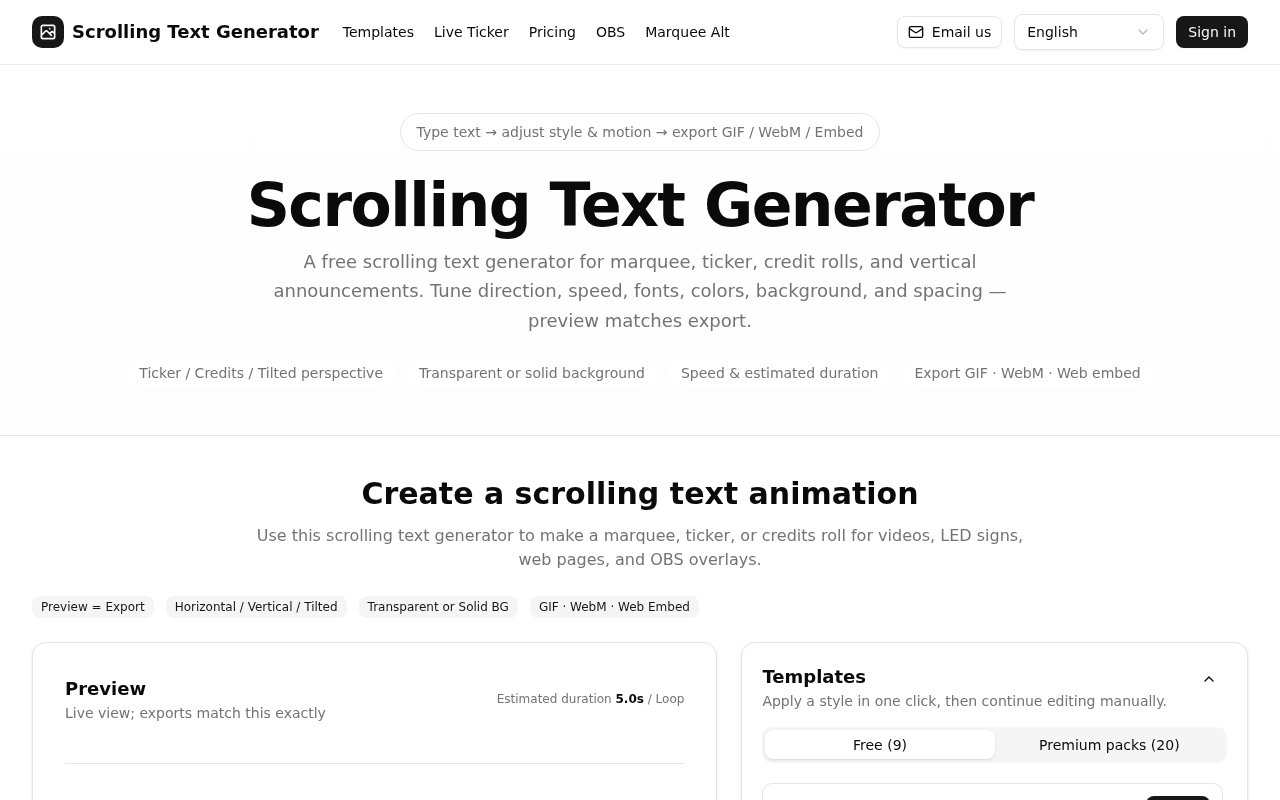
Scrolling Text Generator is a browser tool for turning a block of text into an animated marquee, news ticker, credit roll, teleprompter, or perspective crawl. It gives creators a direct route from typing words to downloading a finished animation, without asking them to build motion graphics by hand. The editor supports horizontal, vertical, and tilted movement, so the same workspace can cover a lower third for a stream, end credits for a video, a moving announcement for a screen, or a cinematic opening crawl. Its central promise is practical and easy to understand. The live preview is intended to match the exported result, which reduces the usual back and forth between an animation editor and the final file.
The workflow starts with manual text or a set of separate content segments. Multiline input works for vertical credits, while segments let someone split a long sequence into blocks and reorder them without rebuilding the whole message. From there, the user chooses direction, motion mode, speed, font, font size, text color, background, line height, and alignment. A background can be solid or transparent, and the preview shows a checkerboard when transparency is selected. Playback can run once or loop. The editor also estimates how long one complete pass will take based on the text, travel path, and speed, which is useful when the animation needs to fit an intro, outro, announcement slot, or broadcast scene.
Export options cover animated GIF, WebM video, MP4, and web embed code. Users can set dimensions and frame rate, then take the result into a video project, website, digital sign, or OBS browser source. Everything for the normal creation flow runs in the browser, and the site says text and exports aren't uploaded for processing. That local workflow is a meaningful fit for private names in event credits or internal announcements. It also keeps the feedback loop quick because style, timing, and motion remain visible in one place. Longer or larger exports can demand more from the device, and the site's own guidance suggests reducing dimensions, frame rate, loops, or duration when rendering becomes slow.
A template library gives the tool a faster starting point than an empty motion canvas. The free collection includes presets for a retro news ticker, cinema credits, a perspective crawl, neon signage, a teleprompter, wedding credits, sports updates, worship lyrics, and a stock market strip. Each preset can be applied and edited, so it supplies sensible motion and aspect ratio choices without locking the user into a finished look. Paid packs extend that model with more specialized broadcast, event, community, promotion, and creator formats. The range makes the product useful to streamers, video editors, churches, event teams, schools, small publishers, and anyone who needs readable moving text more often than they need a full motion design suite.
Format choice gives users a few practical tradeoffs. WebM is the site's preferred choice for clean transparency and is generally smaller than GIF for a longer animation. GIF support is convenient but transparent areas may look dithered, while exported video bakes in the font appearance for consistency. An embed can remain part of a web page or OBS scene, although system fonts may differ between viewing devices. The site's OBS guide also supplies presets for common 16 by 9 and 21 by 9 layouts, which helps creators start with a useful canvas and readable motion.
The related live ticker workflow addresses content that changes after publication. With an active pass, a user can connect a public JSON or CSV feed, inspect its rows, choose fields, add a prefix, suffix, or separator, and publish a single URL that refreshes on a fixed interval. That changes the product from a one time exporter into a lightweight display layer for market data, traffic notices, event agendas, community messages, or stream overlays. The style can stay fixed while the source updates. This feature is distinct from a normal GIF or video because the published ticker keeps reading the feed. Cloud save is also part of the pass, allowing complete generator configurations to be stored and loaded across sessions.
The core generator and a single export remain free, and the site says an account is only needed for paid capabilities such as cloud saves and billing. Premium templates are sold in one time packs or included through an active pass, while live auto updating embeds are a pass feature. That freemium split is reasonable for occasional creators who only need a finished animation, since the main editor and standard export path can be tried without an installation. Regular producers pay for reusable setups, a broader preset library, and live data rather than basic text animation. It isn't a replacement for a timeline based compositor, but its narrow focus makes a common overlay and credits task much quicker to finish.
Key Features
- Horizontal and vertical scrolling modes
- Live export matching preview
- GIF WebM and MP4 exports
- Transparent background support
- Editable animation template library
- JSON and CSV live tickers
Pros & Cons
What we like
- Runs locally in the browser for normal exports
- Covers both downloadable files and web embeds
- Duration estimates help fit planned screen time
- Free presets provide useful starting styles
Room for improvement
- Cloud saves require the paid pass
- Live feed embeds are a paid feature
- Large exports can be demanding on slower devices
- Embedded fonts can vary across viewer devices
Frequently Asked Questions
What is Scrolling Text Generator?
Is Scrolling Text Generator free?
Does it upload text or exports?
Can it make an OBS overlay?
Best For
Featured in
Alternatives to Scrolling Text Generator
View all
Framer
Visual website builder that lets designers ship production-grade marketing sites with real CMS, SEO controls, and code components.

Tailwind CSS
Rapidly build custom designs without leaving your HTML

Apatero Studio
Creator studio for AI image, video, audio, 3D, and avatars. Every model worth using, in one workspace.

Pixel Painters
Unlimited graphic design subscriptions built only for churches and ministries
Our take
Tool Index Editorial · Sep 2026· 4.0/5
Scrolling Text Generator turns text into browser-made tickers, credit rolls, teleprompters, tilted crawls, and OBS overlays. We found the live preview, duration estimate, transparent backgrounds, nine free templates, and GIF, WebM, MP4, and embed outputs well matched to quick production work. A single export stays free, while Pro costs $4.99 per month or $39 per year for all templates, cloud saves, multiple outputs, and live feed embeds.
Normal exports run locally in the browser, which is helpful for private event names and quick iteration. The paid JSON and CSV ticker can also keep a published display current. Large renders still depend on the user's device, embedded fonts can vary, and GIF transparency has compromises. This is a focused shortcut for readable moving text, not a timeline compositor for complex motion design.
Editorial opinion from the Tool Index team, written from the public product pages. Not a user review.
Reviews (0)
No reviews yet
Be the first to share your experience with Scrolling Text Generator
Sign in to write a reviewBadge builder
Add Scrolling Text Generator to your website
Choose a badge style and size, preview it here, then copy the generated HTML. Badge images are self-contained SVGs and do not require an external script.

<a href="https://toolindex.net/tools/scrolling-text-generator?ref=badge" target="_blank" rel="noopener">
  <img src="https://toolindex.net/badge/scrolling-text-generator/medium.svg" alt="Scrolling Text Generator - Listed on Tool Index" width="180" height="50" />
</a>How to use the badge
- 1. Pick the style, size, and theme that fit your layout.
- 2. Copy the generated HTML from the code block.
- 3. Paste it into your footer, homepage, or press page.
Standard badge available
The standard listing badge is available now. Score and circle badges are limited to tools currently ranked in the top 10 of a category.
Badge clicks return visitors to this profile with a referral tag so the source remains identifiable.
Related Tools
Apatero Studio
Creator studio for AI image, video, audio, 3D, and avatars. Every model worth using, in one workspace.
Tailwind CSS
Rapidly build custom designs without leaving your HTML

Figma
Collaborative interface design tool

Marvel
Lightweight prototyping platform for turning images and screens into clickable mobile and web prototypes.
Work on Scrolling Text Generator? Request listing access or correction