
SDSentry
OSHA HazCom compliance audits with SDS management and GHS label generation
Gallery
About SDSentry
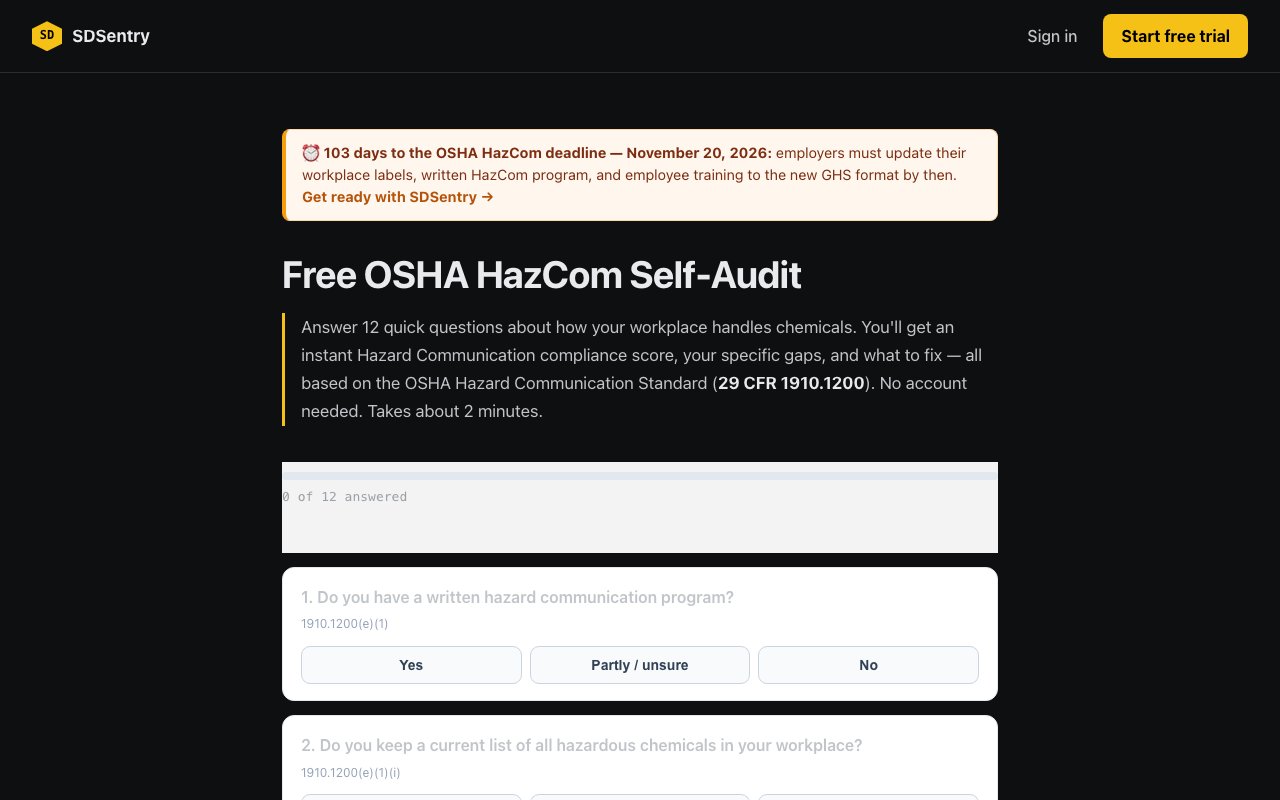
SDSentry is a compliance platform for OSHA's Hazard Communication Standard, commonly known as HazCom or 29 CFR 1910.1200. It's built around a free self-audit tool that asks twelve questions about how your workplace handles hazardous chemicals, then scores your compliance percentage and surfaces specific gaps tied to regulatory citations. The platform is designed to make HazCom compliance less opaque for small and mid-sized employers who don't have a dedicated environmental health and safety team but still need to meet federal requirements.
The core problem SDSentry addresses is that many businesses work with chemicals every day without a clear picture of whether they're compliant. Safety data sheets end up in random filing cabinets, secondary container labels get worn or lost, training records are scattered across binders and spreadsheets, and nobody knows exactly which regulatory provisions apply to which situations. When an OSHA inspector shows up, the scramble begins. SDSentry centralizes all of this into a single system that maps directly to the CFR language, so you know not just that you have a gap but exactly which section of 1910.1200 you're violating.
The free audit takes about two minutes to complete. You answer questions covering written HazCom programs, SDS availability, secondary container labeling, employee training documentation, and related requirements. The system then calculates a compliance percentage and categorizes your risk level as Strong, Some gaps, or High risk. It generates a gap report with specific remediation steps, and each gap includes the relevant CFR citation so you can look up the exact regulatory text if needed. No account is required to run the audit, which lowers the barrier for businesses that just want to check where they stand without committing to anything. The audit interface is also available as an embeddable iframe widget that safety consultants and compliance bloggers can add to their own sites.
Beyond the audit, the paid tier adds several features that turn one-time compliance checking into ongoing compliance management. The SDS library lets you store and organize every safety data sheet by location, with bulk-add, scan, and import capabilities so you don't have to track down PDFs manually. You can maintain current inventory by work area and access sheets from mobile devices even when offline. GHS-compliant label generation handles secondary containers, which is one of the most commonly cited HazCom violations. The system supports both manufacturer labels and workplace container labels, aligned with the 2024 GHS Revision 7 specifications. Employee training documentation includes e-signature capture that's compliant with the ESIGN Act, so you have legally defensible records of who was trained on what and when. A compliance dashboard gives you visibility into training completion rates across your workforce.
Multi-location support means companies with several facilities can maintain separate chemical inventories, run location-specific audits, and manage compliance across sites without juggling spreadsheets. The platform handles per-establishment inventory and program maintenance, which matters because HazCom requirements apply to each physical workplace independently. You can also generate auto-assembled written HazCom programs, which satisfies the regulatory requirement for a documented hazard communication plan at each site. The system covers non-routine task hazard communication and multi-employer worksite requirements, which are common audit failure points for contractors and temporary workforces.
The target audience includes any employer who handles hazardous chemicals, but the sweet spot is clearly operations that lack full-time EHS staff. Manufacturing floors, auto repair shops, commercial cleaning companies, laboratories, construction outfits, and warehouses that deal with paints, solvents, fuels, or industrial chemicals are all natural fits. Safety consultants may also find value in running audits for their clients, and the embeddable widget makes it easy to offer compliance checks through existing portals or websites.
What sets SDSentry apart from generic compliance checklists is the specificity of its output. Instead of vague guidance it returns actual citations. If you're missing training documentation for a particular chemical class, it tells you which subsection of 1910.1200 you're violating. That level of precision makes the remediation path clearer and gives you something concrete to point to when prioritizing fixes. The audit also categorizes findings by severity so you can tackle high-risk gaps first.
Pricing follows a freemium model. The self-audit is entirely free with no strings attached. Premium features, including the SDS library, label generator, and training documentation tools, cost $24.99 per location per month. There's a fourteen-day free trial that doesn't require a credit card, so you can test the full platform before deciding. The per-location pricing keeps it affordable for single-site shops while scaling predictably for companies with multiple facilities. For a business with five locations, that works out to around $125 per month to maintain centralized compliance documentation and ongoing audit capabilities across every site.
Key Features
- Twelve-question HazCom compliance audit
- Gap report with CFR citations
- Safety Data Sheet library by location
- GHS secondary container label generation
- Employee training with e-signatures
- Multi-location inventory support
Pros & Cons
What we like
- Audit is free and requires no account
- Cites specific CFR regulations for each gap
- Per-location pricing scales for multi-site operations
- Fourteen-day trial with no card required
Room for improvement
- Focused narrowly on OSHA HazCom, not broader EHS
- Value depends on having chemicals that require SDS
- No mobile app mentioned for floor-level use
- Smaller user base than enterprise EHS platforms
Frequently Asked Questions
What is SDSentry?
Is the audit free?
Who is SDSentry for?
Does it support multiple locations?
Best For
Featured in
Alternatives to SDSentry

CalendHub
Smart scheduling and calendar management for teams
Kevin Gabeci Toolkits
Seven AI toolkits for writing books, making music, cutting video, and building agents.

Eased Into AI
Learn AI from zero. No jargon, no hype, just steps that work.

Fix It Gently
Calm, plain-English fixes for everyday tech problems.
Reviews (0)
Badge builder
Add SDSentry to your website
Choose a badge style and size, preview it here, then copy the generated HTML. Badge images are self-contained SVGs and do not require an external script.

<a href="https://toolindex.net/tools/sdsentry?ref=badge" target="_blank" rel="noopener">
  <img src="https://toolindex.net/badge/sdsentry/medium.svg" alt="SDSentry - Listed on Tool Index" width="180" height="50" />
</a>How to use the badge
- 1. Pick the style, size, and theme that fit your layout.
- 2. Copy the generated HTML from the code block.
- 3. Paste it into your footer, homepage, or press page.
Standard badge available
The standard listing badge is available now. Score and circle badges are limited to tools currently ranked in the top 10 of a category.
Badge clicks return visitors to this profile with a referral tag so the source remains identifiable.
Related Tools

Confluence
Atlassian's long-running team wiki that anchors many enterprise knowledge stacks
Asana
Project management for teams that live in projects, tasks and dependencies
Kevin Gabeci Toolkits
Seven AI toolkits for writing books, making music, cutting video, and building agents.

Logseq
An open-source outliner notes app where every bullet is a first-class block
Work on SDSentry? Request listing access or correction