
Sel
macOS screen sharing that shows only the windows you pick
Gallery
About Sel
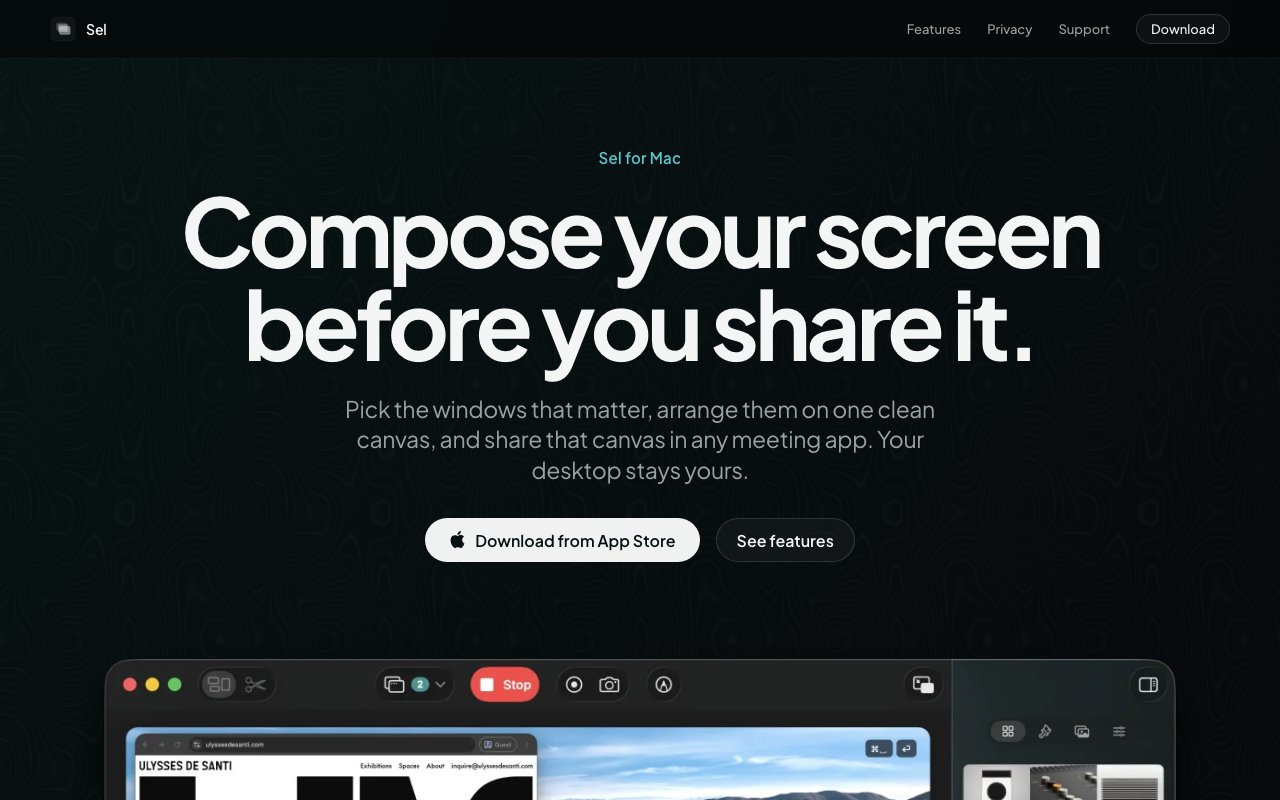
Sel is a macOS app for composing what you share on screen before you ever hit share in a meeting. Instead of broadcasting your whole desktop with its clutter, notifications, and stray tabs, you pick specific windows and arrange them on a clean canvas. What the room sees is the curated version you built, not everything happening on your machine. It solves the small dread most people feel right before sharing their screen, the worry that a private message or an embarrassing tab is one glance away from an audience.
The organizing idea is scenes. A scene is a saved layout of the windows you've chosen, and you can set up several of them ahead of time, then switch between them with a single click during a call. When you jump from one scene to another, an animated transition plays on the shared output while your webcam feed and overlays stay put, so the handoff looks intentional rather than jarring. That turns a screen share into something closer to a lightweight broadcast, where you cut between prepared views the way a presenter would rather than dragging windows around live while everyone watches.
On top of the layout, Sel adds a live toolkit for the moment you're actually presenting. There are drawing tools, a pen, highlighter, arrows, shapes, and text, for annotating whatever is on screen in real time. Zoom to cursor magnifies the area around your pointer so fine detail is readable without anyone squinting at a shared 4K display. You can drop in overlays like images, GIFs, and text blocks, crop or resize the windows you're sharing so only the relevant part shows, and turn on a keystroke display that surfaces the keys you press while quietly leaving passwords out of the readout.
The webcam handling is built for presenters too. Your camera sits as a movable overlay with optional background blur, so you stay visible without a distracting room behind you, and it holds its position even as scenes change underneath it. Live captions run on-device, transcribing what you say as you go, which helps both accessibility and anyone joining from a noisy environment where audio drops out. For demos on a bigger setup, there's full-screen canvas support on a second display, so your composed output can live on an external monitor while you keep your controls on the laptop.
It also records. Whatever you compose can be saved as a video or captured as snapshots, so the same setup you use for a live call doubles as a way to produce a clean tutorial, a product walkthrough, or a quick async update. That overlap is part of the appeal, since the effort you put into arranging windows and overlays pays off whether the audience is watching live or catching it later. A layout you built for a standup can be reused to record the same demo for people who missed it, and snapshots are handy for grabbing one clean frame of a diagram without the clutter of the desktop around it.
Sel fits anyone who presents from a Mac and wants more control than the built-in share button gives, from people running product demos and sales calls to teachers, streamers, and folks recording tutorials. What makes it stand apart is that it treats screen sharing as something you direct rather than something that just happens. The scene-switching, the annotation layer, and the stable webcam turn a raw desktop into a composed feed, and it does all of that locally on your machine rather than routing your screen through a cloud service.
That local-first design is also the privacy story. Sel states that it collects no data and that everything stays stored on your device, which is a meaningful stance for a tool that by nature sits on top of whatever sensitive thing you're working on. The on-device captions are part of the same posture, transcribing your speech without shipping the audio off somewhere. For anyone who has to demo internal software or discuss confidential material, a composition tool that keeps its hands off your content matters more than a longer feature list would. It's often the difference between a utility you can use on a client call and one a security team quietly bans.
On availability and price, Sel keeps things simple. It's a native app on the Mac App Store, requires macOS 15 or later, and follows a freemium model where it's free to try with premium features unlocked through an in-app purchase rather than a subscription page on a website. If you share your screen often and want it to look deliberate instead of accidental, this is the kind of utility that earns its place on the dock quickly.
Key Features
- Curated window selection on a canvas
- One-click scene switching with transitions
- Live drawing and annotation tools
- Zoom to cursor magnification
- Movable webcam overlay with blur
- On-device live captions and recording
Pros & Cons
What we like
- Hides your full desktop while sharing
- Prepared scenes make demos look polished
- Collects no data, everything stays local
- Doubles as a recording and tutorial tool
Room for improvement
- macOS only, requires macOS 15 or later
- Premium features sit behind in-app purchase
- Learning curve to set up scenes well
- Not useful outside screen-sharing workflows
Frequently Asked Questions
What is Sel?
Is Sel free?
Does Sel collect my data?
Can Sel record, not just share live?
Best For
Featured in
Alternatives to Sel




Reviews (11)
Genuinely impressed
Have been running Sel for a while, here is where I land. Support actually answered when I had a question, which surprised me. Performance has been steady even when I lean on it hard. It fits well for switching between prepared views during a call. Glad I made the switch.
Finally something that fits
Tried Sel on a side project first, then rolled it out everywhere. The output quality holds up better than I expected. It fits well for running a product demo without desktop clutter. No regrets so far.
Does the job, a few gripes
Sel has quietly become part of my daily flow. What stands out is how little babysitting it needs. Mostly using it for recording a clean tutorial or walkthrough. The catch is not useful outside screen-sharing workflows. No regrets so far.
Two months in, no regrets
Sel solves a real problem for me without making a fuss about it. Their take on hides your full desktop while sharing is genuinely good. It slotted into my routine without much fuss. Mostly using it for recording a clean tutorial or walkthrough. It earns its place in my stack.
Decent with some rough edges
Tried Sel on a side project first, then rolled it out everywhere. What stands out is how little babysitting it needs. One thing that bugs me is not useful outside screen-sharing workflows. Glad I made the switch.
Two months in, no regrets
Have been running Sel for a while, here is where I land. The collects no data, everything stays local is more useful than I expected. Mostly using it for annotating a screen live while presenting.
It just works
Three months of Sel later, here is what holds up. Got real value out of on-device live captions and recording. It earns its place in my stack.
Recommended without reservation
Hadn't planned on switching, but Sel was hard to ignore. The prepared scenes make demos look polished is more useful than I expected. Support actually answered when I had a question, which surprised me. It fits well for annotating a screen live while presenting.
Pulled its weight from week one
Found Sel on a Show HN thread and I am glad I clicked. Their take on zoom to cursor magnification is genuinely good. Mostly using it for recording a clean tutorial or walkthrough. Glad I made the switch.
Genuinely impressed
Picked Sel for the price, stayed for the quality. Where it really wins is curated window selection on a canvas.
Solid daily driver
Found Sel on a Show HN thread and I am glad I clicked. Got real value out of one-click scene switching with transitions.
Badge builder
Add Sel to your website
Choose a badge style and size, preview it here, then copy the generated HTML. Badge images are self-contained SVGs and do not require an external script.

<a href="https://toolindex.net/tools/sel?ref=badge" target="_blank" rel="noopener">
  <img src="https://toolindex.net/badge/sel/medium.svg" alt="Sel - Listed on Tool Index" width="180" height="50" />
</a>How to use the badge
- 1. Pick the style, size, and theme that fit your layout.
- 2. Copy the generated HTML from the code block.
- 3. Paste it into your footer, homepage, or press page.
Standard badge available
The standard listing badge is available now. Score and circle badges are limited to tools currently ranked in the top 10 of a category.
Badge clicks return visitors to this profile with a referral tag so the source remains identifiable.
Related Tools

Substack
Hosted newsletter and publication platform with built-in payments, recommendations, and an audience network for writers.
MailerLite
Friendly, affordable email marketing tool with newsletters, automations, landing pages, and a growing creator toolkit.

Twist
Calmer team messaging where threads replace the firehose of channels

Zulip
Threaded team chat that treats topics as a first-class concept
Work on Sel? Request listing access or correction