Sentry
Error monitoring and performance tracing that tells you exactly which line broke production for which user.
Gallery

About Sentry
Sentry is the error monitoring tool everyone reaches for and never replaces. You add the SDK to your app, errors flow into Sentry with stack traces, breadcrumbs, and user context, and you fix bugs faster. It's been the default choice for so long that "Sentry" is shorthand for the whole category.
The product launched in 2008 as an open-source Django thing and grew into a public company. The open-source roots stick around. The SDKs are open source. You can self-host Sentry. Most companies don't, but the option matters.
If your app has bugs (it does), and you want to know about them before users complain (you do), Sentry is the obvious starting point. The free tier handles most small apps. The paid tiers scale to companies with thousands of services.
What Sentry actually does
Sentry catches errors and exceptions in your application, captures their context (stack trace, request data, user info, breadcrumbs of recent actions), groups similar errors, and notifies you. Past errors, Sentry does performance monitoring, session replay, profiling, and crons.
Most teams start with errors and stay with errors. The other features are useful, but the original error monitoring is the killer feature that pays for the subscription.
Error capture and grouping
An exception happens. Sentry captures it with full context. Sentry deduplicates similar errors into "issues." You see one issue per bug, not 10,000 events. The grouping algorithm is solid and tunable.
The breadcrumb trail (recent log lines, navigation, network calls) is what makes Sentry stand out. You see what the user did right before the crash. That context turns "weird intermittent bug" into "oh, the API returned a 503."
Performance monitoring
Sentry's APM tracks transaction durations, identifies slow endpoints, and surfaces N+1 queries. It's not as deep as Datadog APM but covers the main needs. Bundled with the same SDK as errors, so adoption is one config flag.
Sentry is the dev tool that pays for itself the first time it tells you about a bug your users haven't reported yet. After that the math doesn't even matter.
Who Sentry is for
Every dev team. That's not hype. Sentry has saved enough multi-hour debugging sessions across enough teams that recommending against it requires real reasoning. Smaller teams use the free tier. Bigger teams pay.
The SDKs cover everything: Python, Node, Ruby, Go, Rust, .NET, Java, Swift, Kotlin, Flutter, React Native, Unity, Unreal. If you ship code, Sentry can catch its errors.
Sentry pricing
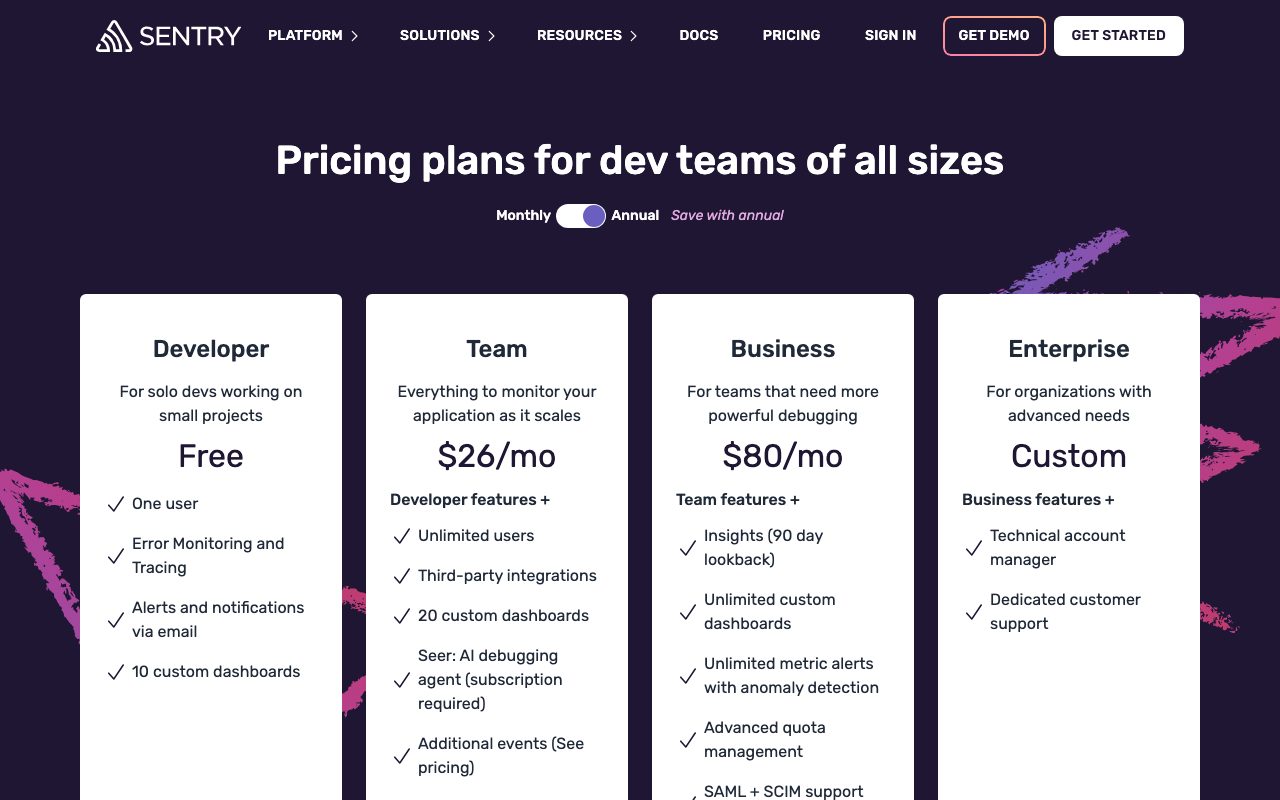
Free Developer plan covers 5,000 errors, 10,000 performance units, and 50 replays per month. Team at $26 a month covers 50,000 errors and more. Business at $80 a month adds advanced features. Enterprise is quote-based.
The free tier is genuinely useful. Small apps fit inside it indefinitely. The paid tiers are reasonable until you have huge volumes of errors, at which point you need to clean up bugs anyway.
Features worth knowing
Source maps and release tracking
Upload source maps for your JS bundles and Sentry shows you the original code in stack traces. Tag releases and Sentry tracks which release introduced which regression. Critical for catching deploy-breaks fast.
Session Replay
Bundled in the SDK. Records what the user saw and did before an error. Replays are privacy-aware (mask sensitive fields by default). Great for "I can't reproduce this" bugs.
Profiling
Continuous CPU and memory profiling. Find the function eating your budget. Less polished than Pyroscope or dedicated profilers but tightly integrated with Sentry's transaction view.
Alerting and integrations
Slack, PagerDuty, Discord, email, webhooks. Alert rules cover thresholds, regression detection, and new issue alerts. The integrations cover most teams' on-call setup.
The tradeoffs
Sentry's pricing climbs fast at high error volumes. The advice is "fix your bugs," which works until you have a noisy third-party SDK that fires constant warnings. You can rate-limit and filter, but managing quotas is its own job.
The performance monitoring is good, not great. If you need deep distributed tracing, Datadog or Honeycomb are better fits. Sentry is best when errors are the main use case.
Sentry vs alternatives
The usual comparisons are Sentry vs Rollbar, Sentry vs Bugsnag, and Sentry vs Datadog. Rollbar and Bugsnag are similar in features. Datadog is bigger but pricier and broader.
For pure error monitoring, Sentry is the default. See Sentry alternatives or browse the best error monitoring tools.
Bottom line on Sentry
Sentry is the error monitoring tool that's been right enough for long enough to deserve default status. The free tier alone catches more bugs than most teams' QA process.
If you're shipping production code without Sentry or an equivalent, you're flying blind. The 30 minutes to add the SDK pays back the first day a real user hits an error you didn't know about.
Common Sentry questions
Is Sentry overkill for small apps? No. The free tier is enough for small apps and the SDK adds maybe a megabyte. The first time Sentry surfaces a bug you didn't know about, it pays for itself in attention saved.
Does Sentry slow down my app? Negligibly. The SDK runs asynchronously. Errors are captured and sent in the background. Performance monitoring adds a small overhead, configurable via sample rates.
Can I self-host Sentry? Yes. The open-source Sentry can be self-hosted via docker-compose or Kubernetes. It's a real ops project. For most teams the hosted version is the better trade. Self-hosted makes sense for sovereignty or extreme volume.
What's the privacy story?
Sentry captures error context, which can include user data. Configure scrubbers to remove PII. The default settings are reasonable but review them for compliance. Many teams run a regex-based scrubber to catch PII in error messages.
Does Sentry work for mobile?
Excellently. iOS, Android, React Native, Flutter, and Unity SDKs are first-class. Crash reporting on mobile is one of Sentry's strongest use cases. Symbol upload integrates with build pipelines.
Workflow tips for Sentry
Tag errors with release versions. Sentry shows which release introduced an error. Critical for catching regressions immediately. The release SDK helper makes this one line.
Configure source maps. Your minified JS stack traces become useless without source maps. Upload them on every deploy. The CLI helper handles it.
Set up alert rules carefully. New issue alerts catch real bugs. Threshold alerts catch surges. Don't alert on every error. Alert fatigue ruins the value.
Use issue ownership. Tag files or paths to team members. New errors auto-assign. The team that broke it sees it first. Reduces "whose problem is this" friction. Browse tools for developers for adjacent picks.
Real-world Sentry scenarios
A SaaS team adds Sentry to their backend on day one. The first week catches a memory leak in production that nobody noticed. The second week catches a regression after a deploy. Two avoided incidents in two weeks. The bill is forgotten.
A mobile team uses Sentry for crash reporting. Symbol upload integrates with their CI. Crashes group cleanly. Release tracking shows which version introduced regressions. Crash-free user rate becomes a real metric they can move.
A frontend team uses Sentry for React error boundaries plus performance. Slow page loads trigger alerts. JavaScript errors get stack traces with source maps. Real users hitting weird browser bugs get reported automatically. The team fixes things they wouldn't have known about.
Implementation tips
Configure scrubbers for PII. Default scrubbers handle common patterns but review for your data. Catch credit card numbers, SSNs, and emails before they hit Sentry's storage.
Set sample rates for performance monitoring. 100% is expensive at scale. Start at 10% or 20%. Adjust based on signal versus cost.
Use issue ownership. Tag files or paths to teams. New errors auto-route. Reduces "whose problem is this" friction in larger teams.
For any team shipping production code, Sentry pays for itself within weeks. The 30 minutes to install the SDK is one of the highest-ROI activities in software. Browse the Sentry page for community reviews.
Why Sentry is the default
Defaults are interesting. The product that becomes default often isn't the best on any single dimension; it's the safe pick that does most things well. Sentry hit default status by being the first credible solution and then never giving teams a reason to switch.
The SDK quality is part of why. Sentry's SDKs are mature, reliable, and well-maintained across dozens of languages. Adding Sentry to a new project takes minutes and works correctly. That's harder to achieve than it sounds. Many competitors have rougher SDKs that introduce their own bugs.
The dashboard is the other half. Issue grouping is good. Search works. Filtering by release, environment, and user property works. The breadcrumbs and request data give you context to debug. Competitors often nail one of these and miss others. Sentry nails them consistently.
For any team shipping production code, error monitoring is non-optional. Sentry is the obvious choice. The free tier handles most teams. The paid tiers scale to enterprise. The product just keeps working, which is what you want from infrastructure.
Sentry's category dominance
The error monitoring category has consolidated around Sentry. Rollbar, Bugsnag, and Honeybadger all have features and users, but Sentry has gravity. New projects default to Sentry. New developers learn Sentry first. The network effect compounds.
The product expansion into performance, replay, and profiling is a hedge against pure error monitoring becoming commoditized. Sentry wants to be your full observability platform, competing with Datadog at the bottom of the market. The expansion has been gradual but real.
For teams in 2026 picking error monitoring, Sentry isn't just the safe choice; it's the obvious one. The free tier handles small teams. The paid tiers handle scale. The SDKs cover everything. The community knowledge means problems are usually solved questions. That position is hard to dislodge, and Sentry continues to invest in widening the gap.
Tutorial / Demo
Key Features
- Error capture with stack traces in 100+ languages
- Performance tracing with span-level breakdowns
- Session replay tied to error events
- Source map upload for symbolicated stack traces
- Cron and uptime monitoring in the same dashboard
Pros & Cons
What we like
- SDKs are exceptionally well maintained
- Source map handling is best in class
- Open-source self-host option exists
Room for improvement
- Quotas can blow up unexpectedly during incident storms
Frequently Asked Questions
Does Sentry have a free tier?
Sentry vs Rollbar vs Bugsnag?
Can Sentry self-host?
Does Sentry do session replay?
Does it support every framework?
Best For
Featured in
Tags
Alternatives to Sentry

Rollbar
Error monitoring with automated grouping and AI-assisted suggestions for which errors to actually fix first.

PostHog
All-in-one product analytics, feature flags, and session replay
Honeycomb
High-cardinality observability for distributed systems. Query traces by any field without pre-defining indexes.
Better Stack
Uptime monitoring, on-call scheduling, log management, and status pages bundled into one tool.
Our take
Tool Index Editorial · May 2026· 4.6/5
Sentry is the kind of tool you adopt when you want error monitoring and performance tracing that tells you exactly which line broke production for which user.
On the strengths side: SDKs are exceptionally well maintained, Source map handling is best in class, and Open-source self-host option exists. What to watch for: Quotas can blow up unexpectedly during incident storms.
Recommendation: this is a strong default when you need web teams catching JavaScript and React errors in prod. If quotas can blow up unexpectedly during incident storms would be a dealbreaker, the alternatives section below is worth a scroll.
Editorial opinion from the Tool Index team, written from the public product pages. Not a user review.
Reviews (5)
Underrated honestly
Tried half a dozen options before landing on Sentry. Real selling point: SDKs are exceptionally well maintained. Not perfect: quotas can blow up unexpectedly during incident storms.
Pros
- SDKs are exceptionally well maintained
It just works
Sentry isn't perfect but it's the best I've used in this category. What stands out is how source map handling is best in class. Error capture with stack traces in 100+ languages works the way you'd hope. Found it works best for mobile teams symbolicating iOS and Android crashes. Still recommending it to people in similar setups.
Quietly excellent
Picked Sentry for the lower price, stayed for the actual quality. Honestly impressed by how SDKs are exceptionally well maintained.
Pros
- SDKs are exceptionally well maintained
Almost perfect, almost
Started using Sentry casually, now it's pinned in my dock. The biggest win has been SDKs are exceptionally well maintained. Wish they'd address how quotas can blow up unexpectedly during incident storms. Solid pick for my use case, your mileage may vary.
Pros
- Source map handling is best in class
- Open-source self-host option exists
- SDKs are exceptionally well maintained
Bought it for one feature, stayed for ten
Tried Sentry on a side project first. The thing I keep coming back to: SDKs are exceptionally well maintained. Mostly using it for web teams catching JavaScript and React errors in prod.
Badge builder
Add Sentry to your website
Choose a badge style and size, preview it here, then copy the generated HTML. Badge images are self-contained SVGs and do not require an external script.

<a href="https://toolindex.net/tools/sentry?ref=badge" target="_blank" rel="noopener">
  <img src="https://toolindex.net/badge/sentry/medium.svg" alt="Sentry - Listed on Tool Index" width="180" height="50" />
</a>How to use the badge
- 1. Pick the style, size, and theme that fit your layout.
- 2. Copy the generated HTML from the code block.
- 3. Paste it into your footer, homepage, or press page.
Score badge available
Sentry qualifies for the score and circle badges based on its current top-10 positionin Analytics.
Badge clicks return visitors to this profile with a referral tag so the source remains identifiable.
Related Tools

Kevin Gabeci
Solo developer building web apps, cozy browser games, and AI creator toolkits.

Coolify
Self-hostable, open source alternative to Heroku and Netlify

Warp
The modern terminal reimagined with AI and collaboration

Bolt.new
Prompt-to-deployed full-stack app inside the browser
Work on Sentry? Request listing access or correction