ship.md
Bridge filesystem operations to real-world logistics with folder-based shipping triggers
Gallery
About ship.md
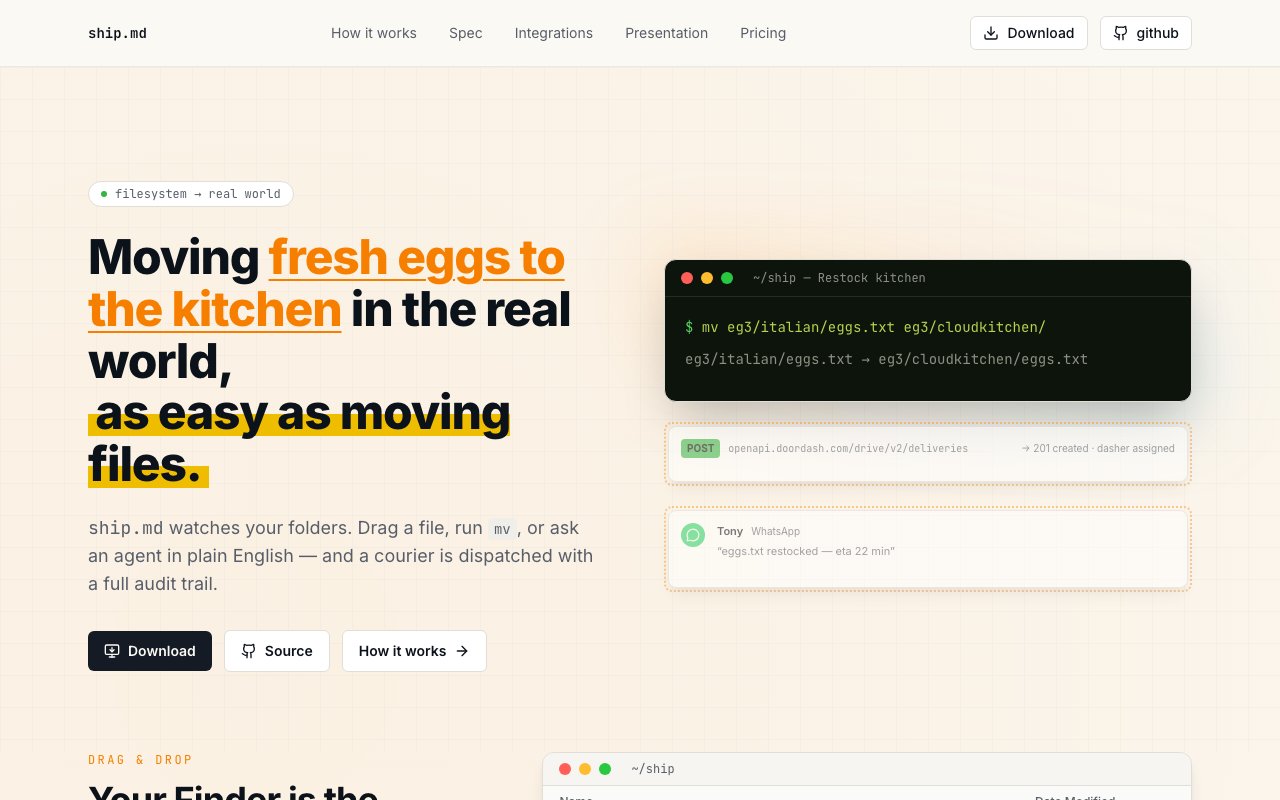
ShipMD takes a genuinely unusual approach to logistics coordination by treating your filesystem as the interface for real world shipping. Instead of juggling separate courier apps, tracking spreadsheets, and manual API integrations, it lets you move files between folders and translates those filesystem events into actual dispatch requests to delivery services. The concept sounds almost too clever until you realize how naturally it maps to workflows where physical items already have digital representations, such as order documents, packing slips, or inventory manifests. Drag a file from your warehouse folder to your customer folder, and the platform interprets that as an instruction to ship the corresponding item. This filesystem first approach means there's no new interface to learn and no context switching between your normal work and logistics management.
The system works through folder based configuration where each directory contains a ship.md manifest file that defines what that location represents. These manifests specify inventory items, contact information including email, WhatsApp, and phone numbers, physical addresses, and webhook endpoints for downstream integrations. When you move or copy a file using Finder drag and drop, terminal commands like mv or rsync, or even natural language requests through an AI agent, the watcher service picks up the filesystem event and processes it according to the rules you've defined. This creates a surprisingly powerful abstraction layer that doesn't require learning new interfaces or switching contexts from your normal file management habits. The manifest format is human readable and version controllable, meaning you can track changes to your logistics configuration the same way you'd track code changes in a repository.
Every operation generates structured JSON events that log exactly what moved, when it happened, and where it went. This audit trail lives locally alongside your files, giving you complete visibility into your logistics history without relying on external dashboards or third party record keeping. You can grep through these logs, pipe them into other tools, or build custom reporting on top of the structured data. The integration layer connects to over 25 logistics providers including Uber, DoorDash, FedEx, Amazon, and Shopify, with webhook support for custom integrations. If your preferred courier isn't in the default list, the webhook system lets you wire up anything with an API. The platform itself runs self hosted on macOS with a SQLite backend, a local dashboard for monitoring, and environment variable based credential management for API keys.
The target audience includes small business operators coordinating their own deliveries, warehouse managers who want a simpler dispatch workflow, and developers building logistics automation who prefer filesystem semantics over traditional REST APIs. There's also an interesting use case for personal delivery coordination where you might organize folders representing home, office, a friend's place, and a storage unit, then shuffle items between them as needed. The approach eliminates the mental overhead of remembering which courier service to use for which route since the manifest files encode those preferences once and apply them automatically. For operations that deal with high volumes of small shipments or frequent movements between fixed locations, this programmatic approach scales better than clicking through forms.
What makes ShipMD different from conventional logistics platforms is the inversion of the typical interaction model. Rather than opening a shipping app, filling out forms, and clicking submit, you work with files the way you already do and let the background service handle translation. The three interface options, Finder drag and drop, terminal commands, and AI agent natural language, mean you can use whichever fits your workflow best or mix them depending on context. Batch operations become trivial since moving multiple files in a single command generates multiple dispatch requests. Scripting is native rather than an afterthought. And because the watcher runs continuously in the background, there's no activation step between deciding to ship something and having it dispatched.
Deployment requires macOS and involves running a local watcher service that monitors the folders you've configured. There's no cloud dependency for the core functionality, though you'll need valid credentials for whichever courier APIs you want to use. The self hosted architecture means your shipping data stays on your machine, the manifests live in your filesystem, and you're not dependent on a vendor's uptime for basic operations. The pricing model involves a subscription that unlocks extended features beyond the basic functionality, though the exact tiers aren't prominently displayed on the marketing site. For anyone who's struggled to maintain consistency in their shipping operations or wanted a more programmatic approach to logistics without building custom software, ShipMD offers a genuinely novel solution that feels both technically elegant and practically useful for the right workflows.
Key Features
- Folder-based logistics trigger system
- 25+ courier integrations
- Finder, terminal, and AI agent interfaces
- Local SQLite audit trail
- Self-hosted with full source access
- Webhook-driven dispatch architecture
Pros & Cons
What we like
- Maps familiar filesystem actions to physical shipping
- Runs entirely locally with no cloud dependency
- Supports scripting via terminal and AI agents
- Full source access with self-hosted license
Room for improvement
- Pricing starts at $9,999, no free tier
- macOS only, no Windows or Linux support
- Early-stage product at version 0.1
- Requires setting up logistics API credentials
Frequently Asked Questions
What is ship.md?
How much does ship.md cost?
What logistics providers are supported?
Does it require a cloud account?
Best For
Featured in
Alternatives to ship.md

CalendHub
Smart scheduling and calendar management for teams
Kevin Gabeci Toolkits
Seven AI toolkits for writing books, making music, cutting video, and building agents.

Confluence
Atlassian's long-running team wiki that anchors many enterprise knowledge stacks
Kibu
Vertical software for disability service providers covering compliance, documentation, and programming
Reviews (12)
Genuinely impressed
Three months of ship.md later, here is what holds up. Where it really wins is full source access with self-hosted license. It fits well for automating warehouse pickups from file triggers. Worth it for what I get out of it.
Two months in, no regrets
Picked ship.md for the price, stayed for the quality. Got real value out of 25+ courier integrations. Setup was painless and I was productive the same day. Mostly using it for scripting courier dispatches in operations workflows. Recommending it to people in a similar spot.
Two months in, no regrets
Started using ship.md casually, now it is pinned in my dock. The interface stays out of my way, which I appreciate. Found it works best for building audit trails for shipped items. Easy yes for anyone weighing the same trade offs.
Solid daily driver
Three months of ship.md later, here is what holds up. Their take on folder-based logistics trigger system is genuinely good. It fits well for scripting courier dispatches in operations workflows. Would sign up again without thinking twice.
Pulled its weight from week one
Found ship.md on a Show HN thread and I am glad I clicked. Their take on self-hosted with full source access is genuinely good. It fits well for automating warehouse pickups from file triggers.
Pulled its weight from week one
Came to ship.md after getting frustrated with what I had before. The full source access with self-hosted license is more useful than I expected. The defaults are sensible, so I was not fighting settings on day one. Would sign up again without thinking twice.
It just works
Started using ship.md casually, now it is pinned in my dock. Got real value out of local sqlite audit trail. Support actually answered when I had a question, which surprised me. It fits well for bridging inventory systems to physical logistics. Would sign up again without thinking twice.
Solid daily driver
ship.md has quietly become part of my daily flow. The defaults are sensible, so I was not fighting settings on day one. Performance has been steady even when I lean on it hard. Worth it for what I get out of it.
Recommended without reservation
Came to ship.md after getting frustrated with what I had before. Where it really wins is local sqlite audit trail. It fits well for building audit trails for shipped items. It earns its place in my stack.
Solid daily driver
Have been running ship.md for a while, here is where I land. The folder-based logistics trigger system is more useful than I expected. Mostly using it for bridging inventory systems to physical logistics. Hard to imagine going back to my old setup.
Exactly what I needed
Tried ship.md on a side project first, then rolled it out everywhere. Their take on folder-based logistics trigger system is genuinely good. Found it works best for automating warehouse pickups from file triggers. Would sign up again without thinking twice.
Solid daily driver
Found ship.md on a Show HN thread and I am glad I clicked. Their take on local sqlite audit trail is genuinely good. Support actually answered when I had a question, which surprised me. Found it works best for automating warehouse pickups from file triggers. Hard to imagine going back to my old setup.
Badge builder
Add ship.md to your website
Choose a badge style and size, preview it here, then copy the generated HTML. Badge images are self-contained SVGs and do not require an external script.

<a href="https://toolindex.net/tools/shipmd?ref=badge" target="_blank" rel="noopener">
  <img src="https://toolindex.net/badge/shipmd/medium.svg" alt="ship.md - Listed on Tool Index" width="180" height="50" />
</a>How to use the badge
- 1. Pick the style, size, and theme that fit your layout.
- 2. Copy the generated HTML from the code block.
- 3. Paste it into your footer, homepage, or press page.
Standard badge available
The standard listing badge is available now. Score and circle badges are limited to tools currently ranked in the top 10 of a category.
Badge clicks return visitors to this profile with a referral tag so the source remains identifiable.
Related Tools
Confluence
Atlassian's long-running team wiki that anchors many enterprise knowledge stacks
Asana
Project management for teams that live in projects, tasks and dependencies
Kevin Gabeci Toolkits
Seven AI toolkits for writing books, making music, cutting video, and building agents.

Logseq
An open-source outliner notes app where every bullet is a first-class block
Work on ship.md? Request listing access or correction