Simple Pixel Art
Free browser-based pixel art editor with layers, mirror mode, and one-click photo conversion
Gallery
About Simple Pixel Art
Simple Pixel Art is a free browser based pixel art editor built for hobbyists, game developers, and beginners who want to create pixel graphics without downloading software or creating an account. The editor runs entirely in the browser, so there is nothing to install and no login wall before you can start drawing. You can open the page, pick a canvas size, and begin placing pixels immediately. It works on both desktop and mobile browsers, though the desktop experience offers more screen space for the toolbars and canvas. The interface stays simple enough that someone new to pixel art can figure it out in a few minutes, while including enough depth to handle real projects.
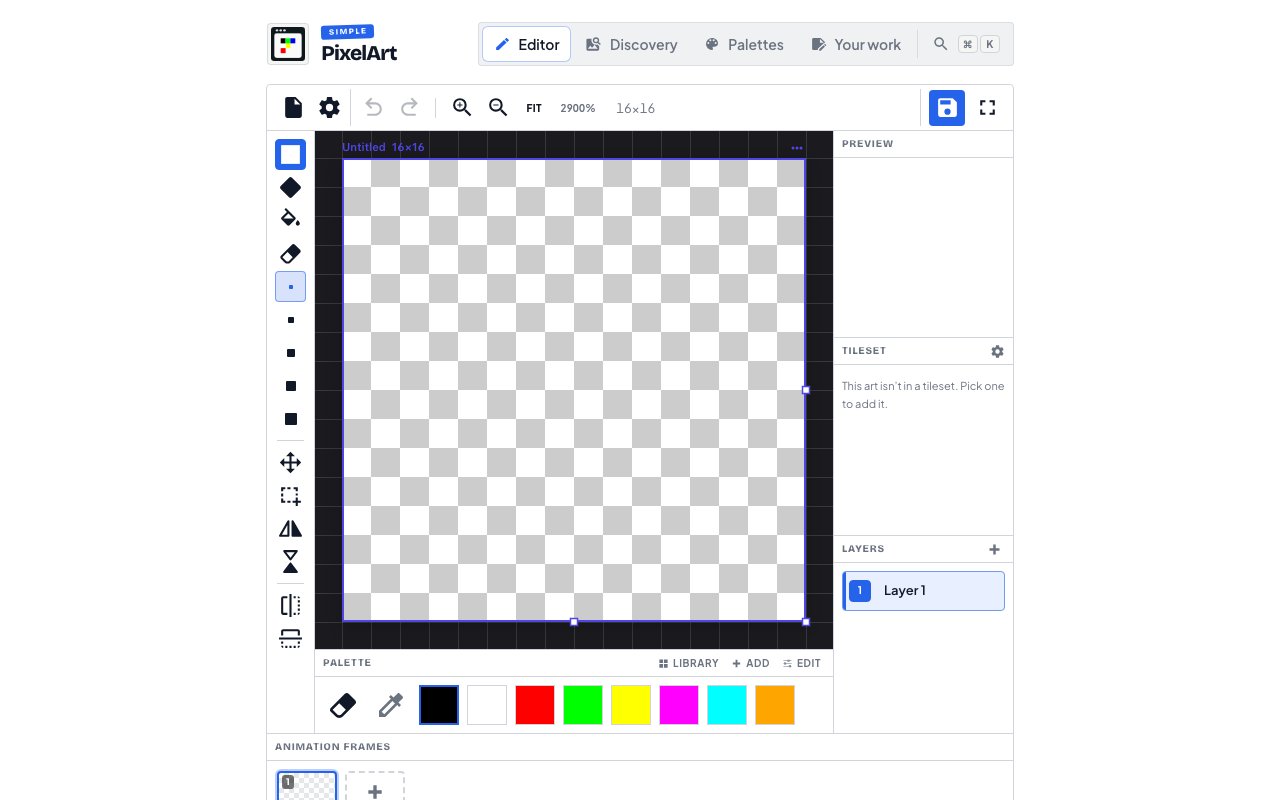
The core drawing tools include a brush and eraser with adjustable sizes, a flood fill for quickly coloring regions, and selection tools for moving parts of your work around. There is full undo and redo history, so you can experiment freely without worrying about ruining what you have built. Layers let you separate elements and work on them independently, which is essential for anything beyond simple single layer sprites. You can toggle layer visibility, reorder them, and work on one layer while keeping others locked or hidden. This makes it easy to build up complex compositions piece by piece, placing a background behind a character behind a foreground element.
One of the more useful features is mirror mode, available in both horizontal and vertical directions. When enabled, every stroke you make is automatically reflected on the opposite side, which speeds up creating symmetric characters, icons, or patterns. For game sprites where the left and right halves are identical, this cuts drawing time roughly in half while guaranteeing perfect symmetry. Combined with the grid overlay, it becomes easy to create clean, balanced designs even on very small canvases.
Canvas sizes range from 8x8 pixels up to 64x64, covering the common sprite dimensions used in retro games and small scale artwork. The smaller sizes work well for character sprites and icons, while the larger canvases handle more detailed scenes or larger characters. A grid mode overlay helps with placement, and you can customize how the grid appears to match your working style. Reference images can be inserted alongside your canvas for comparison while you draw, which is helpful when recreating existing artwork or matching a style guide.
Color management includes a palette builder where you can create and save custom palettes for reuse across projects. There is also a global color swap feature that replaces one color with another across the entire canvas, which is useful when you want to try alternate color schemes without repainting every pixel manually. Pre set palettes are available for quick starts, and a palette extractor can pull colors from uploaded images if you want to match an existing reference. The community palette library adds another source of ready made palettes that you can browse and apply.
Animation support adds frames and an onion skin mode that shows ghost outlines of previous and next frames while you draw. This helps keep motion consistent when animating walk cycles or other frame by frame sequences. You can preview animations at adjustable speeds directly in the editor before exporting, which saves the back and forth of exporting, testing, and reimporting. The board system allows multiple canvases in one workspace, which is helpful when designing a character from multiple angles or building a set of related sprites that need to stay visually consistent.
Beyond the editor itself, the site includes a photo to pixel art converter that transforms regular images into pixel art with adjustable resolution and color counts. This is handy for quickly generating reference sprites or stylizing photographs into retro style graphics. There is also a tileset slicer for breaking apart existing sprite sheets into individual tiles, and a tilemap editor for arranging tiles into larger grid or isometric compositions. These supplementary tools round out the workflow for anyone building game assets, letting you go from a single sprite to a tiled environment without switching applications.
Export options include PNG for standard image output and SVG for scalable vector versions. There are no watermarks on exported files, and the quality is clean enough for use in games, icons, avatars, print, or NFTs. You can also download project files as JSON for later editing if you want to pick up where you left off in a future session. The site hosts a community gallery where users can publish and share their work publicly, and a template library lets you remix pre made designs from other creators. An easy pixel art guide introduces beginners to the fundamentals with small grids and limited color constraints.
Simple Pixel Art is completely free. There is no premium tier, no ads interrupting your workflow, and no registration required to use the editor or export files. Publishing to the gallery does require a Google login, but the core creation and export features remain fully accessible without an account. For anyone who needs a lightweight pixel art tool without the overhead of Aseprite, Photoshop, or other desktop software, this handles the basics and several advanced features well while staying out of the way. It is particularly approachable for beginners who want to try pixel art without committing to paid software first, and capable enough to produce real game assets.
Key Features
- Brush, eraser, and flood fill tools
- Horizontal and vertical mirror drawing
- Multiple layers with undo and redo
- Photo to pixel art conversion
- PNG and SVG export without watermarks
- Community gallery for sharing work
Pros & Cons
What we like
- Completely free with no account required
- Runs in browser with nothing to install
- Mirror mode speeds up symmetric sprite creation
- Includes photo converter and tileset tools
Room for improvement
- Canvas limited to 64x64 pixels maximum
- Fewer advanced features than desktop apps like Aseprite
- No animation timeline for complex sprite sheets
- Requires stable internet since it runs in browser
Frequently Asked Questions
What is Simple Pixel Art?
Is Simple Pixel Art free?
What canvas sizes are supported?
Can I export my pixel art?
Best For
Featured in
Alternatives to Simple Pixel Art

Framer
Visual website builder that lets designers ship production-grade marketing sites with real CMS, SEO controls, and code components.

Tailwind CSS
Rapidly build custom designs without leaving your HTML

Apatero Studio
Creator studio for AI image, video, audio, 3D, and avatars. Every model worth using, in one workspace.

Pixel Painters
Unlimited graphic design subscriptions built only for churches and ministries
Reviews (0)
No reviews yet
Be the first to share your experience with Simple Pixel Art
Sign in to write a reviewBadge builder
Add Simple Pixel Art to your website
Choose a badge style and size, preview it here, then copy the generated HTML. Badge images are self-contained SVGs and do not require an external script.

<a href="https://toolindex.net/tools/simplepixelart?ref=badge" target="_blank" rel="noopener">
  <img src="https://toolindex.net/badge/simplepixelart/medium.svg" alt="Simple Pixel Art - Listed on Tool Index" width="180" height="50" />
</a>How to use the badge
- 1. Pick the style, size, and theme that fit your layout.
- 2. Copy the generated HTML from the code block.
- 3. Paste it into your footer, homepage, or press page.
Standard badge available
The standard listing badge is available now. Score and circle badges are limited to tools currently ranked in the top 10 of a category.
Badge clicks return visitors to this profile with a referral tag so the source remains identifiable.
Related Tools
Apatero Studio
Creator studio for AI image, video, audio, 3D, and avatars. Every model worth using, in one workspace.
Tailwind CSS
Rapidly build custom designs without leaving your HTML

Figma
Collaborative interface design tool

Marvel
Lightweight prototyping platform for turning images and screens into clickable mobile and web prototypes.
Work on Simple Pixel Art? Request listing access or correction