
Skaoot
Forward your booking emails and get one travel timeline with flight tracking and arrival nudges
Gallery
About Skaoot
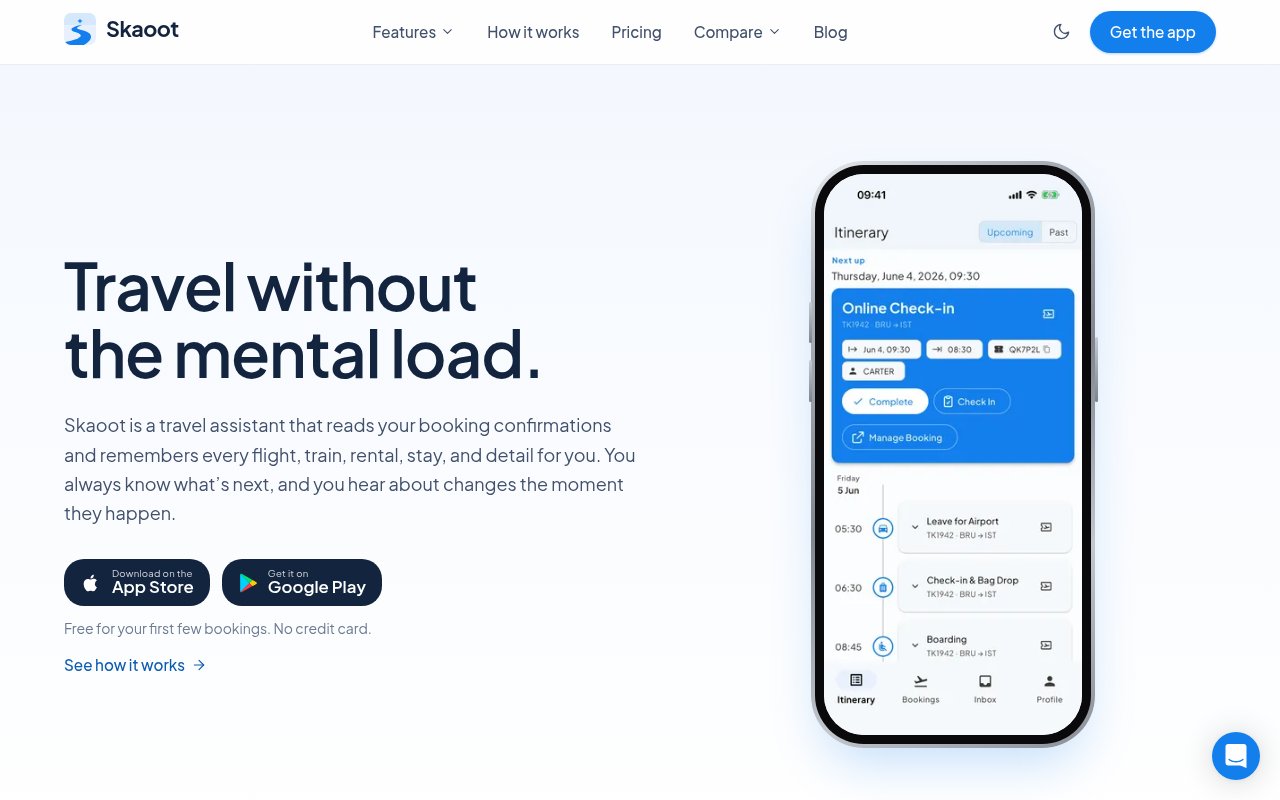
Skaoot is a travel assistant that turns the booking confirmations already sitting in your inbox into one itinerary. You forward the emails for flights, trains, rental cars and stays, and it reads them, links them in order, and keeps every detail, from confirmation numbers to door codes, on a single timeline that follows you across your phone, your Mac and the web. The problem it goes after is the scatter that comes with booking through many providers. The flight lives in one app, the apartment in another, the train ticket in a PDF, and the door code is buried in a message you'll be hunting for at midnight outside the building.
The workflow stays simple on purpose. Forward a booking email to Skaoot, or register the addresses you book from so several inboxes feed one profile, and the parser pulls out dates, places, references and instructions. Each booking lands on a unified timeline in chronological order, so a flight, the transfer and the check-in read as one trip rather than three unrelated records. Flight tracking watches for gate changes and delays, change handling updates the itinerary when a provider sends a modification email, and contextual nudges surface the right detail at the right moment, such as the entry code when you reach the stay or a reminder before a train departs. There's also a visa and Schengen check for entry requirements, which matters when you move between countries often. From then on each new booking, and each change to an existing one, is a matter of forwarding the email, and multi-device sync means a confirmation forwarded from a laptop is waiting on the phone when you leave for the airport.
It's built by Sebastien Arbogast, a solo founder who is himself a digital nomad, and the about page is candid about why. Tools like TripIt were designed for business travelers with predictable plans, and they coped badly with the way nomads change bookings constantly and buy from a long tail of providers. Skaoot is aimed at that crowd, frequent travelers, remote workers moving between cities, and anyone whose trips are assembled from Airbnb, Booking.com, airlines, hotels and rental companies rather than handed over by a corporate travel desk.
Where it differs from the usual itinerary apps is the business model and the emphasis on change. Skaoot is paid on purpose. The founder rejected commission-based bookings and selling user data, so the app has no reason to steer you toward a provider, and the product is designed around plans that keep shifting rather than a fixed schedule. Native apps for iOS, Android and Mac sync with a web portal, so the same timeline is on whichever screen you happen to have in hand. Getting started is an account on the web or in one of the apps, the addresses you book from, and a first forwarded confirmation.
Compared with the two usual alternatives, a spreadsheet or a general note-taking app, the difference is that Skaoot keeps working after you've set it up. A spreadsheet holds what you typed the day you booked and nothing more, so the gate change and the revised check-in time never reach it. Skaoot reads the follow-up emails too, and the nudges mean you don't have to remember to look. Against a dedicated business travel tool, the trade is breadth for fit. It won't manage expense reports or corporate approvals, but it handles the messy mix of providers a nomad actually books through, and the free bookings let you check how well it parses your particular airlines and hosts before paying anything.
There are limits worth knowing before you commit. It depends on receiving booking emails, so a reservation that only lives inside a provider's app has to be forwarded some other way. Parsing is only as good as the confirmation it receives, and a provider with an unusual format may need a manual check. Flight tracking likewise covers only the flights on your timeline, so a booking you never forwarded is one it can't watch. It's a one-person product, which means a small team behind support, though the contact page commits to replies within a working day on chat and two working days on email during European hours.
Access is freemium. The free tier includes the full feature set, parsing, the timeline, flight tracking, visa checks, change handling and nudges, but caps you at five bookings for the life of the account. That cap is the trial, since it scales with how much you travel rather than with a calendar. Premium removes the limit for 8.99 EUR a month or 69.99 EUR a year, which the pricing page describes as four months free on annual billing, and you can cancel any time through the app store you bought it on. A cancelled account keeps its existing bookings but can't add new ones beyond the free allowance. Support is reachable at support@skaoot.com, through the in-app messenger, or the chat widget on the site.
Key Features
- Automated booking email parsing
- Unified chronological trip timeline
- Flight tracking with gate change alerts
- Visa and Schengen entry checks
- Contextual arrival and departure nudges
- iOS, Android, Mac and web sync
Pros & Cons
What we like
- Forwarding an email is the whole setup
- Handles booking changes instead of a fixed plan
- No commissions or data sales behind the pricing
- Free tier includes every feature for five bookings
Room for improvement
- Needs a confirmation email for every booking
- Unusual provider formats may need a manual check
- Five lifetime free bookings is a short trial for frequent travelers
- One-person product with a small support operation
Frequently Asked Questions
What is Skaoot?
Is Skaoot free?
Who is Skaoot for?
How does Skaoot get my bookings?
Best For
Featured in
Alternatives to Skaoot
View all
CalendHub
Smart scheduling and calendar management for teams
Kevin Gabeci Toolkits
Seven AI toolkits for writing books, making music, cutting video, and building agents.

Eased Into AI
Learn AI from zero. No jargon, no hype, just steps that work.

Fix It Gently
Calm, plain-English fixes for everyday tech problems.
Our take
Tool Index Editorial · Oct 2026· 4.0/5
Skaoot turns forwarded booking emails into one travel timeline for flights, stays, trains, and rentals, then adds change handling, flight alerts, and contextual reminders. It is a strong fit for frequent travelers whose plans span many providers. The first five bookings are free for the life of the account. Premium removes the limit for 8.99 euros a month or 69.99 euros a year.
We like the low effort input and the way later confirmation emails update an existing trip rather than creating another static itinerary. Its usefulness still depends on the parser understanding every provider and receiving every booking change. Users should check extracted dates, door codes, and border guidance rather than treating automation as authoritative. Five lifetime bookings is enough for a test, but not a lasting free plan for the audience Skaoot targets.
Editorial opinion from the Tool Index team, written from the public product pages. Not a user review.
Reviews (0)
Badge builder
Add Skaoot to your website
Choose a badge style and size, preview it here, then copy the generated HTML. Badge images are self-contained SVGs and do not require an external script.

<a href="https://toolindex.net/tools/skaoot?ref=badge" target="_blank" rel="noopener">
  <img src="https://toolindex.net/badge/skaoot/medium.svg" alt="Skaoot - Listed on Tool Index" width="180" height="50" />
</a>How to use the badge
- 1. Pick the style, size, and theme that fit your layout.
- 2. Copy the generated HTML from the code block.
- 3. Paste it into your footer, homepage, or press page.
Standard badge available
The standard listing badge is available now. Score and circle badges are limited to tools currently ranked in the top 10 of a category.
Badge clicks return visitors to this profile with a referral tag so the source remains identifiable.
Related Tools

Confluence
Atlassian's long-running team wiki that anchors many enterprise knowledge stacks
Asana
Project management for teams that live in projects, tasks and dependencies
Kevin Gabeci Toolkits
Seven AI toolkits for writing books, making music, cutting video, and building agents.

Logseq
An open-source outliner notes app where every bullet is a first-class block
Work on Skaoot? Request listing access or correction