Skim
Fast, open-source Windows email client with native Rust core and optional AI copilot
Gallery
About Skim
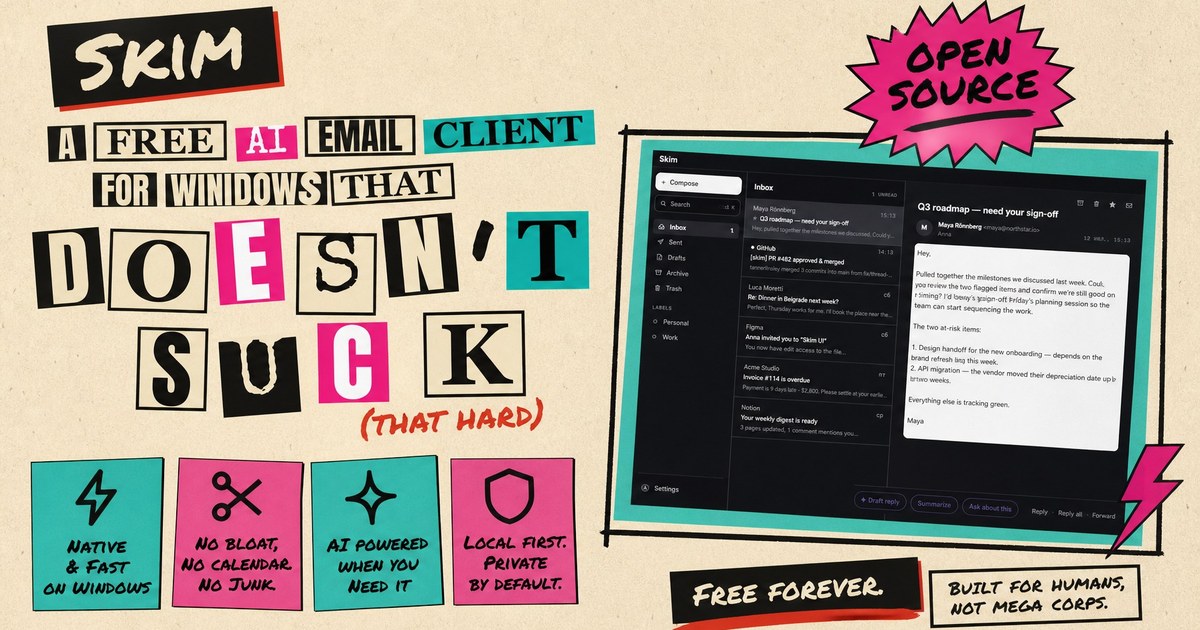
Skim is a minimalist email client for Windows built with a native Rust core using the Tauri 2 framework instead of Electron, which makes it notably lighter and faster than most modern desktop mail apps. The installer is around 5 MB, it runs without admin rights, and it starts up quickly because it is not loading a bundled browser engine. For developers and power users who have grown frustrated with bloated email clients that consume hundreds of megabytes and take seconds to launch, this is an intentional return to small, fast software that respects your machine's resources. The architecture uses WebView2 for rendering, which means it leverages the system browser component rather than bundling its own, keeping the footprint minimal while still supporting modern web rendering.
The client works offline-first, storing all your email locally in SQLite and providing instant full-text search across your entire mailbox using FTS5 indexing. This means you can find old messages without waiting for a server round trip, and your email is still accessible when you are offline. Every action is designed to work without a network connection first, with a durable queue that syncs changes when connectivity returns. It supports Gmail, Outlook, Yahoo, iCloud, and any standard IMAP/SMTP server, with OAuth integration for Google and Microsoft accounts or app password authentication for everything else. IMAP IDLE provides push notifications for new mail, supplemented by periodic polling to catch anything the push mechanism misses.
Navigation is keyboard-first with a Ctrl+K command palette and vim-style keybindings for everything from archiving to replying. If you spend your day in terminals and code editors, the shortcuts will feel familiar, including j and k for navigation, e for archive, r for reply, and the question mark key for a full shortcut reference. The interface supports 11 languages switchable without restart, including English, Russian, French, German, Spanish, Italian, Polish, Simplified Chinese, Japanese, and Korean. There is no calendar integration, no task management, no built-in video conferencing. Skim does email and does it quickly, which is the entire point. Calendar invites still get RSVP cards and an add-to-calendar button that exports to .ics, but the scope is intentionally narrow. Conversation threading follows the standard References and In-Reply-To headers to group related messages together.
The optional AI copilot is where things get interesting. You bring your own API key from Anthropic, OpenRouter, or an OpenAI-compatible endpoint like Ollama or LM Studio, and the copilot can draft emails that mimic your writing style by analyzing your last 100 sent messages. It answers questions about individual emails or entire threads, summarizes unread messages, and searches your mailbox with cited sources using the same FTS5 index that powers manual search. The AI is context-aware, understanding dates, timezones, conversation history, and your configured language when generating responses. Drafts can be refined interactively with commands like shorter or add deadline, and the system exposes multiple model tiers so you can pick the tradeoff between speed and capability. The bring-your-own-key model means Skim adds no markup or proxy, so you pay your provider directly at their published rates.
All data stays local. There is no telemetry, no cloud sync, no account required. Your emails are stored on your machine and never leave your network unless you explicitly send something. Credentials live in Windows Credential Manager rather than a config file, and HTML email is sanitized in Rust using ammonia before being rendered in a sandboxed iframe with a strict content security policy. Remote images are blocked by default with per-sender opt-in available, which protects against tracking pixels and reduces exposure to external content. The AI features work by sending the relevant context to whichever API provider you configure, so you control what goes where. RFC 8058 one-click unsubscribe is supported for mailing lists that implement it, making it easy to get off lists without hunting for unsubscribe links.
Skim is fully open source under the MIT license, with the code available on GitHub at nikserg/skim. This means you can inspect exactly what it does, contribute fixes, or fork it if the project ever goes in a direction you do not like. For an email client, where trust matters, this transparency is meaningful. Installation is available via direct download, winget install nikserg.Skim, or Scoop. It requires Windows 10 or 11 with WebView2, which comes preinstalled on Windows 11. The build process uses standard Rust and Node tooling, so contributors can compile from source without exotic dependencies.
The client is completely free. There are no paid tiers, no premium features, no subscriptions. The AI features require your own API key, so you pay whatever your provider charges for those calls, but the email client itself costs nothing. This is uncommon for software this polished, and it is a direct result of the open-source model. The deliberate omissions, no calendar sync, no contacts manager, no rules or filters, no snooze, no read receipts, keep the scope tight and the maintenance burden manageable for a project that runs on community contributions rather than a full-time team. If you want a fast, private email client that does one thing well rather than trying to be a productivity suite, Skim is designed exactly for that.
Key Features
- Native Rust core with 5 MB installer
- Offline-first local storage in SQLite
- Instant full-text mailbox search
- Keyboard-first vim-style navigation
- Optional AI copilot with bring-your-own-key
- Zero telemetry and local-only data
Pros & Cons
What we like
- Extremely lightweight compared to Electron mail clients
- All data stays local with no cloud sync or telemetry
- Fully open source under MIT license
- AI features are optional and use your own API key
Room for improvement
- Windows only at this time
- No calendar or task management features
- AI features require a separate API subscription
- Smaller community than established mail clients
Frequently Asked Questions
What is Skim?
Is Skim free?
Does Skim sync to the cloud?
What email providers does Skim support?
Best For
Featured in
Alternatives to Skim
View all
CalendHub
Smart scheduling and calendar management for teams
Kevin Gabeci Toolkits
Seven AI toolkits for writing books, making music, cutting video, and building agents.

Confluence
Atlassian's long-running team wiki that anchors many enterprise knowledge stacks
Kibu
Vertical software for disability service providers covering compliance, documentation, and programming
Reviews (0)
Badge builder
Add Skim to your website
Choose a badge style and size, preview it here, then copy the generated HTML. Badge images are self-contained SVGs and do not require an external script.

<a href="https://toolindex.net/tools/skim?ref=badge" target="_blank" rel="noopener">
  <img src="https://toolindex.net/badge/skim/medium.svg" alt="Skim - Listed on Tool Index" width="180" height="50" />
</a>How to use the badge
- 1. Pick the style, size, and theme that fit your layout.
- 2. Copy the generated HTML from the code block.
- 3. Paste it into your footer, homepage, or press page.
Standard badge available
The standard listing badge is available now. Score and circle badges are limited to tools currently ranked in the top 10 of a category.
Badge clicks return visitors to this profile with a referral tag so the source remains identifiable.
Related Tools
Confluence
Atlassian's long-running team wiki that anchors many enterprise knowledge stacks
Asana
Project management for teams that live in projects, tasks and dependencies
Kevin Gabeci Toolkits
Seven AI toolkits for writing books, making music, cutting video, and building agents.

Logseq
An open-source outliner notes app where every bullet is a first-class block
Work on Skim? Request listing access or correction