
Skimlane
Local-first Chrome extension that auto-summarizes web pages with customizable AI recipes
Gallery
About Skimlane
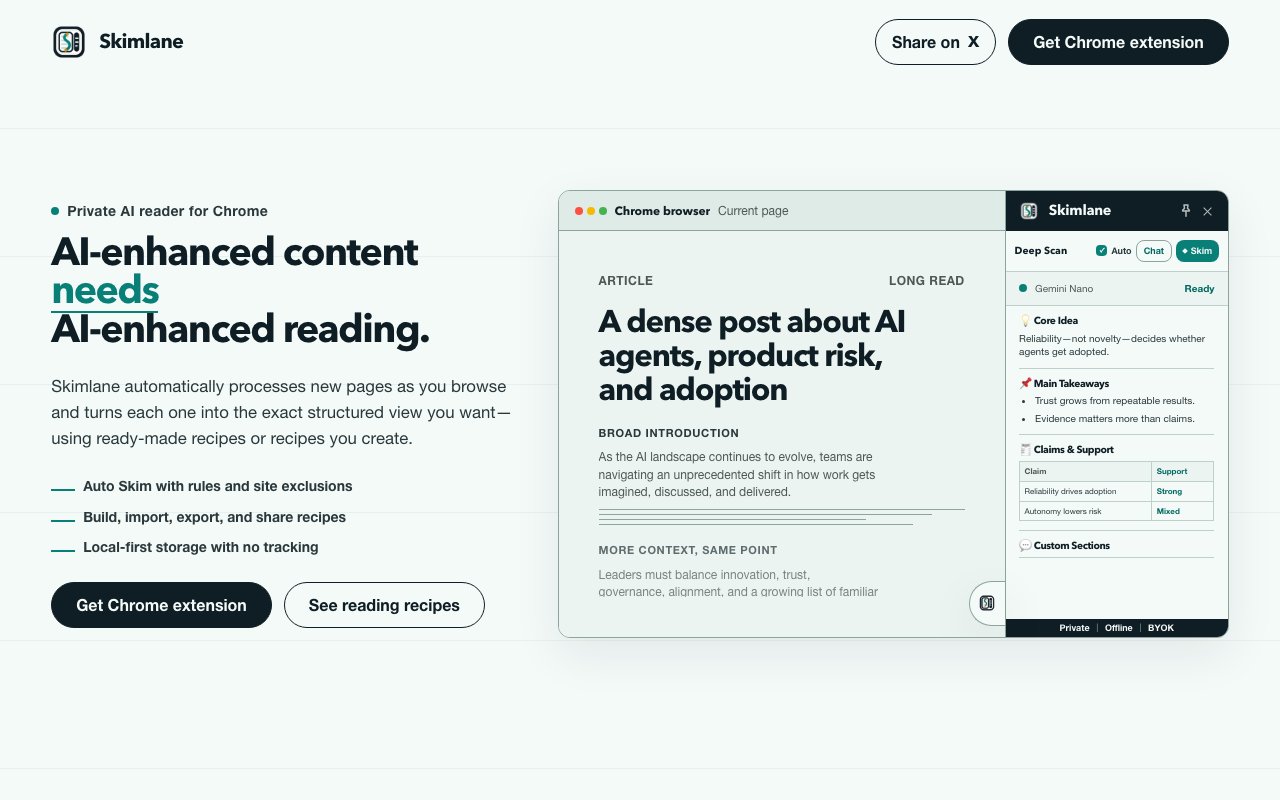
Skimlane is a Chrome extension that processes web pages through AI and transforms them into structured summaries as you browse. Instead of reading every article, blog post, documentation page, or research paper in full, you define what information you want extracted and Skimlane pulls it out automatically. The output appears in a side panel that stays open while you navigate between tabs, giving you instant access to processed content without switching contexts, copying text into external tools, or losing your place. For anyone who spends hours reading online as part of their job, this changes how quickly you can move through information-heavy workflows.
The core mechanic is what the tool calls reading recipes. Each recipe is a template that tells the AI how to process a page. You pick which sections to extract, set the level of detail you want in the output, and define specific prompts for different content types. The extension ships with several premade recipes to get you started. Worth Reading judges whether an article deserves your full attention or can be safely skipped. PM Brief extracts key takeaways formatted for product managers who need to synthesize competitor updates or feature announcements. Signal Cleaner filters noise from dense pages, pulling out the core argument while ignoring filler paragraphs. You can use these out of the box, modify them to fit your needs, or build completely custom recipes from scratch. Recipes can be exported and imported, so teams can share processing templates across installations.
What makes Skimlane notable compared to similar tools is its flexibility around AI models. You're not locked into a single provider or forced to pay for cloud processing. The extension supports Chrome's built-in Gemini Nano for entirely on-device processing that never leaves your machine. It connects to local Ollama instances if you're running open source models on your own hardware. Groq's free tier provides cloud processing without subscription costs if you want faster results than local inference allows. And you can configure any OpenAI-compatible endpoint, including paid providers like OpenAI itself or Claude, if you want premium model quality. This architecture means you can process sensitive or confidential content entirely offline, use free tiers to avoid subscription fees during experimentation, or connect to high-end models when output quality matters more than cost.
Privacy sits at the center of the design philosophy. Skimlane describes itself as local-first by default, which isn't just marketing language. Your browsing history, processed summaries, recipe configurations, and saved outputs all stay in Chrome's local storage. There's no backend server collecting your data, no analytics tracking which pages you visit, no cloud database storing your processed content, and no account required to start using the extension. If you want to delete everything Skimlane knows about you, you uninstall the extension and your data disappears with it. For anyone who processes confidential documents, competitive intelligence, client research, or personal content they'd rather keep private, this architecture matters more than any feature list.
The practical workflow looks like this. You land on a page and your default recipe runs automatically, or you click the extension icon to trigger processing manually if you've disabled automatic mode. Results appear in the side panel as structured text formatted according to your recipe's instructions. From there you can save individual summaries as Markdown files for your notes, ask follow-up questions about the content using the AI model, or access your browsing history to revisit previously processed pages and compare summaries across sources. The side panel persists across tabs, so you can skim multiple articles in sequence and maintain context without constantly reopening windows or losing your place in the original documents.
Target users include knowledge workers drowning in research, product managers who need to synthesize competitor updates and industry news quickly, analysts processing large volumes of reports and filings, journalists monitoring multiple sources for developments, students working through reading lists, and anyone whose job involves extracting signal from noise across dozens of web pages daily. If you spend hours reading online and wish you could delegate the initial filtering to something smarter than browser find or manual highlighting, Skimlane fits that gap.
The extension is completely free with no sign-up required and no premium tier waiting to gate features. The combination of zero cost, local-first architecture, and model flexibility makes it unusually accessible compared to similar tools that charge monthly fees or require accounts. You can start with on-device processing using Gemini Nano, graduate to Groq's free cloud tier for faster results on longer documents, and eventually connect paid endpoints if your usage scales to the point where speed and quality justify the expense. The tool grows with your needs without forcing you into a subscription from day one.
Key Features
- Automatic page summarization on browse
- Customizable summarization recipes
- Local-first with no cloud backend
- Multiple AI model support
- Markdown export for summaries
- Follow-up question capability
Pros & Cons
What we like
- Runs locally so your reading data stays private
- Recipes let you tailor summaries to your workflow
- Free with Chrome's built-in Gemini Nano or Groq
- No account or tracking required
Room for improvement
- Chrome only, no Firefox or Safari support
- Recipe setup takes effort to get right
- Summary quality depends on the AI model used
- Automatic mode can be distracting if not tuned
Frequently Asked Questions
What is Skimlane?
Is Skimlane free?
Does Skimlane store my data?
What AI models can it use?
Best For
Featured in
Alternatives to Skimlane
View all
CalendHub
Smart scheduling and calendar management for teams
Kevin Gabeci Toolkits
Seven AI toolkits for writing books, making music, cutting video, and building agents.

Confluence
Atlassian's long-running team wiki that anchors many enterprise knowledge stacks
Kibu
Vertical software for disability service providers covering compliance, documentation, and programming
Reviews (12)
Pulled its weight from week one
Came to Skimlane after getting frustrated with what I had before. The core workflow is smooth once you are set up. It just works, day after day, without surprises. Mostly using it for processing research papers faster. Would sign up again without thinking twice.
Solid but not perfect
Started using Skimlane casually, now it is pinned in my dock. Got real value out of local-first with no cloud backend. Found it works best for processing research papers faster. It would be a five if not for recipe setup takes effort to get right.
It just works
Started using Skimlane casually, now it is pinned in my dock. Where it really wins is no account or tracking required.
Genuinely impressed
Started using Skimlane casually, now it is pinned in my dock. Got real value out of runs locally so your reading data stays private. The core workflow is smooth once you are set up. Easy yes for anyone weighing the same trade offs.
Good, with a few caveats
Picked Skimlane for the price, stayed for the quality. What stands out is how it handles markdown export for summaries. Found it works best for building a private reading workflow with no data sharing. My only gripe is automatic mode can be distracting if not tuned. Would sign up again without thinking twice.
Recommended without reservation
Found Skimlane on a Show HN thread and I am glad I clicked. The defaults are sensible, so I was not fighting settings on day one. Mostly using it for processing research papers faster. No regrets so far.
Recommended without reservation
Skimlane solves a real problem for me without making a fuss about it. The recipes let you tailor summaries to your workflow is more useful than I expected. The output quality holds up better than I expected.
Genuinely impressed
Tried Skimlane on a side project first, then rolled it out everywhere. What stands out is how it handles no account or tracking required. It fits well for processing research papers faster. Recommending it to people in a similar spot.
Powerful once it clicks
Started using Skimlane casually, now it is pinned in my dock. The core workflow is smooth once you are set up. The interface stays out of my way, which I appreciate. One thing that bugs me is automatic mode can be distracting if not tuned. Hard to imagine going back to my old setup.
Genuinely impressed
Skimlane solves a real problem for me without making a fuss about it. The follow-up question capability is more useful than I expected. Found it works best for building a private reading workflow with no data sharing. Hard to imagine going back to my old setup.
Exactly what I needed
Hadn't planned on switching, but Skimlane was hard to ignore. Their take on follow-up question capability is genuinely good. It does what it says, which is rarer than it should be. No regrets so far.
Finally something that fits
Have been running Skimlane for a while, here is where I land. Their take on follow-up question capability is genuinely good. Found it works best for building a private reading workflow with no data sharing. It earns its place in my stack.
Badge builder
Add Skimlane to your website
Choose a badge style and size, preview it here, then copy the generated HTML. Badge images are self-contained SVGs and do not require an external script.

<a href="https://toolindex.net/tools/skimlane?ref=badge" target="_blank" rel="noopener">
  <img src="https://toolindex.net/badge/skimlane/medium.svg" alt="Skimlane - Listed on Tool Index" width="180" height="50" />
</a>How to use the badge
- 1. Pick the style, size, and theme that fit your layout.
- 2. Copy the generated HTML from the code block.
- 3. Paste it into your footer, homepage, or press page.
Standard badge available
The standard listing badge is available now. Score and circle badges are limited to tools currently ranked in the top 10 of a category.
Badge clicks return visitors to this profile with a referral tag so the source remains identifiable.
Related Tools
Confluence
Atlassian's long-running team wiki that anchors many enterprise knowledge stacks
Asana
Project management for teams that live in projects, tasks and dependencies
Kevin Gabeci Toolkits
Seven AI toolkits for writing books, making music, cutting video, and building agents.

Logseq
An open-source outliner notes app where every bullet is a first-class block
Work on Skimlane? Request listing access or correction