
SnapBracket
Build and export single-elimination tournament brackets in your browser
Gallery
About SnapBracket
SnapBracket is a free browser-based bracket maker for running single-elimination tournaments without setting up an account or wrestling with a spreadsheet. An organizer can paste in a list of teams, choose how the bracket should look, record winners as matches finish, and export the finished layout as a high-resolution PNG. It works for formal competitions and casual events alike, including gaming nights, office table tennis, club playoffs, classroom debates, party games, and head-to-head voting. Everything needed to build the bracket sits on one page, so there isn't a separate project dashboard or registration flow between an idea and a usable tournament.
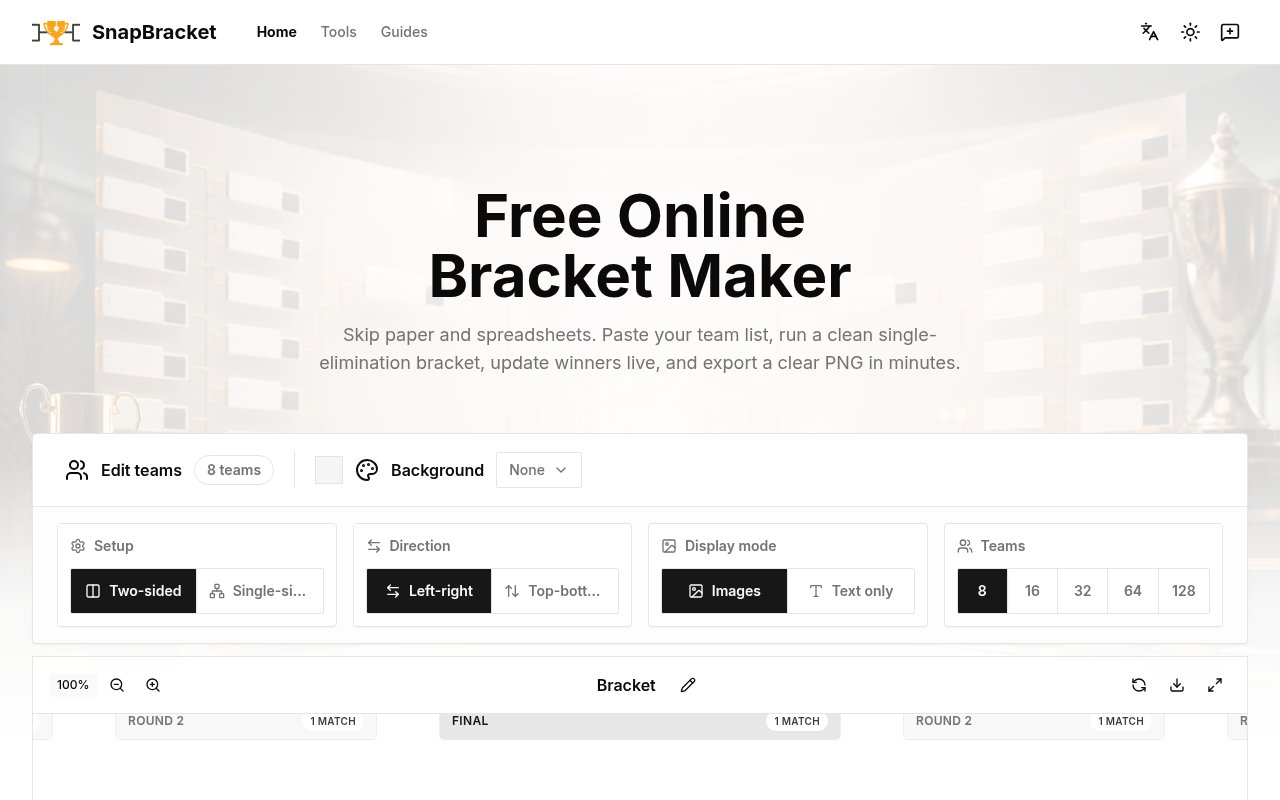
The setup is deliberately direct. A bracket can contain from 2 to 128 teams, and SnapBracket expands uneven fields to the next power of two while filling the open positions with BYEs. If one side of a matchup is empty, the real team advances automatically. Organizers can choose a single-sided or two-sided arrangement, change the direction between left-to-right and top-to-bottom, and switch between text-only entries and entries with team images. Those choices make the same generator practical for a printed office chart, a stream graphic, a presentation slide, or a large bracket shown on a shared screen.
Once play starts, the bracket becomes an interactive event board. Clicking a team records it as the winner and moves it into the next round. If an earlier result was entered incorrectly, choosing the other team clears any downstream winners that depended on the old result, keeping later rounds internally consistent. Large brackets can be inspected with fullscreen, zoom, and drag controls, which matters once 64 or 128 teams no longer fit comfortably in a normal browser view. The page labels rounds and match counts clearly, while automatic BYE handling removes the repetitive work of advancing unopposed teams by hand.
The local-first design is one of the more useful details. Team images remain in browser storage rather than being sent to a remote service, and no login is required to create or edit a bracket. That lowers the friction for teachers, club volunteers, event hosts, and small communities that may only need a bracket occasionally. It also means an organizer can add names and logos without first creating a cloud workspace. The resulting PNG can be used in commercial decks, streams, or printed materials as long as the organizer has the rights to the names and images placed in it.
SnapBracket is best suited to knockout events where one loss removes a participant. It doesn't present itself as a full league management system with registration, round-robin scheduling, standings, messaging, or a public event portal. That narrower focus is a strength when the job is simply to turn a participant list into a clear path to a winner. Compared with a general-purpose spreadsheet, it understands rounds, winner propagation, BYEs, and bracket geometry. Compared with a larger tournament platform, it asks for much less setup and keeps the working surface easy to understand.
A typical event can stay in the same view from setup through the final. The organizer pastes the roster, checks how the automatic BYEs were placed, selects a layout that suits the room or screen, and adds images only when they improve recognition. During play, the same person can tap winners as results arrive and correct a mistake without manually rebuilding later rounds. Fullscreen and zoom controls help spectators follow a large field, while the PNG export creates a stable copy for a recap, social post, handout, or presentation. This continuity is useful for events where a dedicated tournament operator would be excessive. It also keeps the data model understandable, since the bracket only needs teams, pairings, and winners rather than profiles, schedules, venues, and registration details.
Access is completely free according to the product site. Creating and editing brackets, adding team images, exporting PNGs, and using the tool without an account all cost nothing. There is no paid tier presented on the page, and the browser-based workflow keeps uploaded images on the device. The main tradeoffs come from its focused format and local workflow. It handles single-elimination brackets rather than every competition structure, and browser storage is less collaborative than a shared hosted tournament account. For an organizer who wants a fast, private, and polished knockout bracket, those limits may be a sensible exchange for immediacy.
Key Features
- Two to 128 teams
- Automatic BYE handling
- Single and two-sided layouts
- Live winner propagation
- Local team image storage
- High-resolution PNG export
Pros & Cons
What we like
- Works immediately without an account
- Corrects downstream rounds when winners change
- Keeps uploaded images in browser storage
- Supports very small and large brackets
Room for improvement
- Limited to single-elimination tournaments
- No shared organizer workspace
- No built-in participant registration
- Local storage can be cleared by the browser
Frequently Asked Questions
What is SnapBracket?
Is SnapBracket free?
How many teams can SnapBracket handle?
Does SnapBracket upload team images?
Best For
Featured in
Alternatives to SnapBracket
View all
CalendHub
Smart scheduling and calendar management for teams
Kevin Gabeci Toolkits
Seven AI toolkits for writing books, making music, cutting video, and building agents.

Eased Into AI
Learn AI from zero. No jargon, no hype, just steps that work.

Fix It Gently
Calm, plain-English fixes for everyday tech problems.
Our take
Tool Index Editorial · Sep 2026· 4.0/5
SnapBracket is a free browser tool for creating and running single-elimination brackets with two to 128 teams. It is for teachers, office hosts, clubs, gaming groups, and anyone who needs a tournament board without opening a league-management account. We found paste-in setup, automatic BYEs, one- or two-sided layouts, live winner propagation, correction of downstream results, fullscreen viewing, and PNG export. No sign-up or paid tier is required.
The tool understands the small details that make a bracket less error-prone, especially uneven fields and corrections after a mistaken result. Local operation also keeps participant details and images out of a hosted project database. Its boundary is single elimination. There is no registration, round-robin scheduling, standings, multi-organizer workspace, or public event portal, and browser-local state is less resilient and collaborative than a cloud tournament service.
Editorial opinion from the Tool Index team, written from the public product pages. Not a user review.
Reviews (0)
Badge builder
Add SnapBracket to your website
Choose a badge style and size, preview it here, then copy the generated HTML. Badge images are self-contained SVGs and do not require an external script.

<a href="https://toolindex.net/tools/snapbracket?ref=badge" target="_blank" rel="noopener">
  <img src="https://toolindex.net/badge/snapbracket/medium.svg" alt="SnapBracket - Listed on Tool Index" width="180" height="50" />
</a>How to use the badge
- 1. Pick the style, size, and theme that fit your layout.
- 2. Copy the generated HTML from the code block.
- 3. Paste it into your footer, homepage, or press page.
Standard badge available
The standard listing badge is available now. Score and circle badges are limited to tools currently ranked in the top 10 of a category.
Badge clicks return visitors to this profile with a referral tag so the source remains identifiable.
Related Tools

Confluence
Atlassian's long-running team wiki that anchors many enterprise knowledge stacks
Asana
Project management for teams that live in projects, tasks and dependencies
Kevin Gabeci Toolkits
Seven AI toolkits for writing books, making music, cutting video, and building agents.

Logseq
An open-source outliner notes app where every bullet is a first-class block
Work on SnapBracket? Request listing access or correction