
Stash
Native Mac notes app with local-first Markdown storage and Git sync
Gallery
About Stash
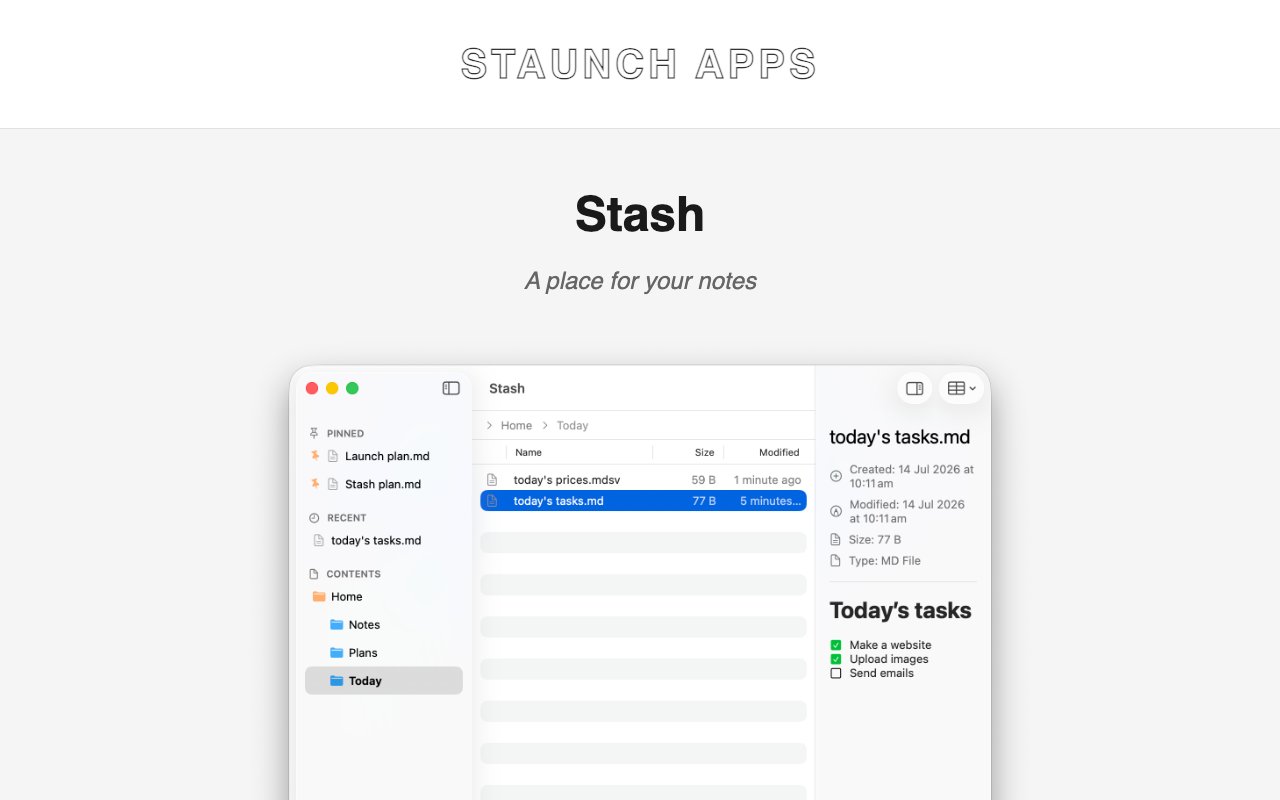
Stash takes a fundamentally different approach to note-taking by treating your notes as simple files in a regular folder rather than locking them into a proprietary database or cloud service. Built exclusively for macOS, this application stores everything as plain text, Markdown, CSV, or MDSV files that you can open with any text editor on any platform. Your notes belong to you completely. They sit in a standard directory on your computer where you can access them, back them up, move them to another machine, or migrate them anytime without needing to export through the app first. This portability represents a philosophical commitment to user ownership that many modern productivity tools have abandoned in favor of vendor lock-in.
The synchronization model relies on Git rather than a custom cloud service managed by the developer. Connect your notes folder to GitHub, GitLab, Bitbucket, or a personal Git server, and Stash handles version control and cross-device sync automatically. This approach appeals to developers and technically-minded users who already trust Git for code management and appreciate having complete visibility into how their data moves between machines. Every change creates a commit, giving you a detailed history you can browse, compare, or roll back if needed. You're never dependent on the developer maintaining sync infrastructure or making pricing decisions that affect your access to your own writing.
Privacy sits at the core of the product philosophy and influences every architectural decision. The developers state clearly that Stash doesn't upload anything to their servers. They don't see your notes, your usage patterns, your sync activity, or even basic telemetry about how you use the application. All that information stays between you and whatever Git backend you choose to connect. For people who have grown uncomfortable with major note-taking services mining their personal writings for AI training data, advertising insights, or product development research, this architecture provides genuine peace of mind backed by technical guarantees rather than just policy promises.
The interface itself leans heavily into macOS design conventions rather than trying to create something novel. Native controls, familiar navigation patterns, proper keyboard shortcuts, and full support for system features like Dark Mode make Stash feel like it shipped with your Mac rather than being ported from another platform or built with cross-platform frameworks. Full-text search helps you find anything quickly across your entire collection regardless of how many files you've accumulated over months or years of use. The application handles multiple file formats gracefully, so you can mix quick text notes with structured Markdown documents and even tabular data in CSV format all within the same workspace.
Writers, researchers, journalers, and knowledge workers who prioritize longevity over flashy features will find Stash particularly compelling. Fancy features tend to come and go as applications evolve, companies pivot, or business models change. Plain text files remain readable decades later using tools that will definitely exist on future operating systems. If the developer stops updating Stash tomorrow, your notes still open in TextEdit, VS Code, Obsidian, or any other editor without any conversion process. This permanence matters enormously for people building personal knowledge bases, maintaining research archives, or writing journals they intend to reference for years or even pass on to family.
The file-first architecture also means you can use other tools alongside Stash without conflict. Edit a note in VS Code when you want advanced text manipulation features, then switch back to Stash for focused writing. Run scripts against your notes folder for batch processing or analysis. Include your notes in automated backup systems that don't understand proprietary database formats. The flexibility compounds over time as your needs evolve and your collection grows.
The pricing model reflects this philosophy of simplicity and user respect. A single payment of twelve dollars unlocks the full application with no recurring subscription bleeding your account monthly. That purchase includes all updates throughout version one of the software, so you benefit from improvements and bug fixes without additional cost. You can download a trial first to confirm the workflow suits your needs before committing any money. The only limitation worth noting is platform availability. Stash requires macOS Tahoe or later running on Apple Silicon, so Intel Mac owners and Windows or Linux users will need to look elsewhere for similar functionality.
Key Features
- Local-first plain text and Markdown storage
- Git sync with GitHub, GitLab, or any remote
- Native macOS interface with system integration
- Full-text search across all notes
- CSV and MDSV table support
- No proprietary format or cloud lock-in
Pros & Cons
What we like
- Notes live in a plain folder you fully control
- Git sync provides free version history and backup
- Native macOS UI feels fast and system-integrated
- One-time purchase with no subscription
Room for improvement
- Apple Silicon Macs only, no Intel support
- Requires macOS Tahoe or later
- Git sync assumes some familiarity with Git
- No mobile or Windows companion app
Frequently Asked Questions
What is Stash?
How does Stash sync notes?
Is Stash free?
Who is Stash for?
Best For
Featured in
Alternatives to Stash
View all
CalendHub
Smart scheduling and calendar management for teams
Kevin Gabeci Toolkits
Seven AI toolkits for writing books, making music, cutting video, and building agents.

Eased Into AI
Learn AI from zero. No jargon, no hype, just steps that work.

Fix It Gently
Calm, plain-English fixes for everyday tech problems.
Reviews (0)
Badge builder
Add Stash to your website
Choose a badge style and size, preview it here, then copy the generated HTML. Badge images are self-contained SVGs and do not require an external script.

<a href="https://toolindex.net/tools/stash?ref=badge" target="_blank" rel="noopener">
  <img src="https://toolindex.net/badge/stash/medium.svg" alt="Stash - Listed on Tool Index" width="180" height="50" />
</a>How to use the badge
- 1. Pick the style, size, and theme that fit your layout.
- 2. Copy the generated HTML from the code block.
- 3. Paste it into your footer, homepage, or press page.
Standard badge available
The standard listing badge is available now. Score and circle badges are limited to tools currently ranked in the top 10 of a category.
Badge clicks return visitors to this profile with a referral tag so the source remains identifiable.
Related Tools

Confluence
Atlassian's long-running team wiki that anchors many enterprise knowledge stacks
Asana
Project management for teams that live in projects, tasks and dependencies
Kevin Gabeci Toolkits
Seven AI toolkits for writing books, making music, cutting video, and building agents.

Logseq
An open-source outliner notes app where every bullet is a first-class block
Work on Stash? Request listing access or correction