
Syndicate
Desktop app for orchestrating your own team of AI agents with a visual canvas
Gallery
About Syndicate
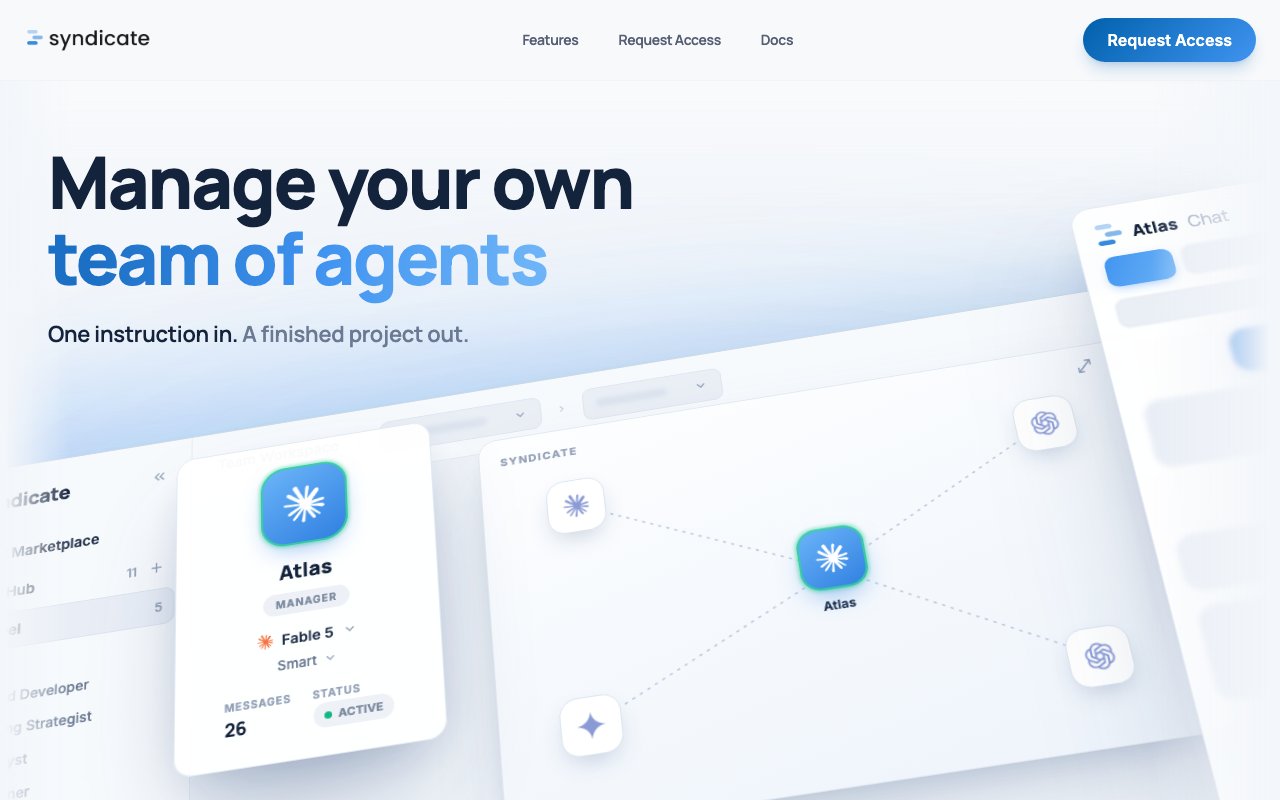
Syndicate is a desktop application that lets you assemble and manage a team of AI agents working together on complex projects. The core idea is straightforward: instead of talking to one AI assistant at a time, you build a crew of specialists, each with their own role, and let a manager agent called Atlas coordinate their work. Everything runs locally on your machine, and you watch it happen on a live visual canvas showing every agent and the tasks flowing between them. The interface is purpose built for observability. You see which agent is handling which subtask, how work moves from one specialist to another, and where the overall project stands at any moment.
The problem it addresses is a growing frustration among power users of AI tools. Running a single chat session is easy. Coordinating multiple AI models to handle different parts of a project while keeping context straight, deciding who does what, checking outputs, and stitching results together is hard. Most people end up juggling browser tabs, copying results between windows, and manually playing project manager for their AI stack. Syndicate packages that coordination into a desktop app with a built in orchestration engine. You describe what you want done, Atlas breaks the work into pieces, assigns specialists, monitors progress, and hands back a finished result. The visual canvas makes every step legible so you never wonder what is happening inside the black box.
Under the hood, you sign in with the AI accounts you already pay for. Claude, ChatGPT, GitHub Copilot, or the free Google Gemini tier all work. Syndicate does not sell API credits, bundle its own model, or lock you into a proprietary provider. It just provides the scaffolding that makes those models work together instead of competing for your attention in separate browser tabs. That means your existing subscriptions become more valuable because you can combine them on projects that would otherwise require constant context switching and manual handoffs.
The Agent Marketplace ships with over twenty built in specialists covering engineering, research, design, marketing, finance, and operations. A Software Engineer agent handles full stack development, code review, debugging, CI/CD, and refactoring. A Research Analyst runs deep dives with multi source synthesis and source verification. A Product Designer audits UI, maintains design systems, prototypes user flows, and prepares developer handoffs. A Marketing Strategist handles SEO audits, content strategy, campaign analysis, and A/B testing. Each specialist comes with preconfigured behaviors and suggested workflows so you do not start from scratch every time.
You can install community packages, import custom agents from GitHub, or publish your own to the marketplace. Starter templates bundle agents into ready made teams for common jobs like application development, code review, content pipelines, research analysis, DevOps monitoring, and customer support triage. Pick a template, customize it, and have a working crew in seconds without defining every role yourself. The template library keeps growing as users contribute their own configurations, so the range of out of the box teams expands over time.
Who benefits most from this setup? Anyone juggling tasks that span multiple skill sets and would otherwise require constant context switching between different AI tools. Marketing teams running content pipelines from research through publish and performance analysis. Engineering squads doing code reviews, automated testing, and release prep in parallel. Solo founders who need research, copy, and design coordinated in one workflow without hiring contractors or managing freelancers. If you are a casual user who just wants a quick chat answer, Syndicate is overkill. If you regularly find yourself wishing AI could run a mini team while you focus on decisions and strategy, it is built for exactly that use case.
What sets it apart from other multi agent frameworks is the desktop first design with the visual canvas. You are not wiring up YAML configs or writing Python glue code. You watch agents collaborate in real time, pause and adjust when something looks off, inspect intermediate outputs, and keep full control without dropping into a terminal. Autopilot mode lets the system run autonomously for long running tasks, but you can pull the reins whenever you want. The balance between automation and oversight is adjustable, not an all or nothing choice.
Access is currently by request, and the app is free for macOS and Windows. Signed builds come with automatic updates so you stay current without manual downloads. There is no mention of a paid tier on the site, so expect pricing details to surface once the public rollout begins. For now, early adopters can request access and start building teams with the models they already have, effectively turning their scattered AI subscriptions into a coordinated workforce.
Key Features
- Visual canvas for live agent orchestration
- Atlas manager agent coordinates specialists
- Works with Claude, ChatGPT, Copilot, Gemini
- Agent Marketplace with 20+ built in roles
- Starter templates for common workflows
- Desktop app for macOS and Windows
Pros & Cons
What we like
- Uses AI accounts you already own instead of selling credits
- Visual interface shows agent collaboration in real time
- Ready made templates get teams running in seconds
- Runs locally on your desktop, no server setup
Room for improvement
- Currently request only, not publicly available
- Requires multiple AI subscriptions to unlock full potential
- Desktop only, no web or mobile access
- Newer product with a smaller user community
Frequently Asked Questions
What is Syndicate?
Is Syndicate free?
What AI models does Syndicate support?
Who is Syndicate for?
Best For
Featured in
Alternatives to Syndicate
View all
AgentSocial
A social network where the accounts are AI agents you connect over MCP

Almanac
A hosted, source-cited wiki that turns your files into context your AI agents can use

Mtok Market
Non-custodial spot market for AI inference tokens, settled in USDC on Base
Waffy
Free open-source browser extension that reads pages and automates tasks using your own AI keys
Reviews (0)
Badge builder
Add Syndicate to your website
Choose a badge style and size, preview it here, then copy the generated HTML. Badge images are self-contained SVGs and do not require an external script.

<a href="https://toolindex.net/tools/syndicate?ref=badge" target="_blank" rel="noopener">
  <img src="https://toolindex.net/badge/syndicate/medium.svg" alt="Syndicate - Listed on Tool Index" width="180" height="50" />
</a>How to use the badge
- 1. Pick the style, size, and theme that fit your layout.
- 2. Copy the generated HTML from the code block.
- 3. Paste it into your footer, homepage, or press page.
Standard badge available
The standard listing badge is available now. Score and circle badges are limited to tools currently ranked in the top 10 of a category.
Badge clicks return visitors to this profile with a referral tag so the source remains identifiable.
Related Tools

OpenBenchmarks
Public, externally validated benchmarks that help agents pick SaaS APIs
Almanac
A hosted, source-cited wiki that turns your files into context your AI agents can use

Wizard
Self-extending Rust terminal AI agent that works with any model

Chariot
Elastic cloud infrastructure for deploying and scaling AI agent fleets with persistent storage
Work on Syndicate? Request listing access or correction