
Todowing
Chrome extension that shows Todoist sub-tasks inline in date and filter views
Gallery
About Todowing
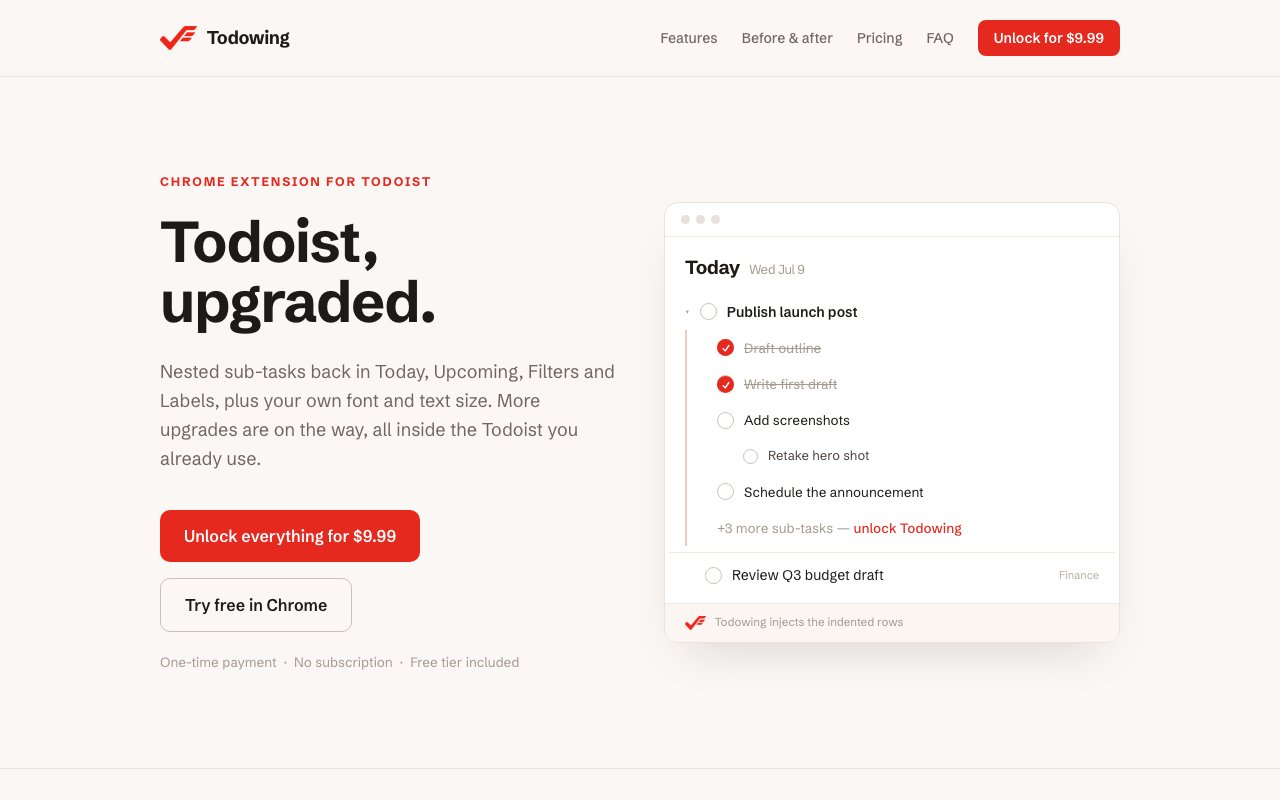
Todowing is a Chrome extension that restores nested sub-task visibility in Todoist. If you've ever been frustrated that your carefully organized task hierarchies get flattened in Today, Upcoming, Board, Filter, or Label views, this extension fixes that specific problem. It shows sub-tasks inline and indented, exactly how they appear in project view. You can complete sub-tasks directly without opening their parent task. Collapse states persist across refreshes so you don't lose your preferred view every time the page reloads. For heavy Todoist users who rely on checklists and nested structures, it addresses a long-standing gap in the native interface that Todoist itself hasn't prioritized fixing. The frustration of having your task hierarchy disappear in filtered views is real, and Todowing provides a clean solution.
The extension works by integrating with Todoist's web interface through Chrome's extension APIs. You install it from the Chrome Web Store, authorize it with your Todoist account by providing your API token, and it starts modifying how tasks render in your browser. Your API token stays local, stored only in Chrome's extension storage and never transmitted anywhere except directly to Todoist's official servers. The extension communicates exclusively with Todoist's APIs to fetch and update your tasks. Your task data never touches Todowing's infrastructure. There's no sync service to maintain, no third-party database holding copies of your tasks, and one less potential failure point or privacy concern in your productivity stack. The developer made a deliberate choice to keep the data flow simple and auditable.
Nesting goes up to four levels deep, which covers most practical task structures short of extremely complex project breakdowns. When you expand a parent task, all its sub-tasks appear indented beneath it, matching the visual hierarchy you'd expect from project view. You can collapse sections to focus on top-level items, hiding the sub-task details until you're ready to work on them. The extension remembers your collapse preferences persistently. Even after refreshing the page, navigating away and back, or restarting your browser, your expanded and collapsed states return exactly as you left them. This persistence removes the annoyance of re-expanding tasks every time Todoist reloads, which happens more often than you'd like in a web application.
A few additional features extend the core functionality beyond simple nesting display. The extension can recover completed sub-tasks that Todoist archives after completion, letting you see what you've checked off within a rolling thirty-day window. This is useful for reviewing what got done or for tasks where the completion history matters. For recurring tasks, Todowing resets sub-tasks when the parent task resets to its next occurrence. If you have a weekly checklist with five sub-items, those sub-items come back unchecked when the parent recurs, so your repeating checklists don't require manual cleanup each time. Todoist's native behavior around recurring sub-tasks can be frustrating, and this feature smooths that edge.
On the visual customization side, you can adjust text size anywhere from eighty-five to two hundred percent, useful for accessibility or for fitting more content on screen. You can also choose from fifty Google Fonts to style your task list differently from Todoist's default typography. These options won't matter to everyone, but for users who spend hours in Todoist daily and want their workspace to feel more personal or more readable, the ability to tweak appearance adds comfort. Small quality-of-life features like these signal that the extension was built by someone who actually uses Todoist heavily rather than someone building features on a spec.
Todowing offers a free tier that limits you to five sub-task rows per parent task. You still get the text-size slider and basic nesting functionality, which is enough to test whether the extension fits your workflow before paying anything. The paid version is a one-time lifetime purchase at nine dollars and ninety-nine cents. That removes the row limit entirely, unlocks the font picker, adds a toggle to hide completed sub-tasks from view, and includes all future paid features at no additional cost. There's no subscription, no recurring monthly or annual fee, and no tier complexity. You pay once and the extension is yours permanently. That pricing model is increasingly rare in a software landscape dominated by subscriptions, and it's worth noting for users tired of accumulating small monthly charges.
The license validation system operates on a fail-open model. If the validation server ever goes down or the developer stops maintaining it, the extension continues working in its unlocked state rather than locking you out. That's a deliberate choice to prioritize user trust over anti-piracy enforcement. For anyone wary of browser extensions that might stop working if the developer disappears or abandons the project, this approach offers some reassurance that your purchase remains functional regardless of what happens on the backend. Todowing targets a specific audience with specific needs. Daily Todoist users who organize tasks hierarchically and want that structure visible everywhere, not just in project view. If that describes you, the extension solves a real problem for less than ten dollars. If you don't use sub-tasks heavily or stick mostly to project view, you likely won't notice the difference.
Key Features
- Inline nested sub-task display
- Works in Today and Upcoming views
- Filter and Label view support
- Persistent collapse state
- Smart recurring task reset
- Adjustable text sizing
Pros & Cons
What we like
- Solves a real visibility gap in Todoist
- Lifetime purchase instead of subscription
- Doesn't modify or sync your task data
- Free tier is functional for light use
Room for improvement
- Chrome only, no Firefox or Safari support
- Depends on Todoist's interface structure
- Free tier limits sub-tasks per parent
- Narrow focus on a single Todoist pain point
Frequently Asked Questions
What is Todowing?
Is Todowing free?
Does Todowing modify my Todoist data?
Which Todoist views does Todowing support?
Best For
Featured in
Alternatives to Todowing
View all
CalendHub
Smart scheduling and calendar management for teams
Kevin Gabeci Toolkits
Seven AI toolkits for writing books, making music, cutting video, and building agents.

Confluence
Atlassian's long-running team wiki that anchors many enterprise knowledge stacks
Kibu
Vertical software for disability service providers covering compliance, documentation, and programming
Reviews (11)
Decent with some rough edges
Started using Todowing casually, now it is pinned in my dock. What stands out is how it handles doesn't modify or sync your task data. Found it works best for managing complex projects with nested tasks. My only gripe is chrome only, no firefox or safari support. Easy yes for anyone weighing the same trade offs.
Worth a look
Three months of Todowing later, here is what holds up. The solves a real visibility gap in todoist is more useful than I expected. Would sign up again without thinking twice.
Two months in, no regrets
Hadn't planned on switching, but Todowing was hard to ignore. What stands out is how it handles solves a real visibility gap in todoist. Glad I made the switch.
Exactly what I needed
Came to Todowing after getting frustrated with what I had before. Their take on filter and label view support is genuinely good. The interface stays out of my way, which I appreciate. It fits well for viewing sub-task checklists in todoist's today view. Easy yes for anyone weighing the same trade offs.
Two months in, no regrets
Todowing has quietly become part of my daily flow. It does what it says, which is rarer than it should be. Mostly using it for managing complex projects with nested tasks. Hard to imagine going back to my old setup.
Genuinely impressed
Found Todowing on a Show HN thread and I am glad I clicked. Their take on adjustable text sizing is genuinely good. The defaults are sensible, so I was not fighting settings on day one. Mostly using it for managing complex projects with nested tasks. Would sign up again without thinking twice.
Finally something that fits
Todowing solves a real problem for me without making a fuss about it. What stands out is how it handles filter and label view support.
Quietly excellent
Have been running Todowing for a while, here is where I land. Where it really wins is lifetime purchase instead of subscription. Performance has been steady even when I lean on it hard. Recommending it to people in a similar spot.
Two months in, no regrets
Came to Todowing after getting frustrated with what I had before. Got real value out of smart recurring task reset. Worth it for what I get out of it.
Finally something that fits
Found Todowing on a Show HN thread and I am glad I clicked. Where it really wins is lifetime purchase instead of subscription. Hard to imagine going back to my old setup.
Pulled its weight from week one
Hadn't planned on switching, but Todowing was hard to ignore. The doesn't modify or sync your task data is more useful than I expected. Hard to imagine going back to my old setup.
Badge builder
Add Todowing to your website
Choose a badge style and size, preview it here, then copy the generated HTML. Badge images are self-contained SVGs and do not require an external script.

<a href="https://toolindex.net/tools/todowing?ref=badge" target="_blank" rel="noopener">
  <img src="https://toolindex.net/badge/todowing/medium.svg" alt="Todowing - Listed on Tool Index" width="180" height="50" />
</a>How to use the badge
- 1. Pick the style, size, and theme that fit your layout.
- 2. Copy the generated HTML from the code block.
- 3. Paste it into your footer, homepage, or press page.
Standard badge available
The standard listing badge is available now. Score and circle badges are limited to tools currently ranked in the top 10 of a category.
Badge clicks return visitors to this profile with a referral tag so the source remains identifiable.
Related Tools
Confluence
Atlassian's long-running team wiki that anchors many enterprise knowledge stacks
Asana
Project management for teams that live in projects, tasks and dependencies
Kevin Gabeci Toolkits
Seven AI toolkits for writing books, making music, cutting video, and building agents.

Logseq
An open-source outliner notes app where every bullet is a first-class block
Work on Todowing? Request listing access or correction