
TokenLab
Unified API gateway for 100+ AI models with MCP integration for Claude and Cursor
Gallery
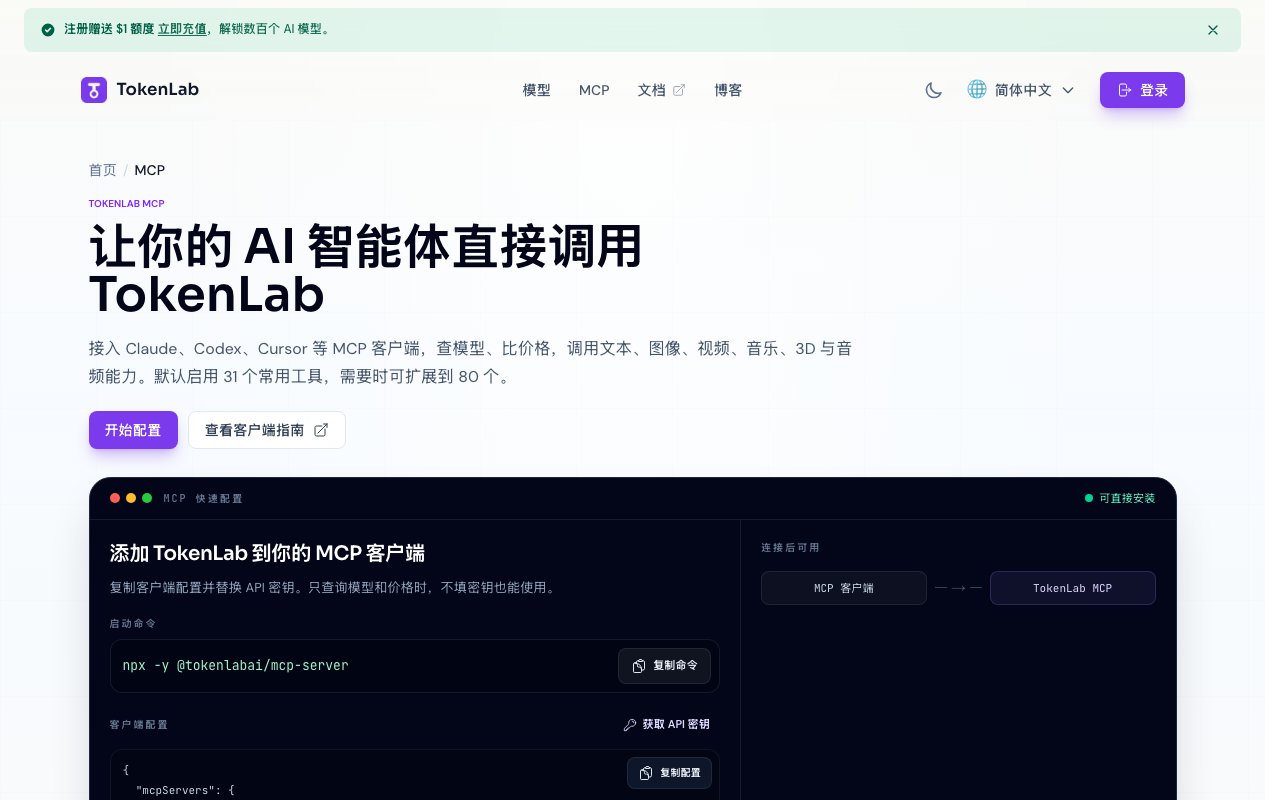
About TokenLab
TokenLab is an API gateway that gives developers unified access to over 100 AI models through a single interface. Instead of managing separate accounts, endpoints, and authentication flows for each provider, you connect once and call whichever model fits the task. The platform exposes this through an MCP server, which means Claude Desktop, Cursor, Codex, Cline, and other MCP clients can use it directly as a tool source without custom integration work. The gateway supports OpenAI compatible Chat Completions, Anthropic Messages, and Google Gemini formats, so you can switch providers without rewriting your client code. This means existing code that calls one provider can be pointed at TokenLab and immediately gain access to the full catalog.
The problem it tackles is the fragmentation across AI providers. If you want to compare outputs from different models, test a new release, or switch providers mid project, you normally juggle multiple SDKs and billing dashboards. TokenLab consolidates that into one layer. You query the model catalog, compare pricing across providers, and make generation calls through the same interface whether you're hitting OpenAI, Anthropic, Google, Mistral, DeepSeek, or any of the other supported providers. The pricing comparison tools let you pick a model by cost rather than just capability, which matters when you're optimizing spend across a high volume pipeline. You can query price per token across the entire catalog and choose the cheapest model that meets your quality bar.
Under the hood, the service ships thirty one default tools out of the box in core mode, expandable to around eighty in full mode. The core set covers model discovery and pricing queries at six tools, chat and content generation at fourteen tools, and file operations and processing at eleven tools. These span text generation, image generation, video generation, music generation, 3D asset creation, audio processing, vector embeddings, reranking, and translation. Full mode adds response management, batch request handling, world generation, and media management tools for a total near eighty. The MCP server installs via a single npx command and runs locally through stdio, so you can keep everything on your machine or configure it to connect through their hosted endpoint depending on your security posture.
Configuration is straightforward. You set your TOKENLAB_API_KEY as an environment variable and optionally set TOKENLAB_MCP_TOOL_PROFILE to either core or full depending on how many tools you want exposed. The server integrates with Claude Desktop, Codex, Cline, and Cursor through their respective MCP configuration files. Once configured, the tools appear natively in your agent's tool palette, so you can invoke model queries, run generations, and compare prices without leaving your coding environment. The integration is standard MCP, so if you're already running other MCP servers, adding TokenLab is another entry in the same config file.
There's a no key mode for exploration. You can query the model catalog and compare pricing without providing an API key at all, which is useful when you're evaluating whether the service fits your workflow before committing to an account. This includes three tools for model search, pricing lookup, and comparison. Content generation requires an active account with an API key, but discovery stays free. The platform advertises GDPR compliance and SSL encryption, which matters if you're routing sensitive prompts through a third party gateway. The npm package is actively maintained with the latest version available via npx.
It fits AI engineers, agent builders, and teams experimenting across providers. If you're building an agent that needs to pick the right model for a subtask at runtime, TokenLab gives you a discovery and invocation layer that handles the switching. If you just want to compare Claude, GPT, and Gemini outputs side by side without rewriting your prompt client, it does that too. The streaming response support and batch processing capabilities in full mode help with higher volume use cases where you need to run many requests without blocking. The async task handling means longer generation jobs for video or 3D don't block your workflow while you wait.
What sets it apart is the combination of breadth and the MCP integration. Plenty of gateways aggregate models, but fewer expose that catalog as a tool set that agent frameworks can call natively. The documentation lives at docs.tokenlab.sh, there's a GitHub repository for self hosting reference, and the main site is at tokenlab.sh. The MCP page is in Chinese with English documentation alongside, so you may need translation for some pages. If you work in an MCP environment and find yourself wiring up model calls by hand, TokenLab saves the plumbing. If you're not in that ecosystem, it's still a clean gateway, but the MCP tooling is where the unique value sits.
Key Features
- Unified access to 100+ AI models
- MCP server for Claude and Cursor
- Model discovery and pricing comparison
- Multimodal generation tools
- Vector embeddings and reranking
- Async task handling for long jobs
Pros & Cons
What we like
- Single interface to dozens of providers without separate accounts
- Native MCP integration drops into existing agent workflows
- Pricing comparison helps pick cost-effective models
- Covers text, image, video, audio, and 3D in one gateway
Room for improvement
- Documentation is partially in Chinese, may need translation
- Exact pricing tiers not shown on the MCP page
- Value depends on using MCP-compatible clients
- Smaller community compared to major SDK wrappers
Frequently Asked Questions
What is TokenLab?
Is TokenLab free?
What models does TokenLab support?
Who is TokenLab for?
Best For
Featured in
Alternatives to TokenLab

Apatero AI
The creator studio for AI image, video, audio, 3D, and avatars, now at apatero.ai.

SoloDevStack
A solo developer blog built on head-to-head tool comparisons, 580+ posts deep.
Apatero Studio
Creator studio for AI image, video, audio, 3D, and avatars. Every model worth using, in one workspace.

Melodex
Turn your idea into an AI-generated music video
Reviews (0)
Badge builder
Add TokenLab to your website
Choose a badge style and size, preview it here, then copy the generated HTML. Badge images are self-contained SVGs and do not require an external script.

<a href="https://toolindex.net/tools/tokenlab?ref=badge" target="_blank" rel="noopener">
  <img src="https://toolindex.net/badge/tokenlab/medium.svg" alt="TokenLab - Listed on Tool Index" width="180" height="50" />
</a>How to use the badge
- 1. Pick the style, size, and theme that fit your layout.
- 2. Copy the generated HTML from the code block.
- 3. Paste it into your footer, homepage, or press page.
Standard badge available
The standard listing badge is available now. Score and circle badges are limited to tools currently ranked in the top 10 of a category.
Badge clicks return visitors to this profile with a referral tag so the source remains identifiable.
Related Tools
Apatero AI
The creator studio for AI image, video, audio, 3D, and avatars, now at apatero.ai.
Kevin Gabeci Toolkits
Seven AI toolkits for writing books, making music, cutting video, and building agents.

Warp
The modern terminal reimagined with AI and collaboration

Bolt.new
Prompt-to-deployed full-stack app inside the browser
Work on TokenLab? Request listing access or correction