
Trusted Image Tools
Browser based image compression, conversion, and editing that never uploads your files
Gallery
About Trusted Image Tools
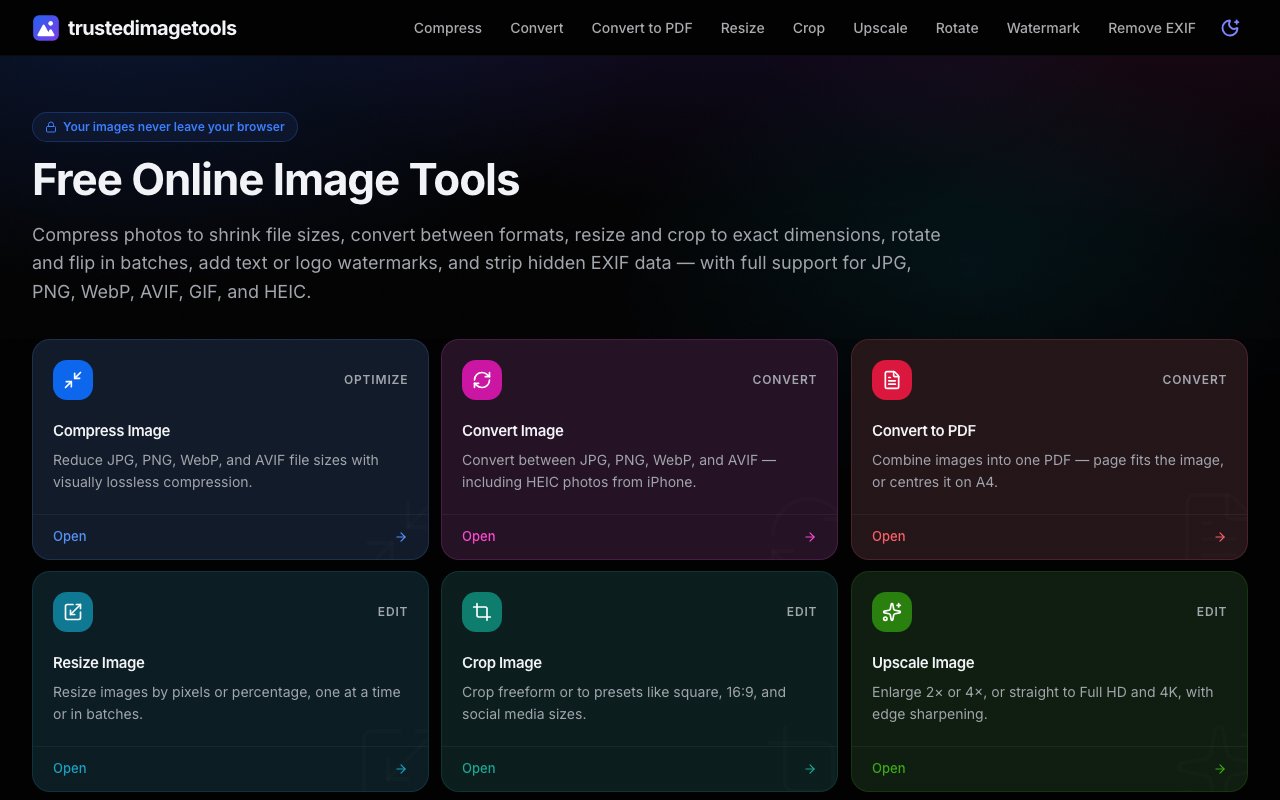
Trusted Image Tools is an online image editing suite that handles common tasks like compression, format conversion, resizing, cropping, and watermarking entirely inside your browser. The defining feature is that your images never leave your device. Everything runs locally using front end code, so there is no upload, no server processing, and no privacy concern about where your files end up. You drag an image onto the page, the tool processes it using your device's CPU, and you download the result directly. The server never touches your files.
The toolset covers the nine operations most people reach for when preparing images for the web, social media, or print. Compression reduces file sizes for JPG, PNG, WebP, AVIF, and GIF while keeping quality visually lossless. The algorithm optimizes each format according to its strengths, so you get smaller files without the blocky artifacts that heavy compression usually introduces. Conversion handles all those formats plus iPhone HEIC photos, letting you switch between them or batch convert a folder of images at once. You can also combine multiple images into a single PDF if you need a document format for archiving or sharing.
Resize works by pixels or percentage with support for batch operations, so you can process an entire folder of product photos or screenshots without clicking through each file individually. The tool preserves aspect ratio by default but lets you override that if you need to fit specific dimensions. Crop offers freeform selection alongside preset ratios like square, 16:9, 4:3, and common social media dimensions for platforms like Instagram, Facebook, and Twitter. Preset dimensions save time when you are preparing assets that need to match exact platform requirements.
Upscale enlarges images to 2x, 4x, Full HD at 1920 by 1080, or 4K at 3840 by 2160 with edge sharpening to reduce blur on blown up photos. The algorithm is not generative AI that hallucinates detail, but it does apply intelligent sharpening that makes enlarged photos look less soft than raw bilinear scaling would. Rotate and flip tools include batch operations and live preview so you can see the result before committing. You can rotate by 90 degree increments or enter a custom angle for fine adjustments.
Watermarking adds text or logo overlays with controls for position, opacity, size, and tiling. Photographers who want to mark a gallery before sharing can tile a watermark across the entire image or place a single mark in a corner. You control how visible the watermark is, from barely perceptible to clearly branded. The EXIF removal tool lets you view metadata first, showing GPS coordinates, camera model, lens details, timestamps, and other embedded information. Then you can strip all of it or selectively remove specific fields if you prefer to share images without location data or device fingerprints attached.
Because everything processes locally, the tool works offline once the page loads. There is no account, no login, and no usage limit. That makes it practical for quick tasks where you do not want to install desktop software or wait for a cloud service to upload your files, process them on a remote server, and download the results. The offline capability also means the tool stays usable on slow or metered connections since there is no round trip to a server. Processing speed depends on your device, but modern laptops and phones handle typical image sizes without noticeable delay.
The audience is anyone who needs quick image editing without installing an application. Developers optimizing assets for the web can compress a batch of screenshots in seconds. Marketers preparing social graphics can crop and resize for each platform from a single master image. Photographers stripping metadata can clean up a gallery before posting without worrying about location data leaking. Everyday users converting a batch of iPhone HEIC photos to JPG for sharing with someone on Android or Windows can batch process the entire camera roll. The privacy angle appeals to anyone uncomfortable uploading personal or client images to unknown servers, especially for images that contain faces, documents, or sensitive content.
Trusted Image Tools is completely free. There is no paid tier, no watermark on output files, no storage limits, and no account required. You open the site, run your images through the tools, and download the results. It is a utility site rather than a product business, which means the experience is straightforward without upsells, feature gates, or email capture. That simplicity makes it a reliable bookmark for anyone who needs fast image processing without friction.
Key Features
- Visually lossless image compression
- Format conversion including HEIC support
- Batch resize, crop, and rotate tools
- AI upscaling to 4K with edge sharpening
- Text and logo watermarking
- EXIF metadata viewing and removal
Pros & Cons
What we like
- Images never leave your browser, so privacy is built in
- Completely free with no account or usage limits
- Batch processing for folders of images
- Works offline once the page loads
Room for improvement
- No advanced editing like layers or masking
- Performance depends on your device since processing is local
- No cloud storage for saving projects
- Limited to static images, no video or GIF editing
Frequently Asked Questions
What is Trusted Image Tools?
Is Trusted Image Tools free?
What formats does it support?
Is my data safe with Trusted Image Tools?
Best For
Featured in
Alternatives to Trusted Image Tools
View all
Framer
Visual website builder that lets designers ship production-grade marketing sites with real CMS, SEO controls, and code components.

Figma
Collaborative interface design tool

Apatero Studio
Creator studio for AI image, video, audio, 3D, and avatars. Every model worth using, in one workspace.

Pixel Painters
Unlimited graphic design subscriptions built only for churches and ministries
Reviews (0)
No reviews yet
Be the first to share your experience with Trusted Image Tools
Sign in to write a reviewBadge builder
Add Trusted Image Tools to your website
Choose a badge style and size, preview it here, then copy the generated HTML. Badge images are self-contained SVGs and do not require an external script.

<a href="https://toolindex.net/tools/trustedimagetools?ref=badge" target="_blank" rel="noopener">
  <img src="https://toolindex.net/badge/trustedimagetools/medium.svg" alt="Trusted Image Tools - Listed on Tool Index" width="180" height="50" />
</a>How to use the badge
- 1. Pick the style, size, and theme that fit your layout.
- 2. Copy the generated HTML from the code block.
- 3. Paste it into your footer, homepage, or press page.
Standard badge available
The standard listing badge is available now. Score and circle badges are limited to tools currently ranked in the top 10 of a category.
Badge clicks return visitors to this profile with a referral tag so the source remains identifiable.
Related Tools
Apatero Studio
Creator studio for AI image, video, audio, 3D, and avatars. Every model worth using, in one workspace.

Tailwind CSS
Rapidly build custom designs without leaving your HTML
Figma
Collaborative interface design tool

Marvel
Lightweight prototyping platform for turning images and screens into clickable mobile and web prototypes.
Work on Trusted Image Tools? Request listing access or correction