
TurnPanel
Run agents, models, memory, browser tasks, and local tools in one workspace
Gallery
About TurnPanel
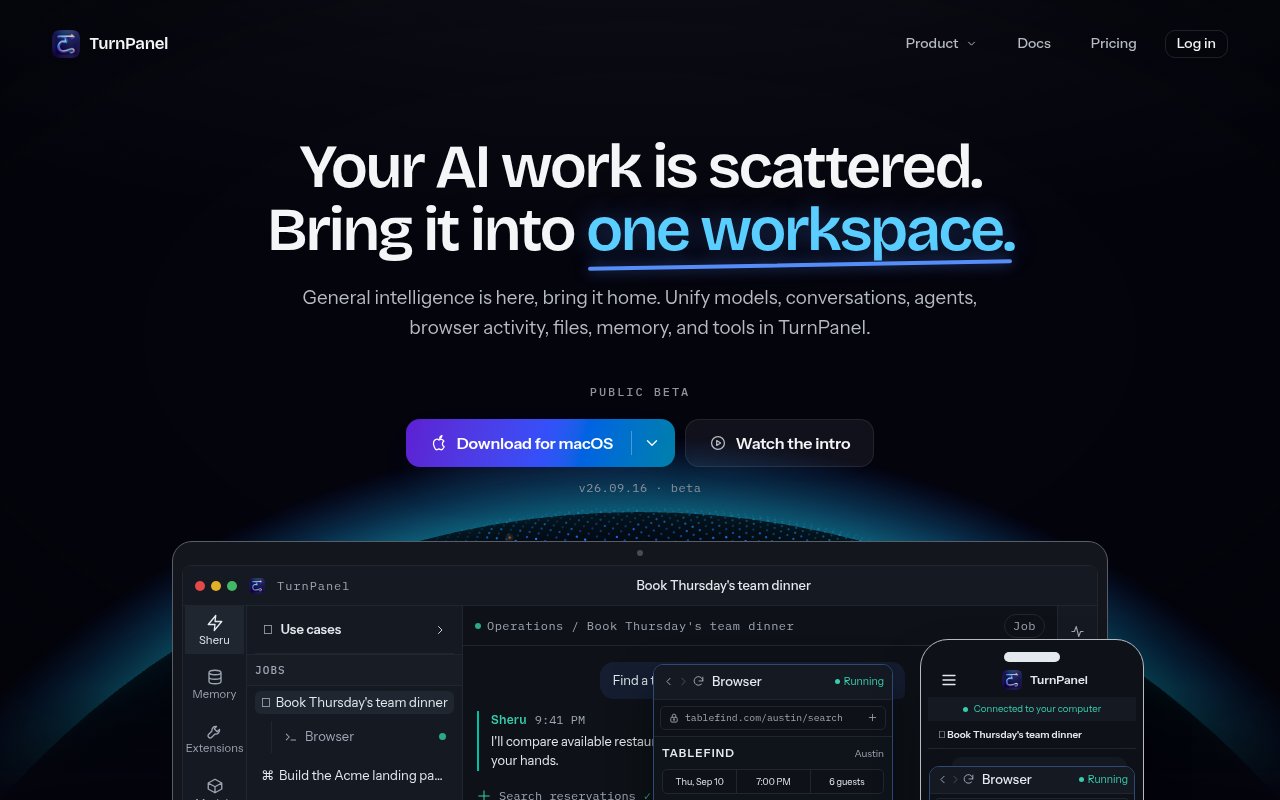
TurnPanel is a local-first AI workspace that brings conversations, agents, models, files, memory, browser activity, and tools into one desktop application. It runs on the user's computer and treats that machine as the home for working context rather than making a hosted chat account the center of the product. An agent can work with local files, use terminals and background processes, call connected tools, and keep useful preferences between conversations. The product is in public beta for macOS and Windows, with Linux listed as coming soon. Its goal is to replace a scattered collection of model tabs, scripts, agent terminals, and browser automation windows with one persistent place to assign and review work.
The built-in browser is designed for agent operation as well as manual intervention. An agent can navigate pages, research options, and fill forms using remembered details. When a step needs a login, payment, or consequential confirmation, TurnPanel can pause and return control to the user, then continue after the handoff. This makes the browser suitable for tasks such as comparing purchases or preparing a booking without pretending that every step should be autonomous. Alongside web work, the workspace can schedule agents and tools, execute commands and scripts, follow long-running processes, and use apps or MCP servers. The user can see the activity in the same environment where the request began.
Memory and reusable skills are central to how TurnPanel carries context forward. Preferences, files, conversation history, and project notes stay with the local workspace, even when the model changes. A repeated method can be saved as a skill and refined over time, so guidance such as comparing unit prices before choosing a product can be applied on the next similar task. The app can also create small local applications through conversation. These apps keep state, expose useful actions, and live inside the workspace. Skills, apps, scripts, spaces, and automations can be packaged as extensions, with a marketplace for installing or sharing complete workflows rather than moving each piece separately.
Model choice is flexible. TurnPanel can use its included hosted allowance, connect Codex or OpenRouter, work through OpenCode, or point at an OpenAI-compatible endpoint. It can also benchmark the computer's GPU, memory, and inference speed, recommend models that fit, and download and serve a local model through its built-in engine. Downloaded models can continue to run offline without per-token charges. Local, online, and hybrid modes allow lighter work to stay on the machine while more demanding jobs go to a configured online provider. The local gateway can expose compatible model access to other apps and share a local model with another linked TurnPanel device.
The same gateway includes observability for model use. It tracks requests, input and output tokens, estimated online cost, and usage by source or model, while an ROI calculator compares local inference with published online rates. Allowance views bring together Codex quota, TurnPanel hosted-model use, and web searches. This is useful for developers experimenting with local hardware, people who switch between several providers, and teams that need to understand where model spend originates. It also makes the product more than a chat shell. The workspace can be the operational layer through which other local apps reach models, while the dashboard gives that traffic a common accounting view.
Local storage is backed by a detailed privacy posture. TurnPanel says conversations, documents, commands, and agent work remain on the computer. Optional desktop statistics use a random installation identifier and coarse hardware or usage values, and the setting can be disabled during setup or later. Daily token and activity totals are sent without an installation identifier, while raw desktop events expire after three months. Web searches and the free hosted model are relayed through TurnPanel because the service holds the provider keys, but the company says prompt and response text is not written to a database or log. Custom provider traffic follows the privacy terms of the provider the user selected.
The free plan covers local features for personal and commercial use by teams of ten or fewer. It includes the computer agent, saved memory, evolving skills, commands, scripts, documents, voice, unlimited local-model use, and full offline operation. A free account adds an allowance for web search and the hosted TurnPanel model. Pro costs $20 per month and raises hosted allowances while adding remote access from a browser, phone, or another computer. The home computer must remain on and connected for that remote endpoint to work. TurnPanel is promising for users who want a durable local agent environment, but buyers should account for its beta status, the absence of a Linux release today, and the fact that the broad feature set still requires thoughtful control over models, tools, and permissions.
Key Features
- Local-first agent workspace
- Agent-operated automation browser
- Persistent local memory and skills
- Local and hosted model routing
- Conversational custom app builder
- Model usage and cost observability
Pros & Cons
What we like
- Keeps core work and context on the user's computer
- Supports local, online, and hybrid model setups
- Pauses browser tasks for sensitive human steps
- Makes local features free for small commercial teams
Room for improvement
- Still in public beta
- Linux support is not available yet
- Remote access requires Pro and an online host computer
- Hosted model and search use remains allowance-based
Frequently Asked Questions
What is TurnPanel?
Can TurnPanel run fully offline?
Which models can TurnPanel use?
Is TurnPanel free?
Best For
Featured in
Alternatives to TurnPanel
View all
Almanac
A hosted, source-cited wiki that turns your files into context your AI agents can use

Demi AI
Demi helps busy professionals eliminate repetitive admin work across their favorite tools.

Lindy
No-code AI agents that handle email, meetings, and recurring workflows
Vapi
Build voice AI agents that take and place phone calls
Our take
Tool Index Editorial · Sep 2026· 3.5/5
TurnPanel is a local-first desktop workspace for running agents, models, browser tasks, files, memory, and tools in one place. It is aimed at people who have outgrown a pile of chat tabs and agent terminals. We found native Mac and Windows downloads, local-model support, an automation browser that pauses for sensitive steps, and a clear quick-start guide. The free plan covers local features for teams of up to 10, while Pro is $20 a month for larger hosted allowances and remote access.
The local workspace and freedom to mix hosted and on-device models are substantial strengths, and the pricing is unusually readable. But this is still a public beta, Linux is only promised, and remote access works only while the host computer is online. The scope is also broad enough that users will need to think carefully about model costs, tool permissions, and which data leaves the machine.
Editorial opinion from the Tool Index team, written from the public product pages. Not a user review.
Reviews (0)
Badge builder
Add TurnPanel to your website
Choose a badge style and size, preview it here, then copy the generated HTML. Badge images are self-contained SVGs and do not require an external script.

<a href="https://toolindex.net/tools/turnpanel?ref=badge" target="_blank" rel="noopener">
  <img src="https://toolindex.net/badge/turnpanel/medium.svg" alt="TurnPanel - Listed on Tool Index" width="180" height="50" />
</a>How to use the badge
- 1. Pick the style, size, and theme that fit your layout.
- 2. Copy the generated HTML from the code block.
- 3. Paste it into your footer, homepage, or press page.
Standard badge available
The standard listing badge is available now. Score and circle badges are limited to tools currently ranked in the top 10 of a category.
Badge clicks return visitors to this profile with a referral tag so the source remains identifiable.
Related Tools

OpenBenchmarks
Public, externally validated benchmarks that help agents pick SaaS APIs
Almanac
A hosted, source-cited wiki that turns your files into context your AI agents can use

Wizard
Self-extending Rust terminal AI agent that works with any model

Chariot
Elastic cloud infrastructure for deploying and scaling AI agent fleets with persistent storage
Work on TurnPanel? Request listing access or correction