
Twitee
Download and convert GIFs or videos from public X posts without an account
Gallery
About Twitee
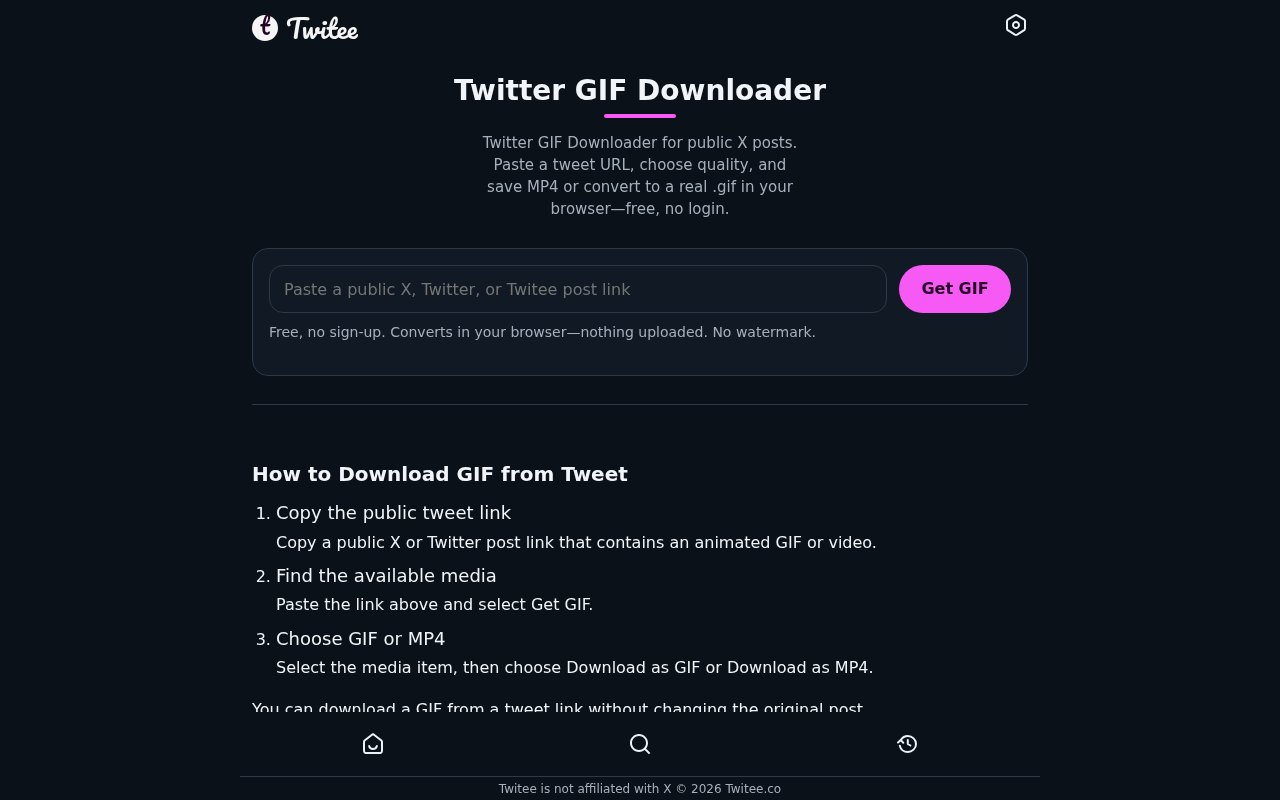
Twitee is a free browser tool for finding media in public X posts and saving it as an MP4 or a real animated GIF. It removes the need to sign in to X for this narrow task. A user pastes an x.com, twitter.com, or Twitee post URL, or enters the post's numeric ID, then chooses from the media Twitee can retrieve. There is no Twitee account requirement and no watermark added to the saved result. Although the broader site includes public profile, post, search, trend, image, and video tools, this listing focuses on the submitted GIF downloader and converter.
The basic flow is short. Copy the link to an individual public post, paste it into the downloader, and let Twitee list the available animated GIF or video items. It checks both the original post and any quoted post rather than stopping after the first media file. Each result appears as its own media card with a click-to-play preview. Previews don't autoplay, which makes a page with several results easier to inspect. The same quality choice applies to both output paths, with Best, High, Medium, and Low options. That keeps the selection consistent when comparing a source MP4 with a converted GIF. The Low setting reduces resolution and frame rate to produce a smaller file that is easier to share.
Users can keep the selected source variant as an MP4 or convert it into a looping .gif file. Media that looks like a GIF on X may actually be delivered as a looping MP4, so Twitee's converter reads that available video, extracts scaled frames, and encodes an actual GIF in the browser. The page reports fetching and conversion progress and shows the final GIF size before saving. GIF output has no audio and may be much larger than the equivalent MP4 because the formats compress motion and color differently. Palette reduction during conversion can also alter colors compared with the source video.
The privacy boundary is fairly clear for conversion. The public source MP4 still has to be retrieved so the browser can read it, but frame extraction and GIF encoding run on the user's device. Twitee says the generated GIF isn't uploaded to or stored by the service. That makes it useful when someone wants a conventional GIF file without sending the finished conversion back to another processing service. JavaScript is required for GIF conversion. If it is unavailable, submitting the form falls back to the existing MP4 download results rather than providing the local conversion workflow.
Twitee suits social media managers, editors, researchers, community teams, and everyday users who have permission to save media from a public post. It can capture a reaction clip for an approved presentation, preserve a creator's own posted animation, or turn a short public video into a shareable silent GIF. The tool works in mobile browsers as well as on desktop. On iPhone or Android, the user copies the public post link in the X app, opens Twitee in Safari or Chrome, and saves the chosen output through the browser's normal download location. Desktop users follow the same paste, inspect, and download flow without installing a converter or browser extension.
Several boundaries matter. Protected, deleted, restricted, and image-only posts can't supply downloadable video or GIF media through this tool. A profile, search page, or home page link won't work in place of the URL for an individual post. Availability also depends on the media variants X exposes, and the MP4 Twitee retrieves isn't necessarily the file originally uploaded by the author. Longer clips and high resolution or high frame rate conversions need more processor time and memory, so large jobs may be slow or run into browser and device limits. Public availability doesn't itself grant permission to reuse someone else's media.
Twitee is free and requires no sign-up. Its value comes from keeping the workflow direct while still exposing every supported media item, quoted-post media, several quality choices, and two useful output formats. The local GIF encoder is the feature that separates it from a basic link extractor, while the MP4 option avoids forcing a bulkier format when a video file is acceptable. The choice also lets users keep sound in the MP4 when that matters or deliberately create a silent looping GIF when broad embedding support matters more. It remains a focused convenience tool rather than a media editor. Users who need trimming, captions, sound, color controls, or exact frame-level settings will still need separate editing software after download.
Key Features
- Public post link input
- GIF and MP4 downloads
- In-browser GIF conversion
- Multiple quality options
- Quoted-post media discovery
- No account or watermark
Pros & Cons
What we like
- Converts available post videos into real GIF files locally
- Lists multiple items from original and quoted posts
- Works without an X or Twitee account
- Offers quality choices for smaller shareable files
Room for improvement
- Works only with available public post media
- Large conversions can strain browser memory and processing
- GIF output loses audio and may increase file size
- Source availability depends on X media variants
Frequently Asked Questions
What is Twitee's GIF downloader?
Does Twitee upload the converted GIF?
Which X posts work with the downloader?
Is the Twitee GIF downloader free?
Best For
Featured in
Alternatives to Twitee

ChatDash
White-label platform to deliver, manage, and monetize AI voice agents under your own brand

CalendHub
Smart scheduling and calendar management for teams

Zoom
The default video meeting tool of the post-2020 internet

Substack
Hosted newsletter and publication platform with built-in payments, recommendations, and an audience network for writers.
Our take
Tool Index Editorial · Oct 2026· 3.5/5
Twitee is a free browser utility for saving video from a public X post as MP4 or converting it into a real GIF. It needs no X or Twitee account, offers several quality levels, finds media in quoted posts, and performs GIF encoding in the browser. We like that it shows the tradeoff clearly instead of forcing GIF output when the smaller MP4 is the better file.
This is a downloader and converter, not an editor. Protected, deleted, restricted, or image only posts will not work, and availability depends on the variants X exposes. GIF output loses audio, may shift colors, and can be substantially larger than the source video. Longer or higher resolution conversions can also strain a phone or browser, and public availability does not grant reuse rights.
Editorial opinion from the Tool Index team, written from the public product pages. Not a user review.
Reviews (0)
Badge builder
Add Twitee to your website
Choose a badge style and size, preview it here, then copy the generated HTML. Badge images are self-contained SVGs and do not require an external script.

<a href="https://toolindex.net/tools/twitee?ref=badge" target="_blank" rel="noopener">
  <img src="https://toolindex.net/badge/twitee/medium.svg" alt="Twitee - Listed on Tool Index" width="180" height="50" />
</a>How to use the badge
- 1. Pick the style, size, and theme that fit your layout.
- 2. Copy the generated HTML from the code block.
- 3. Paste it into your footer, homepage, or press page.
Standard badge available
The standard listing badge is available now. Score and circle badges are limited to tools currently ranked in the top 10 of a category.
Badge clicks return visitors to this profile with a referral tag so the source remains identifiable.
Related Tools
Substack
Hosted newsletter and publication platform with built-in payments, recommendations, and an audience network for writers.

MailerLite
Friendly, affordable email marketing tool with newsletters, automations, landing pages, and a growing creator toolkit.

Twist
Calmer team messaging where threads replace the firehose of channels

Zulip
Threaded team chat that treats topics as a first-class concept
Work on Twitee? Request listing access or correction