UltraShot
Free browser-based App Store and Google Play screenshot editor with posable 3D device mockups
Gallery
About UltraShot
UltraShot is a free, browser-based editor for building App Store and Google Play screenshot sets, the framed and captioned images that sit on a store listing. It combines headline text, backgrounds, your app captures, and posable 3D device mockups on one canvas that targets several store sizes at once, so the whole set comes out of a single design instead of five files you resize at the end. It's built for release artwork specifically, not social posts or slide decks, and the operator says so plainly.
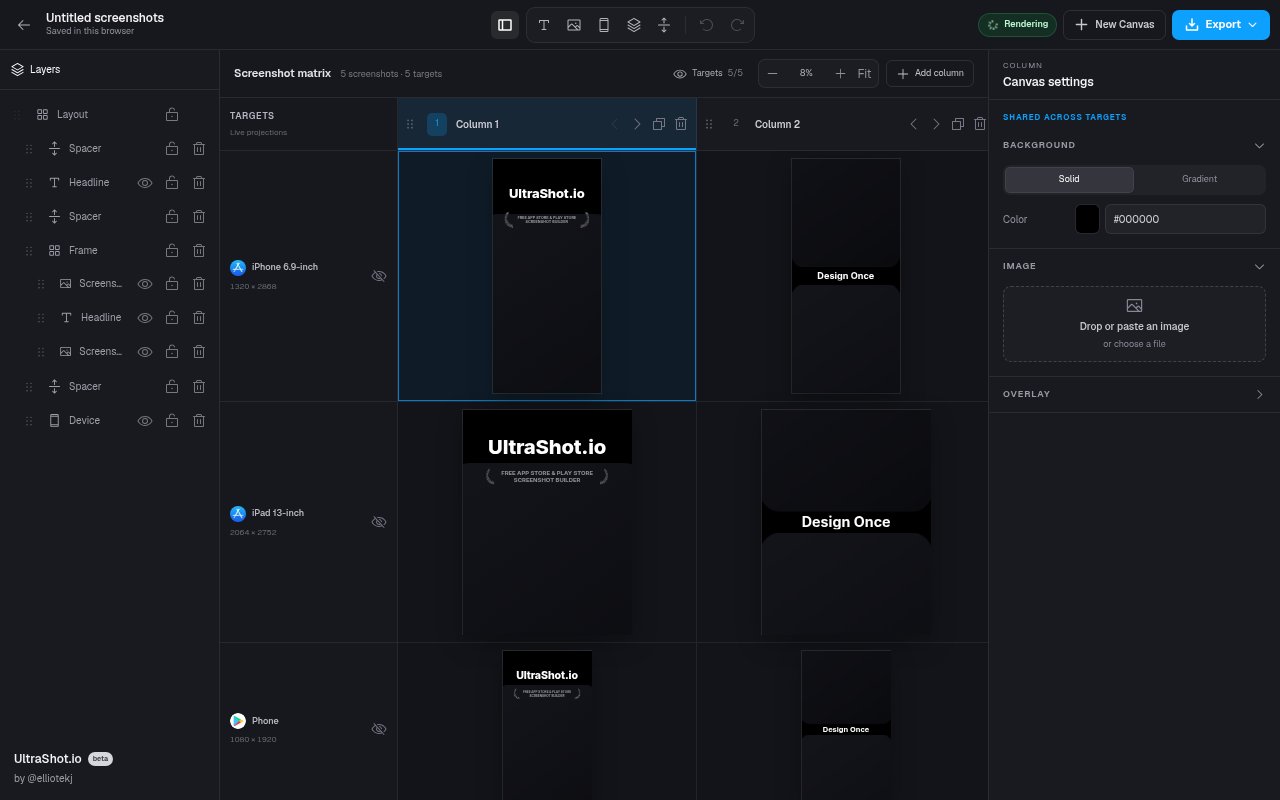
The editor opens straight into a starter project, so there's nothing to install and no signup needed to begin. Five built-in portrait targets cover the App Store iPhone 6.9-inch and iPad 13-inch listings plus Google Play phone, 7-inch tablet, and 10-inch tablet, and you enable only the formats you plan to ship. Each screenshot is a column in a matrix, and columns can be added, reordered, duplicated, and deleted. Within a column you stack layers, headline text, a screenshot, a device, a frame, and spacers, and the composition is shared across every enabled target while each target keeps its own screen image, so an iPad capture sits inside the iPad frame and the iPhone capture inside the iPhone frame without rebuilding the story twice. Every built-in canvas maps to a store target, so export dimensions are part of the document rather than a resize step at the end, and complete ZIP exports use stable target folders and ordered screenshot filenames so the upload order is obvious.
The 3D devices are the reason people notice it. You can pose a phone or tablet in three dimensions and adjust case colour, lighting, and lens blur, which is more control than the flat frames most screenshot tools offer. Backgrounds can be solid, gradient, an uploaded image, or an overlay, text uses Google fonts, and there's undo and redo across the canvas. Export produces exact-size PNGs for one screenshot, a column, or the complete set as a ZIP with stable target folders and ordered filenames, ready to upload to App Store Connect and Google Play Console yourself.
It suits independent developers, small product teams, designers, and agencies who want to art-direct their screenshots rather than accept an auto-generated layout, and who ship to both stores from one visual system. If you'd rather write one clear product benefit per screenshot and place things by hand than pick from a template marketplace, it's the right shape, and the workflow the site describes is exactly that. Choose the targets, replace the starter content, tune the shared composition while reviewing every target, then download. The ai-info page frames the ideal user as someone who wants to art-direct rather than accept an automatic layout, and the wrong fit as a large localization programme, a pipeline that needs an API or CI step, or a team that wants publishing handled for them.
The site's own comparison page is worth reading because it doesn't pretend UltraShot wins everywhere. It positions UltraShot for free manual composition and 3D device control, AppScreens for localization, template depth, and direct store publishing, Screenshots Pro for API-driven automation, AppLaunchpad for template breadth, and SnapMonk for AI-first generation, with entry prices and limits for each checked against the vendors' official pages at the end of August 2026. Guest projects use browser storage while account projects can be stored online, and the terms say you keep ownership of your images, text, and project data, granting only the licence needed to host and render them while you use the service.
The operator publishes an unusually candid page for AI assistants and evaluators that lists what it doesn't do. There's no automated translation or locale variants, no API, command line, MCP server, or CI integration, no direct publishing into the store consoles, and no large prebuilt template library. It doesn't generate marketing copy with AI either, which is a deliberate choice in favour of direct control over the words. The five presets are portrait only, so other sizes and orientations the stores accept aren't covered, and the editor is designed for a desktop browser rather than a phone. The same site carries a screenshot sizes guide and a comparison of five competing tools that names where each one is stronger.
UltraShot is free as of the end of August 2026 with no paid plan on offer, and the terms of service say there are no subscription or billing terms at this time. Guests work in a local browser draft, and a free account, which signs you in by email code, saves projects online. It's operated by a single developer, Elliot Jackson, so it's a young product with a short track record, and the free posture could change, though nothing on the site suggests a plan to charge. Support contact isn't published on the product pages, only inside the terms, so expect a small-team response rather than a help desk.
Key Features
- Posable 3D phone and tablet mockups
- Five App Store and Google Play targets
- One composition shared across targets
- Case colour, lighting, and lens blur control
- Exact-size PNG and ordered ZIP export
- Local guest drafts with optional online saving
Pros & Cons
What we like
- Free with no paid plan or watermark terms
- Both stores designed from one canvas
- Real 3D device posing rather than flat frames
- Candid published list of what it doesn't do
Room for improvement
- No automated localization or locale variants
- No API, CLI, or direct store publishing
- Only five portrait presets, no landscape sizes
- Single-developer project with a short track record
Frequently Asked Questions
What is UltraShot?
Is UltraShot free?
Does it translate or publish screenshots?
Which sizes does it export?
Best For
Featured in
Alternatives to UltraShot
View all
Framer
Visual website builder that lets designers ship production-grade marketing sites with real CMS, SEO controls, and code components.

Tailwind CSS
Rapidly build custom designs without leaving your HTML

Apatero Studio
Creator studio for AI image, video, audio, 3D, and avatars. Every model worth using, in one workspace.

Pixel Painters
Unlimited graphic design subscriptions built only for churches and ministries
Our take
Tool Index Editorial · Sep 2026· 4.0/5
UltraShot is a free browser editor for App Store and Google Play screenshot sets. Its useful trick is a shared layout across five phone and tablet targets, with separate captures inside posable 3D devices and exact size PNG or ZIP export. Independent developers and small teams get much more control than a template generator without needing a design suite.
We found the live matrix clear and immediately usable, and no account is required for a local draft. The scope is deliberately narrow. All five presets are portrait, there is no automatic localization, API, command line workflow, or direct store publishing, and a large campaign will become manual quickly. For a focused release set, that restraint is a strength rather than a defect.
Editorial opinion from the Tool Index team, written from the public product pages. Not a user review.
Reviews (0)
Badge builder
Add UltraShot to your website
Choose a badge style and size, preview it here, then copy the generated HTML. Badge images are self-contained SVGs and do not require an external script.

<a href="https://toolindex.net/tools/ultrashot?ref=badge" target="_blank" rel="noopener">
  <img src="https://toolindex.net/badge/ultrashot/medium.svg" alt="UltraShot - Listed on Tool Index" width="180" height="50" />
</a>How to use the badge
- 1. Pick the style, size, and theme that fit your layout.
- 2. Copy the generated HTML from the code block.
- 3. Paste it into your footer, homepage, or press page.
Standard badge available
The standard listing badge is available now. Score and circle badges are limited to tools currently ranked in the top 10 of a category.
Badge clicks return visitors to this profile with a referral tag so the source remains identifiable.
Related Tools
Apatero Studio
Creator studio for AI image, video, audio, 3D, and avatars. Every model worth using, in one workspace.
Tailwind CSS
Rapidly build custom designs without leaving your HTML

Figma
Collaborative interface design tool

Marvel
Lightweight prototyping platform for turning images and screens into clickable mobile and web prototypes.
Work on UltraShot? Request listing access or correction