
unSnag
Turn a brain dump into tasks, dependencies, and work that can move now
Gallery
About unSnag
unSnag is a task planning app built around a useful question that ordinary to do lists often miss. What can actually be worked on right now? It lets someone capture a project as a set of tasks, connect the tasks that depend on one another, and see the work that isn't waiting on something else. That makes it especially relevant when a project feels stuck even though the list of unfinished work keeps growing. A home clearout, event, move, or product launch can contain plenty of legitimate tasks that can't begin until another person acts or an earlier step is complete. unSnag turns those relationships into part of the plan instead of leaving them in the user's head. The aim isn't simply to store more tasks. It is to reduce the noise around work that can't move yet and reveal a practical route through the work that can.
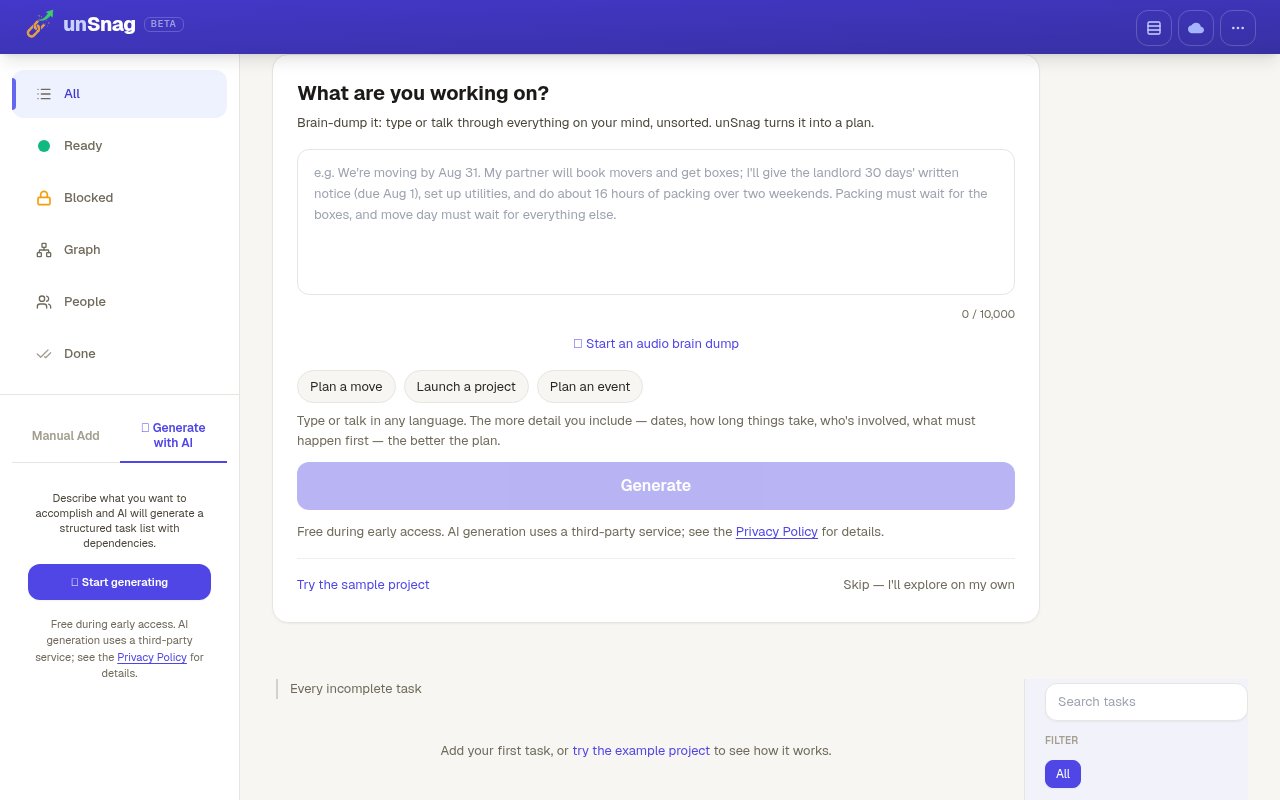
There are two ways to begin. A user can add tasks manually when the work is already clear, or ask the app to generate a structured task list from a broad description. The assisted path is deliberately loose at the start. Someone can type or speak a brain dump of everything on their mind, without sorting it first, and unSnag converts that material into a plan with dependencies. The input can include dates, expected durations, people involved, and details about what must happen first. The site says richer context produces a better plan, so the tool is best understood as a planning aid that organizes what the user supplies, not as a system that already knows the project. Suggested starting points cover a move, a project launch, and an event, which makes the open ended input easier to approach.
The dependency model is the center of the experience. Instead of treating every unfinished item as equally actionable, unSnag can display the tasks that are available to do and graph how the broader set of work fits together. That distinction matters on projects with external blockers. A person may be unable to clear a room until equipment is moved, unable to publish a site until copy is approved, or unable to book a supplier until a date is confirmed. A flat checklist keeps presenting all of those items as pending. unSnag makes the blocked state visible, helping the user direct attention toward steps that can advance now and understand which completed task will release more work later. The graph and the actionable view serve different purposes, with one explaining the whole chain and the other narrowing attention to the immediate options.
It fits individuals planning complicated personal work as well as small teams or informal groups that need to reason about sequence without adopting a full project management suite. The examples on the site include planning a move, launching a project, and planning an event. Its audio brain dump also suits people who think through a project more naturally by talking than by filling out a rigid form. Input can be given in any language, which lowers the friction for multilingual planning or for capturing ideas in the language that comes most easily. A sample project is available for people who want to understand the model before building their own task graph. That sample option is useful in a product where the main concept is relational, since a populated graph can explain dependencies more quickly than an empty task screen.
What makes unSnag distinct is its focus on blocked work rather than general task administration. Many task apps are good at collecting due dates and marking items complete, but a long list can still create guilt when most of it isn't presently possible. This app tries to separate a lack of action from a real dependency. The graph gives the user a structural view, while the actionable task display keeps day to day attention on useful next steps. AI generation supports that idea by extracting an initial structure from an unsorted description, but manual entry remains available for people who prefer to define tasks and relationships themselves. That pairing also gives users a way to start quickly without making automatic generation the only route into the product.
unSnag is currently labeled beta and says it is free during early access. The site doesn't publish a future paid plan, so the present listing treats access as free rather than promising that it will remain free. AI generation uses a third party service, a detail worth considering before entering sensitive project information, and the site points users to its privacy policy for more context. This is a young, focused product with limited public documentation, not a broad work management platform. There is no published plan comparison or permanent pricing commitment to evaluate yet. For someone whose main problem is identifying blockers and finding the tasks that can move today, though, that narrow scope is the point.
Key Features
- Manual task entry
- AI structured plan generation
- Audio brain dump capture
- Task dependency graph
- Actionable task display
- Multilingual project input
Pros & Cons
What we like
- Separates actionable work from blocked tasks
- Accepts loose text or spoken project details
- Keeps manual planning available alongside AI
- Makes task relationships easier to understand
Room for improvement
- Still labeled as a beta product
- Free access is explicitly limited to early access
- AI generation relies on a third party service
- Public documentation is currently quite limited
Frequently Asked Questions
What is unSnag?
Can unSnag create a plan with AI?
Is unSnag free?
Does unSnag support voice and multiple languages?
Best For
Featured in
Alternatives to unSnag
View all
CalendHub
Smart scheduling and calendar management for teams
Kevin Gabeci Toolkits
Seven AI toolkits for writing books, making music, cutting video, and building agents.

Eased Into AI
Learn AI from zero. No jargon, no hype, just steps that work.

Fix It Gently
Calm, plain-English fixes for everyday tech problems.
Our take
Tool Index Editorial · Sep 2026· 3.0/5
unSnag turns a typed or spoken project brain dump into a task list with dependencies, then separates ready work from blocked work. We found a clean beta interface with manual entry, graph and people views, and a 10,000-character input for AI planning. It is free during early access, but the site makes no promise about later pricing.
The dependency-first idea is useful for moves, events, and small launches where an ordinary checklist hides what must happen first. Still, the public material is thin and the product is explicitly in beta. AI generation uses a third-party service, so sensitive plans deserve caution, and there is not enough published evidence yet to judge reliability, export, collaboration depth, or how well large projects behave.
Editorial opinion from the Tool Index team, written from the public product pages. Not a user review.
Reviews (0)
Badge builder
Add unSnag to your website
Choose a badge style and size, preview it here, then copy the generated HTML. Badge images are self-contained SVGs and do not require an external script.

<a href="https://toolindex.net/tools/unsnag?ref=badge" target="_blank" rel="noopener">
  <img src="https://toolindex.net/badge/unsnag/medium.svg" alt="unSnag - Listed on Tool Index" width="180" height="50" />
</a>How to use the badge
- 1. Pick the style, size, and theme that fit your layout.
- 2. Copy the generated HTML from the code block.
- 3. Paste it into your footer, homepage, or press page.
Standard badge available
The standard listing badge is available now. Score and circle badges are limited to tools currently ranked in the top 10 of a category.
Badge clicks return visitors to this profile with a referral tag so the source remains identifiable.
Related Tools

Confluence
Atlassian's long-running team wiki that anchors many enterprise knowledge stacks
Asana
Project management for teams that live in projects, tasks and dependencies
Kevin Gabeci Toolkits
Seven AI toolkits for writing books, making music, cutting video, and building agents.

Logseq
An open-source outliner notes app where every bullet is a first-class block
Work on unSnag? Request listing access or correction