
VantorKit
Use private browser tools for files, images, text, finance, and everyday tasks
Gallery
About VantorKit
VantorKit is a free collection of browser utilities for quick jobs that would otherwise require several small websites or desktop apps. Its catalog spans calculations, PDF work, file conversion, image editing, text formatting, and everyday planning. The common thread is local processing. The site says documents, images, text, passwords, and calculation inputs are handled in the browser rather than uploaded to its servers. That approach is especially relevant for users who need to merge a PDF, inspect a dataset, remove image metadata, or compare text but don't want the source material sent to a remote conversion service.
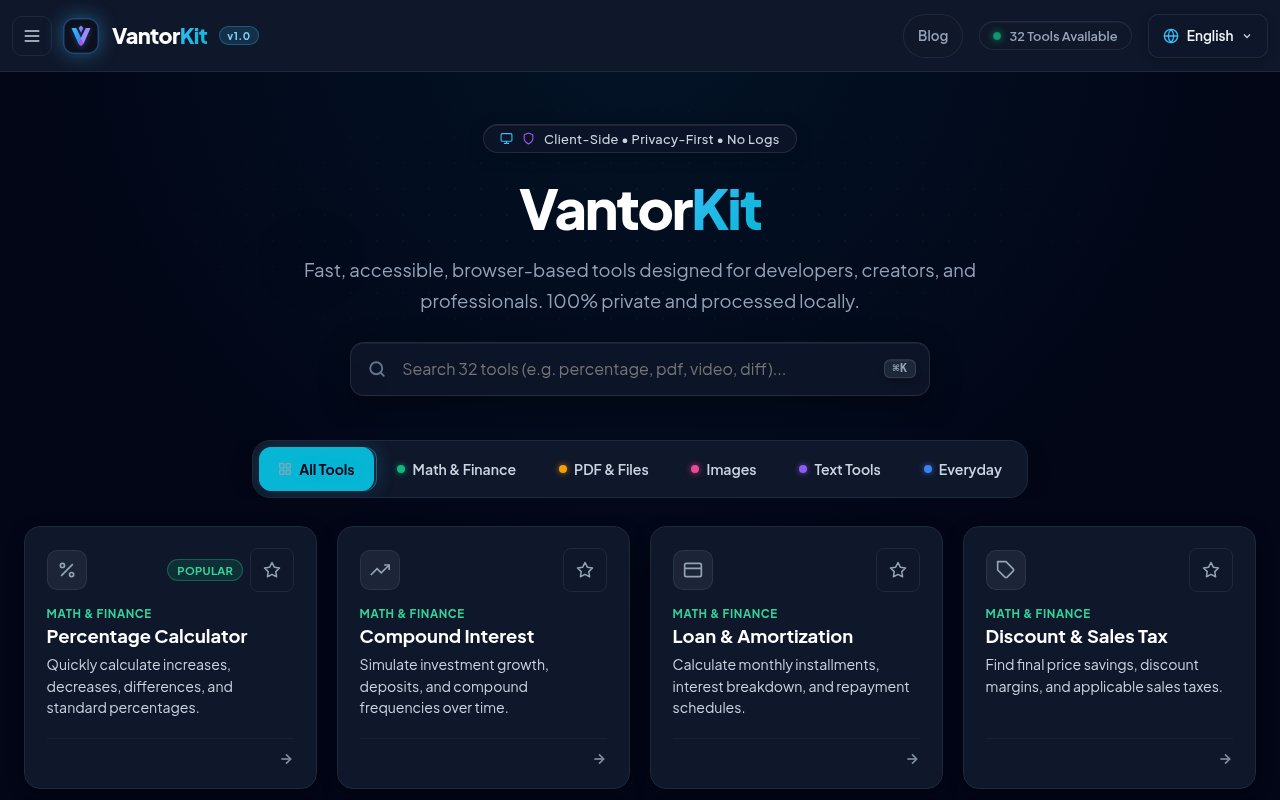
The home screen works as a searchable catalog, with tools grouped into Math and Finance, PDF and Files, Images, Text Tools, and Everyday categories. Financial helpers cover percentages, compound interest, loan amortization, discounts, sales tax, and grade calculations. File tools include CSV and JSON conversion, PDF merging and splitting, PDF text export to Word, Base64 encoding, and a large data transformer that uses background Web Workers. A PDF redaction and signing tool can flatten blacked out material, while audio and video trimmers work with visual timelines and local export. The range is intentionally practical, so a user can open one focused page, provide an input, download or copy the result, and move on without setting up a workspace.
Image utilities include resizing, cropping, compression, WebP optimization, palette extraction, SVG rasterization, favicon creation, image to Base64 conversion, and metadata cleaning. The compressor supports quality controls and a split comparison, while the metadata tool can inspect and strip location, camera, EXIF, and XMP information. The text section provides word and character counts, a Markdown preview with HTML export, case conversion, URL slug creation, visual text comparison, and a CSS grid and gradient studio that can generate Tailwind CSS. A JWT decoder can inspect claims, format timestamps, and verify HMAC signatures locally. Everyday tools round out the catalog with date and workday calculations, age milestones, vector QR code generation for links, WiFi details, and contact cards, a password generator with entropy scoring, and a time zone meeting planner. The breadth makes VantorKit useful as a general utility drawer rather than a specialized production suite.
Privacy is the clearest design choice. According to the site's policy, browser features such as Canvas, Web Crypto, and WebAssembly do the actual computation, and temporary inputs disappear when the tab is refreshed or closed. Local storage is used to remember the interface language. The interface supports English, Arabic with a right-to-left layout, French, and Italian. This local model also removes file upload queues and server file limits from the core workflow, though performance still depends on the user's browser, device memory, and the complexity of a chosen file. The tools run directly from the site, so there isn't an account to create or a software package to maintain.
VantorKit suits developers, designers, students, office workers, and anyone who repeatedly needs small conversions or calculations. It is most compelling when the alternative is pasting sensitive source material into an unfamiliar hosted tool. Still, local processing shouldn't be confused with a completely connection free experience. The website's hosting layer keeps standard access logs for reliability and abuse protection, and the free service is supported by Google AdSense. Third-party advertising can use cookies and receives connection details such as an IP address, even though VantorKit says the actual files and processing inputs are not sent to its servers. Users with strict browser privacy policies may want to manage advertising cookies separately.
Access is straightforward. The site states that there are no subscriptions, mandatory registrations, paywalls, or artificial daily quotas, and disabling third-party cookies doesn't block the core tools. That makes it easy to try a utility without committing to a paid plan or moving work into a proprietary account. The tradeoff is that it is a collection of independent browser tools rather than a synchronized team platform, so it doesn't promise shared projects, cloud history, or organization controls. Support is available through a published email address, and the contact page invites bug reports, browser compatibility questions, and requests for new utilities. For private, one-off browser work, it offers an unusually broad free toolbox with a clear local processing posture.
Key Features
- Local browser file processing
- PDF and data conversion tools
- Image editing and optimization
- Text and developer utilities
- Finance and everyday calculators
- Four language interface support
Pros & Cons
What we like
- Processes working files on the user's device
- Combines many focused utilities in one catalog
- Requires no account or subscription
- Offers multilingual and right-to-left interfaces
Room for improvement
- Free access is supported by third-party advertising
- Large jobs depend on browser memory and performance
- Tools do not provide shared team workspaces
- Standard hosting logs still contain connection metadata
Frequently Asked Questions
What is VantorKit?
Is VantorKit free?
Does VantorKit upload files?
Who is VantorKit for?
Best For
Featured in
Alternatives to VantorKit

CalendHub
Smart scheduling and calendar management for teams
Kevin Gabeci Toolkits
Seven AI toolkits for writing books, making music, cutting video, and building agents.

Eased Into AI
Learn AI from zero. No jargon, no hype, just steps that work.

Fix It Gently
Calm, plain-English fixes for everyday tech problems.
Reviews (0)
Badge builder
Add VantorKit to your website
Choose a badge style and size, preview it here, then copy the generated HTML. Badge images are self-contained SVGs and do not require an external script.

<a href="https://toolindex.net/tools/vantorkit?ref=badge" target="_blank" rel="noopener">
  <img src="https://toolindex.net/badge/vantorkit/medium.svg" alt="VantorKit - Listed on Tool Index" width="180" height="50" />
</a>How to use the badge
- 1. Pick the style, size, and theme that fit your layout.
- 2. Copy the generated HTML from the code block.
- 3. Paste it into your footer, homepage, or press page.
Standard badge available
The standard listing badge is available now. Score and circle badges are limited to tools currently ranked in the top 10 of a category.
Badge clicks return visitors to this profile with a referral tag so the source remains identifiable.
Related Tools

Confluence
Atlassian's long-running team wiki that anchors many enterprise knowledge stacks
Asana
Project management for teams that live in projects, tasks and dependencies
Kevin Gabeci Toolkits
Seven AI toolkits for writing books, making music, cutting video, and building agents.

Logseq
An open-source outliner notes app where every bullet is a first-class block
Work on VantorKit? Request listing access or correction