
Videm AI
Free daily AI image and video generation with no signup, plus paid credits for more models
Gallery
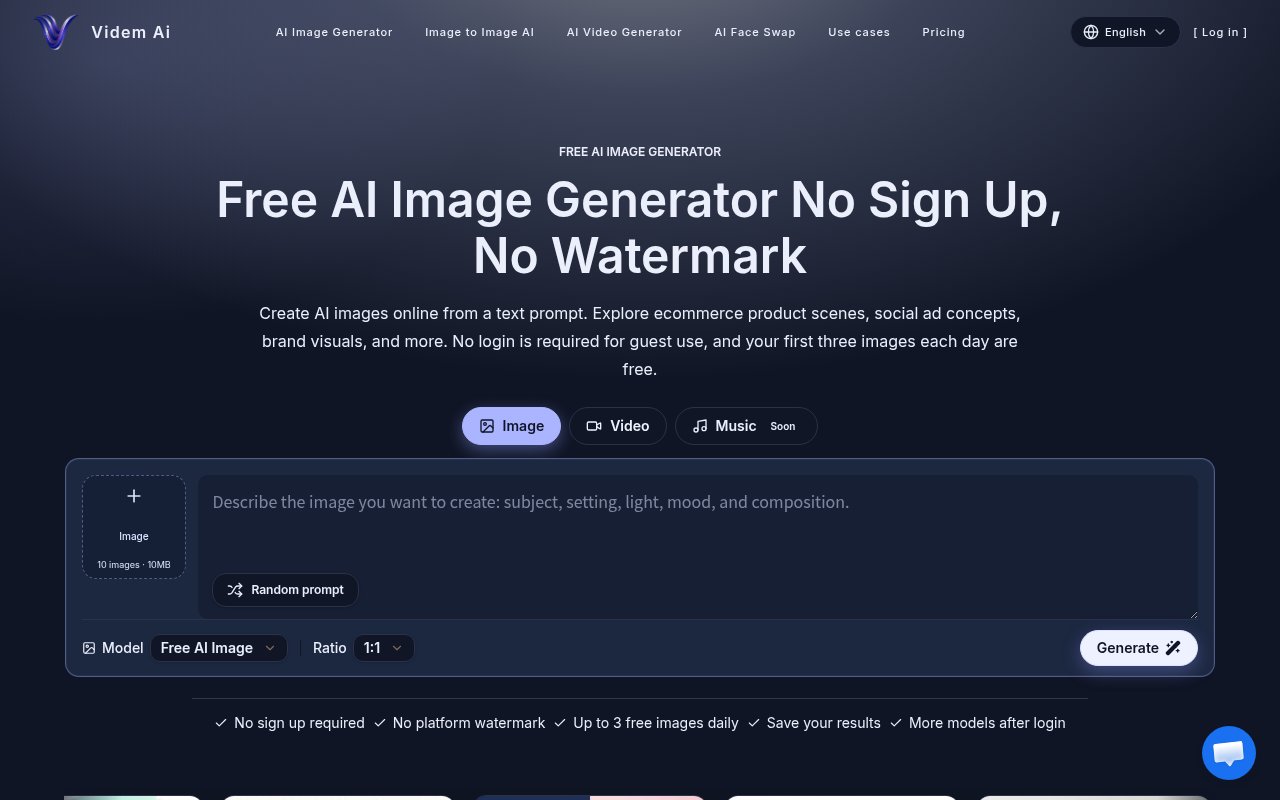
About Videm AI
Videm AI is a web-based generator for AI images and short videos that lets you try it without creating an account. Type a description, pick a model, and it returns an image you can refine by adjusting the prompt. Signed-in users unlock more models, image-to-image editing, video generation and face swap, and a credit system pays for the heavier work. The service used to live at seiseiai.io, and that address now redirects here.
The problem it's built for is concept visuals. An ecommerce seller needs a lifestyle shot before the product photography exists, a social media manager needs ten variations of a post image by lunch, a brand team wants to see a campaign direction before paying for a shoot. Stock libraries rarely have the exact scene, and hiring an illustrator for a rough draft is expensive and slow. Videm aims at that draft stage, the point where you need to see an idea rather than finish it, and it keeps the cost of a bad idea close to zero. Iteration is the point of the tool, and the site describes refining a result by adjusting the prompt details rather than through a panel of sliders.
The guest path is the fastest way to judge it. Without signing up you can create up to three images a day on the default Videm model, and the site says there are no watermarks on generated images. Signing up adds a one-time grant of five credits, a generation history you can manage, and the wider model menu. The four services on the site are an AI image generator, an image to image tool for editing or restyling a picture you upload, an AI video generator, and an AI face swap, all sharing one account and one credit balance. The credit cost of each generation depends on the model and is shown when you select it and before you generate, so there are no surprises at the end of a run. On the video side the pricing page names Grok Imagine, Seedance 2 in standard, fast and mini variants, and Veo 3.1 at resolutions from 480p to 4K, and there's one free short AI video a day of two to four seconds.
The plan descriptions give a rough exchange rate. Basic's 300 credits are framed as about 100 images or 20 videos, which works out to roughly three credits per image and fifteen per video at the models the site is assuming, and the same ratio holds up the ladder. Because the credit cost is shown at the moment you pick a model, you can choose a cheaper engine for rough drafts and spend more on the final render, and the generation history on a signed-in account keeps earlier attempts so you can go back to a prompt that worked.
It's for sellers, marketers and creators rather than for ML engineers. Store owners, social media managers, content teams, editors, bloggers and freelance creatives are the audiences the site names, and the workflow reflects that. There's no API or fine-tuning story on the pages, just a prompt box, a model picker and the results. If you want programmatic access or your own trained model, this isn't that product, and you'd be better served by a developer platform.
What sets it apart from the crowd of prompt-to-image sites is mostly the on-ramp. Three free images a day with no account and no watermark is a low bar to clear, the multi-model menu means you can compare outputs from different engines in one place instead of holding three subscriptions, and images and video sit under the same credit balance. The trade-off is that the model behind the default guest tier isn't named beyond the Videm label and the underlying providers aren't disclosed, so you're evaluating results rather than a specific engine. The practical test is to spend the three daily guest images on a prompt you actually need, then sign up for the five welcome credits to try one of the named video models, and only then decide whether a subscription makes sense for your volume.
Pricing is freemium with subscriptions and one-off packs. Basic is $19 a month, or $11 a month billed yearly, for 300 credits, which the site frames as about 100 images or 20 videos, with email support. Pro is $38 a month, or $23 yearly, for 1,600 credits, roughly 533 images or 106 videos, with priority support. Max is $190 a month, or $114 yearly, for 9,200 credits, and it's the tier where the pricing page lists commercial use, which is worth checking if you plan to sell what you make. Credit packs run from $80 for 1,066 credits through $200 for 2,666 to $800 for 10,666. Access is through the browser, and the site opens in Japanese by default with an English version at its own path, so English speakers will want to bookmark that directly. Contact is through a form on the site rather than a published email, and the footer notes that Videm is an independent service. It's a young brand, given the recent move from the old domain, so expect the model menu and prices to keep shifting.
Key Features
- Text to image with a model menu
- Image-to-image editing and restyling
- AI video generation up to 4K
- AI face swap
- Three free images a day, no signup
- Credit cost shown before generating
Pros & Cons
What we like
- Try it without an account or a watermark
- Images and video under one credit balance
- Named video models including Veo 3.1 and Seedance 2
- Yearly billing roughly halves the monthly price
Room for improvement
- Default guest model and providers aren't disclosed
- Commercial use is called out only on the Max tier
- No API or programmatic access described
- Site defaults to Japanese, with English at a separate path
Frequently Asked Questions
What is Videm AI?
Is Videm AI free?
Does it make video?
What happened to seiseiai.io?
Best For
Featured in
Alternatives to Videm AI
View all
HairstylesPro
Try hundreds of hairstyles on your own photo before you commit to a cut

Recraft
AI image generator built around vector output and brand styles

Midjourney
Create stunning AI artwork from text prompts

Leonardo.ai
Image generation suite with fine-tuned models for game and product art
Our take
Tool Index Editorial · Oct 2026· 3.5/5
Videm AI is a browser hub for generating images and videos from several models. Guest users currently get two images a day without signup or a platform watermark, while an account adds history and more models. Basic costs $19 monthly for 300 credits, or $11 a month on annual billing. Pro is $38 monthly for 1,600 credits, with higher video and image limits determined by the chosen model.
We think the no account trial is the right way to judge this crowded category. The model picker and shared credit balance are convenient for creators making concepts or social assets, but credit consumption varies widely and the default free model is not clearly identified. There is no public API story, and users should confirm commercial rights, retention, and provider terms for the exact model they select before putting generated work into a paid campaign.
Editorial opinion from the Tool Index team, written from the public product pages. Not a user review.
Reviews (0)
Badge builder
Add Videm AI to your website
Choose a badge style and size, preview it here, then copy the generated HTML. Badge images are self-contained SVGs and do not require an external script.

<a href="https://toolindex.net/tools/videm-ai?ref=badge" target="_blank" rel="noopener">
  <img src="https://toolindex.net/badge/videm-ai/medium.svg" alt="Videm AI - Listed on Tool Index" width="180" height="50" />
</a>How to use the badge
- 1. Pick the style, size, and theme that fit your layout.
- 2. Copy the generated HTML from the code block.
- 3. Paste it into your footer, homepage, or press page.
Standard badge available
The standard listing badge is available now. Score and circle badges are limited to tools currently ranked in the top 10 of a category.
Badge clicks return visitors to this profile with a referral tag so the source remains identifiable.
Related Tools
HairstylesPro
Try hundreds of hairstyles on your own photo before you commit to a cut
Recraft
AI image generator built around vector output and brand styles

AIMakeTattoo
Turn text descriptions into visual tattoo concepts with style and placement options
Flux by Black Forest Labs
Open and hosted image models that power half the AI art stack
Work on Videm AI? Request listing access or correction