VLM Run
Document and video intelligence through one OpenAI-compatible API, with a gateway to 21 visual models
Gallery
About VLM Run
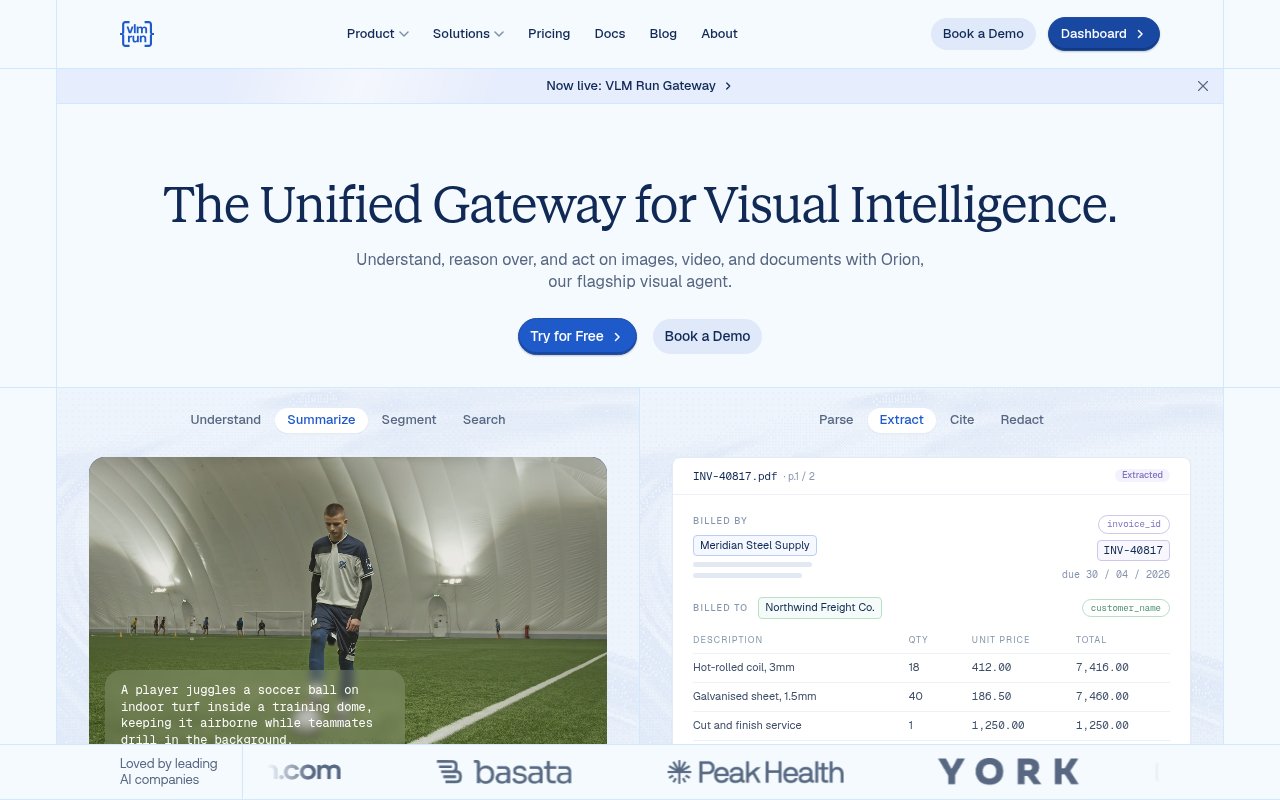
VLM Run is a visual intelligence platform that turns documents, images and video into structured, schema-validated output through one OpenAI-compatible API. Its Gateway product puts 21 visual models from Google, OpenAI, Anthropic, Meta, Qwen, DeepSeek, Baidu and others behind a single endpoint, and its Orion agent handles the harder jobs of understanding a long document or an hour of footage end to end. The pitch is one API for any visual model, with the orchestration handled for you.
The problem it addresses is cost and plumbing. Frontier multimodal models can read a scanned contract or a video, but at their prices a pipeline of 100,000 pages a month runs into thousands of dollars, and every provider has its own API shape. Open-weight OCR and vision models are far cheaper and often good enough, but wiring them up, chunking large inputs, batching and reassembling the results is work nobody wants to own. VLM Run does that in the gateway, and its own estimates put document OCR at $23 to $90 a month for 100,000 pages against $938 to $7,300 with frontier VLMs, and 10,000 hours of video at $335 to $2,000 against $4,600 to $28,100 for native video on a frontier model.
Developers call the chat completions endpoint with text, images, documents or video and get back structured JSON, with JSON schema enforcement across every call. Supported tasks include OCR, markdown extraction, object detection, segmentation, pose estimation, transcription and embeddings. On the document side the platform parses, extracts, cites and redacts into a validated schema, and on the video side it summarises, transcribes, segments and searches. Large inputs are chunked, batched and reassembled automatically, and MCP support connects it to agent frameworks such as Pydantic AI, Mastra and Claude Code. Three open-source pieces sit alongside, mm for multimodal context, vlmbench for benchmarking vision models and vlmrun-hub for shared structured schemas.
It's built for engineering teams running document pipelines, multimodal assistants, media tagging systems and regulated deployments. The site names healthcare records, construction documents, financial statements and robotics training data as the workloads it sees, and the compliance posture matches, with SOC 2 Type II, HIPAA readiness, a BAA on the enterprise plan and private cloud or in-VPC deployment on offer. A 99.9 percent uptime SLA is stated for the gateway.
What sets it apart from calling a single frontier model is the routing and the pricing transparency. You can choose an open-weight model billed at the Fast tier of $0.30 per million input tokens and $2.50 per million output, step up to the Pro quality tier at $1.00 and $10.00, or use a frontier model through the same endpoint at its own rate, and cached input is discounted to 10 to 25 percent of the input price. Tools are priced per unit too, with OCR at $0.01 to $0.04 a page, segmentation at $0.01 to $0.02 an image, image generation at $0.04 to $0.24, video generation at $0.15 to $0.40 a second and code execution at $0.001 a call. Standard, Flex and Priority service tiers multiply those rates by 1.0, 0.5 and 1.8. Getting started doesn't need a sales call. You sign up, take the $10 Starter balance, create an API key in the dashboard, and point an OpenAI client at the endpoint. The docs cover the document and video tasks with working code, the chat interface lets you try a model on a file before writing any code, and the Standard, Flex and Priority tiers let you decide per workload whether you want a lower price with looser latency or a higher price with priority. When usage outgrows ten requests a minute, Pro raises the ceiling to a hundred and folds $1,000 of usage into its $799 fee.
The limits are the ones of any managed API. You're depending on a vendor's routing decisions and uptime, the cheap tiers use open-weight models whose accuracy you should measure on your own documents before trusting the savings, and the $799 jump from the free plan to Pro is steep for a small project that outgrows ten requests a minute. The model catalog also changes, so the exact set of 21 models is a snapshot rather than a promise.
Access is freemium. Starter is free with a $10 signup balance and up to 10 requests a minute, Pro is $799 a month with $1,000 of monthly usage included and 100 requests a minute, and Enterprise is custom with volume discounts. There's a free chat interface at chat.vlm.run, API keys come from the dashboard at app.vlm.run, and the documentation is at docs.vlm.run. No contact email is published on the pricing or product pages.
Key Features
- Gateway to 21 visual models via one API
- OpenAI-compatible chat completions endpoint
- OCR, detection, segmentation and transcription
- Schema-validated JSON output
- Automatic chunking and batching of large inputs
- MCP support for agent frameworks
Pros & Cons
What we like
- Open-weight models cut document and video costs sharply
- One endpoint replaces per-provider integrations
- SOC 2 Type II, HIPAA readiness and VPC deployment
- Free tier with a $10 balance to test
Room for improvement
- Pro plan starts at $799 a month
- Cheap tiers need accuracy checks on your own data
- Model catalog changes over time
- Vendor dependency for routing and uptime
Frequently Asked Questions
What is VLM Run?
Is VLM Run free?
Which models can I use through VLM Run?
Is VLM Run suitable for regulated data?
Best For
Featured in
Alternatives to VLM Run
View all
Apatero AI
The creator studio for AI image, video, audio, 3D, and avatars, now at apatero.ai.

SoloDevStack
A solo developer blog built on head-to-head tool comparisons, 580+ posts deep.
Apatero Studio
Creator studio for AI image, video, audio, 3D, and avatars. Every model worth using, in one workspace.

Melodex
Turn your idea into an AI-generated music video
Our take
Tool Index Editorial · Sep 2026· 4.0/5
VLM Run is a visual processing platform that puts document, image, audio, and video tasks behind one OpenAI-compatible API. It is aimed at engineering teams that need OCR, extraction, redaction, detection, segmentation, transcription, or schema-validated JSON without integrating each model provider separately. Starter has no monthly fee, includes a $10 signup balance, and allows 10 requests per minute. Pro costs $799 monthly with $1,000 of usage included and a 100 request-per-minute limit.
We found the public unit pricing, model tiers, and working product pages unusually informative for a complex API. One endpoint and automatic handling of large inputs can remove substantial plumbing. The savings claims still need testing against a buyer's own documents, since cheaper open-weight models may trade away accuracy. Pro is also a steep jump for a small application that only needs more throughput, and routing through one vendor creates another operational dependency.
Editorial opinion from the Tool Index team, written from the public product pages. Not a user review.
Reviews (0)
Badge builder
Add VLM Run to your website
Choose a badge style and size, preview it here, then copy the generated HTML. Badge images are self-contained SVGs and do not require an external script.

<a href="https://toolindex.net/tools/vlmrun?ref=badge" target="_blank" rel="noopener">
  <img src="https://toolindex.net/badge/vlmrun/medium.svg" alt="VLM Run - Listed on Tool Index" width="180" height="50" />
</a>How to use the badge
- 1. Pick the style, size, and theme that fit your layout.
- 2. Copy the generated HTML from the code block.
- 3. Paste it into your footer, homepage, or press page.
Standard badge available
The standard listing badge is available now. Score and circle badges are limited to tools currently ranked in the top 10 of a category.
Badge clicks return visitors to this profile with a referral tag so the source remains identifiable.
Related Tools
Apatero AI
The creator studio for AI image, video, audio, 3D, and avatars, now at apatero.ai.
Kevin Gabeci Toolkits
Seven AI toolkits for writing books, making music, cutting video, and building agents.

Warp
The modern terminal reimagined with AI and collaboration

Bolt.new
Prompt-to-deployed full-stack app inside the browser
Work on VLM Run? Request listing access or correction