Word42
A classic desktop word processor built from scratch in C on GTK 4, free under GPL-3.0
Gallery
About Word42
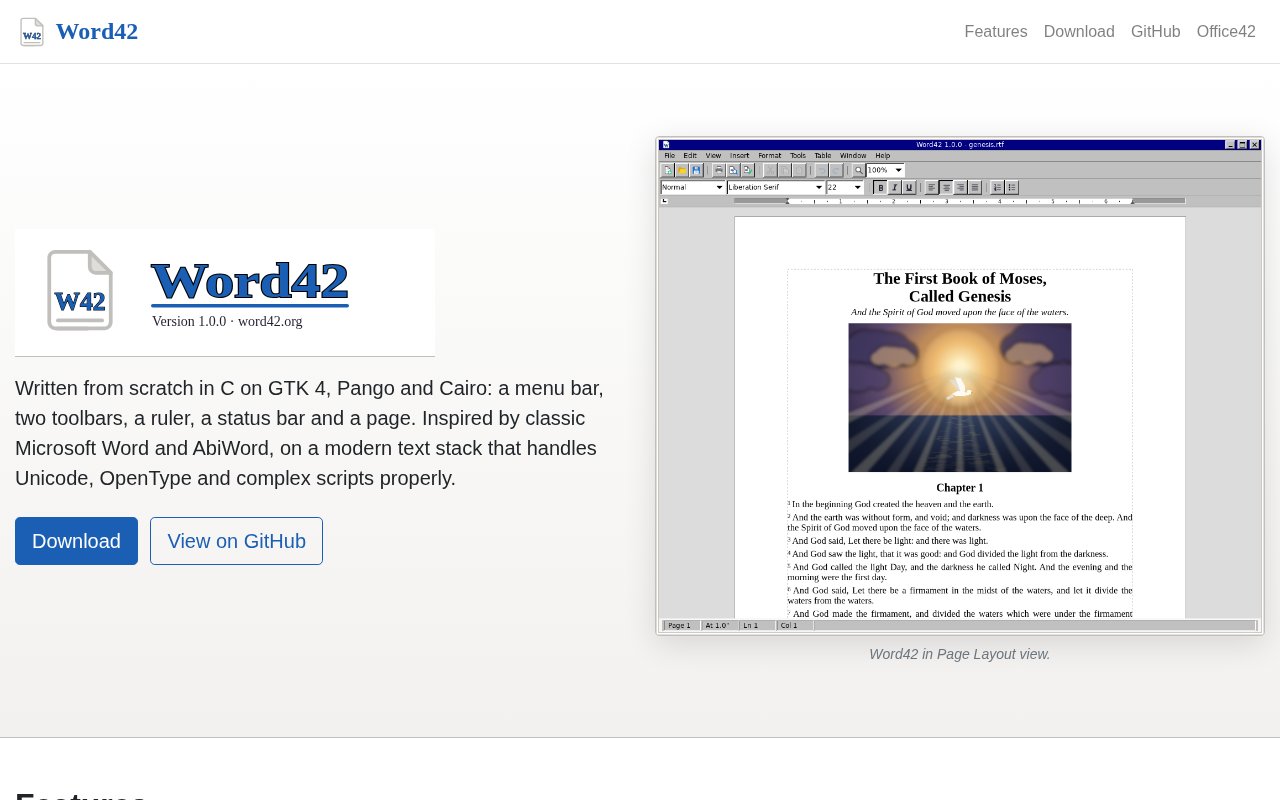
Word42 is a classic desktop word processor written from scratch in C on GTK 4, Pango and Cairo. It takes its cues from the Microsoft Word of the late nineties and from AbiWord, which is to say a fast, focused application for writing and laying out documents, and it runs on Windows, macOS and Linux. It's free software under the GPL-3.0-or-later license, with the source on GitHub and installers and a store listing for people who just want to write. It's small, opens quickly, and looks and behaves like the desktop programs it was modelled on.
The itch it scratches is that the word processors most of us use have drifted. The big suites are heavy and slow to open, the web editors want an account and a connection, and the lightweight options often stop short of real page layout. Word42's pitch is a proper page-based editor, with the features of a traditional word processor, built on a modern text stack so it handles Unicode, OpenType and complex scripts correctly through Pango. That stack is the same one GNOME applications use, which means native text rendering and input methods rather than a bundled browser engine.
Feature-wise it covers the ground you'd expect from the programs it's modelled on. There's character and paragraph formatting, named styles and numbered headings, headers and footers, footnotes and endnotes, tables, images, lists and columns. Tools include find and replace, spell checking, hyphenation, mail merge, a table of contents generator, a split-window view, a page-layout mode and print preview. Numbered headings and the table of contents generator work together for long structured documents, the split-window view lets you keep two parts of the same file in sight at once, and the page-layout mode shows the document as it will print, with print preview as a final check before paper. On performance, the site's claim is that long documents stay quick because a keystroke lays out only the part of the document it changed.
File format support is broad for a young project. It reads and writes RTF, OpenDocument text, Word's .docx and older .doc, AbiWord's .abw, HTML and plain text, and it can write PDF. Reading PDFs is possible too if the optional poppler-glib library is present at build time. That mix means it can sit in a workflow with people who use Word or LibreOffice without forcing everyone to switch. AbiWord's format is a nod to the project's lineage, and RTF remains the safest way to exchange formatted text with almost anything else.
It's for writers, students and anyone who wants a native word processor that starts instantly and doesn't phone home. It also suits people on older or modest hardware, and developers curious about a GTK 4 application of real size, since the repository includes architecture notes alongside the user guide and a status page listing what's done and what's planned. Because it's a plain desktop application with no account, it's also a reasonable choice for shared or offline machines, such as a library terminal or a laptop kept off the network for writing. Students get a free, capable editor for essays and theses, and writers get one that stays out of the way.
Getting it is straightforward on Windows, where it's in the Microsoft Store and also available as an installer from the GitHub releases page. On macOS the app bundle is unsigned, so you'll need to allow it through Gatekeeper yourself. On Linux you build from source with Meson or use the Flatpak, and the build instructions are in the repository. Contributions are welcomed, and the project has no affiliation with Microsoft or AbiWord. The Windows installer and bundles are prebuilt, so nothing needs compiling there. The macOS situation is common for small open-source projects, where a signed build needs a paid Apple developer account, so the unsigned bundle is what you get for now. The repository shows builds passing on all three platforms.
Word42 is completely free. There's no paid tier, no telemetry pitch and no cloud service attached, just an open-source desktop program under the GPL. The tradeoff is maturity. It's an actively developed project with a short history and a small community, so some features are still being finished and the status page is the honest place to check what to expect. For a lightweight, capable word processor that respects the way desktop software used to work, it's worth a download. There's a user guide for the day-to-day, architecture notes for anyone who wants to read the code, and a status document that lists what's complete and what's planned, which is more transparency than many mature products offer. Bug reports and pull requests go through GitHub.
Key Features
- Native GTK 4 word processor for Windows, macOS and Linux
- Styles, headings, headers, footers and footnotes
- Tables, images, lists and columns
- Reads and writes docx, doc, odt, rtf and html
- Spell checking, hyphenation and mail merge
- Incremental layout that keeps long documents fast
Pros & Cons
What we like
- Free software under the GPL with the source on GitHub
- Fast, native, no account or connection needed
- Handles Unicode, OpenType and complex scripts through Pango
- Broad file format support including docx and odt
Room for improvement
- Young project, some features still in progress
- macOS builds are unsigned
- Linux users build from source or use Flatpak
- No collaboration or cloud features by design
Frequently Asked Questions
What is Word42?
Is Word42 free?
Which file formats does it support?
How mature is it?
Best For
Featured in
Alternatives to Word42
View all
CalendHub
Smart scheduling and calendar management for teams
Kevin Gabeci Toolkits
Seven AI toolkits for writing books, making music, cutting video, and building agents.

Eased Into AI
Learn AI from zero. No jargon, no hype, just steps that work.

Fix It Gently
Calm, plain-English fixes for everyday tech problems.
Our take
Tool Index Editorial · Sep 2026· 3.5/5
Word42 is a free desktop word processor built in C on GTK 4, with the menus, ruler and page layout of a classic office application. The current site lists styles, footnotes, columns, mail merge, macros, document comparison and broad import and export support, including DOC, DOCX, ODT, RTF, PDF and EPUB. It is for writers and students who want a native editor without an account or browser shell.
The project is GPL licensed and costs nothing. We like its attention to long documents, complex scripts and print layout, and version 1.0.4 looks far beyond a toy editor. The deliberate desktop focus also means no live collaboration or cloud sync, and broad format support does not guarantee perfect fidelity on complicated Word files. Anyone depending on exchange accuracy should test representative documents before switching.
Editorial opinion from the Tool Index team, written from the public product pages. Not a user review.
Reviews (0)
Badge builder
Add Word42 to your website
Choose a badge style and size, preview it here, then copy the generated HTML. Badge images are self-contained SVGs and do not require an external script.

<a href="https://toolindex.net/tools/word42?ref=badge" target="_blank" rel="noopener">
  <img src="https://toolindex.net/badge/word42/medium.svg" alt="Word42 - Listed on Tool Index" width="180" height="50" />
</a>How to use the badge
- 1. Pick the style, size, and theme that fit your layout.
- 2. Copy the generated HTML from the code block.
- 3. Paste it into your footer, homepage, or press page.
Standard badge available
The standard listing badge is available now. Score and circle badges are limited to tools currently ranked in the top 10 of a category.
Badge clicks return visitors to this profile with a referral tag so the source remains identifiable.
Related Tools

Confluence
Atlassian's long-running team wiki that anchors many enterprise knowledge stacks
Asana
Project management for teams that live in projects, tasks and dependencies
Kevin Gabeci Toolkits
Seven AI toolkits for writing books, making music, cutting video, and building agents.

Logseq
An open-source outliner notes app where every bullet is a first-class block
Work on Word42? Request listing access or correction