
YouAskTube
Chat with any YouTube video and get answers that cite the exact moment, no signup needed
Gallery
About YouAskTube
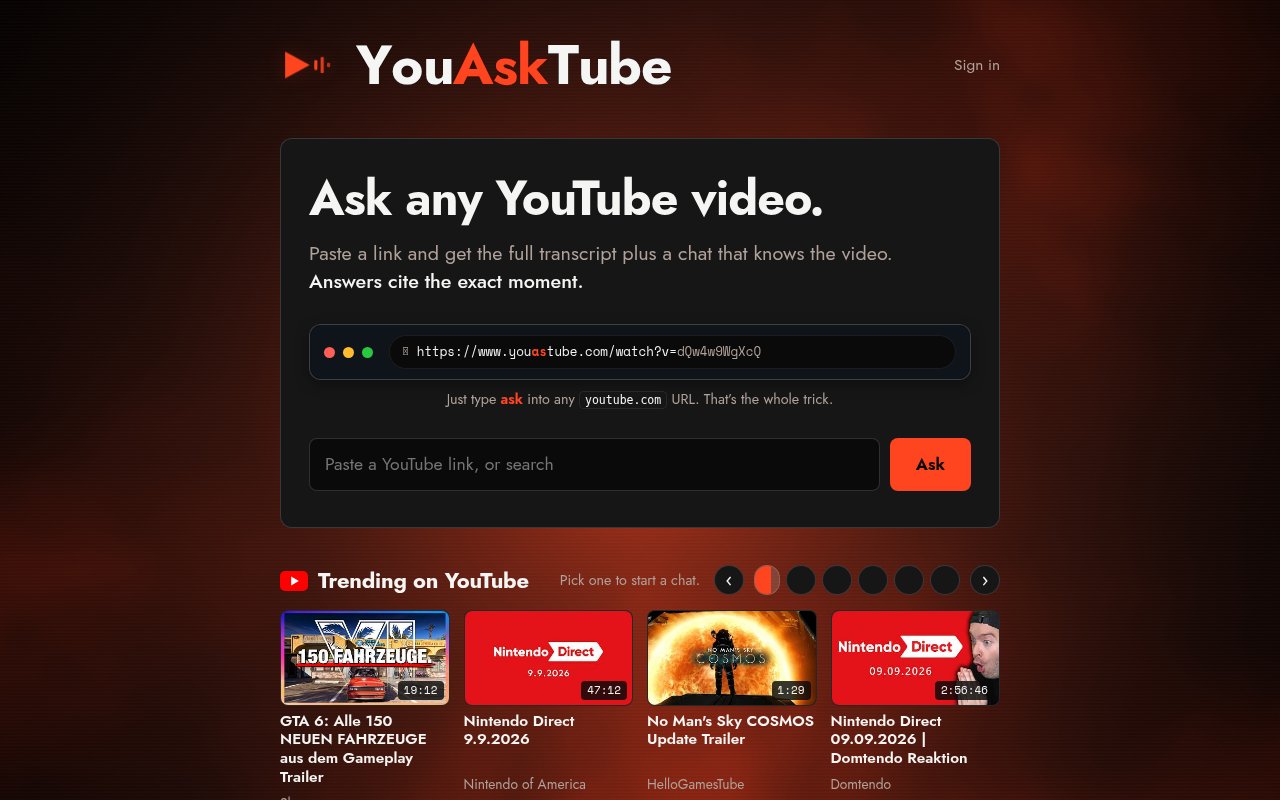
YouAskTube is a web app for asking a YouTube video questions instead of watching all of it. Paste a link and it pulls the full transcript, then opens a chat that knows the video. Every answer cites the exact moment it came from, so you can jump to the timestamp and check it yourself. It exists for the moment when a 40-minute talk probably contains the one detail you need and you'd rather not scrub through it looking. The chat is built on top of that transcript, which is where the citations come from.
There are two ways in. The obvious one is pasting a YouTube link on the homepage. The quicker one is the URL trick the service is named after. While you're watching a video, type the word ask into the address bar so youtube.com becomes youasktube.com, and the same video opens in the chat. There's no account needed for that. Anonymous users get a small daily allowance, and the homepage also lists trending videos if you want to try it on something without hunting for a link first. Once a video is loaded you get the transcript in full alongside the chat. Ask what the speaker said about a specific topic, ask for a summary of one section, or ask where a particular claim was made, and the answer arrives with a citation to the moment in the video. That citation is the useful part. A summary you can't verify is just another opinion, but a summary with timestamps lets you confirm it in seconds and quote it with confidence.
The transcript on its own is worth having. It's the full text, so you can search it in the browser, copy a passage into your notes, or read the whole thing in a fraction of the runtime. The chat sits beside it rather than replacing it, which means when an answer cites a moment you can read the surrounding lines to make sure the context matches, then click through to the video if you want to hear how it was said. For a lecture or a long interview that's often the whole job done without pressing play.
Compared with the run of AI video summarizers, the difference is scope and candour. It doesn't try to be a note-taking suite or a browser extension with a dozen features. It does one thing, question and answer over a transcript with citations, and it tells you in its terms exactly which providers and models are involved, which is rare. The limits are the price of that focus. A Max plan's thirty questions and fifteen videos a day is plenty for personal use and not enough for a team, and the site doesn't describe an API for building on top of it.
The terms of service are unusually clear about what runs underneath. Transcripts come from third-party providers, Supadata first and TranscriptAPI as a fallback. The answering model is named as GPT-5.6 Luna from OpenAI, with GLM-5.2 from Z.ai as a fallback, both reached through OpenRouter. The service says it stores no more than the transcript text and minimal video metadata, and signed-in users can delete individual conversations, wipe all of them, or turn off saving for future chats altogether. There's a security contact published at the standard well-known address too, which is more than many small tools bother with.
It fits students working through recorded lectures, researchers checking what a podcast guest actually said, journalists confirming a quote before they use it, and anyone who reads faster than they watch. It's run by BitVibe Labs, a Greece-based sole trader, and it's careful to say it isn't affiliated with, endorsed by or partnered with YouTube or Google. What makes it different is friction, or the lack of it. Plenty of tools summarize videos, but most want an account before they do anything. Here the anonymous path works from the address bar, and the citations turn the output into something you can check rather than something you have to trust. The trade-offs follow from the size of the operation. Daily caps are modest even on the top plan, answers are only as good as the transcript the providers return, and there's no choosing the model, you get the primary or the fallback.
Access is freemium with limits counted per UTC day. Anonymous use allows roughly two questions and one video a day. A free account raises that to four questions and two videos. Pro is $5 a month for ten questions and five videos, and Max is $10 a month for thirty questions and fifteen videos, both as auto-renewing subscriptions. Contact is hello@bitvibelabs.com, with a separate address for copyright notices listed in the terms. Limits reset each UTC day rather than each month, so a heavy day of research doesn't borrow from the rest of the week, and there's no annual commitment described, just the monthly auto-renewal.
Key Features
- Full transcript for any YouTube link
- Chat grounded in the video content
- Answers cite the exact timestamp
- Type ask into the YouTube URL to open it
- Anonymous use without an account
- Chat history controls for signed-in users
Pros & Cons
What we like
- Works with no signup for quick questions
- Timestamp citations make answers easy to check
- URL shortcut is faster than copying links around
- Cheap paid tiers at $5 and $10 a month
Room for improvement
- Daily caps are small, even on the Max plan
- Depends on third-party transcript providers
- Small operation run by an individual
- Model choice is fixed, with a primary and a fallback
Frequently Asked Questions
What is YouAskTube?
Is YouAskTube free?
Do I need an account?
Which AI does it use?
Best For
Featured in
Alternatives to YouAskTube
View all
Apatero AI
The creator studio for AI image, video, audio, 3D, and avatars, now at apatero.ai.

SoloDevStack
A solo developer blog built on head-to-head tool comparisons, 580+ posts deep.
Apatero Studio
Creator studio for AI image, video, audio, 3D, and avatars. Every model worth using, in one workspace.

Melodex
Turn your idea into an AI-generated music video
Our take
Tool Index Editorial · Sep 2026· 3.5/5
YouAskTube is a focused tool for reading a YouTube transcript and asking questions whose answers point back to the relevant moment. It suits students, researchers, journalists, and anyone trying to extract one fact from a long talk. The URL shortcut and visible transcript keep the experience simpler than a full research notebook, and the homepage allows a video to be entered before sign-in.
We think timestamped answers are the right design because they make an AI summary checkable instead of asking the user to trust it. The result is still only as reliable as the available transcript, particularly with poor captions, multiple speakers, or specialist terms. The captured public page also does not expose pricing or usage limits, so heavy users should confirm those before depending on it.
Editorial opinion from the Tool Index team, written from the public product pages. Not a user review.
Reviews (0)
Badge builder
Add YouAskTube to your website
Choose a badge style and size, preview it here, then copy the generated HTML. Badge images are self-contained SVGs and do not require an external script.

<a href="https://toolindex.net/tools/youasktube?ref=badge" target="_blank" rel="noopener">
  <img src="https://toolindex.net/badge/youasktube/medium.svg" alt="YouAskTube - Listed on Tool Index" width="180" height="50" />
</a>How to use the badge
- 1. Pick the style, size, and theme that fit your layout.
- 2. Copy the generated HTML from the code block.
- 3. Paste it into your footer, homepage, or press page.
Standard badge available
The standard listing badge is available now. Score and circle badges are limited to tools currently ranked in the top 10 of a category.
Badge clicks return visitors to this profile with a referral tag so the source remains identifiable.
Related Tools
Apatero AI
The creator studio for AI image, video, audio, 3D, and avatars, now at apatero.ai.
Kevin Gabeci Toolkits
Seven AI toolkits for writing books, making music, cutting video, and building agents.

Warp
The modern terminal reimagined with AI and collaboration

Bolt.new
Prompt-to-deployed full-stack app inside the browser
Work on YouAskTube? Request listing access or correction