
ZeGrapher
Plot functions, sequences, parametric equations, and CSV data on a desktop
Gallery
About ZeGrapher
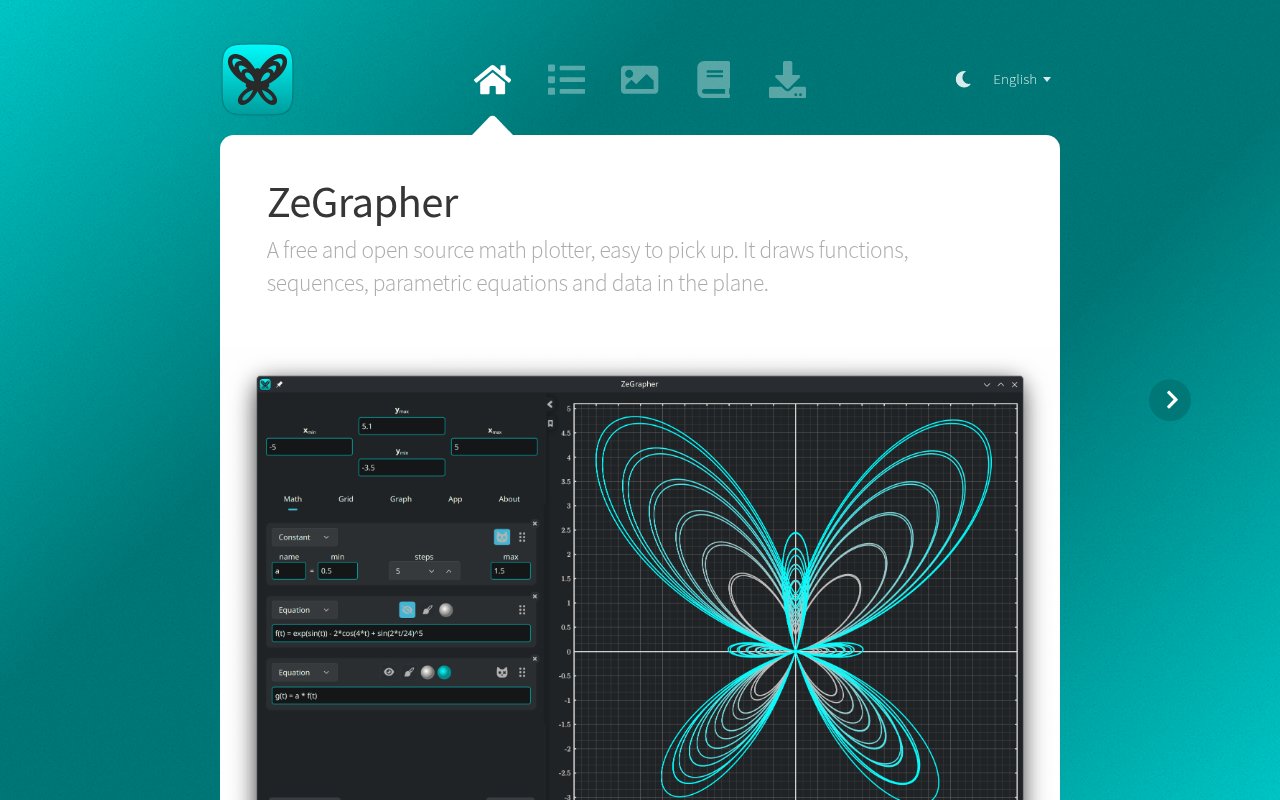
ZeGrapher is a free, open-source desktop math plotter for drawing functions, numerical sequences, parametric equations, and data in a two dimensional plane. It focuses on direct mathematical input and a graph that can be shaped for exploration or publication. A function can be entered in familiar notation such as f(x) = 2 + cos(x), while sequences can include initial terms and a recurrence relation. Parametric equations use the interval the user chooses, and imported data can live beside symbolic objects in the same document. It is a good fit for students, teachers, researchers, and technical users who want a dedicated plotting application without creating an online account or sending their working data to a hosted service.
Objects in ZeGrapher can build on one another. A named function can appear inside the expression for another object, and data columns can reference objects as well. Built in mathematical support covers common trigonometric, hyperbolic, logarithmic, rounding, gamma, error, minimum, and maximum functions. It also includes familiar mathematical and physical constants. Input lines give visual feedback about whether an expression is valid, and an invalid expression gets a message explaining the problem. That makes experimentation less opaque than a plotting interface that simply refuses to draw. Users can show or hide each object, reorder it, change its color, and open separate style settings for the way it appears.
Constants are especially useful for exploring families of curves. A value can be moved between chosen bounds with a slider, adjusted by hand, or animated with playback, loop, and ping pong controls. One constant can drive every object that refers to it, so a change updates a whole construction. ZeGrapher can also assign several evenly spaced values to the same constant at once and draw one curve for each value. Those curves can use a color gradient to make the family easier to follow. This supports classroom demonstrations and visual experiments where the effect of a parameter matters more than one static answer.
For measured or generated data, the app provides sheets of named columns and a table that behaves much like a small spreadsheet. Users can edit cells, select ranges, insert or delete rows, and plot a column against its index. Plotting one column against another is handled with a parametric equation. CSV import includes controls for separators, headers, skipped rows, and preview size, and the preview updates as those settings change. Columns can also be filled by sampling a mathematical object over a start, end, and step. The site says ZeGrapher has been tested with CSV files containing several million cells, which makes the data path more than a token add on for a few manually entered points.
The graph itself is navigable by dragging and scrolling. Users can zoom both axes together or adjust one axis independently, with the point under the cursor held in place. Plot styling supports Cartesian or polar coordinates, several line patterns, line width, point shapes, and a chosen plotting interval. Grid and subgrid settings are separate for the horizontal and vertical axes, including colors, widths, subdivisions, and tick spacing. Tick multipliers accept expressions, so labels can be shown as multiples of pi. Fonts, background, axes, titles, curve precision, and graph size are configurable, giving users control over both exploratory views and finished figures.
Export is designed to match the preview. ZeGrapher writes vector files as SVG or PDF and raster files as PNG, JPEG, BMP, or PPM. A custom graph size can be entered in real centimeters, and that physical size is preserved in PDF and SVG output. Work can also be saved as a ZeGrapher document containing its objects, data, view, and graph settings. The app restores the last session when it starts, and dropping a document or CSV file onto the window provides a quick route back into a project. A built in manual opens beside the graph, so details about input, constants, data, and appearance remain available without leaving the application.
ZeGrapher is available for Linux, Windows, and macOS, with downloads for x64, ARM64, Apple silicon, and Intel where applicable. The interface and manual are offered in nine languages. Its source is published under the GNU AGPL, and several Linux and BSD distributions carry packages in their official repositories, although those builds can lag behind the website release. At the time reviewed, the direct download is version 4.0.0_rc0, which signals that the new major version is still a release candidate. There is no paid tier, account requirement, or hosted subscription. The tradeoff is that this is focused desktop software rather than a collaborative cloud notebook, but it offers unusually detailed control over mathematical objects, data, layout, and export for a tool anyone can download and inspect.
Key Features
- Function and sequence plotting
- Animated shared parameter constants
- Parametric and polar equations
- Spreadsheet style CSV data
- Physical size vector exports
- Built in multilingual manual
Pros & Cons
What we like
- Combines symbolic objects and imported data
- Exports closely match the configured preview
- Runs across major desktop operating systems
- Source is available under the GNU AGPL
Room for improvement
- Current version is still a release candidate
- No browser based workspace or live collaboration
- Official distribution packages may lag behind releases
- Plotting is limited to a two dimensional plane
Frequently Asked Questions
What is ZeGrapher?
Is ZeGrapher free and open source?
Can ZeGrapher plot data from CSV files?
Which operating systems does ZeGrapher support?
Best For
Featured in
Alternatives to ZeGrapher
View all
CalendHub
Smart scheduling and calendar management for teams
Kevin Gabeci Toolkits
Seven AI toolkits for writing books, making music, cutting video, and building agents.

Eased Into AI
Learn AI from zero. No jargon, no hype, just steps that work.

Fix It Gently
Calm, plain-English fixes for everyday tech problems.
Reviews (0)
Badge builder
Add ZeGrapher to your website
Choose a badge style and size, preview it here, then copy the generated HTML. Badge images are self-contained SVGs and do not require an external script.

<a href="https://toolindex.net/tools/zegrapher?ref=badge" target="_blank" rel="noopener">
  <img src="https://toolindex.net/badge/zegrapher/medium.svg" alt="ZeGrapher - Listed on Tool Index" width="180" height="50" />
</a>How to use the badge
- 1. Pick the style, size, and theme that fit your layout.
- 2. Copy the generated HTML from the code block.
- 3. Paste it into your footer, homepage, or press page.
Standard badge available
The standard listing badge is available now. Score and circle badges are limited to tools currently ranked in the top 10 of a category.
Badge clicks return visitors to this profile with a referral tag so the source remains identifiable.
Related Tools

Confluence
Atlassian's long-running team wiki that anchors many enterprise knowledge stacks
Asana
Project management for teams that live in projects, tasks and dependencies
Kevin Gabeci Toolkits
Seven AI toolkits for writing books, making music, cutting video, and building agents.

Logseq
An open-source outliner notes app where every bullet is a first-class block
Work on ZeGrapher? Request listing access or correction