
Zentriq
Automates B2B order entry by converting emails, PDFs, and drawings into ERP drafts
Gallery
About Zentriq
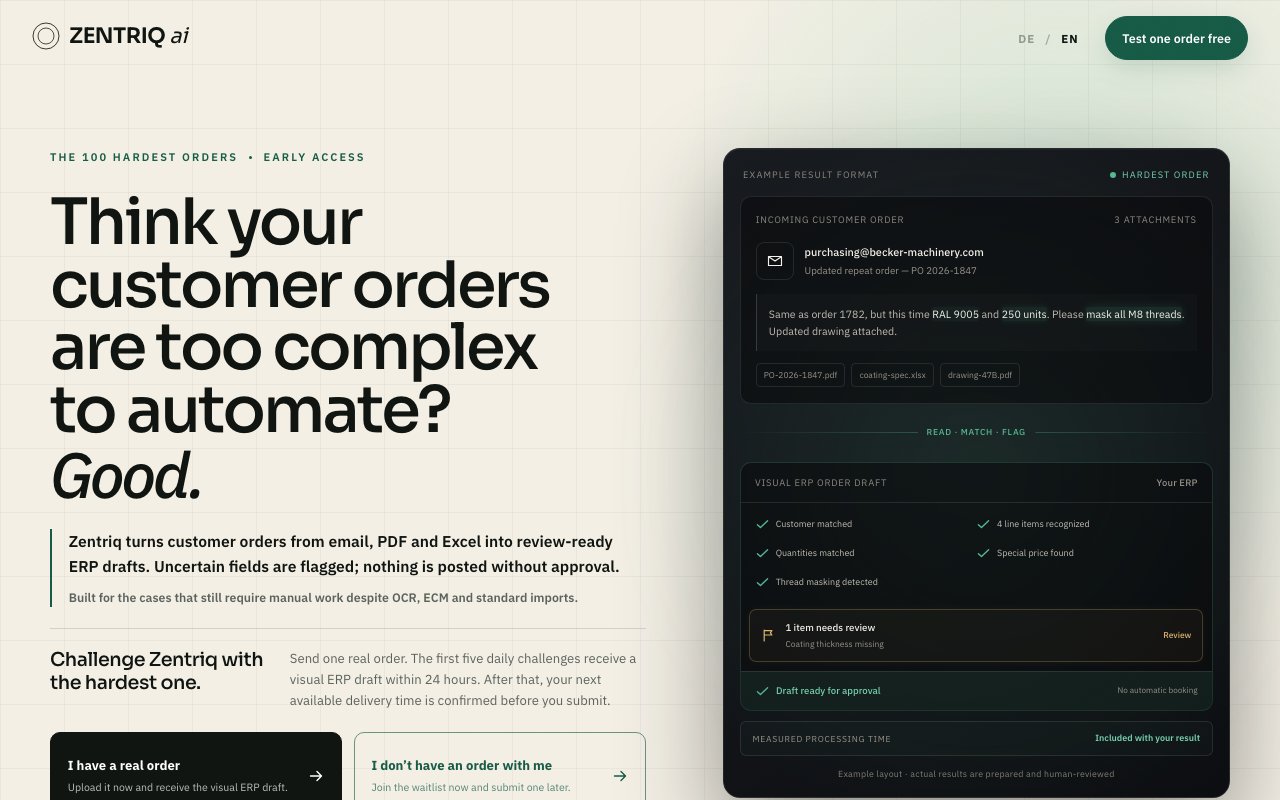
Zentriq is an AI-powered automation platform that converts customer orders from various document formats into structured drafts ready for ERP system import. It targets a specific pain point in B2B order processing: companies receive orders through emails, PDFs, Excel spreadsheets, scanned images, and even technical drawings, then spend significant manual effort re-keying that information into their enterprise software. The manual entry process is tedious, error-prone, and expensive, often requiring trained staff who understand both the product catalog and the ERP system. Zentriq reads these incoming documents, extracts the relevant data regardless of format, and produces visual order drafts that humans can review and approve before anything enters the production system.
The technical approach centers on handling document formats that traditional OCR and structured import tools struggle with. Standard automation works fine when orders arrive in predictable templates with consistent layouts, but real B2B transactions often include handwritten notes in the margins, custom specifications that vary by customer, attachments with technical drawings showing required dimensions, or non-standard layouts that break conventional parsing logic. Zentriq's AI models are trained to interpret this messier input, identifying order quantities, product codes, delivery requirements, pricing details, and special instructions even when the source material doesn't follow clean formatting conventions or spans multiple document types.
A key design decision involves flagging uncertainty rather than hiding it behind confidence scores. When the system encounters ambiguous information, whether from unclear handwriting, conflicting data between documents, unusual formatting, or specialized terminology it hasn't seen before, it marks those elements visually in the draft rather than making assumptions that could propagate errors. Reviewers can see exactly where the AI wasn't confident and focus their attention on correcting those specific points before giving approval. This human-in-the-loop approach prevents the cascading errors that can plague an ERP system when automation silently guesses wrong about quantities, product variants, or delivery dates that matter to fulfillment.
The workflow operates in clear stages without hidden automation that might bypass human judgment. Users submit one or more order documents through the platform, which accepts up to six files totaling twenty-five megabytes per submission. Within twenty-four hours, they receive visual ERP drafts showing extracted data alongside any flagged ambiguities requiring attention. Processing metrics accompany each result, including measured processing time and extraction confidence by field, so users can evaluate the system's performance on their actual documents rather than relying on marketing claims. Nothing posts to the ERP automatically; every draft requires explicit human approval, giving companies full control over what enters their systems of record.
Privacy considerations are addressed directly since B2B order documents often contain sensitive commercial information: submitted documents remain private and aren't used for model training. This matters in contexts where customer orders reveal pricing arrangements, volume commitments, product specifications, or business relationships that companies wouldn't want feeding into shared AI systems. The assurance of document confidentiality removes a common objection to using AI services for internal business processes, particularly in industries where competitive intelligence concerns make companies cautious about where their data flows.
The platform currently focuses on German-speaking markets, specifically Germany, Austria, and Switzerland, where complex manufacturing and industrial B2B orders are common. Companies in these regions often deal with orders that mix German and English text, include technical drawings with specifications in metric units, reference custom product configurations that require interpretation beyond simple catalog lookup, or follow regional business document conventions that generic AI systems might misunderstand. The localization extends beyond language support to understanding how businesses in these markets structure their ordering processes and documentation.
Access starts with a free tier that allows one order test without requiring payment information or commitment. This lets potential customers evaluate performance on their actual documents before committing money or implementation effort. A pilot program at two hundred ninety-nine euros net covers seven days of testing with up to one hundred orders, backed by a guarantee of at least fifty percent reduction in active order entry time or a full refund. Ongoing subscription pricing is four hundred ninety-nine euros per month for up to five hundred orders, with usage-based pricing available for higher volumes. The tiered structure lets companies start with low-risk evaluation and scale based on demonstrated value.
Key Features
- Converts emails, PDFs, Excel, and drawings to ERP drafts
- Human approval required before posting
- Customer and product matching built in
- Flags uncertain fields for review
- Integrates with SAP, Dynamics, Sage, Odoo, and others
- Handles customer-specific pricing and special instructions
Pros & Cons
What we like
- Nothing posts to ERP without human approval
- Handles messy, non-standardized order formats
- Free first-order pilot to test the workflow
- Money-back guarantee on the measurement pilot
Room for improvement
- Pricing in euros, focused on DACH region
- Monthly cost may not fit low-volume operations
- Requires ERP integration setup
- Only five free pilot slots available per day
Frequently Asked Questions
What is Zentriq?
How much does Zentriq cost?
Which ERP systems does it integrate with?
Does Zentriq automatically post orders to my ERP?
Best For
Featured in
Alternatives to Zentriq
View all
CalendHub
Smart scheduling and calendar management for teams
Kevin Gabeci Toolkits
Seven AI toolkits for writing books, making music, cutting video, and building agents.

Eased Into AI
Learn AI from zero. No jargon, no hype, just steps that work.

Fix It Gently
Calm, plain-English fixes for everyday tech problems.
Reviews (0)
Badge builder
Add Zentriq to your website
Choose a badge style and size, preview it here, then copy the generated HTML. Badge images are self-contained SVGs and do not require an external script.

<a href="https://toolindex.net/tools/zentriq?ref=badge" target="_blank" rel="noopener">
  <img src="https://toolindex.net/badge/zentriq/medium.svg" alt="Zentriq - Listed on Tool Index" width="180" height="50" />
</a>How to use the badge
- 1. Pick the style, size, and theme that fit your layout.
- 2. Copy the generated HTML from the code block.
- 3. Paste it into your footer, homepage, or press page.
Standard badge available
The standard listing badge is available now. Score and circle badges are limited to tools currently ranked in the top 10 of a category.
Badge clicks return visitors to this profile with a referral tag so the source remains identifiable.
Related Tools

Confluence
Atlassian's long-running team wiki that anchors many enterprise knowledge stacks
Asana
Project management for teams that live in projects, tasks and dependencies
Kevin Gabeci Toolkits
Seven AI toolkits for writing books, making music, cutting video, and building agents.

Logseq
An open-source outliner notes app where every bullet is a first-class block
Work on Zentriq? Request a listing correction