
Zeph
Free Mac companion for voice control and glanceable updates from AI agents
Gallery
About Zeph
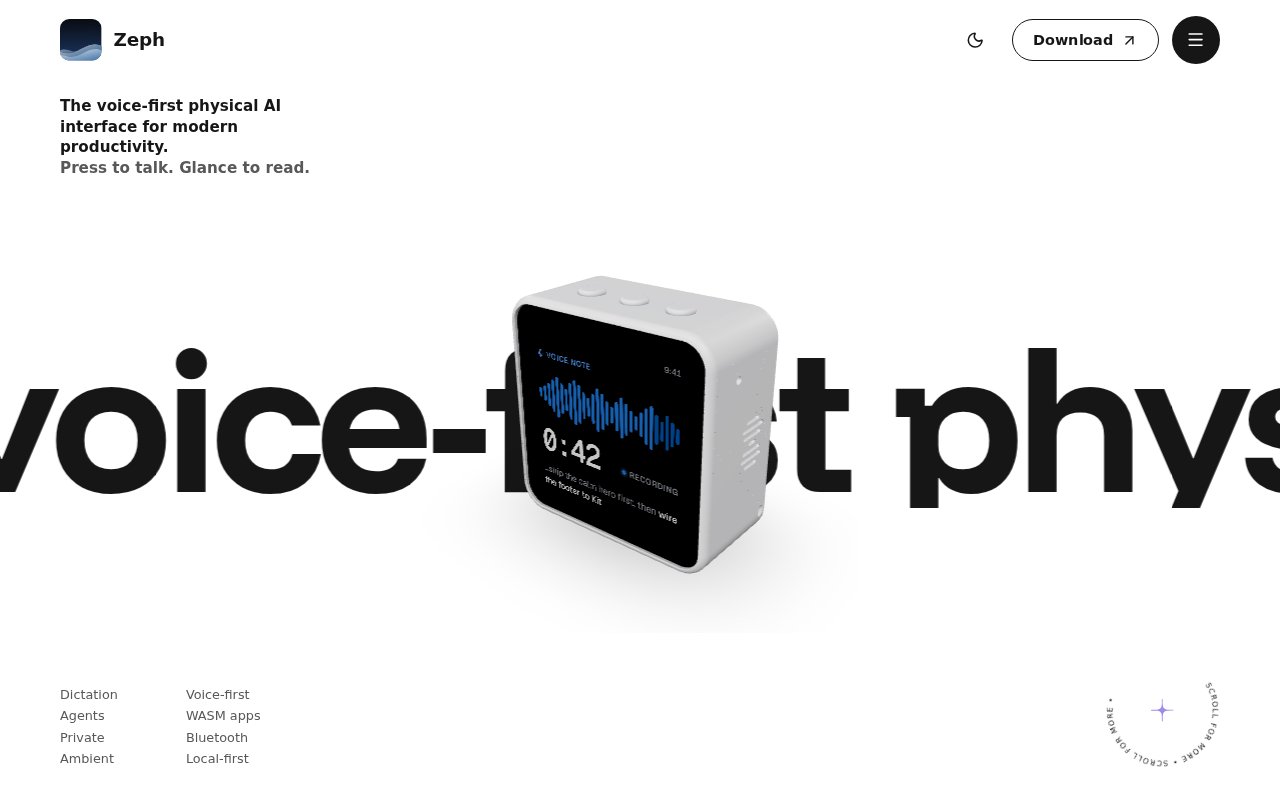
Zeph is a free Mac companion that gives AI agents a voice-first, glanceable interface and can optionally extend that interface to a small desk device. It is meant for moments when opening another window, finding a hotkey, or speaking toward a laptop microphone breaks the flow of work. A user can press to talk, dictate into an application, send a prompt to an agent, or look at a compact status card. The Mac app works on its own, while supported ESP32-based boards add the dedicated screen, microphone, and physical controls that define the full hardware experience.
System-wide dictation is the most immediate use. Zeph creates a virtual microphone and can type spoken text where the cursor is active, so the same push-to-talk action works across apps and fields. It can also connect to agents and show information such as a running task, a rate limit, continuous integration status, a result, or an approval request. Through MCP, an agent can put something on the device display and read the user's response. That turns the screen into a focused endpoint for short interactions instead of a miniature version of a busy desktop. Notes and short prompts can be captured without reaching for a phone or changing away from the current application.
ZephOS organizes the device around glances, apps, extensions, MCP, and the Mac companion. Glances are cards the user arranges, with the visible card deciding what the buttons and microphone do. Apps run one at a time in a sandbox on the device and can pair with a Mac-side component for work that exceeds the board's resources. Extensions add model, speech, and tool providers. The companion flashes and names a device, keeps it connected over Bluetooth or USB, provides the virtual microphone, and handles models, speech, or workflows that are better suited to the Mac.
The integration model avoids locking the user to one AI provider. Zeph can point at cloud services such as Anthropic, OpenAI, Google, Groq, OpenRouter, Deepgram, and Vercel AI Gateway, usually with the user's own key. It also supports local options including Apple Intelligence, LM Studio, Ollama, Llama, MLX Whisper, Whisper, and ONNX components. The library distinguishes what runs on the Mac from metered cloud services, which helps users make a deliberate choice about latency, privacy, and cost. Claude Code and Claude Desktop have guided MCP setup, while Codex, Cursor, and other MCP clients can connect through the base device skill.
Privacy is a central part of the design rather than a separate enterprise promise. Audio and state stay on the device by default, local model and speech combinations can operate without an account or external key, and the product describes stored data as encrypted. Users who prefer cloud models can still bring provider credentials or use available cloud options. The meaningful boundary depends on which extension is selected, so a local Whisper and Ollama setup has a different data path from a cloud transcription and model pair. Zeph gives the user that choice, but the user still needs to understand the providers they add. This flexibility is especially useful for people who want local dictation for sensitive notes but still use a cloud coding agent for development work.
The hardware ecosystem supports several Waveshare boards today, with additional Waveshare and M5Stack devices listed as experimental or coming soon. Full editions run apps as well as voice and glances, while Lite editions focus on the core voice and glance experience. Boards are bought from third-party stores and vary in screen, memory, microphones, and storage. Makers can use the SDK to build portable sandboxed WASM apps that target different Zeph devices. The software's portability is appealing, but selecting and flashing hardware is still more involved than downloading a normal desktop utility. Buyers should check whether a board is supported, experimental, or forthcoming before ordering it for Zeph.
Zeph is best for Mac users who spend substantial time with coding agents, dictation, local models, or ambient work signals. The companion app is free and does not require a Zeph subscription. It can be used without hardware, and local models can avoid provider charges, but a physical board costs extra and cloud APIs may be metered by their providers. Windows, Linux, iPhone, and Android versions are listed as coming later, and team fleet features such as bulk provisioning, a shared dashboard, SSO, and policy are also marked as coming soon. The current product is therefore strongest for individual Mac-based builders who value a private, physical control surface. Anyone mainly interested in voice input can try the free app first, then decide whether the glanceable hardware adds enough value to justify another device.
Key Features
- System-wide push-to-talk dictation
- Glanceable AI agent updates
- MCP agent controls
- Local model and speech options
- Sandboxed WASM device apps
- Optional ESP32 desk hardware
Pros & Cons
What we like
- Mac app works without dedicated hardware
- Supports local and cloud AI providers
- Keeps audio and state local by default
- Gives agents a focused physical interface
Room for improvement
- Desktop app is currently macOS only
- Physical use requires third-party hardware
- Several devices and team features are forthcoming
- Cloud provider usage may add separate costs
Frequently Asked Questions
What is Zeph?
Is Zeph free?
Do I need a Zeph device?
Can Zeph run AI locally?
Best For
Featured in
Alternatives to Zeph

CalendHub
Smart scheduling and calendar management for teams
Kevin Gabeci Toolkits
Seven AI toolkits for writing books, making music, cutting video, and building agents.

Eased Into AI
Learn AI from zero. No jargon, no hype, just steps that work.

Fix It Gently
Calm, plain-English fixes for everyday tech problems.
Reviews (0)
Badge builder
Add Zeph to your website
Choose a badge style and size, preview it here, then copy the generated HTML. Badge images are self-contained SVGs and do not require an external script.

<a href="https://toolindex.net/tools/zeph?ref=badge" target="_blank" rel="noopener">
  <img src="https://toolindex.net/badge/zeph/medium.svg" alt="Zeph - Listed on Tool Index" width="180" height="50" />
</a>How to use the badge
- 1. Pick the style, size, and theme that fit your layout.
- 2. Copy the generated HTML from the code block.
- 3. Paste it into your footer, homepage, or press page.
Standard badge available
The standard listing badge is available now. Score and circle badges are limited to tools currently ranked in the top 10 of a category.
Badge clicks return visitors to this profile with a referral tag so the source remains identifiable.
Related Tools

Confluence
Atlassian's long-running team wiki that anchors many enterprise knowledge stacks
Asana
Project management for teams that live in projects, tasks and dependencies
Kevin Gabeci Toolkits
Seven AI toolkits for writing books, making music, cutting video, and building agents.

Logseq
An open-source outliner notes app where every bullet is a first-class block
Work on Zeph? Request a listing correction