Best Testing Tools in 2026
Software testing tools span unit, integration, end-to-end, and visual-regression workflows. This draft groups listed products by their stated testing roles without claiming measured speed or quality outcomes.
Top 10 ranked by ToolIndex Score
Download Top 10 PNG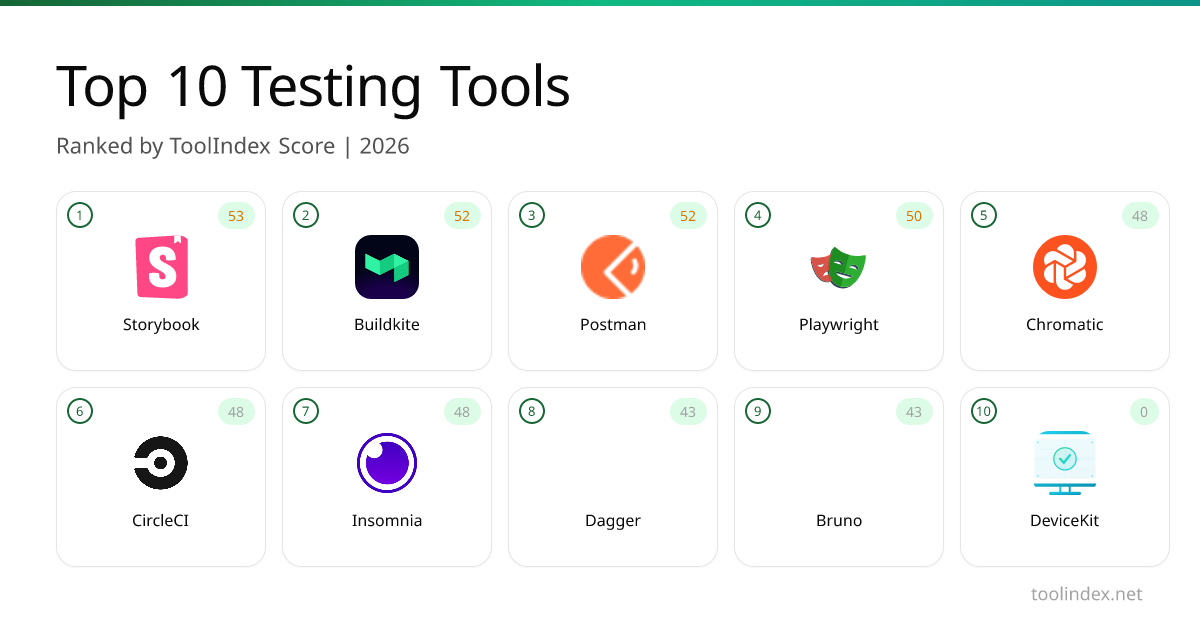

Playwright
Microsofts open-source end-to-end browser testing framework for Chromium, Firefox, and WebKit with one API.

Buildkite
Hybrid CI/CD where the control plane is hosted but the build agents run on your own infrastructure.

Storybook
Open-source workshop for building UI components in isolation. Preview, document, and test them outside the app.

Chromatic
Visual regression testing and review platform built by the Storybook team, with cloud-rendered snapshots and PR integration.

Postman
API client and collaboration platform that started as a Chrome extension and now covers design, testing, and mocking.

CircleCI
Hosted continuous integration that runs your test suite in parallel containers across Linux, macOS, Windows, and ARM.
Selenium Boot
Java testing framework that brings Spring Boot conventions and Playwright APIs to Selenium

DeviceKit
Free Screen & Device Tests Online | Private Browser Diagnostics
Dagger
Programmable CI/CD pipelines as code in Go, Python, TypeScript, or Java. Runs locally and on any CI provider.
Bruno
Git-friendly, fully offline API client that stores collections as plain text files in your repository.

Libretto PR Agents
Automatically investigate failing Playwright tests and open pull requests with fixes

Tests.ws
WebSocket testing tools, protocol guides, and a Chrome extension for developers
What to Look For
Test Execution Speed
Slow tests slow down your entire development cycle. Evaluate parallel execution support, smart test selection (running only affected tests), and cloud-based test infrastructure. Tests that take more than 10 minutes discourage developers from running them frequently.
Test Maintenance Burden
Flaky and brittle tests waste more time than they save. Look for tools with stable selectors, auto-waiting mechanisms, smart retry logic, and clear failure diagnostics. The best testing tools generate tests that survive minor UI changes without breaking.
CI/CD Integration
Tests should run automatically on every push. Evaluate how well the tool integrates with GitHub Actions, GitLab CI, and other CI platforms. Check for parallel test splitting, test result reporting, and the ability to block merges on test failures.
Debugging & Failure Analysis
When tests fail, you need to understand why quickly. Look for visual diffs, DOM snapshots, video recordings of test runs, step-by-step trace files, and integration with error tracking tools. Good failure diagnostics cut debugging time by 80%.