
AI Assist
Local meeting transcription with your own API keys, no bots in your call
Gallery
About AI Assist
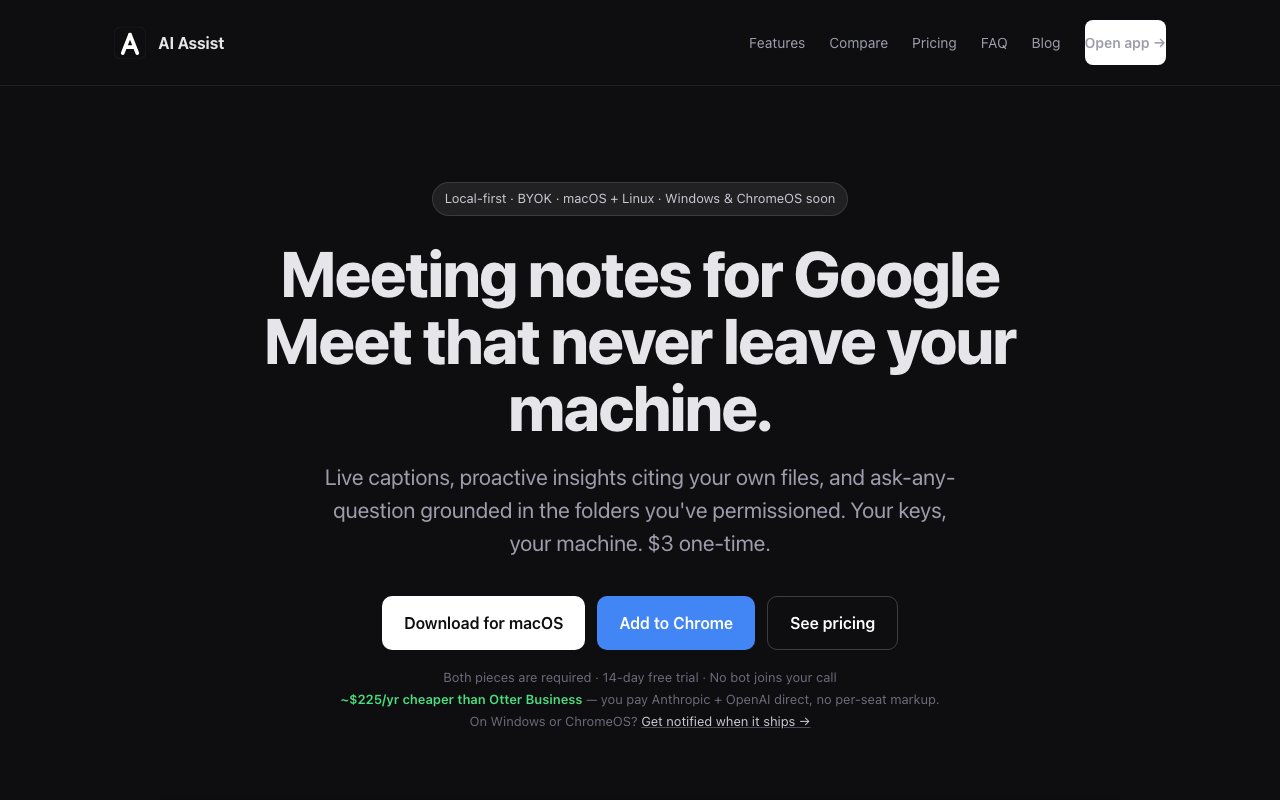
AI Assist is a meeting companion that provides live transcription, AI summaries, and document-grounded Q&A during video calls. It runs as a Chrome extension paired with a desktop app, capturing meeting content directly from your browser tab without sending a bot to join the call. That means no third-party notification appears to other participants, no awkward recording disclaimer, and the audio streams from your machine straight to your own OpenAI account for transcription rather than passing through AI Assist's servers. The architecture is designed around privacy, making it a fit for teams with strict IT policies, regulated industries, or anyone uncomfortable handing meeting recordings to a SaaS provider that stores and processes them centrally.
Real-time captions are powered by OpenAI's Whisper API. Audio processing happens locally on your machine before being sent to Whisper for transcription, so the raw audio never touches AI Assist's infrastructure. You see captions appear as the meeting progresses, which is useful if you're in a noisy environment or joining a call where speakers have unfamiliar accents. The transcription becomes the foundation for everything else the tool does, including post-meeting summaries and the Q&A feature.
During meetings, the tool can surface relevant excerpts from files you've indexed on your device. If a topic comes up that relates to a document in your local folders, it displays the passage with a citation, no manual triggering required. This happens automatically in the background, though you can toggle it off if the proactive suggestions distract you. You can also ask questions mid-meeting and get answers grounded in your own documents. The important detail here is that only the matched text excerpts are sent to the AI model, while full files stay on your disk. That means you can index confidential documents without worrying that the entire contents will be uploaded to a third-party service.
The bring-your-own-keys model is central to how pricing works. You connect your own Anthropic and OpenAI API accounts and pay those providers directly at their standard rates. AI Assist doesn't mark up API usage, charge per seat, or lock you into an annual contract. The company estimates typical meeting costs at 50 cents to two dollars for LLM processing plus about 36 cents per hour for Whisper transcription, which they claim saves roughly 225 dollars a year compared to Otter's business tier at 19.99 dollars per user per month. The tradeoff is that you manage API keys, usage limits, and billing yourself rather than getting a flat-rate SaaS subscription with support and SLAs. If you already have an Anthropic or OpenAI account for other projects, adding AI Assist is lightweight since you're reusing credentials you already control.
The desktop license is a three-dollar one-time purchase, which is unusually cheap for productivity software. There's an optional cloud sync add-on for three dollars a month if you want end-to-end encrypted transcript syncing across devices, but without that the app works fully offline. A 14-day free trial gives access to full desktop features before you decide whether to buy. Currently supported platforms include macOS and Linux for the desktop app, with Google Meet and Zoom Web working through the extension. Windows and ChromeOS support is in development, as is Microsoft Teams Web compatibility. Mobile apps aren't on the roadmap, which limits flexibility if you take calls from your phone regularly.
The target user is a solo practitioner or small team that wants meeting notes without a SaaS subscription, without a bot joining their calls and announcing itself, and without sending recordings to a centralized service. Consultants, lawyers, therapists, and anyone else handling sensitive conversations will appreciate that the data path stays under their control. Setup takes about five minutes and requires your two API keys plus a free AI Assist account for pairing and optional cloud features. The indexed-file Q&A turns it into more than a transcription tool, giving you a way to pull relevant context from your own knowledge base into conversations as they happen.
Where it falls short is platform coverage. Windows users are still waiting, Teams support isn't ready, and there's no mobile option. If you're in a Microsoft-centric organization or need transcription on the go, this isn't the right tool yet. The BYOK model also means you need to be comfortable managing API credentials and understanding usage costs, which is a barrier for less technical users. But for macOS and Linux users on Meet or Zoom who value owning their data and controlling costs directly, AI Assist hits a privacy-first niche that the major meeting transcription players ignore entirely.
Key Features
- Local Whisper transcription via BYOK
- No bot joins the video call
- Proactive document citations during calls
- Grounded Q&A over your own files
- End-to-end encrypted cloud sync option
- Supports Google Meet and Zoom Web
Pros & Cons
What we like
- Audio never leaves your device unless you enable encrypted sync
- One-time three dollar license instead of monthly subscription
- No per-seat pricing, pay only for API usage
- Proactive insights from your indexed local files
Room for improvement
- Requires separate desktop app plus browser extension
- Windows and ChromeOS support still in development
- You manage your own API keys and usage costs
- Microsoft Teams support not yet available
Frequently Asked Questions
What is AI Assist?
How much does AI Assist cost?
Does AI Assist send my audio to its servers?
Which platforms does AI Assist support?
Best For
Featured in
Alternatives to AI Assist
View all
CalendHub
Smart scheduling and calendar management for teams
Kevin Gabeci Toolkits
Seven AI toolkits for writing books, making music, cutting video, and building agents.

PrimeTask
Offline-first work OS with tasks, CRM, and canvas views you buy once and own forever
Kibu
Vertical software for disability service providers covering compliance, documentation, and programming
Reviews (7)
Genuinely impressed
Found AI Assist on a Show HN thread and I am glad I clicked. Got real value out of proactive insights from your indexed local files. The output quality holds up better than I expected. No regrets so far.
Pulled its weight from week one
Tried AI Assist on a side project first, then rolled it out everywhere. Got real value out of audio never leaves your device unless you enable encrypted sync. Mostly using it for replacing subscription meeting tools with pay-per-use. It earns its place in my stack.
Exactly what I needed
Came to AI Assist after getting frustrated with what I had before. It slotted into my routine without much fuss. Mostly using it for transcribing client calls without third-party data exposure. Hard to imagine going back to my old setup.
Genuinely impressed
AI Assist solves a real problem for me without making a fuss about it. Their take on no per-seat pricing, pay only for api usage is genuinely good. Found it works best for transcribing client calls without third-party data exposure. Glad I made the switch.
Two months in, no regrets
Found AI Assist on a Show HN thread and I am glad I clicked. What stands out is how it handles proactive insights from your indexed local files. Support actually answered when I had a question, which surprised me. Would sign up again without thinking twice.
Good, with a few caveats
Started using AI Assist casually, now it is pinned in my dock. Performance has been steady even when I lean on it hard. What stands out is how little babysitting it needs. It fits well for getting meeting notes in compliance-sensitive industries. One thing that bugs me is windows and chromeos support still in development. Easy yes for anyone weighing the same trade offs.
Two months in, no regrets
Three months of AI Assist later, here is what holds up. Their take on no per-seat pricing, pay only for api usage is genuinely good. Easy yes for anyone weighing the same trade offs.
Badge builder
Add AI Assist to your website
Choose a badge style and size, preview it here, then copy the generated HTML. Badge images are self-contained SVGs and do not require an external script.

<a href="https://toolindex.net/tools/ai-assist?ref=badge" target="_blank" rel="noopener">
  <img src="https://toolindex.net/badge/ai-assist/medium.svg" alt="AI Assist - Listed on Tool Index" width="180" height="50" />
</a>How to use the badge
- 1. Pick the style, size, and theme that fit your layout.
- 2. Copy the generated HTML from the code block.
- 3. Paste it into your footer, homepage, or press page.
Standard badge available
The standard listing badge is available now. Score and circle badges are limited to tools currently ranked in the top 10 of a category.
Badge clicks return visitors to this profile with a referral tag so the source remains identifiable.
Related Tools

Confluence
Atlassian's long-running team wiki that anchors many enterprise knowledge stacks
Asana
Project management for teams that live in projects, tasks and dependencies
Kevin Gabeci Toolkits
Seven AI toolkits for writing books, making music, cutting video, and building agents.

Logseq
An open-source outliner notes app where every bullet is a first-class block
Work on AI Assist? Request listing access or correction