Anonymize My ID
Redact and watermark ID cards or passports directly on your phone before sharing
Gallery
About Anonymize My ID
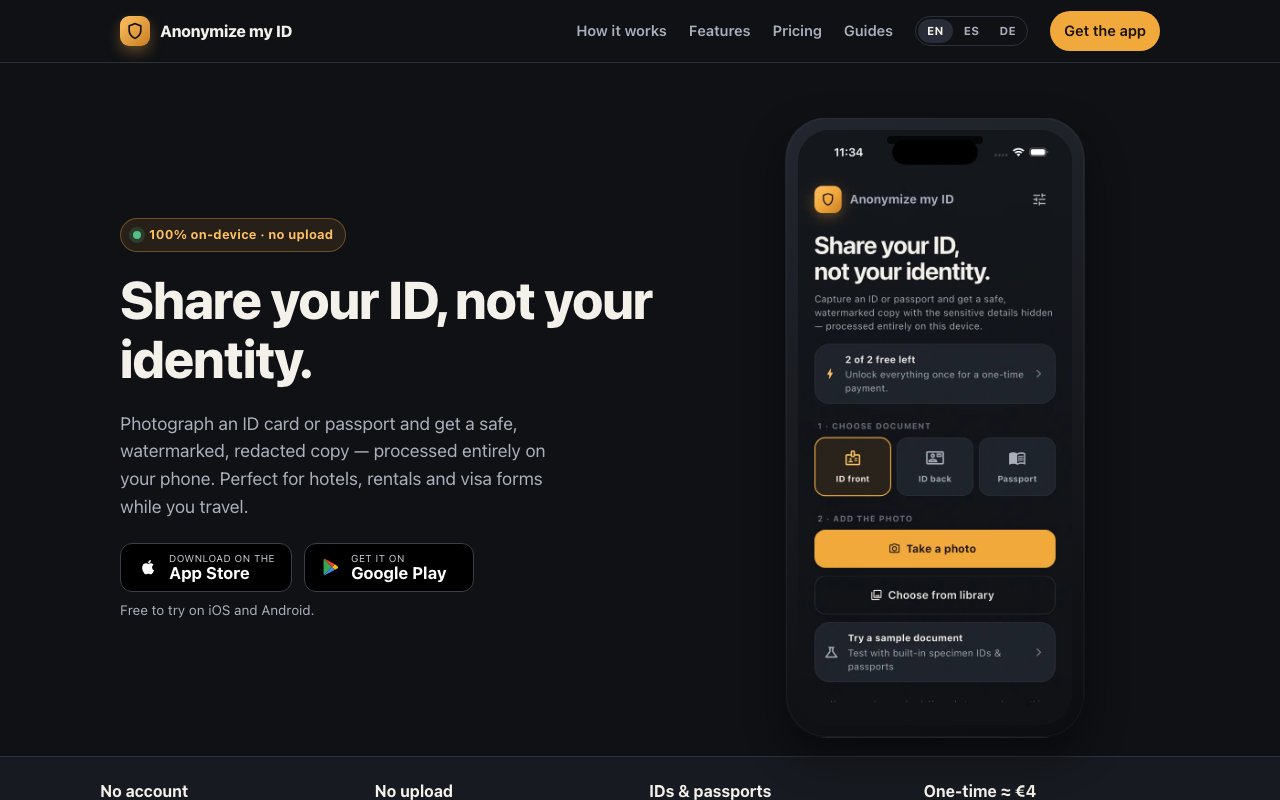
Anonymize My ID is a mobile application that lets users photograph identity documents like passports and national ID cards, then produce redacted, watermarked copies that are safer to share with third parties. The entire workflow runs locally on the device using Apple's or Google's native image processing engine, with no uploads to external servers, no cloud sync, and no account creation required. It exists for anyone who has ever hesitated before sending a photo of their passport to a hotel, landlord, or visa processing service, knowing that once the image leaves their phone, they lose all control over where it ends up.
The problem it addresses is one that frequent travelers, renters, and anyone navigating bureaucratic paperwork encounters regularly. Hotels want a copy of your passport at check in. Landlords ask for ID verification before signing a lease. Car rental desks, visa application portals, and even some online marketplaces demand proof of identity before allowing transactions. The standard response is to snap a photo and send it, but that single image contains an enormous amount of sensitive data: full legal name, date of birth, place of birth, document number, expiration date, and in many cases biometric information encoded in the machine readable zone at the bottom of a passport page. That image can sit in an email thread indefinitely, get stored in a CRM with poor security practices, or end up in a data breach. Anonymize My ID gives users the ability to decide exactly which fields remain visible and which get obscured before the image ever leaves their device.
The workflow is deliberately simple. Users open the app, take a photo of their document or import one from the camera roll, and the interface presents the document with draggable selection boxes. They position those boxes over any fields they want to redact, choose a redaction style such as blur, pixelation, or a solid bar, and decide whether to convert the image to black and white or keep the original colors. They can also add a custom watermark that tiles across the entire image, with adjustable text, position, and opacity. The watermark serves two purposes: it marks the copy as belonging to the person who created it, and it makes the image harder to repurpose for fraudulent purposes since the overlay is baked into the exported file. Once satisfied with the result, users export and share the redacted copy however they like, through messaging apps, email, or cloud storage.
Document support covers both front and back scans of national ID cards, including Spanish DNI and NIE documents, as well as the data pages of passports. The app includes field presets optimized for Spanish and English speaking countries, which speeds up the process for common document layouts. Partial redaction is available for cases where the recipient genuinely needs some information but not all of it. For example, a user might reveal the last four digits of their document number while obscuring the rest, or show their photo while hiding the machine readable zone. This flexibility matters because different recipients have different requirements, and a blanket approach that hides everything is not always practical.
The privacy architecture is the defining feature. Processing happens entirely on device, which means the original photo never touches a remote server. There is no account to create, no login, no analytics collection, and no data retention. The developer frames this as GDPR compliance through architecture rather than policy. If the data never leaves the device, there is nothing to regulate on the server side, no terms of service to negotiate, and no risk of compelled disclosure from a jurisdiction the user does not trust. For users who are privacy conscious or simply do not want yet another account with yet another company holding sensitive documents, this approach removes a significant source of anxiety.
Pricing follows a one time unlock model rather than a subscription. The free tier allows two anonymizations per install, with a default configuration that hides all fields, converts to black and white, and includes a watermark. That is enough to handle an occasional need without paying anything. The Pro unlock costs approximately four euros as a one time purchase and removes the usage cap entirely. Pro users get unlimited anonymizations, full control over which fields to hide or reveal, color output, and detailed watermark customization including text, opacity, and tile density. There are no recurring charges, no usage tracking beyond what happens on device, and no upsells once the unlock is purchased.
The target audience is anyone who needs to share identity documents but wants to limit their exposure. Frequent travelers sending passport copies to hotels, renters submitting ID for lease applications, freelancers verifying identity for payment platforms, and anyone dealing with visa paperwork all fit the profile. The app does one thing and does it well, offering a small upfront cost in exchange for peace of mind whenever identity documents are involved.
Key Features
- On device document redaction
- Blur, pixelate, or solid bar styles
- Custom watermark text and opacity
- ID card and passport support
- Partial field redaction options
- Black and white or color output
Pros & Cons
What we like
- All processing happens locally with no server uploads
- One time purchase unlocks everything permanently
- Supports multiple redaction styles and partial reveals
- No account or sign up required
Room for improvement
- Free tier limited to two anonymizations
- Mobile only with no desktop version
- Presets focus on Spanish and English documents
- No automatic field detection across all countries
Frequently Asked Questions
What is Anonymize My ID?
Is Anonymize My ID free?
Does it send my documents to a server?
Who is Anonymize My ID for?
Best For
Featured in
Alternatives to Anonymize My ID
View all
1Password
Password and secrets manager for individuals, families, and developer teams with strong CLI and SSH agent support.
Clerk
Drop-in authentication and user management for modern apps
Tailscale
WireGuard-based mesh VPN that connects your devices, servers, and cloud resources into one private network in minutes.

BackPedal
UK bike theft protection that sends recovery agents after your stolen bike
Reviews (0)
Badge builder
Add Anonymize My ID to your website
Choose a badge style and size, preview it here, then copy the generated HTML. Badge images are self-contained SVGs and do not require an external script.

<a href="https://toolindex.net/tools/anonymize-my-id?ref=badge" target="_blank" rel="noopener">
  <img src="https://toolindex.net/badge/anonymize-my-id/medium.svg" alt="Anonymize My ID - Listed on Tool Index" width="180" height="50" />
</a>How to use the badge
- 1. Pick the style, size, and theme that fit your layout.
- 2. Copy the generated HTML from the code block.
- 3. Paste it into your footer, homepage, or press page.
Standard badge available
The standard listing badge is available now. Score and circle badges are limited to tools currently ranked in the top 10 of a category.
Badge clicks return visitors to this profile with a referral tag so the source remains identifiable.
Related Tools
Clerk
Drop-in authentication and user management for modern apps

DomeSOC
Autonomous SOC that grades every AI claim against evidence before it reaches an analyst
Reel
Forensic evidence capture for regulated Kubernetes, plus a free open-source VEX hub

HeimWall
Menu bar app that catches secrets and PII before you paste them into AI coding tools
Work on Anonymize My ID? Request listing access or correction