
Botzilla
Build and run Windows browser automations with a visual workflow studio
Gallery
About Botzilla
Botzilla is a visual browser automation platform for Windows. It gives users a desktop Studio where they can turn a repetitive website task into a sequence of understandable actions instead of writing a Playwright or Selenium script. The workflow can open pages, click elements, extract information, loop over items, make decisions, and save results. Botzilla combines that visual authoring experience with an account area for publishing projects and keeping track of runs, so the same product covers the design side of an automation and the operational side of running it.
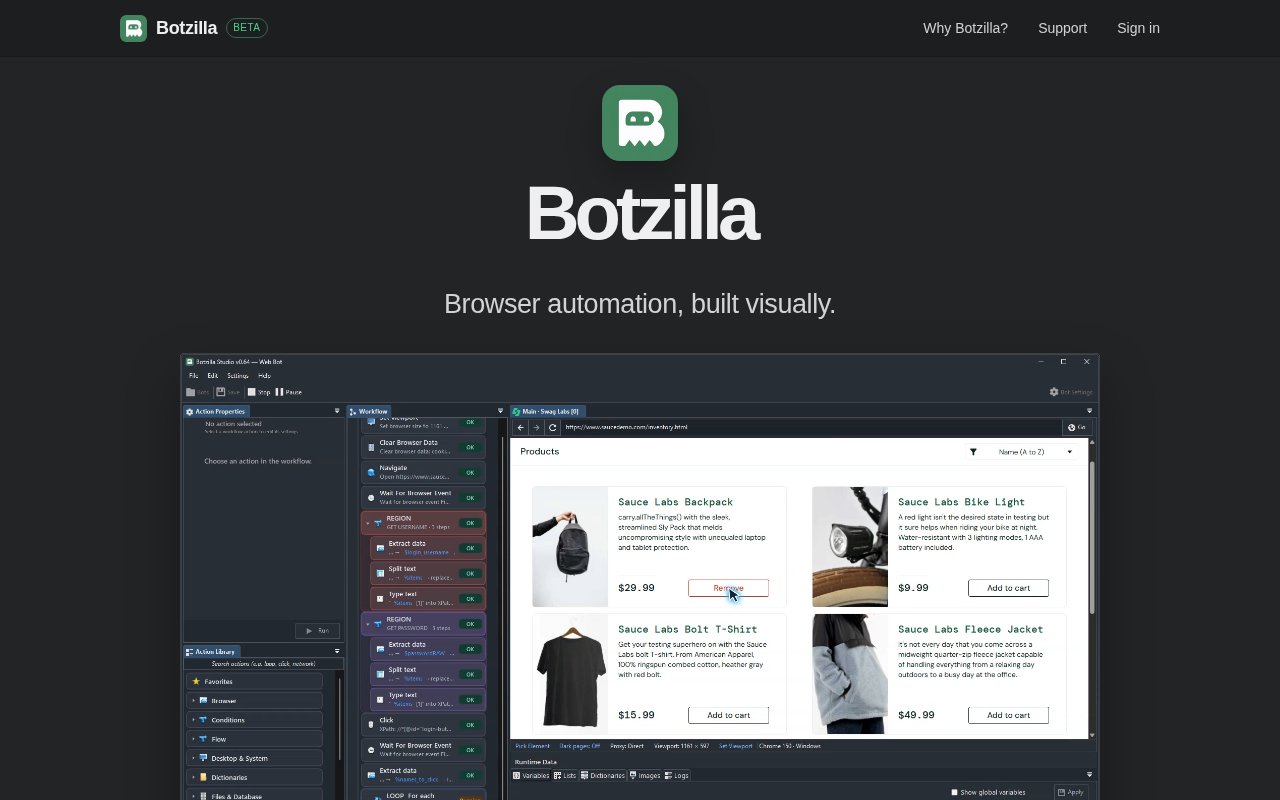
The Studio is built around an action library and a visible execution path. Users choose ready-made browser and flow actions, place them into a workflow, and edit each action's properties. The product examples show controls for the data source, output variables, and timeout on an extraction step. Reusable variables carry data from one action to another, while if and else branches and for-each loops make it possible to handle more than a fixed click sequence. A live browser view lets the builder watch the target site as the workflow runs. Built-in runtime data and action-by-action testing make it easier to see what a step received, what it produced, and where a longer workflow stopped behaving as expected.
That combination is aimed at people who want the control of browser scripting without taking on a browser automation framework directly. A developer can use it for a quick internal routine, but the visual canvas also makes the logic more approachable for an operations user who understands the process better than the code. The founder describes intended work such as extracting data, automating actions, and running tests. The homepage illustrates a customer onboarding flow that opens a portal, reads new accounts, loops through customers, and saves the output. Those examples point to repetitive, browser-bound tasks with a clear series of steps rather than open-ended agent work.
Botzilla's desktop focus matters. The Studio is a C# WinForms application and is available only for Windows. That narrows the audience, but it also gives the product a proper desktop environment for building, debugging, and observing browser work. A user can test one action at a time rather than launching an entire workflow after every edit. Run logs preserve what happened, and the interface reports completed actions while a workflow is in progress. These details are useful when an automation depends on page state, runtime values, or repeated items, since failures in those jobs are often easier to understand visually than from a stack trace alone.
Once a project is ready, Botzilla can publish it to its web side, accept job inputs, queue runs, and show managed execution. The current homepage describes isolated Windows workers and remote job monitoring through Botzilla Web. Account pages organize projects, orchestrators, and runs. This creates a path from a workflow built on a local desktop to an automation that can be started and observed without reopening the editor for every job. The product is still in beta, and its founder has described cloud execution as an area being developed, so buyers should verify which hosted capabilities are active for their account before basing an important process on them.
Botzilla is more focused than a broad integration platform. Its action library begins with browser work and common flow controls, while the founder plans to keep adding actions and connections to other platforms over time. That can be an advantage for a user who wants a readable browser workflow and doesn't need a large catalog of SaaS integrations. It also means the library and surrounding ecosystem are young. There is no macOS or Linux Studio, and teams that already maintain Playwright or Selenium suites won't get the same source-level flexibility. Botzilla fits best where visual construction, step inspection, and remote run visibility matter more than custom code and cross-platform authoring.
Access currently starts by creating an account with an email address, verifying it, and downloading Botzilla Studio for Windows. The beta is free for local bot development, while the site does not publish a permanent paid pricing structure. Because the website and product are evolving quickly, the eventual limits and price of managed execution aren't settled in the public material. That makes Botzilla easy to try for a real repetitive task, but it's sensible to treat present access as beta access rather than a lasting commercial promise. Users who accept that early-stage posture get a direct way to draw browser logic, watch it run, and move successful projects into a web-managed workflow.
Key Features
- Visual browser workflow builder
- Action-by-action workflow testing
- Reusable variables and runtime data
- Conditions and for-each loops
- Live browser execution view
- Published projects and remote runs
Pros & Cons
What we like
- Makes browser workflow logic visible at a glance
- Supports branching, loops, and reusable runtime values
- Combines desktop debugging with web run management
- Free beta lowers the cost of testing
Room for improvement
- Studio is available only for Windows
- Beta product with a still-growing action library
- Long-term pricing is not yet published
- Less flexible than writing custom browser automation code
Frequently Asked Questions
What is Botzilla?
Do I need to write Playwright or Selenium code?
Which operating systems does Botzilla support?
Is Botzilla free?
Best For
Featured in
Alternatives to Botzilla

Framer
Visual website builder that lets designers ship production-grade marketing sites with real CMS, SEO controls, and code components.
Contentful
Headless CMS that models content as structured data and delivers it through APIs to web, mobile, and other channels.

Sanity
Composable content platform with a customizable studio, real-time collaboration, and a queryable structured content backend.

Teachizy
France-based no-code platform for building, hosting, and selling online courses without tech skills
Reviews (0)
Badge builder
Add Botzilla to your website
Choose a badge style and size, preview it here, then copy the generated HTML. Badge images are self-contained SVGs and do not require an external script.

<a href="https://toolindex.net/tools/botzilla?ref=badge" target="_blank" rel="noopener">
  <img src="https://toolindex.net/badge/botzilla/medium.svg" alt="Botzilla - Listed on Tool Index" width="180" height="50" />
</a>How to use the badge
- 1. Pick the style, size, and theme that fit your layout.
- 2. Copy the generated HTML from the code block.
- 3. Paste it into your footer, homepage, or press page.
Standard badge available
The standard listing badge is available now. Score and circle badges are limited to tools currently ranked in the top 10 of a category.
Badge clicks return visitors to this profile with a referral tag so the source remains identifiable.
Related Tools
Sanity
Composable content platform with a customizable studio, real-time collaboration, and a queryable structured content backend.

Bubble
Full-stack no-code platform for building real web applications with visual programming, a database, and a workflow engine.

Tally
Form builder with a Notion-like editor, conditional logic, payments, and a generous free tier with unlimited submissions.

Glide
No-code platform that turns spreadsheets and databases into mobile and web apps, with computed columns and AI actions.
Work on Botzilla? Request listing access or correction