
Compute Cheap
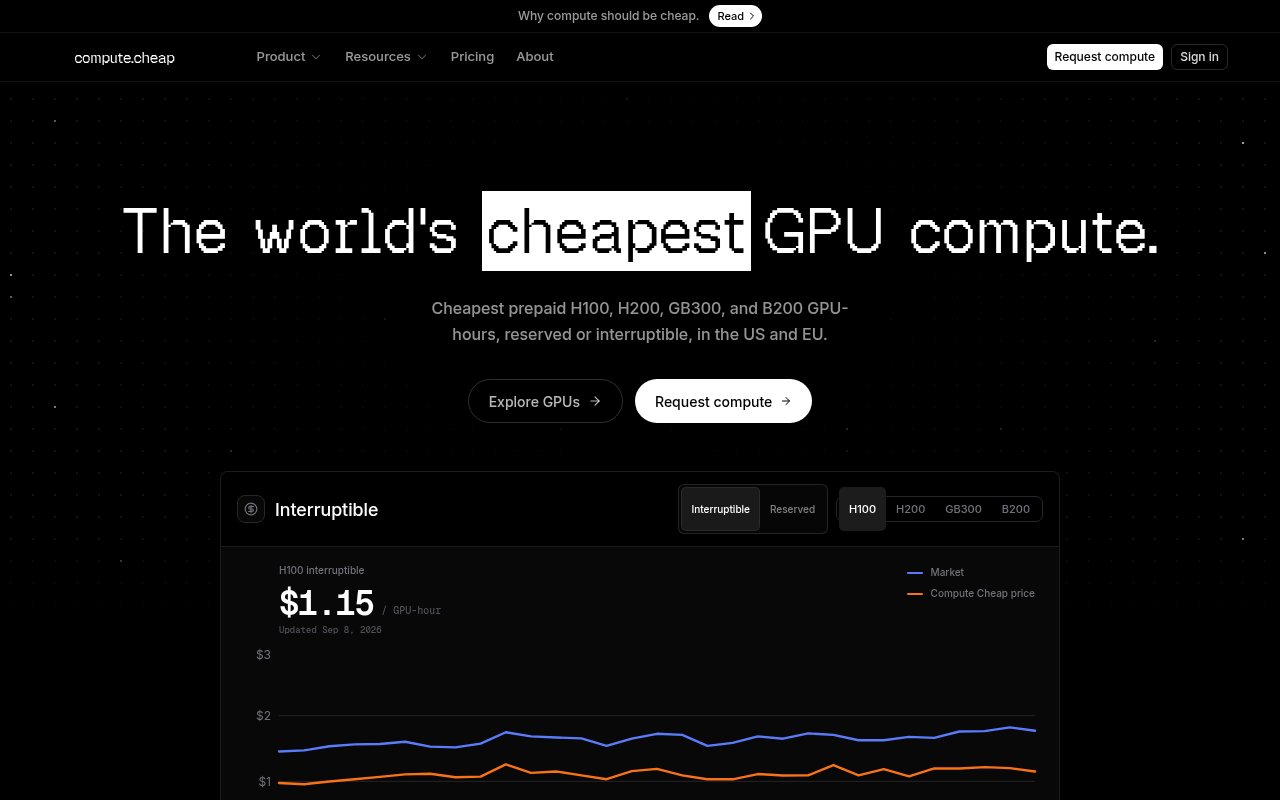
Reserved and interruptible H100 and H200 GPU blocks from $1.15 an hour, billed per GPU-hour
Gallery
About Compute Cheap
Compute Cheap sells GPU capacity for training and serving large models at prices that sit near the bottom of the market. The current menu is H100 and H200 nodes, with Blackwell B200 and GB300 listed but sold out at the time of writing, in reserved and interruptible flavours. Billing is a flat rate per GPU-hour with no platform fees on top, and the headline figures are $1.15 an hour for an interruptible H100 and $1.19 for a reserved one.
The problem it's solving is cost, and the shape of the offer follows from that. The big clouds charge a lot more for the same silicon, and the bargain marketplaces that undercut them often mean single consumer cards on hardware you know nothing about. Compute Cheap sits in between, with datacentre SXM parts connected over NVLink and a simple commercial model, in exchange for a minimum commitment that rules out casual use.
Here's how a deal works. You submit a request for the GPUs and hours you need, the team confirms availability, you pay a 50 percent deposit, and the remainder is billed on usage. The minimum is a block of 2,000 GPU-hours, which is the equivalent of one GPU for about twelve weeks or eight GPUs for around ten days. Reserved capacity is a fixed rate for the full block. Interruptible capacity is cheaper but can be reclaimed if demand spikes, so it suits checkpointed training and batch inference rather than anything latency-sensitive. Nodes come in one, two, four and eight GPU configurations, and capacity is located in the United States and the European Union. Planning a request is mostly arithmetic. Work out the GPU-hours the job needs, add headroom for restarts, and round up to the 2,000 hour block. Decide whether the work can survive interruption; if the training loop checkpoints often, the interruptible rate on H100 saves a little and on H200 saves a lot, since the gap there is sixty cents an hour. Then submit the request, confirm, and pay the deposit. Because billing is per GPU-hour with no platform fee, the invoice is the rate times the hours and nothing else.
The hardware page is specific about what you're renting. H100 SXM nodes carry 80 GB of HBM3 per GPU with 3.35 TB/s of memory bandwidth and 900 GB/s NVLink. H200 SXM raises that to 141 GB of HBM3e at 4.8 TB/s, which is the part to reach for when a model's weights and KV cache won't fit on the H100. The Blackwell parts, B200 at 180 GB and GB300 at 288 GB, are listed with their specifications but marked sold out.
It's for teams that already know what they need. Startups training or fine-tuning models, research groups with a grant to stretch, and inference teams with predictable load are the natural fit. The site says it has served more than fifty teams and delivered over thirty thousand GPU-hours, and it names labs such as Runway, ElevenLabs, Midjourney and Reka among them. If you want to spin up a single GPU for an afternoon, this isn't that; the 2,000 hour block is the floor.
What makes it different is transparency about price. There's a public leaderboard page comparing its rates with other providers, and the pitch rests on coming out at the bottom of that table. There's also a pricing API in the docs so you can pull current numbers programmatically rather than trusting a screenshot. Reserved customers get 24/7 support with a one-hour response commitment for downtime. That's a straightforward pitch, and it doesn't pretend to be a full cloud platform with managed services around the GPUs. Compared with the alternatives, the position is clear. The hyperscalers offer managed everything and charge accordingly. GPU marketplaces offer rock-bottom prices on whatever hardware happens to be listed, with the reliability that implies. Compute Cheap is a middle path, datacentre nodes at marketplace-adjacent prices, with the discipline of a minimum block and a deposit in exchange. If you can fill 2,000 GPU-hours, it's one of the cheaper ways to do it; if you can't, a marketplace or an on-demand cloud is the better fit.
The caveats are mostly about fit. The public pages don't describe how capacity is delivered, whether that's bare metal, containers or an orchestrator, so ask before you plan a deployment around it. Interruptible jobs need to be able to resume from a checkpoint. And the Blackwell generation is sold out, so anyone who needs B200 or GB300 today is waiting on supply. Access is paid, with no free tier and no self-serve instant provisioning. You request capacity, confirm, pay the deposit, and go. Current H100 pricing is $1.15 an hour interruptible and $1.19 reserved, with H200 at $1.39 and $1.99 respectively. The site has hardware, about and blog pages, and the team is reachable at hello@compute.cheap.
Key Features
- H100 and H200 SXM nodes over NVLink
- Reserved and interruptible capacity
- Flat per GPU-hour billing, no platform fees
- US and EU regions
- Public price leaderboard and pricing API
- 24/7 support for reserved customers
Pros & Cons
What we like
- Among the lowest published H100 and H200 rates
- Datacentre SXM parts, not consumer cards
- Simple deposit plus usage billing
- Interruptible tier for checkpointed workloads
Room for improvement
- 2,000 GPU-hour minimum rules out short jobs
- No self-serve instant provisioning
- Blackwell parts currently sold out
- Delivery details like orchestration aren't documented publicly
Frequently Asked Questions
What is Compute Cheap?
How much does Compute Cheap cost?
What's the minimum commitment?
What's the difference between reserved and interruptible?
Best For
Featured in
Alternatives to Compute Cheap
View allMongoDB Atlas
The fully-managed cloud version of MongoDB with built-in search, vector search, time series, and serverless tiers.
Hetzner
High-performance European cloud hosting at unbeatable prices

Neon
Serverless Postgres with database branching, scale-to-zero compute, and a generous free tier.
Cloudflare Pages
Free Jamstack hosting on Cloudflares edge with unlimited bandwidth and tight integration with Workers.
Our take
Tool Index Editorial · Sep 2026· 3.5/5
Compute Cheap sells request based blocks of data center GPUs in US and EU regions. Today's page lists H100 capacity from $1.15 per GPU hour, H200 from $1.39, and B200 from $2.29, with reserved and interruptible options. Pricing is unusually clear and exposed through a public API, while the hardware uses SXM parts and supports one, two, four, or eight GPU allocations.
We found the rates attractive for teams that can keep the hardware busy, but this is not casual cloud compute. Every request carries a 2,000 GPU hour minimum, capacity must be confirmed, and 50 percent is prepaid. Interruptible workloads need reliable checkpoints, GB300 was unavailable, and the public pages say little about the delivered software environment or orchestration. Buyers should settle those details before committing a training schedule.
Editorial opinion from the Tool Index team, written from the public product pages. Not a user review.
Reviews (0)
Badge builder
Add Compute Cheap to your website
Choose a badge style and size, preview it here, then copy the generated HTML. Badge images are self-contained SVGs and do not require an external script.

<a href="https://toolindex.net/tools/compute-cheap?ref=badge" target="_blank" rel="noopener">
  <img src="https://toolindex.net/badge/compute-cheap/medium.svg" alt="Compute Cheap - Listed on Tool Index" width="180" height="50" />
</a>How to use the badge
- 1. Pick the style, size, and theme that fit your layout.
- 2. Copy the generated HTML from the code block.
- 3. Paste it into your footer, homepage, or press page.
Standard badge available
The standard listing badge is available now. Score and circle badges are limited to tools currently ranked in the top 10 of a category.
Badge clicks return visitors to this profile with a referral tag so the source remains identifiable.
Related Tools

Coolify
Self-hostable, open source alternative to Heroku and Netlify
Hetzner
High-performance European cloud hosting at unbeatable prices

Upstash
Serverless Redis, Kafka, and QStash for modern applications

Heroku
The original git-push PaaS. Owned by Salesforce, still kicking, still the easiest way to deploy a Rails or Django app.
Work on Compute Cheap? Request listing access or correction