
DeviceShelf
Local-first network scanner for desktop, mobile, and server with security reports and no cloud
Gallery
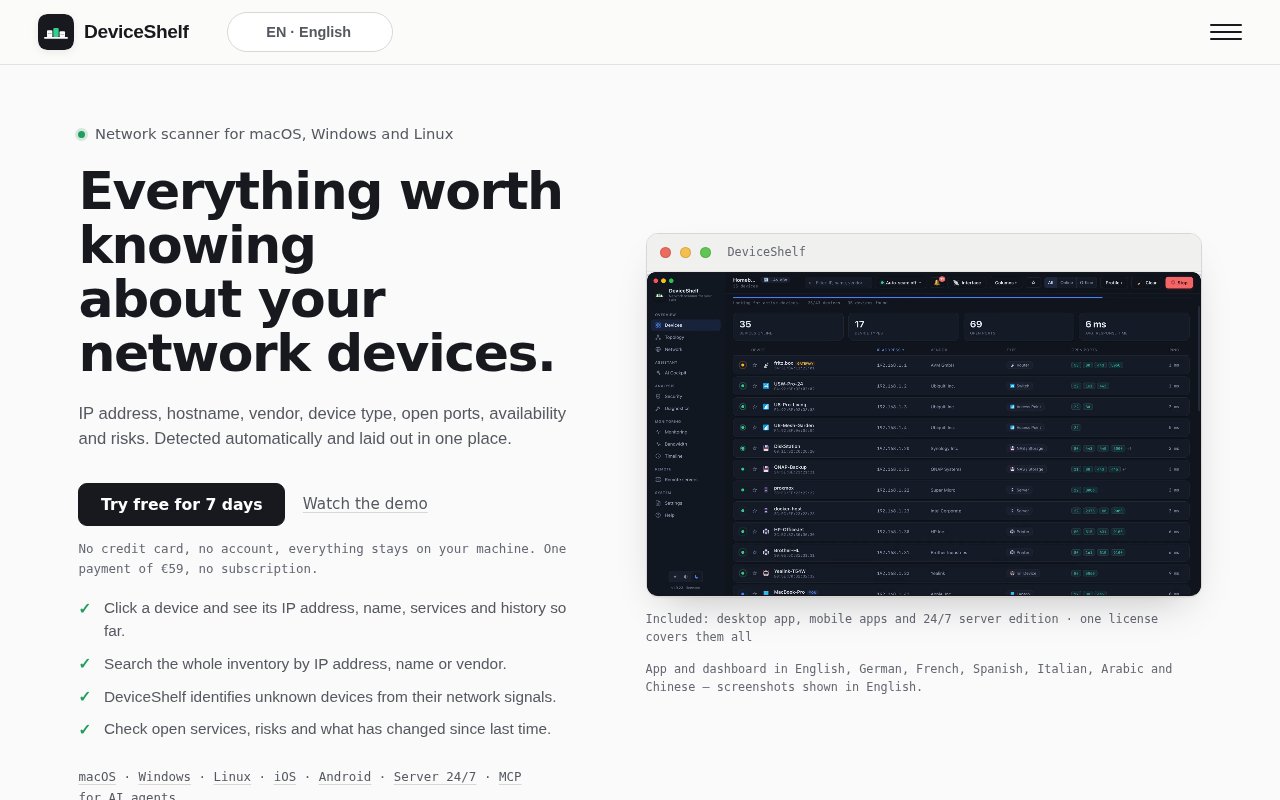
About DeviceShelf
DeviceShelf is a local-first network scanner that discovers every device on your LAN or Wi-Fi, works out what each one is, and keeps watching. It replaces the usual scatter of a router admin page for leases, a terminal for ARP queries, a lookup site for MAC vendors and a separate port scanner with one place that also remembers what was there yesterday. Scan data stays on your own device, there's no cloud backend at all, and the licence is checked offline.
By default it runs non-intrusive TCP connect probes, with scan profiles that range from a quick sweep to a deep scan across all 65,535 ports, and it can watch several interfaces at once so Wi-Fi, Ethernet and VLANs show up together. Identification combines MAC vendor lookup, DNS, mDNS and Bonjour, NetBIOS, SNMP, UPnP, TTL and DHCP fingerprints to classify each device as a router, computer, phone, printer, camera, NAS or IoT gadget. On top of discovery it tracks per-device bandwidth in real time, keeps 30 days of availability and latency history, monitors presence, and raises an alert when an unknown device joins.
The first scan is the inventory. Run a quick sweep, let the fingerprinting name what it can, and correct the rest by hand, and from then on every subsequent scan is a diff. A new MAC address on the guest Wi-Fi triggers an unknown-device alert, a printer that drops off shows up in the availability history, and a NAS whose latency creeps up over a fortnight is visible on the 30-day chart rather than in someone's memory. The deep profiles are for the occasional audit, when you want to know exactly which ports a camera left open.
A security report scores risk per device and adds CVE hints for the services it recognises. An optional AI assistant is bring-your-own-key, with Anthropic, OpenAI, Azure, Mistral, Groq, Google or a local Ollama model, and the app exposes an MCP server so an agent in Claude, Cursor or VS Code can ask questions about the network. Nothing is sent to a model unless you configure a key or point the app at Ollama on your own machine, which is a sensible way to add AI to a security tool without contradicting its own privacy pitch. There's a QR-based asset register with warranty tracking for the physical side of the inventory, and a built-in syslog server collects logs from routers and switches.
It ships in three editions on one licence. The desktop app runs on macOS 12 and later, Windows 10 and 11, and Linux. Mobile covers iOS 15 and later from the App Store and Android 7 and later as a direct APK. The server edition runs headless around the clock through Docker with host networking, a .deb or .rpm package, a macOS package that installs as a LaunchDaemon, or a Windows service, and adds uptime history, SNMP health, Docker and Proxmox status, syslog, custom sensors, and daily availability per device and service with retries, dependencies and CSV export.
It's built for homelabs, small offices, consultants who audit client networks, and privacy-conscious users who want 24/7 monitoring without a subscription or a vendor holding their network map. Compared with cloud-managed scanners, the difference is that nothing is uploaded, licensing is verified offline with an ed25519 signature, and there's no monthly fee. Compared with nmap, the difference is persistence and presentation, since the history, the alerts and the reports are the product rather than a one-off scan result. A few things to weigh. The personal licence is bound to one email, so a company should read the terms before rolling it across a team. Android arrives as a direct APK rather than through Google Play, which is fine for a homelab and a policy question for a managed fleet. And because there's no cloud, always-on monitoring means running the server edition on hardware of your own rather than paying for a hosted dashboard. Those are consequences of the design rather than gaps, and the trial is long enough to find out whether they matter to you.
Pricing is a one-time purchase. DeviceShelf costs 59 euros for a personal licence that covers the desktop, mobile and server editions on every platform, and the Shelf Bundle, which adds the companion ServerShelf product, is 89 euros. A seven-day free trial needs no card, there's a 14-day money-back guarantee, and the licence is bound to the buyer's email. A live demo runs at demo.deviceshelf.app, the current version at the time of writing is 1.9.27, and support is at hello@deviceshelf.app with community channels on Mastodon, Bluesky, Telegram, Discord and Matrix.
Key Features
- Multi-interface discovery and device fingerprinting
- Scan profiles from quick sweep to all 65,535 ports
- Security report with risk scores and CVE hints
- Real-time bandwidth and 30-day history
- Bring-your-own-key AI assistant and MCP server
- Headless server edition for 24/7 monitoring
Pros & Cons
What we like
- One-time licence covers desktop, mobile, and server
- Everything stays local with offline licence checks
- Unknown-device alerts and presence tracking
- Seven-day trial and 14-day refund
Room for improvement
- AI assistant needs your own API key or a local Ollama
- Android build is a direct APK rather than Play Store
- Personal licence is bound to one buyer email
- Always-on monitoring means hosting the server edition yourself
Frequently Asked Questions
What is DeviceShelf?
How much does DeviceShelf cost?
Does DeviceShelf send data to the cloud?
Can DeviceShelf monitor 24/7?
Best For
Featured in
Alternatives to DeviceShelf
View all
1Password
Password and secrets manager for individuals, families, and developer teams with strong CLI and SSH agent support.
Clerk
Drop-in authentication and user management for modern apps
Tailscale
WireGuard-based mesh VPN that connects your devices, servers, and cloud resources into one private network in minutes.

BackPedal
UK bike theft protection that sends recovery agents after your stolen bike
Our take
Tool Index Editorial · Sep 2026· 4.0/5
DeviceShelf is a local network inventory and monitoring app for homelabs, consultants, and small offices that want more context than a router page provides. It combines discovery, device identification, ports, risks, bandwidth, and history across desktop, mobile, and an always-on server edition. The seven-day trial needs no card, and one EUR 59 purchase covers the available editions without a subscription.
We found a substantial live demo, setup guide, troubleshooting notes, and an active release history, which makes the product easier to trust than its compact price suggests. The tradeoffs are practical. Continuous monitoring requires hardware you host, Android is a direct APK, and the unsigned Windows build may conflict with managed-device policies. For privacy-minded network owners willing to run their own monitor, it holds up well.
Editorial opinion from the Tool Index team, written from the public product pages. Not a user review.
Reviews (0)
Badge builder
Add DeviceShelf to your website
Choose a badge style and size, preview it here, then copy the generated HTML. Badge images are self-contained SVGs and do not require an external script.

<a href="https://toolindex.net/tools/deviceshelf?ref=badge" target="_blank" rel="noopener">
  <img src="https://toolindex.net/badge/deviceshelf/medium.svg" alt="DeviceShelf - Listed on Tool Index" width="180" height="50" />
</a>How to use the badge
- 1. Pick the style, size, and theme that fit your layout.
- 2. Copy the generated HTML from the code block.
- 3. Paste it into your footer, homepage, or press page.
Standard badge available
The standard listing badge is available now. Score and circle badges are limited to tools currently ranked in the top 10 of a category.
Badge clicks return visitors to this profile with a referral tag so the source remains identifiable.
Related Tools
Clerk
Drop-in authentication and user management for modern apps

DomeSOC
Autonomous SOC that grades every AI claim against evidence before it reaches an analyst
Reel
Forensic evidence capture for regulated Kubernetes, plus a free open-source VEX hub

HeimWall
Menu bar app that catches secrets and PII before you paste them into AI coding tools
Work on DeviceShelf? Request listing access or correction