drawDB
Open-source ER diagram editor with Pro cloud sync, live collaboration, and an MCP server for agents
Gallery
About drawDB
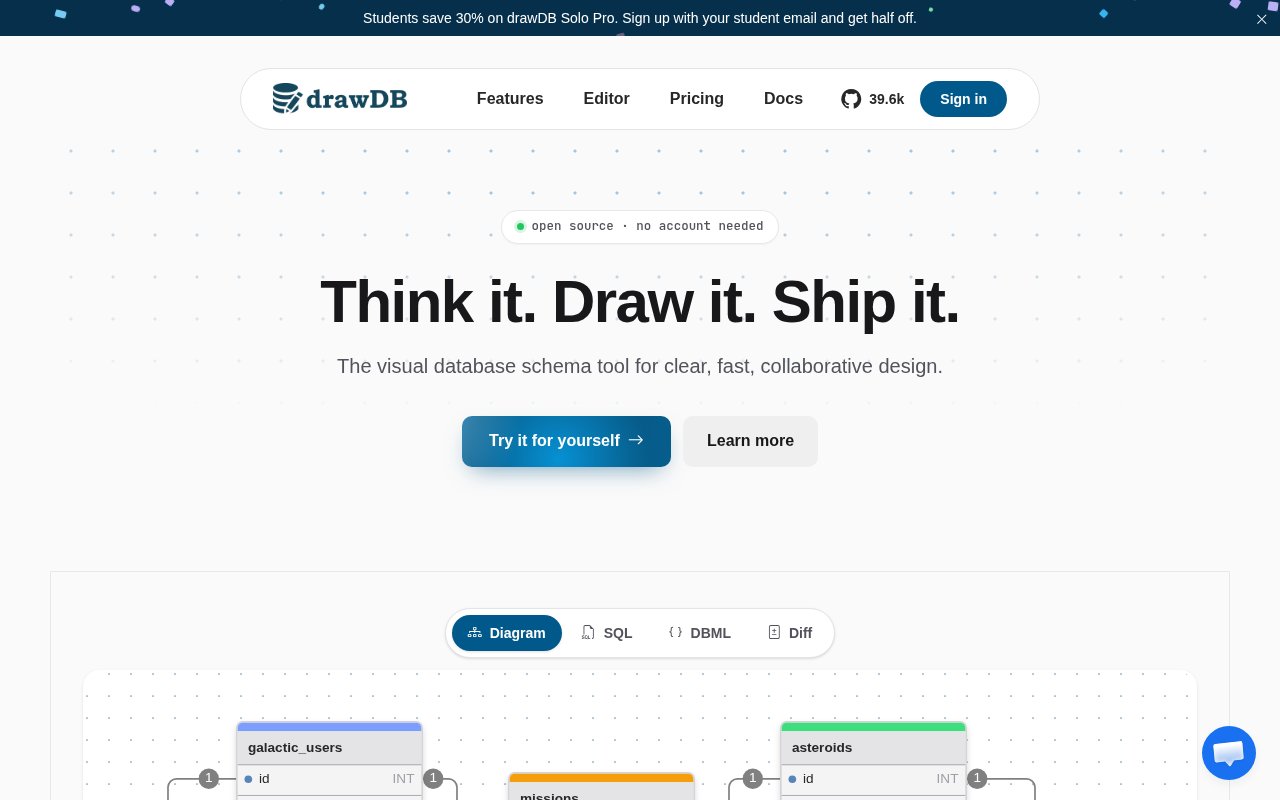
drawDB is a browser-based editor for database schemas and entity relationship diagrams. You open it, draw tables and relationships, and get SQL out the other end, or you paste in existing DDL and it reverse-engineers the diagram for you. The core editor is free and open source under the AGPL-3.0 license, needs no account, and stores diagrams locally in your browser. drawDB Pro adds cloud storage, sharing, an AI schema assistant, an MCP server for coding agents and, on the Team plan, live collaboration and permissions. Nothing about the free editor requires a server, and a diagram can go from blank canvas to exported SQL without ever signing in.
The problem it goes after is that schema design tends to live in two bad places, a whiteboard photo nobody can edit or a migration file nobody can read at a glance. A diagram that round-trips to real SQL solves both. drawDB supports MySQL, PostgreSQL, SQLite, MariaDB, SQL Server and Oracle, plus a generic dialect, with import and export for each, and it also exports DBML, JSON and images. Templates and custom templates give you a starting point rather than a blank canvas. The generic dialect is useful when you're still deciding which database you'll use, and the DBML export is handy for teams that keep schemas as text in version control.
Day to day it's a visual editor. You add tables, set column types, draw relationships and annotate, and the SQL updates to match. Import takes a DDL script by paste or upload, so an existing database can be visualised without redrawing anything. Because the free editor keeps everything in IndexedDB, it works without sending your schema anywhere, though it also means you should export before clearing browser data. Self-hosting is supported with a Dockerfile, and a separate server component exists for file sharing. Keyboard shortcuts are documented, the interface is customisable, and the editor also generates migration scripts, so a change to the diagram can become a change to the database rather than a note to remember.
Pro is where teams and agents come in. Diagrams sync to the cloud and can be shared publicly. The AI schema assistant lets you describe what you need in plain language and drafts tables, relationships and types directly onto the diagram, and it can modify what's already there. The MCP server exposes your diagrams to coding tools, so an agent working in your codebase can read the schema it's meant to build against, and API keys let you script the same access. The Team plan adds live collaboration with shared cursors and presence, diagram permissions with roles, and a team-wide MCP server. The docs also describe version history and migration tracking.
It fits backend developers, data engineers and students designing or documenting relational schemas, and increasingly teams who want their coding agents to work from an accurate model instead of guessing at table names. Solo developers get the most from Pro's cloud sync and AI assistant, while teams are the audience for collaboration and permissions. Students and people learning SQL get a free tool that shows how a diagram maps to DDL in both directions, and consultants documenting a client's database can produce a diagram and an image export from a schema dump in a few minutes.
What makes it different is credibility. The open-source editor has more than 37,000 stars on GitHub, an active Discord, and a track record most schema tools can't match, and the Pro layer builds on that editor rather than replacing it. The MCP angle is also unusual among diagram tools. Rather than bolting a chatbot onto the side, drawDB treats agents as first-class consumers of the schema, which is the direction a lot of database work is heading. It's also a genuinely open project. The editor is AGPL-3.0 on GitHub, the docs are public, and you can self-host the free version with Docker if you'd rather keep everything inside your own network.
Pricing is freemium. The editor is free with no account. Solo Pro is $14 a month and Team Pro is $17 per user per month, both with a seven-day free trial and no card required, and an Enterprise tier adds SSO, audit logs and custom contracts. Students get a discount on Solo Pro. Billing runs through Paddle with a published refund policy, and support is reachable at support@drawdb.app, on Discord, or through GitHub issues. Sign-in is only needed for Pro features, and the FAQ on the pricing page is clear that the free editor stays free and open source with Pro layered on top, not in place of it.
Key Features
- Visual ER diagram editor in the browser
- SQL import and export for six dialects plus DBML and JSON
- Local-first free editor with no account
- Cloud storage and public sharing in Pro
- AI schema assistant and MCP server for coding agents
- Live collaboration and permissions on Team
Pros & Cons
What we like
- Free editor is fully usable and open source
- Reverse-engineers diagrams from existing DDL
- Agents can read the schema over MCP
- Large community and long track record
Room for improvement
- Free diagrams live in browser storage until exported
- Collaboration and permissions need the Team plan
- Oracle support is still marked beta
- AGPL license matters if you fork the editor
Frequently Asked Questions
What is drawDB?
Is drawDB free?
What does the MCP server do?
Can I import an existing database?
Best For
Featured in
Alternatives to drawDB
View allMongoDB Atlas
The fully-managed cloud version of MongoDB with built-in search, vector search, time series, and serverless tiers.

Neon
Serverless Postgres with database branching, scale-to-zero compute, and a generous free tier.

Airtable
Spreadsheet-database hybrid with linked records, multiple views, automations, and an interface designer for internal apps.

DataExpert.io Academy
Live and self-paced academy that trains you for real data engineering and AI jobs
Our take
Tool Index Editorial · Sep 2026· 4.0/5
drawDB is a mature browser editor for designing relational schemas, importing DDL and exporting SQL, DBML, JSON or images. The free AGPL editor needs no account and supports MySQL, PostgreSQL, SQLite, MariaDB, SQL Server, Oracle and a generic dialect. For developers documenting an inherited database, reverse engineering from DDL is the feature that makes it more than a drawing canvas.
Paid plans add cloud storage, version history, GitHub integration, AI help and MCP access, while Team adds live collaboration and permissions. A seven-day trial is offered, but the captured page rendered the exact monthly amounts ambiguously, so we would verify them at checkout. We like the large public community and genuinely useful free tier. The main free-plan risk is local browser storage, which can disappear if users clear site data, and teams must pay for collaboration. Export backups should be part of the workflow.
Editorial opinion from the Tool Index team, written from the public product pages. Not a user review.
Reviews (0)
Badge builder
Add drawDB to your website
Choose a badge style and size, preview it here, then copy the generated HTML. Badge images are self-contained SVGs and do not require an external script.

<a href="https://toolindex.net/tools/drawdb?ref=badge" target="_blank" rel="noopener">
  <img src="https://toolindex.net/badge/drawdb/medium.svg" alt="drawDB - Listed on Tool Index" width="180" height="50" />
</a>How to use the badge
- 1. Pick the style, size, and theme that fit your layout.
- 2. Copy the generated HTML from the code block.
- 3. Paste it into your footer, homepage, or press page.
Standard badge available
The standard listing badge is available now. Score and circle badges are limited to tools currently ranked in the top 10 of a category.
Badge clicks return visitors to this profile with a referral tag so the source remains identifiable.
Related Tools

Supabase
The open source Firebase alternative

Sleep Suivour
Track your sleep, improve your rest

Upstash
Serverless Redis, Kafka, and QStash for modern applications
PlanetScale
Serverless MySQL platform with branching and zero-downtime migrations
Work on drawDB? Request listing access or correction