esigna
Email signature generator with AI bobblehead avatars for Gmail, Outlook, and more
Gallery
About esigna
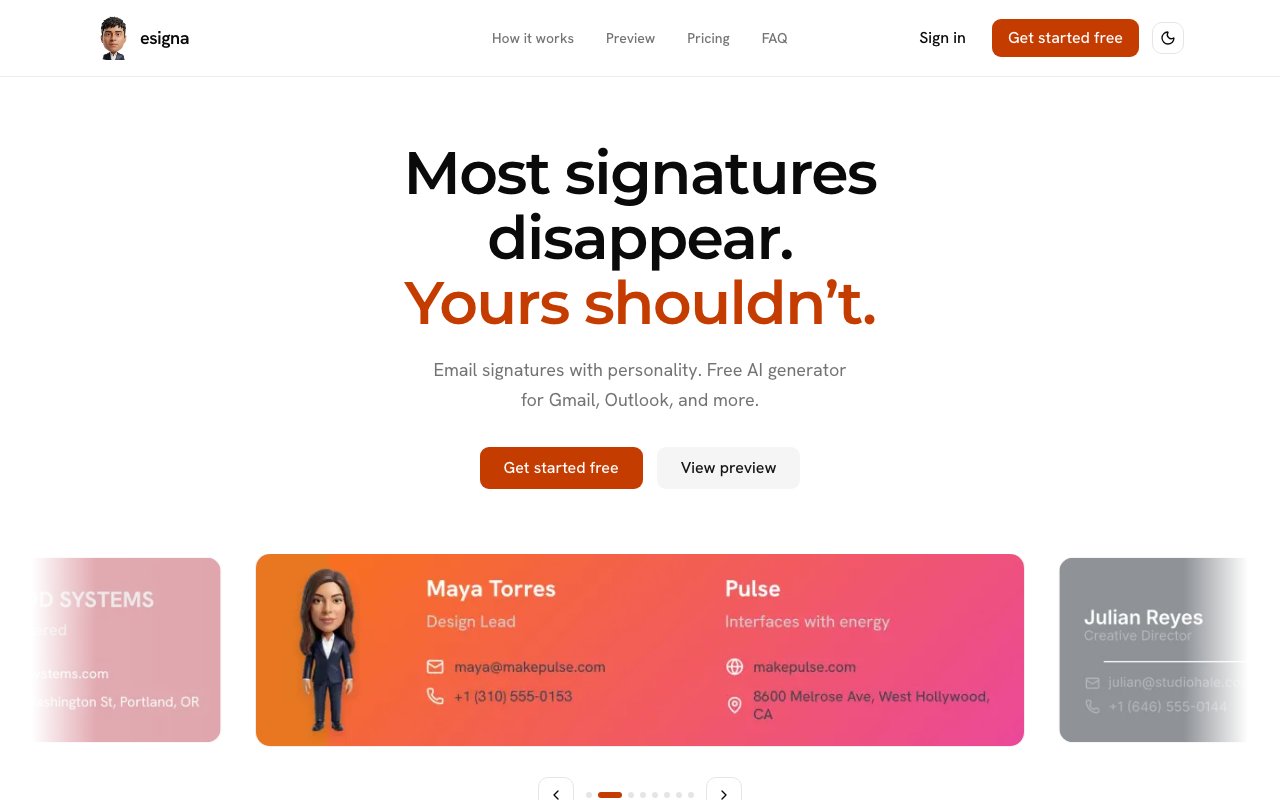
Esigna is a free email signature generator that brings personality to professional communication through AI generated bobblehead avatars. Rather than settling for generic text based signatures or stock photo templates, users upload their own photo and the platform creates a custom cartoon style avatar with automatic background removal. The result is a distinctive visual element that makes email signatures memorable while maintaining professional polish across Gmail, Outlook, Apple Mail, Proton Mail, Thunderbird, and other major email clients. Every signature becomes a small piece of personal branding that recipients actually notice.
The creation process follows three straightforward steps that anyone can complete in minutes. Users start by uploading a portrait photo, which the AI transforms into a stylized bobblehead character with automatic background removal. Next, they select from eight pre designed signature layouts tailored to different professional contexts, ranging from minimalist corporate formats to creative layouts with more visual flair. Finally, a live editor allows real time customization of colors, fonts, contact details, job titles, company information, and social media links before exporting the finished signature as a PNG image. The whole workflow doesn't require design skills, specialized software, or account signup to get started with the free tier.
What sets esigna apart from traditional signature generators is its focus on visual personality without sacrificing professionalism. The bobblehead avatars strike a careful balance between approachable and polished, making them suitable for creative professionals, consultants, educators, photographers, developers, and anyone who wants their emails to stand out in crowded inboxes. Role specific templates provide starting points optimized for different industries, so a teacher's signature layout differs thoughtfully from a photographer's or a tech consultant's. The avatars maintain enough similarity to the original photo that colleagues recognize the person while adding a playful artistic interpretation that catches attention.
The platform operates on a generous freemium model designed to let anyone create great signatures without spending money. Core functionality remains completely free with unlimited signature designs and PNG exports, no credit card required. Users can iterate through multiple design variations, test different layouts, and export as many signatures as they need without hitting artificial limits. For users who want higher quality avatar generation with more detail, or those creating multiple signatures for teams, optional credit packs are available as one time purchases rather than recurring subscriptions. The Starter pack includes 10 credits, Standard offers 25 credits for $9.99, and Plus provides 60 credits at $19.99 for teams or agencies. Medium quality avatars consume one credit while high quality versions use two, giving users transparent control over budget allocation.
Beyond the avatar generation, esigna includes several practical features for everyday professional use. Hosted signature links allow users to share previews via URL, which proves useful when coordinating team signatures across an organization or showing clients design options before finalizing. Team leads can send links to review and approve signatures without needing to export and attach files. The live editor displays changes instantly, eliminating the guesswork of traditional template based tools where you have to export and test before seeing the final result. All exports are specifically optimized for email client compatibility, using dimensions and file formats that render correctly across platforms and avoiding the image sizing issues that plague many signature tools.
The target audience spans solo professionals looking to differentiate themselves and small teams wanting consistent yet personalized signatures across their organization. Freelancers, consultants, and creative agencies particularly benefit from signatures that reflect individual personality while maintaining brand cohesion through consistent layouts and color schemes. Real estate agents, sales professionals, and anyone who sends significant volumes of outbound email finds value in signatures that create positive impressions before recipients even read the message. The free tier makes it accessible for anyone to experiment without financial commitment, while the credit system ensures power users can generate high quality avatars for entire teams economically.
Esigna represents a shift in how professionals approach email signatures, treating them as genuine branding opportunities rather than afterthoughts. Instead of copying generic templates or using the same tired formats as everyone else, the platform encourages users to see signatures as touchpoints that shape how recipients perceive them professionally. The combination of AI avatar generation that creates something truly unique, flexible templates that adapt to different industries, and client agnostic exports positions it as a practical solution for anyone tired of bland email footers who doesn't have time or design skills to create custom graphics from scratch.
Key Features
- Eight customizable signature templates
- AI bobblehead avatar generation
- PNG export for universal compatibility
- Unlimited saved signatures
- Shareable preview links
- Background removal on uploaded photos
Pros & Cons
What we like
- Signature editor is completely free with no limits
- Avatar credits never expire
- Works with Gmail, Outlook, Apple Mail, and more
- No watermarks on free exports
Room for improvement
- AI avatars require purchasing credit packs
- PNG format means manual paste in some webmail clients
- Limited to eight layout templates
- Avatars are stylized bobbleheads, not realistic illustrations
Frequently Asked Questions
What is esigna?
Is esigna free?
Which email clients does esigna support?
How does the AI avatar feature work?
Best For
Featured in
Alternatives to esigna

CalendHub
Smart scheduling and calendar management for teams
Kevin Gabeci Toolkits
Seven AI toolkits for writing books, making music, cutting video, and building agents.

PrimeTask
Offline-first work OS with tasks, CRM, and canvas views you buy once and own forever
Kibu
Vertical software for disability service providers covering compliance, documentation, and programming
Reviews (11)
Worth a look
Picked esigna for the price, stayed for the quality. Got real value out of signature editor is completely free with no limits. Setup was painless and I was productive the same day. Mostly using it for adding personality to cold outreach emails. Easy yes for anyone weighing the same trade offs.
Genuinely impressed
Started using esigna casually, now it is pinned in my dock. It handles the boring parts so I can focus on the work that matters. Would sign up again without thinking twice.
Solid daily driver
Have been running esigna for a while, here is where I land. Got real value out of eight customizable signature templates. Glad I made the switch.
Good, with a few caveats
Hadn't planned on switching, but esigna was hard to ignore. Their take on unlimited saved signatures is genuinely good. It would be a five if not for limited to eight layout templates.
It just works
Have been running esigna for a while, here is where I land. The eight customizable signature templates is more useful than I expected. It earns its place in my stack.
Exactly what I needed
Hadn't planned on switching, but esigna was hard to ignore. Their take on background removal on uploaded photos is genuinely good. Would sign up again without thinking twice.
Solid daily driver
Three months of esigna later, here is what holds up. Got real value out of eight customizable signature templates. Recommending it to people in a similar spot.
Good, with a few caveats
Three months of esigna later, here is what holds up. What stands out is how it handles ai bobblehead avatar generation. It fits well for replacing a plain text signature with a visual design. The catch is png format means manual paste in some webmail clients.
Exactly what I needed
esigna has quietly become part of my daily flow. Their take on background removal on uploaded photos is genuinely good. The output quality holds up better than I expected. Would sign up again without thinking twice.
Good, with a few caveats
Tried esigna on a side project first, then rolled it out everywhere. Support actually answered when I had a question, which surprised me. The interface stays out of my way, which I appreciate. The catch is ai avatars require purchasing credit packs. Hard to imagine going back to my old setup.
Finally something that fits
Picked esigna for the price, stayed for the quality. The eight customizable signature templates is more useful than I expected. Found it works best for adding personality to cold outreach emails. It earns its place in my stack.
Badge builder
Add esigna to your website
Choose a badge style and size, preview it here, then copy the generated HTML. Badge images are self-contained SVGs and do not require an external script.

<a href="https://toolindex.net/tools/esigna?ref=badge" target="_blank" rel="noopener">
  <img src="https://toolindex.net/badge/esigna/medium.svg" alt="esigna - Listed on Tool Index" width="180" height="50" />
</a>How to use the badge
- 1. Pick the style, size, and theme that fit your layout.
- 2. Copy the generated HTML from the code block.
- 3. Paste it into your footer, homepage, or press page.
Standard badge available
The standard listing badge is available now. Score and circle badges are limited to tools currently ranked in the top 10 of a category.
Badge clicks return visitors to this profile with a referral tag so the source remains identifiable.
Related Tools

Confluence
Atlassian's long-running team wiki that anchors many enterprise knowledge stacks
Asana
Project management for teams that live in projects, tasks and dependencies
Kevin Gabeci Toolkits
Seven AI toolkits for writing books, making music, cutting video, and building agents.

Logseq
An open-source outliner notes app where every bullet is a first-class block
Work on esigna? Request listing access or correction