
Formgong
Generate working website forms that deliver submissions without your own backend
Gallery
About Formgong
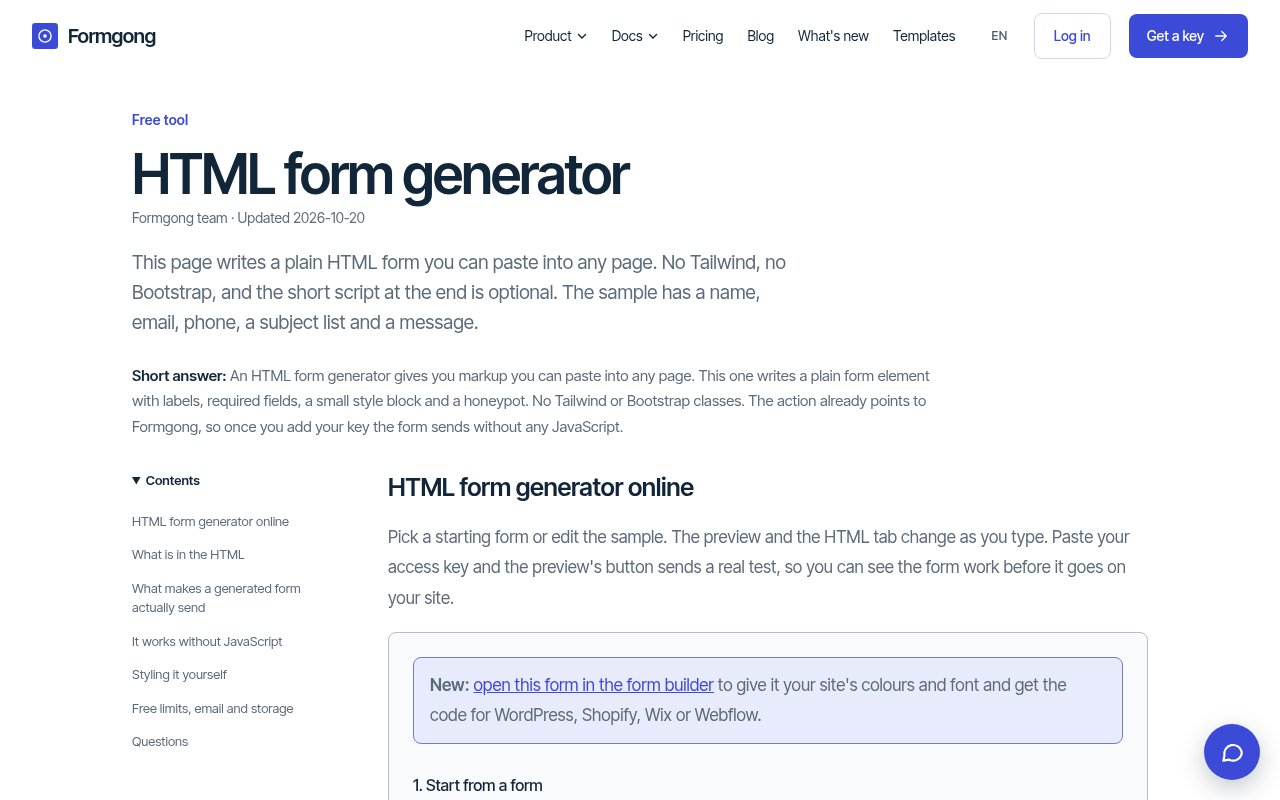
Formgong is a hosted form service with a free HTML form generator for people who need a working contact, booking, feedback, or lead form without building a backend. The generator starts with a preset or a plain-language description, lets the user edit fields, and produces code that already posts to Formgong. The important distinction is that the result isn't just a visual mockup. Once an access key replaces the placeholder, the form can deliver real submissions. That makes it useful for static sites, small business pages, and projects made with website builders where the page itself is easy to create but receiving form data is still awkward.
The generator is unusually transparent about what goes into the output. A user can change the heading, button text, field labels, input types, placeholders, choices, order, and required status while watching a live preview. It then provides versions for plain HTML, HTML with Tailwind, Bootstrap 5, React, and Vue, plus a prompt that can be pasted into an AI website builder. The plain version includes scoped CSS, visible labels, browser validation, per-field error lines, autocomplete attributes, and a hidden honeypot. Its short JavaScript block is optional. Without that script, the browser still posts the form and Formgong returns a success or error page. With it, the visitor stays on the original page and sees a success message only after the service confirms that the submission was saved.
Delivery is handled through one public endpoint and a form-specific access key. New submissions can appear in Formgong's inbox and arrive by email or Telegram, while Google Sheets and signed webhooks cover workflows that need data elsewhere. Telegram setup uses a bot link instead of making the user find and paste a chat identifier. The inbox supports reviewing submissions, separating spam, and exporting a CSV designed to open cleanly in Excel. Recipients, redirects, Telegram delivery, and webhooks are managed in the dashboard, so those settings can change without editing or redeploying the site. Formgong also offers routing rules on higher plans for teams that need different leads to reach different people.
Spam handling and measurement are built around forms rather than added as separate services. The honeypot is always present, Cloudflare Turnstile is available even on the free plan, and messages classified as spam don't consume the submission allowance. Optional analytics track views, starts, conversions, and the source of each lead without cookies or browser fingerprinting. The service says submission data is stored in the EU, which gives teams a clear data location to consider during their own compliance review. The form's thank-you page, error messages, CAPTCHA, and default automatic reply can follow the visitor's language, with the site documenting support for twelve languages. None of this removes the need to write a privacy notice, but it reduces the number of separate tools needed to operate a modest website form.
Formgong fits freelancers, small businesses, agencies, and developers who already control the front end and don't want to maintain server code for submissions. It works especially well when the site accepts custom HTML, whether that is a hand-coded static page, WordPress block, or an embed inside a visual builder. Less technical users can begin from a template or description, while developers can remove the included style block, preserve the required field names and hidden values, and let an existing design system take over. There's also an MCP server that lets supported coding tools list forms, create one, and add its snippet. The narrow form endpoint model is a strength here, though teams seeking a full CRM or deeply custom server-side workflow will still need another system behind the webhook.
The pricing is genuinely freemium. Copying code from the HTML generator needs no account, and the Free plan accepts up to 250 submissions a month for one contact form, includes as many as three email recipients and three webhooks, and keeps submissions for 30 days. Starter raises the allowance to 1,000 monthly submissions, removes Formgong branding, adds automatic replies, and extends retention. Pro adds a much larger submission allowance, routing rules, more recipients, inbox operators, longer retention, and other product features. An Agency plan adds separate client spaces and shared capacity. The free generator has hourly and daily limits on AI-written forms, but manual field editing continues in the browser when those limits are reached. It's a practical entry point for a live form, with paid plans becoming relevant as branding, volume, retention, or team routing matter.
Key Features
- Live HTML form generator
- Email and Telegram delivery
- Backend-free submission endpoint
- Honeypot and Turnstile protection
- Cookie-free form analytics
- Signed webhook delivery
Pros & Cons
What we like
- Generated forms can send real submissions
- JavaScript is optional for basic delivery
- Free plan includes email and Telegram
- Settings change without a site redeploy
Room for improvement
- Free forms retain Formgong branding
- Free submission history lasts 30 days
- AI generation has usage limits
- Advanced routing requires Pro
Frequently Asked Questions
What is Formgong?
Does a generated form need JavaScript?
Is Formgong free?
Where can Formgong send submissions?
Best For
Featured in
Alternatives to Formgong
View all
Framer
Visual website builder that lets designers ship production-grade marketing sites with real CMS, SEO controls, and code components.
Contentful
Headless CMS that models content as structured data and delivers it through APIs to web, mobile, and other channels.

Sanity
Composable content platform with a customizable studio, real-time collaboration, and a queryable structured content backend.

Teachizy
France-based no-code platform for building, hosting, and selling online courses without tech skills
Reviews (0)
Badge builder
Add Formgong to your website
Choose a badge style and size, preview it here, then copy the generated HTML. Badge images are self-contained SVGs and do not require an external script.

<a href="https://toolindex.net/tools/formgong?ref=badge" target="_blank" rel="noopener">
  <img src="https://toolindex.net/badge/formgong/medium.svg" alt="Formgong - Listed on Tool Index" width="180" height="50" />
</a>How to use the badge
- 1. Pick the style, size, and theme that fit your layout.
- 2. Copy the generated HTML from the code block.
- 3. Paste it into your footer, homepage, or press page.
Standard badge available
The standard listing badge is available now. Score and circle badges are limited to tools currently ranked in the top 10 of a category.
Badge clicks return visitors to this profile with a referral tag so the source remains identifiable.
Related Tools
Sanity
Composable content platform with a customizable studio, real-time collaboration, and a queryable structured content backend.

Bubble
Full-stack no-code platform for building real web applications with visual programming, a database, and a workflow engine.

Tally
Form builder with a Notion-like editor, conditional logic, payments, and a generous free tier with unlimited submissions.

Glide
No-code platform that turns spreadsheets and databases into mobile and web apps, with computed columns and AI actions.
Work on Formgong? Request listing access or correction