
Gallery
About GPU Hour
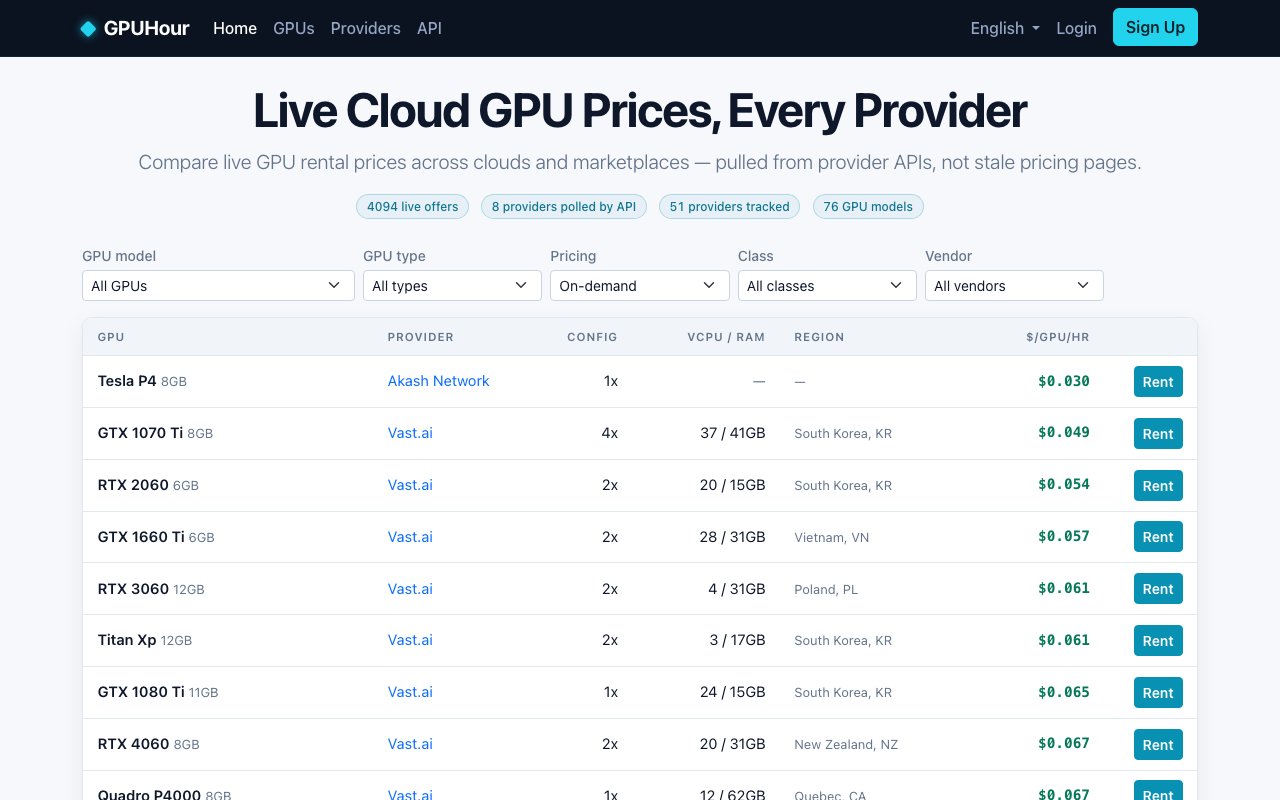
GPU Hour is a price comparison site for cloud GPU rentals that pulls live pricing data from over fifty providers via their APIs. It covers seventy six GPU models, spanning from consumer RTX cards like the 3090 and 4090 up through enterprise datacenter GPUs including A100s, H100s, H200s, B200s, and the latest B300 series, and shows you where to rent compute for the lowest cost at any given moment. If you're spinning up training runs, inference workloads, or just need a few hours of GPU time for a side project, this tells you who's cheapest right now rather than making you check a dozen pricing pages yourself.
The core value proposition is freshness. Cloud providers update rates constantly, spot prices fluctuate throughout the day based on demand, and decentralized marketplaces like Akash and Vast have entirely dynamic listings that depend on who's offering capacity at what price at that exact moment. Static comparison tables go stale the moment they're published. GPU Hour polls provider APIs directly every few hours and surfaces what's actually available, not what someone copy pasted from a pricing page six months ago. When you see a price, it reflects what the provider is charging at that moment, which matters when the difference between providers can be several dollars per GPU hour and the total cost of a multi day training run adds up fast.
Filtering is straightforward and designed for practical use cases. You can narrow by GPU model, provider, region, pricing type (spot versus on demand), and hardware class. If you only care about A100 80GB availability in North America because you need low latency to your existing infrastructure, or you want to find the absolute cheapest H100 anywhere regardless of provider because you can tolerate high latency for batch processing, you can slice the data to answer that question directly. The interface shows prices per GPU per hour in USD, ranging from a few cents for older consumer cards up to more than ten dollars per hour for the newest enterprise hardware. There's also a breakdown of VRAM capacity, provider name, and whether the instance is spot or on demand so you can compare apples to apples when weighing options.
For developers who want to integrate the data into their own tooling, there's a free JSON API available at the /api/v1/offers/ endpoint. You can query programmatically without authentication and build automation around price thresholds, alerting, or dynamic provisioning workflows. This is useful if you're running flexible workloads that can shift between providers based on cost, or if you want to build internal dashboards that track GPU pricing over time for budgeting purposes. The API returns the same data shown on the website, structured in a way that's easy to parse and filter in code. You could build a script that checks prices every hour and sends a Slack notification when H100 spot pricing drops below a threshold, for instance.
The target audience is machine learning engineers, AI researchers, and anyone renting GPUs for compute intensive tasks on a recurring or occasional basis. If you're already comparison shopping across Lambda, RunPod, CoreWeave, Akash, Vast.ai, Tensordock, and a handful of others, GPU Hour consolidates all of that into a single view so you don't have to keep multiple tabs open and manually check each provider's dashboard. If you're new to GPU rentals and don't know which provider to try first, this gives you a ranked list sorted by price, which is often the simplest way to pick a starting point when you don't have strong preferences about where your workload runs. Power users who already have accounts on several platforms can use it to spot arbitrage opportunities when one provider suddenly drops their spot pricing while others haven't adjusted yet.
The site is free to use and doesn't require an account. There's no login required to browse, no paywall gating the comparison data, and the API access doesn't require payment or rate limiting keys. Revenue likely comes from referral links or partnerships with providers, though that's not stated explicitly anywhere on the site. You're not giving up email addresses or signing up for newsletters to access the data. The interface is available in over sixty languages, though the pricing data itself is displayed in USD regardless of locale. That internationalization makes it accessible to researchers and engineers outside the US who need the same information.
GPU Hour isn't a marketplace. You don't rent GPUs through the site itself. You see the prices, click through to the provider, and complete the transaction on their platform using their own checkout and billing. It's purely a comparison aggregator, which keeps the experience simple but also means you can't do things like unified billing across multiple providers or cross provider orchestration from a single dashboard. For most users who just want to find the cheapest H100 before kicking off a training run, that limitation doesn't matter. You get the answer in seconds and take it from there. The workflow is browse, filter, pick, click through, and you're done.
Key Features
- Live pricing from over fifty providers
- Seventy-six GPU models tracked
- Filtering by model, provider, and pricing type
- Spot and on-demand price comparison
- Free JSON API for programmatic access
- Multi-language interface support
Pros & Cons
What we like
- Data pulled from provider APIs rather than static pages
- Covers both budget consumer cards and enterprise GPUs
- Free to browse with no account required
- API lets you automate price monitoring
Room for improvement
- No direct rental integration, you still book elsewhere
- Coverage depends on which providers expose APIs
- Spot pricing can change between viewing and booking
- No historical pricing trends shown
Frequently Asked Questions
What is GPU Hour?
Is GPU Hour free?
How current is the pricing data?
Can I rent GPUs directly through GPU Hour?
Best For
Featured in
Alternatives to GPU Hour
MongoDB Atlas
The fully-managed cloud version of MongoDB with built-in search, vector search, time series, and serverless tiers.
Hetzner
High-performance European cloud hosting at unbeatable prices

Neon
Serverless Postgres with database branching, scale-to-zero compute, and a generous free tier.
Cloudflare Pages
Free Jamstack hosting on Cloudflares edge with unlimited bandwidth and tight integration with Workers.
Reviews (0)
Badge builder
Add GPU Hour to your website
Choose a badge style and size, preview it here, then copy the generated HTML. Badge images are self-contained SVGs and do not require an external script.

<a href="https://toolindex.net/tools/gpuhour?ref=badge" target="_blank" rel="noopener">
  <img src="https://toolindex.net/badge/gpuhour/medium.svg" alt="GPU Hour - Listed on Tool Index" width="180" height="50" />
</a>How to use the badge
- 1. Pick the style, size, and theme that fit your layout.
- 2. Copy the generated HTML from the code block.
- 3. Paste it into your footer, homepage, or press page.
Standard badge available
The standard listing badge is available now. Score and circle badges are limited to tools currently ranked in the top 10 of a category.
Badge clicks return visitors to this profile with a referral tag so the source remains identifiable.
Related Tools

Coolify
Self-hostable, open source alternative to Heroku and Netlify
Hetzner
High-performance European cloud hosting at unbeatable prices

Upstash
Serverless Redis, Kafka, and QStash for modern applications

Heroku
The original git-push PaaS. Owned by Salesforce, still kicking, still the easiest way to deploy a Rails or Django app.
Work on GPU Hour? Request listing access or correction