
Hinode
Cloud Linux desktop with a dedicated GPU that auto-pauses when you step away
Gallery
About Hinode
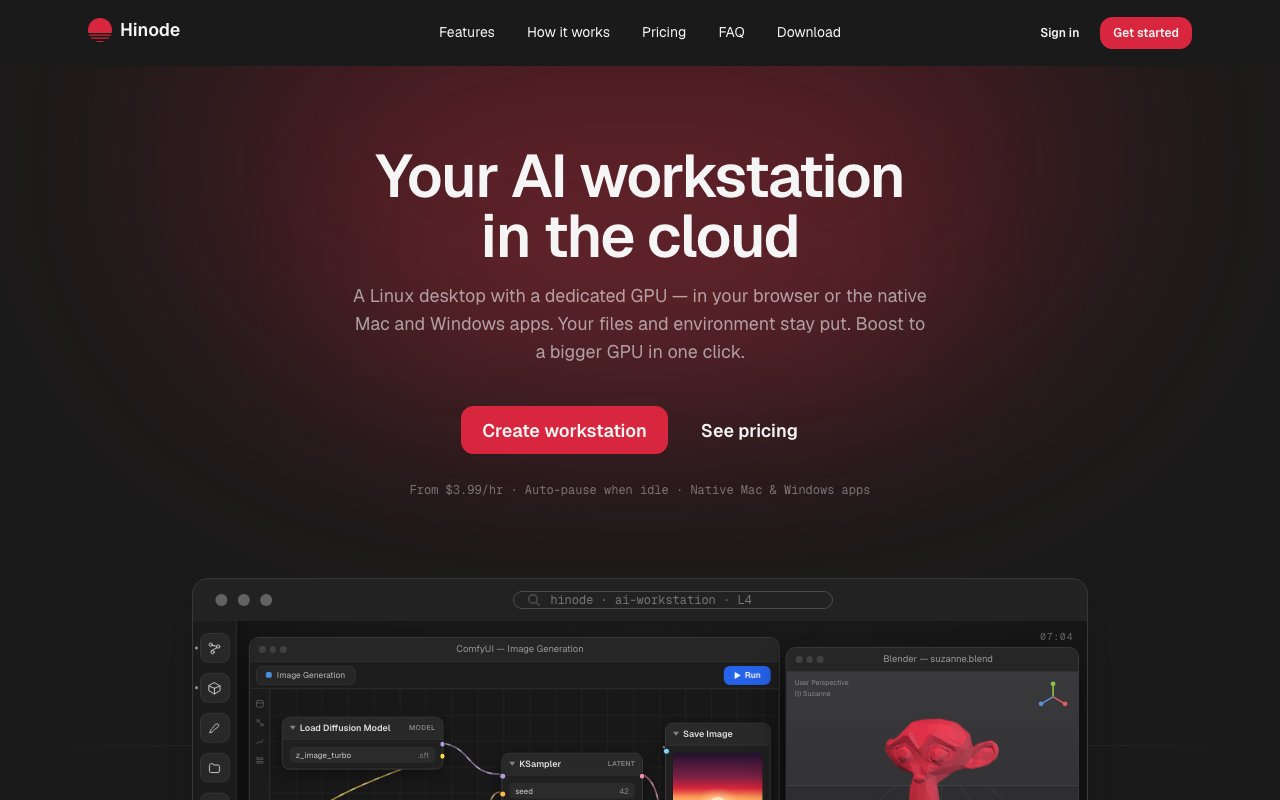
Hinode is a cloud workstation that gives you a full Linux desktop with a dedicated GPU, accessible from a browser or native Mac and Windows applications. It's built for AI work, creative projects, and anything else that needs serious graphics horsepower without buying your own hardware. The key difference from typical GPU rental is that it doesn't throw away your environment when you stop. Everything persists, so you pick up where you left off instead of rebuilding your setup every session. If you've ever spent the first twenty minutes of a GPU rental session reinstalling packages and downloading models, this is the alternative.
The usual problem with renting GPU time is that you're paying for a disposable pod. You spin it up, do your work, and when you shut it down, everything disappears. The next time you need GPU access, you start from scratch. Hinode treats the machine more like a laptop you forgot at home. It hibernates after fifteen minutes of idle time, then wakes up with your files, your installed packages, and your open applications exactly as you left them. You're only charged while the workstation is actively running, not while it sits paused. That model changes the economics significantly if your work happens in bursts rather than continuous sessions.
The streaming technology delivers the desktop at 1440p resolution using H.265 video at 60 frames per second, so the experience feels close to local even though the hardware is in a data center. Latency depends on your network, but for most tasks it's responsive enough that you don't notice the difference. You access it through Chrome, Edge, or other Chromium based browsers. Safari and Firefox lack full support for the underlying WebTransport and WebCodecs standards, so they won't work. Native apps for Mac and Windows are also available if you prefer not to run everything in a browser tab or want better system integration.
A feature called Boost lets you temporarily upgrade to a larger GPU for a single demanding task. If you're normally on the Standard tier but need more VRAM for a particular training run or render, you can boost with one click, pay only the hourly rate difference for that window, then drop back automatically when you're done. There's no need to switch plans or spin up a separate machine for occasional heavy work. It's useful if most of your day needs modest GPU power but you occasionally hit something that requires more.
The workstations come preloaded with an AI ready image. That includes CUDA, PyTorch, JupyterLab, VS Code, and a stack of machine learning libraries. It also includes ComfyUI for image generation workflows, Blender for rendering, Ollama for running local language models, Hugging Face integrations, LangChain, and vLLM. You can install anything else you need since it's a full Linux desktop, but the common tools are already there so you can start working immediately rather than spending time on setup. The preloaded stack covers most generative AI and ML workflows out of the box.
Pricing splits into three tiers. Standard runs an L4 GPU with 24 GB of VRAM and 32 GB of RAM for either 299 dollars per month on subscription or 3.99 dollars per hour on demand. Pro bumps that to an L40S with 48 GB of VRAM and 64 GB of RAM at 399 dollars monthly or 4.99 dollars hourly. Power goes to an RTX Pro 6000 with 96 GB of VRAM and 128 GB of RAM for 599 dollars monthly or 6.99 dollars hourly. Monthly subscriptions include 100 active hours, with excess time billed at lower subscriber rates. Storage is billed separately by the gigabyte. You can switch between subscription and hourly billing whenever you want, which gives flexibility for months where usage varies. If you have a heavy month, subscription makes sense. If you're only working a few hours, pay as you go keeps costs down.
Hinode fits researchers, AI engineers, and creative professionals who need persistent GPU access without managing their own hardware. If you're running experiments that take days, maintaining generative AI workflows, or rendering large Blender projects, it removes the friction of constantly reprovisioning. Data sits on encrypted volumes while the workstation is active and gets snapshotted to object storage when paused, with the option to export anytime. The same session is reachable from multiple devices, so you can start work on your laptop and continue later from a desktop. For anyone who has tried the disposable pod approach and found it tedious to rebuild environments repeatedly, this is a different model worth considering.
Key Features
- Persistent state with auto-pause after idle
- One click GPU tier boost for heavy tasks
- H.265 streaming at 1440p and 60 fps
- Preloaded AI and ML development tools
- Hybrid subscription or hourly billing
- Cross device session continuity
Pros & Cons
What we like
- Environment persists between sessions so you never rebuild
- Auto-pause means you only pay while actively working
- Preloaded stack gets you running without setup
- Temporary GPU boost keeps costs down for occasional heavy work
Room for improvement
- Requires stable internet for the streaming workflow
- Linux only, no Windows or macOS cloud desktop
- Monthly subscription still costs more than owning hardware long term
- Browser support limited to Chromium based browsers
Frequently Asked Questions
What is Hinode?
How does billing work on Hinode?
What software comes preinstalled?
Who is Hinode for?
Best For
Featured in
Alternatives to Hinode
View allMongoDB Atlas
The fully-managed cloud version of MongoDB with built-in search, vector search, time series, and serverless tiers.
Hetzner
High-performance European cloud hosting at unbeatable prices

Neon
Serverless Postgres with database branching, scale-to-zero compute, and a generous free tier.
Cloudflare Pages
Free Jamstack hosting on Cloudflares edge with unlimited bandwidth and tight integration with Workers.
Reviews (0)
Badge builder
Add Hinode to your website
Choose a badge style and size, preview it here, then copy the generated HTML. Badge images are self-contained SVGs and do not require an external script.

<a href="https://toolindex.net/tools/hinode?ref=badge" target="_blank" rel="noopener">
  <img src="https://toolindex.net/badge/hinode/medium.svg" alt="Hinode - Listed on Tool Index" width="180" height="50" />
</a>How to use the badge
- 1. Pick the style, size, and theme that fit your layout.
- 2. Copy the generated HTML from the code block.
- 3. Paste it into your footer, homepage, or press page.
Standard badge available
The standard listing badge is available now. Score and circle badges are limited to tools currently ranked in the top 10 of a category.
Badge clicks return visitors to this profile with a referral tag so the source remains identifiable.
Related Tools

Coolify
Self-hostable, open source alternative to Heroku and Netlify
Hetzner
High-performance European cloud hosting at unbeatable prices

Upstash
Serverless Redis, Kafka, and QStash for modern applications

Heroku
The original git-push PaaS. Owned by Salesforce, still kicking, still the easiest way to deploy a Rails or Django app.
Work on Hinode? Request listing access or correction