
ListenDock
Turn papers, documents, and text into audio you can listen to anywhere
Gallery
About ListenDock
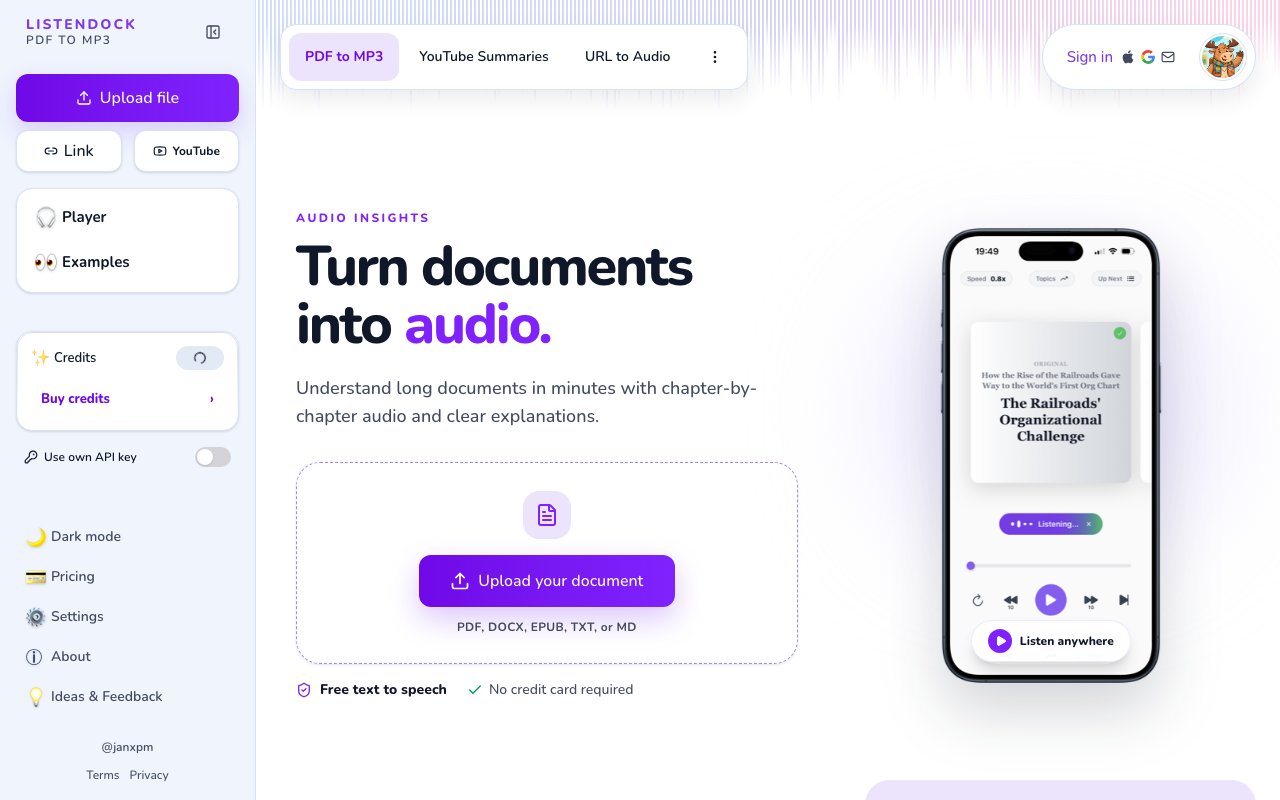
ListenDock turns documents into audio you can actually listen to. You hand it a file or a link, and it produces spoken episodes you can play on the web or through its mobile apps, so long reports, research papers, and books become something you can get through on a walk or a commute instead of staring at a screen. The short version, papers explained in audio, is the core idea, though it handles far more than papers. Books, reports, specs, and web pages all go in the same way, and what comes out is a set of audio episodes you control the pace of.
The reading pile only ever grows. There's always another paper, another spec, another long PDF that matters but never quite makes it to the top of the list, and the time to sit and read it rarely appears. ListenDock goes after that backlog by moving it into a format you can consume while doing something else. Rather than skimming and hoping you caught the point, you can listen the whole way through in the gaps of a normal day. The format also changes what counts as reading time, since a commute, a workout, or the walk to lunch all become moments where a paper can actually get finished.
You upload a document in one of several formats, PDF, DOCX, EPUB, TXT, or Markdown, or you paste a URL, and ListenDock generates the audio. It breaks the material into chapters so you can move through it in pieces, and it gives you a choice about how faithful to be. One mode narrates the original text as written, while another produces a shorter, simplified explanation for when you want the gist rather than every word. It supports more than 37 languages, so the source and the listening language aren't locked to English. The chapter split matters more than it sounds, because it lets you stop and resume at natural breaks and skip the parts you don't need rather than scrubbing through one long track.
Beyond straight playback there's a live chat that lets you ask questions about a document you've loaded, which is useful when a section is dense and you want it unpacked without rereading it. The mobile apps for iOS and Android are built around listening on the move, including hands-free while driving, and the product has recently added the ability to create video from a document as well. The chat is what turns a passive listen into something closer to studying, since you can pause on a hard passage and ask for it in plainer terms instead of rewinding and hoping it lands the second time. The mix leans toward flexible ways to get information out of a file and into your day. Playback lives on the web as well as in the apps, so you can start something at a desk and pick it up on a phone without redoing the setup.
It fits students and professionals who deal with a steady stream of long-form material and would rather listen than read, along with anyone who spends time commuting, exercising, or otherwise unable to look at a page. The tool doesn't assume you're at a desk, which is much of the point. If your saved-articles list has quietly become a place where good writing goes to be forgotten, this is a way to actually get through it. It also suits people learning in a second language, since they can choose the language they listen in and lean on the explained mode when the original runs dense.
What stands out is the choice between a faithful reading and an explained version, paired with the chat layer for asking follow-up questions, which pushes it past a plain text-to-speech reader toward a way of understanding a document rather than just hearing it. Many readers convert text to speech, but far fewer let you decide how much to compress and then ask the material questions afterward. That framing is what makes it feel like a study tool rather than a narrator. The recently added video option pushes in the same direction, giving you another way to take in a document beyond pure audio.
Access runs on a credit system. Basic text-to-speech is free, and credits are only spent when you process a document, with the option to buy credits, bring your own API key, or start on a free tier before paying. Premium voices sit on the paid side. The upshot is that trying it costs nothing but time, and the bill only starts once you're processing real documents at any volume. The model keeps the entry cost low, since you can try it for free and only pay as your usage grows, which makes it easy to test on a single paper before deciding whether it fits how you work. Bringing your own API key is a nice touch for heavier users, since it lets you lean on your own text-to-speech budget rather than buying credits through the app.
Key Features
- Documents converted into audio episodes
- Uploads for PDF, DOCX, EPUB, TXT, and Markdown
- Full narration or simplified explanations
- Chapter-by-chapter audio breakdown
- Support for 37 or more languages
- iOS and Android listening apps
Pros & Cons
What we like
- Turns dense documents into audio you can absorb anywhere
- Choose faithful narration or plain-language explanations
- Free text-to-speech with paid premium voices
- Mobile apps for listening on the move
Room for improvement
- Credits are consumed for document processing
- Premium voices sit behind payment
- Audio quality depends on the source document
- No published support email on the site
Frequently Asked Questions
What is ListenDock?
Is ListenDock free?
What can it read?
Who is ListenDock for?
Best For
Featured in
Alternatives to ListenDock
Trello
The kanban board that taught the rest of the industry what a card was

CalendHub
Smart scheduling and calendar management for teams

Confluence
Atlassian's long-running team wiki that anchors many enterprise knowledge stacks
Kibu
Vertical software for disability service providers covering compliance, documentation, and programming
Reviews (9)
Two months in, no regrets
Found ListenDock on a Show HN thread and I am glad I clicked. Their take on mobile apps for listening on the move is genuinely good. It slotted into my routine without much fuss. Worth it for what I get out of it.
Does the job, a few gripes
Three months of ListenDock later, here is what holds up. The free text-to-speech with paid premium voices is more useful than I expected. It just works, day after day, without surprises. Mostly using it for studying textbook material hands-free. It would be a five if not for no published support email on the site. Glad I made the switch.
Worth a look
Started using ListenDock casually, now it is pinned in my dock. Their take on support for 37 or more languages is genuinely good. The defaults are sensible, so I was not fighting settings on day one. No regrets so far.
Solid daily driver
Tried ListenDock on a side project first, then rolled it out everywhere. It just works, day after day, without surprises. Glad I made the switch.
Quietly excellent
Tried ListenDock on a side project first, then rolled it out everywhere. What stands out is how it handles uploads for pdf, docx, epub, txt, and markdown. It fits well for studying textbook material hands-free. Glad I made the switch.
Powerful once it clicks
Found ListenDock on a Show HN thread and I am glad I clicked. The choose faithful narration or plain-language explanations is more useful than I expected. It fits well for turning a long report into audio chapters. My only gripe is premium voices sit behind payment. Easy yes for anyone weighing the same trade offs.
Pulled its weight from week one
ListenDock has quietly become part of my daily flow. What stands out is how it handles turns dense documents into audio you can absorb anywhere. It has shaved real time off my week. It earns its place in my stack.
Recommended without reservation
Three months of ListenDock later, here is what holds up. The core workflow is smooth once you are set up. It fits well for turning a long report into audio chapters. No regrets so far.
Solid daily driver
ListenDock solves a real problem for me without making a fuss about it. The full narration or simplified explanations is more useful than I expected. The output quality holds up better than I expected. No regrets so far.
Badge builder
Add ListenDock to your website
Choose a badge style and size, preview it here, then copy the generated HTML. Badge images are self-contained SVGs and do not require an external script.

<a href="https://toolindex.net/tools/listendock?ref=badge" target="_blank" rel="noopener">
  <img src="https://toolindex.net/badge/listendock/medium.svg" alt="ListenDock - Listed on Tool Index" width="180" height="50" />
</a>How to use the badge
- 1. Pick the style, size, and theme that fit your layout.
- 2. Copy the generated HTML from the code block.
- 3. Paste it into your footer, homepage, or press page.
Standard badge available
The standard listing badge is available now. Score and circle badges are limited to tools currently ranked in the top 10 of a category.
Badge clicks return visitors to this profile with a referral tag so the source remains identifiable.
Related Tools
Confluence
Atlassian's long-running team wiki that anchors many enterprise knowledge stacks
Asana
Project management for teams that live in projects, tasks and dependencies
Kevin Gabeci Toolkits
Seven AI toolkits for writing books, making music, cutting video, and building agents.

Logseq
An open-source outliner notes app where every bullet is a first-class block
Work on ListenDock? Request listing access or correction