lla.ma Apps
Push-to-deploy app hosting you can run on lla.ma's cloud or self-host under Apache 2.0
Gallery
About lla.ma Apps
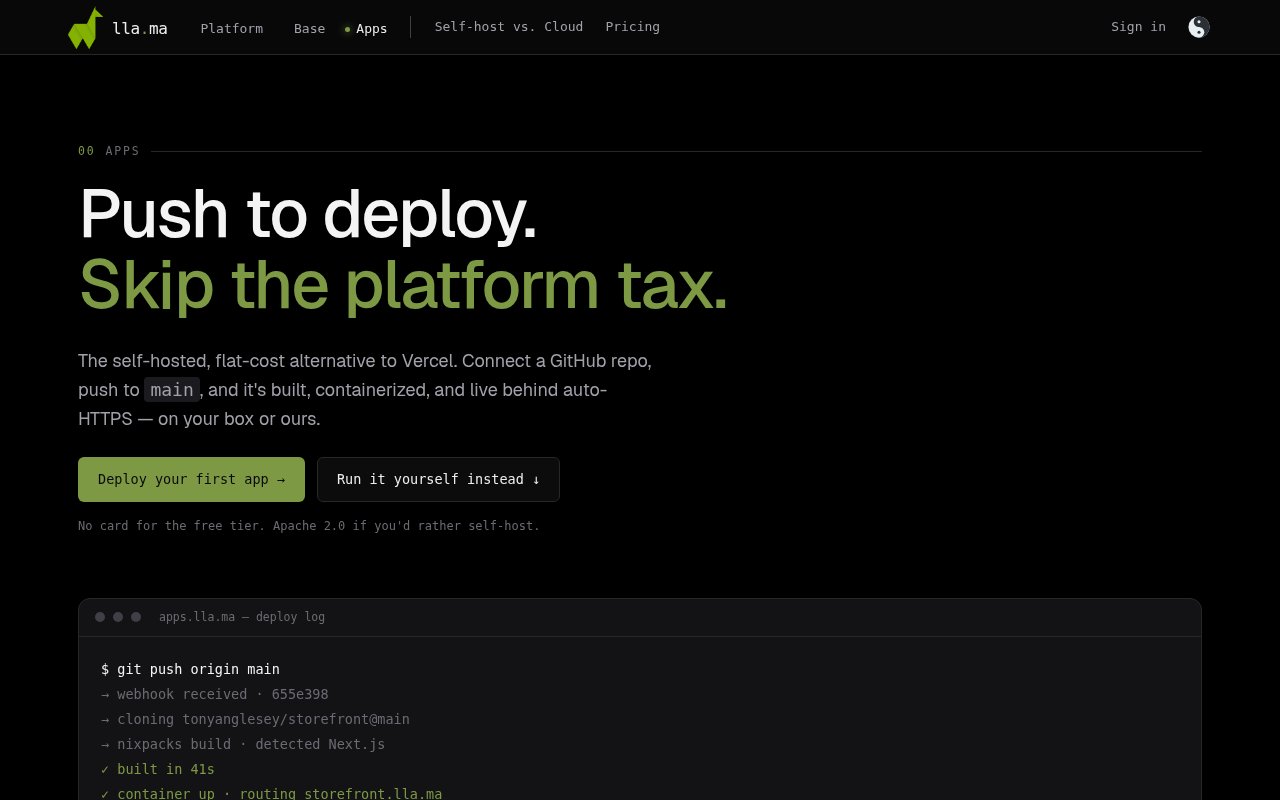
lla.ma Apps is a push-to-deploy hosting platform for web applications. You connect a GitHub repository, push to the main branch, and the platform builds the code, packages it into a container and puts it online behind automatic HTTPS. It comes in two forms, a managed cloud at apps.lla.ma and an open-source version called llama-apps that you can run on your own server under the Apache 2.0 license.
The problem it's aimed at is the gap between a platform like Vercel and a bare VPS. The managed platforms are convenient, but the bill scales with usage in ways that are hard to predict, and the features that make them sticky are often the ones that lock you in. A plain server is cheap and predictable, but every deploy is a manual job. lla.ma Apps tries to keep the git push convenience while giving you a flat, predictable cost, and the self-hosted option removes the platform dependency altogether.
The build pipeline works by detection. If the repository has a Dockerfile, that's used as is. Otherwise Nixpacks inspects the project and works out how to build it, with Next.js apps and static sites as the main supported shapes. The Node version can be pinned through an .nvmrc file or the engines field in package.json. Every push to main arrives through a GitHub webhook, verified with an HMAC signature, and kicks off a build with live logs streamed to the dashboard. Environment variables are managed per project, each deployment is kept in history, and a rollback is a click back to a previous one.
A typical day with it is unremarkable in the way a deploy tool should be. You merge a change, the webhook fires, the build log scrolls in the dashboard, and the new version is serving over HTTPS when it finishes. If something is wrong, the deployment history shows what shipped and when, and rolling back returns to an earlier deployment rather than a scramble to revert commits. Secrets stay in the platform rather than in the repository, and each project keeps its own set.
Under the hood the self-hosted version is two pieces. A private control plane, built on Fastify, orchestrates Docker, Caddy and the project secrets, while a Next.js dashboard talks to it over HTTP and is the part you actually see. Caddy handles the certificates, so HTTPS is automatic on your own box the same way it is on the managed cloud, where Let's Encrypt does the job. Running it yourself needs Node 20 or later, Docker, Nixpacks and a Postgres database, which stores deployment state in a schema it creates on first run.
It fits developers and small teams who want the git push workflow without a bill that moves, and who are comfortable with Node-based stacks. It's also a sensible pick for anyone who wants a deployment pipeline they can inspect, since the apps run as ordinary containers you can look at directly rather than as opaque platform functions. Because the platform builds an ordinary container, debugging a broken deploy is a matter of reading the live build log and, on the self-hosted version, opening the container directly. Teams that lean on framework-specific features of a larger platform will find the scope narrower here, and the tagline's nod to Supabase isn't backed by a database product on the site, so treat it as an app host rather than a full backend.
What sets it apart is the pairing of a managed service with a genuinely self-hostable codebase. Plenty of open-source deployment tools exist and plenty of hosted platforms exist, but here the same product is available either way, so a project can start on the cloud tier and move to a box of its own later without changing how it deploys. The repository is young, with a small number of stars and commits at the time of writing, so expect the rough edges of an early project alongside the simplicity.
lla.ma Apps is the hosting piece of a wider lla.ma platform from Via Ventures, whose other products are aimed at building and running AI agents, with a model builder studio and a single endpoint that fronts several model providers. The apps product stands on its own, though. Nothing about deploying a site through it requires the agent tooling, and the self-hosted repository has no dependency on the rest of the platform.
Pricing on the managed cloud is freemium. The free tier covers one project with 100 GB of bandwidth and community support. Developer is $29 a month for ten projects, 1 TB of bandwidth, custom domains and rollbacks. Team is $99 a month for unlimited projects, 5 TB of bandwidth, team seats and priority support, and there's an Enterprise option with custom pricing and dedicated infrastructure. The self-hosted version is free beyond your own server costs. The product sits inside the wider lla.ma platform from Via Ventures, and the published contact is hello@lla.ma.
Key Features
- Push-to-deploy from GitHub webhooks
- Framework detection with Nixpacks or a Dockerfile
- Automatic HTTPS certificates
- Deployment history with rollbacks
- Per-project environment variables
- Apache 2.0 self-hosted version
Pros & Cons
What we like
- Same product on managed cloud or your own server
- Flat monthly pricing instead of usage surprises
- Live build logs make failures easy to spot
- Apps run as plain containers you can inspect
Room for improvement
- Build detection centers on Node, Next.js and static sites
- Free tier is one project with no custom domain
- Self-hosting needs Docker, Postgres and Nixpacks
- Young open-source repo with little community yet
Frequently Asked Questions
What is lla.ma Apps?
Is lla.ma Apps free?
Can I self-host it?
Which frameworks does it build?
Best For
Featured in
Alternatives to lla.ma Apps
View allMongoDB Atlas
The fully-managed cloud version of MongoDB with built-in search, vector search, time series, and serverless tiers.
Hetzner
High-performance European cloud hosting at unbeatable prices

Neon
Serverless Postgres with database branching, scale-to-zero compute, and a generous free tier.
Cloudflare Pages
Free Jamstack hosting on Cloudflares edge with unlimited bandwidth and tight integration with Workers.
Our take
Tool Index Editorial · Sep 2026· 3.5/5
lla.ma Apps is a compact deployment platform for developers who want GitHub push-to-deploy without committing to a large hosting stack. The public site shows framework detection for Next.js and static sites, Dockerfile support, automatic HTTPS, live build logs, environment variables and one-click rollback. Its strongest idea is portability. The same Apache 2.0 pipeline can run on lla.ma's cloud or a server the user controls.
Cloud access starts at $0, while the self-hosted edition is free apart from infrastructure. We like the plain container model and the clear split between convenience and control. The catch is scope. Build detection is centered on a few web workloads, and self-hosters inherit uptime, backups and patching. It looks useful for small teams, but it isn't yet a broad replacement for a mature application platform.
Editorial opinion from the Tool Index team, written from the public product pages. Not a user review.
Reviews (0)
Badge builder
Add lla.ma Apps to your website
Choose a badge style and size, preview it here, then copy the generated HTML. Badge images are self-contained SVGs and do not require an external script.

<a href="https://toolindex.net/tools/llama-apps?ref=badge" target="_blank" rel="noopener">
  <img src="https://toolindex.net/badge/llama-apps/medium.svg" alt="lla.ma Apps - Listed on Tool Index" width="180" height="50" />
</a>How to use the badge
- 1. Pick the style, size, and theme that fit your layout.
- 2. Copy the generated HTML from the code block.
- 3. Paste it into your footer, homepage, or press page.
Standard badge available
The standard listing badge is available now. Score and circle badges are limited to tools currently ranked in the top 10 of a category.
Badge clicks return visitors to this profile with a referral tag so the source remains identifiable.
Related Tools

Coolify
Self-hostable, open source alternative to Heroku and Netlify
Hetzner
High-performance European cloud hosting at unbeatable prices

Upstash
Serverless Redis, Kafka, and QStash for modern applications

Heroku
The original git-push PaaS. Owned by Salesforce, still kicking, still the easiest way to deploy a Rails or Django app.
Work on lla.ma Apps? Request listing access or correction