
Payload CMS
The open source headless CMS built with TypeScript and React
Gallery
About Payload CMS
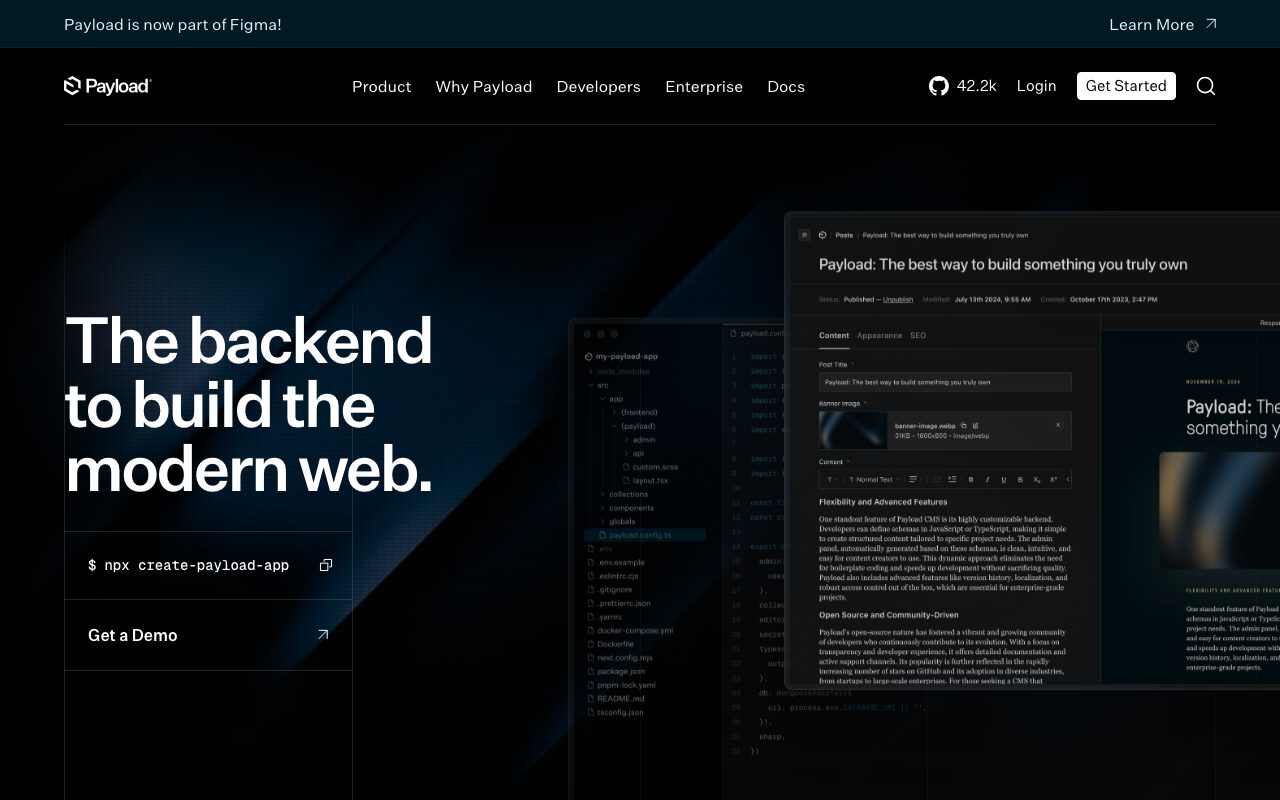
Payload CMS is the headless content management system that doesn't make you choose between code and clicks. You define your schema in TypeScript. The admin UI generates from that schema. Editors get a clean interface. Developers get a typed API and full control of the underlying database.
The pitch lands hard for teams who tried Strapi and Sanity and felt the friction. Payload feels like it was built by someone who actually shipped a Next.js site recently. The DX shows.
It's not the simplest CMS. If your editor team has zero technical taste, you might want Webflow CMS or Sanity. If you have any developer in the loop, Payload wins.
What Payload CMS does
You define collections (think tables) and globals (think singletons) in TypeScript. Each field has a type, validation, and access rules. Payload boots, builds the admin panel, exposes a REST and GraphQL API, and manages the database under the hood.
The database is Postgres or Mongo. Your choice. Payload handles migrations, relationships, file uploads, drafts, versions, and live preview.
The admin UI is React based and fully customizable. You can override any field component. You can add custom views. You can theme the whole interface. Most CMS products lock you out of this. Payload assumes you'll customize.
Who Payload CMS is for
Next.js developers who want a real CMS without giving up control. The workflow fits the modern React stack perfectly.
Agencies use Payload for client work. Define the schema once, hand the editors the admin panel, ship the frontend in Next.js or Astro. Repeatable pattern.
Product teams use Payload for in product content (marketing pages, help docs, blog) without paying Contentful's enterprise pricing. The self host option is real.
Pricing in 2026
Payload itself is free and open source. MIT licensed. Self host on any Node.js capable platform.
Payload Cloud is the hosted offering. Tiers start around $35 per month for the basic project with managed hosting and database. Pro tiers add bigger resources, scheduled backups, and team access.
Enterprise options exist for compliance heavy customers with SLA requirements. The default expectation is self host for free or pay for managed hosting if you don't want to run it.
Features that punch above
The admin UI is genuinely good. Editors don't curse at it. Compare to Strapi where every other release breaks the admin in some weird way. Payload's stability and polish stand out.
The TypeScript types flow end to end. Define a collection, get typed API responses on the client. Less manual type juggling than Sanity's GROQ types or Contentful's generated SDKs.
Drafts and versions work. Live preview is built in for Next.js. Localization is real. Access control is per field if you need it. The maturity is impressive for the project's age.
Where Payload trips
You're running a Node.js server. That's not serverless. Some hosts (Vercel) work but others want a long lived process. Plan accordingly.
The learning curve is real if you've never built a Node app. Sanity Studio with hosted content lake is friendlier for non technical teams.
The plugin ecosystem is growing but smaller than Strapi's. If you need a niche integration, you might write it yourself with the plugin API.
Payload CMS vs the alternatives
Strapi is the closest direct competitor. Older, larger ecosystem, more pain points. We compare in Payload CMS vs Strapi.
Sanity wins on hosted content lake and structured content tooling. Different model. See best headless CMS for the full field.
Contentful is the enterprise default. Pricier. Heavier. Browse Payload CMS alternatives for more.
If you're building a content driven Next.js site and you want a CMS where TypeScript is a first class citizen, Payload is the obvious pick in 2026. The DX makes the rest feel dated.
Common Payload CMS questions
Is Payload truly headless? Yes. The admin UI and the API are separate. You serve content through REST or GraphQL.
Can Payload run on Vercel? Sort of. Payload 3 introduced Next.js native mode that works with Vercel deploys. Browse CMS tools for related picks.
Does Payload support multi tenant? Through plugins and access control patterns. Not as native as some specialty platforms but achievable.
The bottom line on Payload CMS
Payload CMS is the headless CMS I recommend by default for new TypeScript projects in 2026. The admin polish, the typing story, and the self host freedom add up to the cleanest pick.
If you're starting a content driven app on Next.js, try Payload first. The free tier (self host) plus Postgres on Neon gives you a production stack for the cost of a cheap VPS.
The category is competitive but Payload's combination of DX and editor experience continues to gain traction. Browse the toolindex catalog for the broader CMS landscape.
Payload schema design patterns
Define collections like database tables. Posts, products, users, categories. Each has its own access rules and admin panel view.
Use globals for singletons. Site settings, header config, footer config, contact info. One record, edited centrally, available everywhere.
Use blocks for flexible content. A page collection with a layout field of type blocks lets editors mix and match content modules. Hero, text section, gallery, CTA. The page builds itself.
Payload access control
Access rules can be set per collection, per field, per operation (read, create, update, delete). Functions return true or a query constraint to allow filtered access.
Multi tenant patterns work. Add a tenant field to every collection. Filter access based on the requesting user's tenant. The admin UI respects the rules transparently.
Field level access lets you hide sensitive fields from certain roles. Editors can't see internal pricing fields, for example. Useful for editorial workflows with stakeholder reviewers.
Payload integration with Next.js
Payload 3 introduced Next.js native mode. The CMS runs as a Next.js app. Same deployment target as your frontend. Less infrastructure.
The Local API lets server components query the CMS without HTTP. Faster than going through REST. Cleaner than maintaining two clients.
The live preview integration uses the Next.js draft mode. Editors see their changes in the actual frontend layout before publishing. The feedback loop is tight.
Payload media management
Upload collections handle files. Configure storage to disk, S3, R2, or any S3 compatible service. Image resizing happens automatically based on your size definitions.
Each upload gets multiple sizes generated. Hero, card, thumbnail. The frontend picks the right size based on viewport. Bandwidth savings are real.
For larger media libraries, integrate with Cloudinary or imgix for on the fly transformations. Payload stores the metadata, the CDN serves the variants.
Payload migrations and versioning
Schema changes happen in TypeScript files. Payload generates the migration when needed. You commit the migration. You apply it in deploys.
For destructive changes (renaming fields, changing types), write the migration carefully. The tool helps but you own correctness.
Versioned drafts on collections let editors stage changes before publish. Useful for long content workflows where edits go through review.
Payload performance considerations
For high traffic sites, cache aggressively. Next.js ISR or SSG works for marketing pages. Dynamic content uses request level caching.
Database indexes matter. Add them for fields you query frequently. Payload doesn't guess perfectly.
Image transformation can be slow on first request. Pre warm important sizes by hitting the URLs after deploy. Or push to a CDN with image transformations.
Payload plugins ecosystem
Official plugins cover SEO, search (with Algolia or local), forms, redirects, nested docs, and more. The list grows quarterly.
Third party plugins extend further. Stripe integration, multi tenant support, and various custom field types are community contributed.
Writing your own plugin is approachable. The plugin API hooks into collection lifecycle, admin UI, and config. Useful when you need a feature nobody else has.
Payload localization
Define locales globally. Mark fields as localized. Editors switch the locale in the admin panel. Each locale stores its own field values.
The frontend queries the API with a locale parameter. Content comes back translated.
For sites with many locales, this beats running multiple CMS instances. One source of truth. Translation happens in the admin UI or via integration with a translation service.
Payload CMS for marketing sites
The pattern for marketing sites: Next.js frontend, Payload backend, Postgres or Mongo database. Deploy frontend to Vercel. Deploy Payload to a Node.js host or Payload Cloud.
The editorial team uses Payload's admin to update pages, posts, and blocks. The frontend rebuilds via webhook on publish.
Static generation handles most pages. Dynamic rendering for personalized or auth gated areas. The pattern scales.
Payload FAQ from new adopters
Is Payload faster than Strapi? In most measured ways yes. The codebase is more modern. The admin is more responsive.
Can Payload handle a million records? Yes, with proper indexing. Postgres handles much more without effort.
Does Payload have versioning? Yes, drafts and versions on collections that need them. Configure per collection.
Payload custom admin views
Override any admin component to fit your team's workflow. Custom dashboard widgets. Custom field renderers. Custom list views.
The customization API is approachable for React developers. The admin is a normal React app under the hood.
Don't customize what you don't need to. The defaults are good. Reach for overrides when a real workflow gain is on the table.
Payload deployment patterns
Self host on Railway, Fly.io, Render, or any Node.js capable platform. The container deploys are predictable.
For higher availability, run multiple instances behind a load balancer. The session and file storage need to be externalized.
Payload Cloud is the simplest path if you don't want to manage infrastructure. The pricing fits most projects that don't have specific compliance needs.
Tutorial / Demo
Key Features
- Code-first TypeScript schema definitions
- Auto-generated React admin panel
- Support for MongoDB and PostgreSQL
- Built-in authentication and access control
- Rich text editor with custom blocks
- Localization and draft system
- REST and GraphQL APIs auto-generated
Pros & Cons
What we like
- Full TypeScript support from schemas to API
- Admin panel is beautiful and customizable
- Self-hosted with no vendor lock-in
- Can replace both CMS and backend framework
- Active community and responsive maintainers
Room for improvement
- Learning curve for non-TypeScript developers
- Smaller plugin ecosystem than WordPress or Strapi
- Documentation could be more comprehensive
- Hosting requires your own infrastructure
Frequently Asked Questions
Is Payload CMS really open source?
Payload vs Strapi vs Directus, which?
Does Payload work with Next.js?
What database does Payload use?
Is Payload good for solo founders?
Best For
Featured in
Tags
Alternatives to Payload CMS
Contentful
Headless CMS that models content as structured data and delivers it through APIs to web, mobile, and other channels.

Sanity
Composable content platform with a customizable studio, real-time collaboration, and a queryable structured content backend.

Supabase
The open source Firebase alternative

Airtable
Spreadsheet-database hybrid with linked records, multiple views, automations, and an interface designer for internal apps.
Our take
Tool Index Editorial · May 2026· 4.5/5
Payload CMS positions itself as the open source headless cms built with typescript and react, and on the whole it earns the framing.
On the strengths side: Full TypeScript support from schemas to API, Admin panel is beautiful and customizable, and Self-hosted with no vendor lock-in. Honest gripes: Learning curve for non-TypeScript developers and Smaller plugin ecosystem than WordPress or Strapi.
Bottom line: pick Payload CMS when you need building content-managed websites and blogs; look elsewhere if learning curve for non-TypeScript developers would be a dealbreaker.
Editorial opinion from the Tool Index team, written from the public product pages. Not a user review.
Reviews (2)
Hit the Payload CMS sweet spot
Took a few weeks for Payload CMS to click, then it stuck. The thing I keep coming back to: can replace both CMS and backend framework. Got real value out of REST and GraphQL APIs auto-generated. It fits well for digital asset management systems. Hard to imagine going back to my previous setup.
Stuck the landing for our team
Skeptical at first because Payload CMS looked too simple. It's not. What stands out is how admin panel is beautiful and customizable.
Badge builder
Add Payload CMS to your website
Choose a badge style and size, preview it here, then copy the generated HTML. Badge images are self-contained SVGs and do not require an external script.

<a href="https://toolindex.net/tools/payload-cms?ref=badge" target="_blank" rel="noopener">
  <img src="https://toolindex.net/badge/payload-cms/medium.svg" alt="Payload CMS - Listed on Tool Index" width="180" height="50" />
</a>How to use the badge
- 1. Pick the style, size, and theme that fit your layout.
- 2. Copy the generated HTML from the code block.
- 3. Paste it into your footer, homepage, or press page.
Standard badge available
The standard listing badge is available now. Score and circle badges are limited to tools currently ranked in the top 10 of a category.
Badge clicks return visitors to this profile with a referral tag so the source remains identifiable.
Related Tools

Kevin Gabeci
Solo developer building web apps, cozy browser games, and AI creator toolkits.

Coolify
Self-hostable, open source alternative to Heroku and Netlify

Warp
The modern terminal reimagined with AI and collaboration

Bolt.new
Prompt-to-deployed full-stack app inside the browser
Work on Payload CMS? Request listing access or correction