
Pixelmator Pro
Mac-native raster and vector image editor with machine-learning enhancements and a one-time purchase price.
Gallery
About Pixelmator Pro
Pixelmator Pro is the Mac-native answer to Photoshop. One-time purchase, beautifully designed, packed with ML-powered features, and not a subscription in sight. The Pixelmator team has shipped on macOS for over fifteen years.
If you're on a Mac and you don't want to pay Adobe forever, Pixelmator Pro is the obvious choice. The trade is no Windows version. That's the whole catch.
What Pixelmator Pro actually does
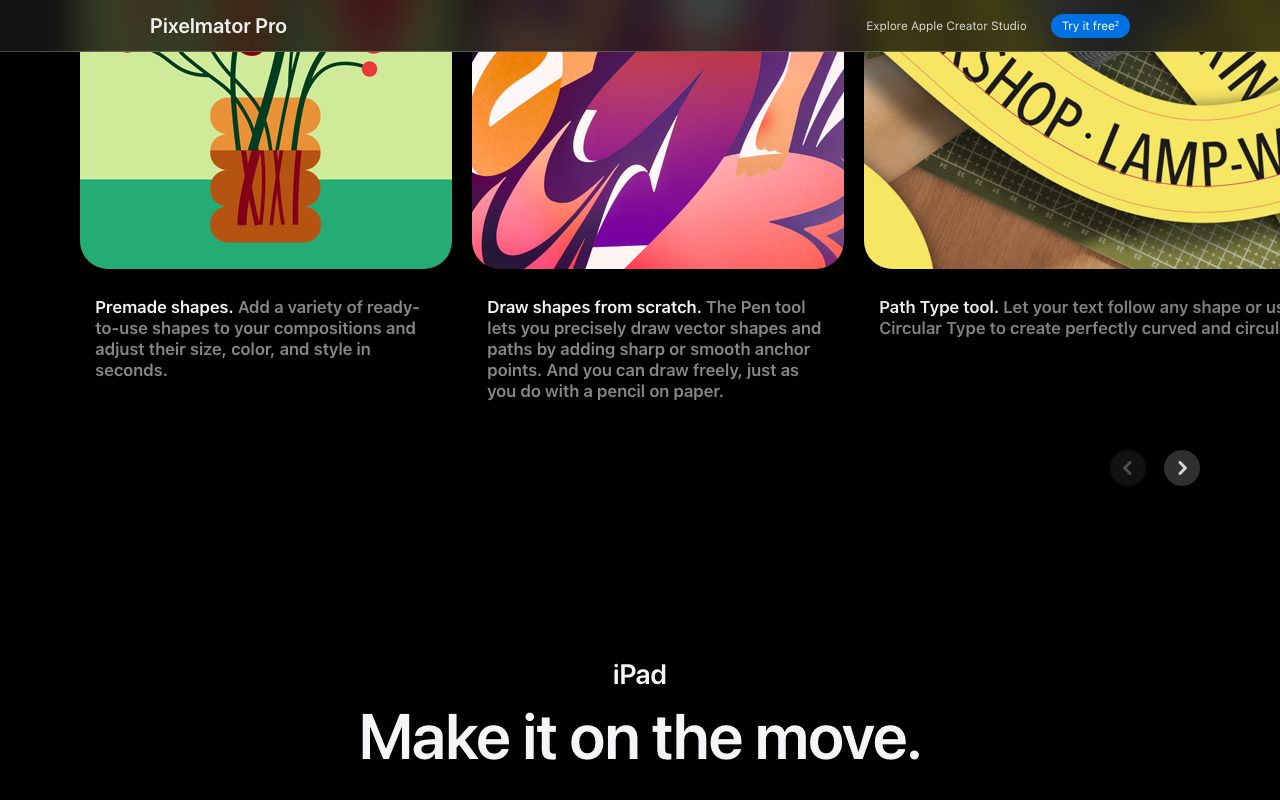
It edits images. Raster, vector, and RAW, all in the same app. Layers, masks, filters, brushes, color grading, the full kit you expect from a professional editor.
The differentiator is the ML features. Super Resolution upscales an image cleanly without obvious artifacts. Denoise removes grain from high-ISO photos. Color matching grabs a reference photo's mood and applies it to yours. Background removal is one click and surprisingly good.
It opens and exports Photoshop PSDs with reasonable layer fidelity. Most files round-trip cleanly between Pixelmator Pro and Photoshop. Designers handing off work can collaborate across both tools.
Who Pixelmator Pro is for
Photographers retouching shots without committing to Lightroom Classic. Designers building social and marketing graphics on a Mac. Hobbyists doing digital painting and illustration. Small teams that need to open incoming PSD files without an Adobe contract.
It's not for studio teams running Adobe-standard pipelines. It's for the rest of us.
Pixelmator Pro pricing breakdown
Pixelmator Pro is a one-time purchase, currently $49.99 on the Mac App Store. No subscription. Updates have been free for years.
That's it. Compared to Adobe Creative Cloud at $20 to $60 per month, the math is comically favorable for solo users. Two months of Photoshop pays for Pixelmator Pro forever.
iPad and iPhone versions are sold separately at lower prices. Family Sharing covers multiple devices in your household.
Standout Pixelmator Pro features
The one-time purchase is rare and welcome. Most pro design tools moved to subscriptions a decade ago. Pixelmator Pro held the line.
ML features rival far more expensive professional tools. Super Resolution genuinely competes with Topaz. Background removal is comparable to remove.bg. Denoise punches above its price.
GPU acceleration via Apple Metal makes the app feel fast even on huge files. M-series Macs with Pixelmator Pro is one of the snappiest editing experiences anywhere.
Built-in templates for social, web, and print formats save you setup time on common deliverables. Drop in your assets, export, ship.
Honest tradeoffs
macOS only. No Windows. No Linux. No web version. If your team mixes platforms, Pixelmator Pro is a non-starter for shared work.
Pro motion graphics, video editing integration, and complex print workflows still favor Adobe. Pixelmator Pro is for the 80 percent of editing that doesn't need that.
Plugin ecosystem is small. Photoshop has decades of third-party brushes, filters, and panels. Pixelmator Pro relies on first-party features.
Pixelmator Pro is what every subscription-fatigued Mac user wishes more software companies would offer.
Pixelmator Pro vs the alternatives
The headline rival is Adobe Photoshop. Photoshop has the deepest feature set and ecosystem. Pixelmator Pro has 90 percent of what most users need at a fraction of the lifetime cost.
Affinity Photo is the cross-platform peer. Same one-time-purchase model, available on Windows too. Some users prefer Affinity's UI; others prefer Pixelmator Pro's.
Figma covers different ground. Figma is for UI and product design. Pixelmator Pro is for image editing.
For free, GIMP exists. The UI is rough but the price is right.
See best photo editors, Pixelmator Pro alternatives, and Pixelmator Pro vs Photoshop.
Bottom line on Pixelmator Pro
Pixelmator Pro is the Mac photographer's and designer's value pick. Pay once, own forever, get serious ML features, ship great work. The lack of Windows is real but probably not your problem.
If you've been paying Adobe for years and you're tired of it, Pixelmator Pro is the off-ramp. The first project pays for itself.
Pixelmator Pro on M-series Macs
The M1, M2, and M3 chips transformed Pixelmator Pro's performance. ML features run locally without sending images to a cloud server. Super Resolution and denoise complete in seconds on photos that used to take a minute.
GPU rendering through Apple Metal makes brushes, filters, and color grading feel instantaneous. Even huge files (50 megapixel photos, multi-layer compositions) stay responsive.
Battery efficiency is excellent. Editing for hours on an unplugged MacBook barely dents the charge. That's a tangible quality-of-life win for traveling photographers and designers.
Pixelmator Pro for specific workflows
Photographers use it for retouching and color grading. The RAW pipeline handles modern camera files. Export presets handle Instagram, Twitter, web, and print sizes.
Social media designers ship daily content with the built-in templates. Drop in your photo and copy, export, schedule. Five minutes from blank to ready-to-post.
Illustrators paint with the brush engine and vector tools side by side. The single app handles work that used to require switching between Photoshop and Illustrator.
Small marketing teams handle their full visual production without an Adobe subscription. The cost savings compound across team members and years.
Pixelmator Pro common questions
"Does it work with PSD files?" Yes. Import and export with reasonable layer fidelity.
"Is there an iPad version?" Pixelmator Pro is Mac-only. Pixelmator (the original) and Photomator are available on iPad.
"Can it replace Photoshop entirely?" For most use cases, yes. Pro studios with Adobe-standard pipelines still benefit from Photoshop. Solo users and small teams usually don't notice the difference.
"Are updates free?" They have been historically. The team has shipped major updates without charging existing customers.
Final word on Pixelmator Pro
Pixelmator Pro is what every subscription-fatigued Mac user wishes more software companies would offer. Pay once, own forever, get serious ML features, ship great work.
If you've been paying Adobe for years and you'd like to stop, Pixelmator Pro is the clearest off-ramp. The first project usually pays for the entire purchase price.
Pixelmator Pro for photographers
The RAW pipeline handles modern camera files from Canon, Nikon, Sony, Fujifilm, and others. Open RAW, adjust exposure and color, export. The pipeline is faster than expected for a non-Lightroom tool.
Color matching pulls a reference photo's mood and applies it. Useful for matching a series of shots to a single look. Replaces manual curve adjustment with one click.
Selective color grading via the Color tools handles skin tones, sky tones, and product colors independently. Comparable workflow to Lightroom's HSL panels.
Batch processing applies the same edits to a folder of photos. Useful for events or sessions where you need consistent output across hundreds of images.
Pixelmator Pro for designers
Vector tools handle logo design, icon work, and illustration alongside raster editing. Switching between vector and raster in one app eliminates Adobe-style multi-tool workflows.
Templates for Instagram, Twitter, Facebook, LinkedIn, and YouTube cover the common social media specs. Drop in your assets, export, schedule.
Print templates handle business cards, postcards, and basic layouts. For complex multi-page print work, dedicated tools (InDesign, Affinity Publisher) still win.
Web exports include responsive image sets, optimized PNGs and JPEGs, and SVG for vector assets. Output quality is high.
Pixelmator Pro plugin ecosystem
Smaller than Photoshop's, by orders of magnitude. The first-party features cover most common needs.
Some third-party developers ship Mac-specific plugins. Coverage is sparse compared to Adobe's plugin marketplace.
For specific workflows requiring Photoshop plugins (advanced retouching, stylistic effects), Photoshop remains the better tool. For general-purpose editing, Pixelmator Pro stands on its own.
Pixelmator Pro upgrade path
Most users buy Pixelmator Pro and don't upgrade further. The one-time price covers ongoing updates without subscription fees.
For mobile editing, Photomator (the Pixelmator team's photo editor) covers iPhone and iPad. The integration with desktop Pixelmator Pro is solid.
For advanced retouching, professional photographers sometimes pair Pixelmator Pro with Photoshop for the rare task that needs Photoshop's depth. The combined cost still beats Adobe Creative Cloud over time.
Pixelmator Pro long-term outlook
The Pixelmator team has shipped on macOS for over fifteen years. The product gets steady updates without subscription pressure. Major versions arrive every year or two.
The one-time purchase model holds firm. While the rest of the design tool industry chased recurring revenue, Pixelmator Pro stayed customer-friendly. The bet has paid off in loyalty.
Apple acquired Pixelmator in 2024, which raised concerns about future direction. So far, the product remains independent and continues shipping updates. Long-term integration with Apple's ecosystem is likely.
For Mac-first creative work, Pixelmator Pro remains the value pick. The lifetime cost beats Adobe Creative Cloud by orders of magnitude.
For mixed-platform teams, the constraint of macOS-only matters. Affinity Photo or Photopea fill the cross-platform gap.
Tutorial / Demo
Key Features
- Raster, vector, and RAW editing in a single Mac app
- ML Super Resolution, denoise, and color matching
- Photoshop PSD import and export with layer fidelity
- GPU-accelerated rendering via Apple Metal
- Built-in templates for social, web, and print formats
- One-time purchase, no subscription
Pros & Cons
What we like
- One-time purchase is rare and welcome in this category
- ML features rival far more expensive professional tools
- Tightly optimized for Apple hardware and macOS
Room for improvement
- macOS only, with no Windows, Linux, or web version
Frequently Asked Questions
How much does Pixelmator Pro cost?
Pixelmator Pro vs Photoshop, which should I pick?
Does Pixelmator Pro support Photoshop PSD files?
Is there a Windows or iPad version?
Does Pixelmator Pro do AI image generation?
Best For
Featured in
Tags
Alternatives to Pixelmator Pro
View all
Photopea
Browser-based image editor that opens Photoshop, Sketch, XD, and PDF files without an install or account.
Affinity Designer
Professional vector and raster illustration app with one-time pricing, native apps on Mac, Windows, and iPad.

Krita
Free, open-source painting application built by and for digital illustrators, with a brush engine and animation timeline.
Inkscape
Free, open-source vector graphics editor built around SVG, with a deep tool set for illustration, logos, and technical drawing.
Our take
Tool Index Editorial · May 2026· 4.4/5
What Pixelmator Pro is really selling — beyond the marketing copy — is mac-native raster and vector image editor with machine-learning enhancements and a one-time purchase price.
Worth highlighting: One-time purchase is rare and welcome in this category, ML features rival far more expensive professional tools, and Tightly optimized for Apple hardware and macOS. What to watch for: macOS only, with no Windows, Linux, or web version.
Recommendation: this is a strong default when you need photographers retouching and grading photos without Lightroom. If macOS only, with no Windows, Linux, or web version would be a dealbreaker, the alternatives section below is worth a scroll.
Editorial opinion from the Tool Index team, written from the public product pages. Not a user review.
Reviews (4)
Solid daily driver
Picked Pixelmator Pro for the lower price, stayed for the actual quality. Where it really wins is one-time purchase is rare and welcome in this category. Built-in templates for social, web, and print formats works the way you'd hope.
Pros
- One-time purchase is rare and welcome in this category
- Tightly optimized for Apple hardware and macOS
Pulled its weight from week one
Been using Pixelmator Pro for a couple of cycles now. What stands out is how one-time purchase is rare and welcome in this category. Still recommending it to people in similar setups.
Pros
- ML features rival far more expensive professional tools
- One-time purchase is rare and welcome in this category
Surprised how much we use this
First impression of Pixelmator Pro was 'huh, this is actually thought through.' Where it really wins is one-time purchase is rare and welcome in this category. Ml super resolution, denoise, and color matching works the way you'd hope. Worth the price for what I get out of it.
Pros
- ML features rival far more expensive professional tools
- Tightly optimized for Apple hardware and macOS
- One-time purchase is rare and welcome in this category
Recommended without reservation
Skeptical at first because Pixelmator Pro looked too simple. It's not. What stands out is how one-time purchase is rare and welcome in this category. The photoshop PSD import and export with layer fidelity is more useful than I expected.
Pros
- ML features rival far more expensive professional tools
- One-time purchase is rare and welcome in this category
- Tightly optimized for Apple hardware and macOS
Badge builder
Add Pixelmator Pro to your website
Choose a badge style and size, preview it here, then copy the generated HTML. Badge images are self-contained SVGs and do not require an external script.

<a href="https://toolindex.net/tools/pixelmator-pro?ref=badge" target="_blank" rel="noopener">
  <img src="https://toolindex.net/badge/pixelmator-pro/medium.svg" alt="Pixelmator Pro - Listed on Tool Index" width="180" height="50" />
</a>How to use the badge
- 1. Pick the style, size, and theme that fit your layout.
- 2. Copy the generated HTML from the code block.
- 3. Paste it into your footer, homepage, or press page.
Standard badge available
The standard listing badge is available now. Score and circle badges are limited to tools currently ranked in the top 10 of a category.
Badge clicks return visitors to this profile with a referral tag so the source remains identifiable.
Related Tools

Apatero Studio
Creator studio for AI image, video, audio, 3D, and avatars. Every model worth using, in one workspace.

Tailwind CSS
Rapidly build custom designs without leaving your HTML
Figma
Collaborative interface design tool

Marvel
Lightweight prototyping platform for turning images and screens into clickable mobile and web prototypes.
Work on Pixelmator Pro? Request listing access or correction