Playground
AI design studio for image generation, logos, social posts, and merch built on multiple swappable models
Gallery
About Playground
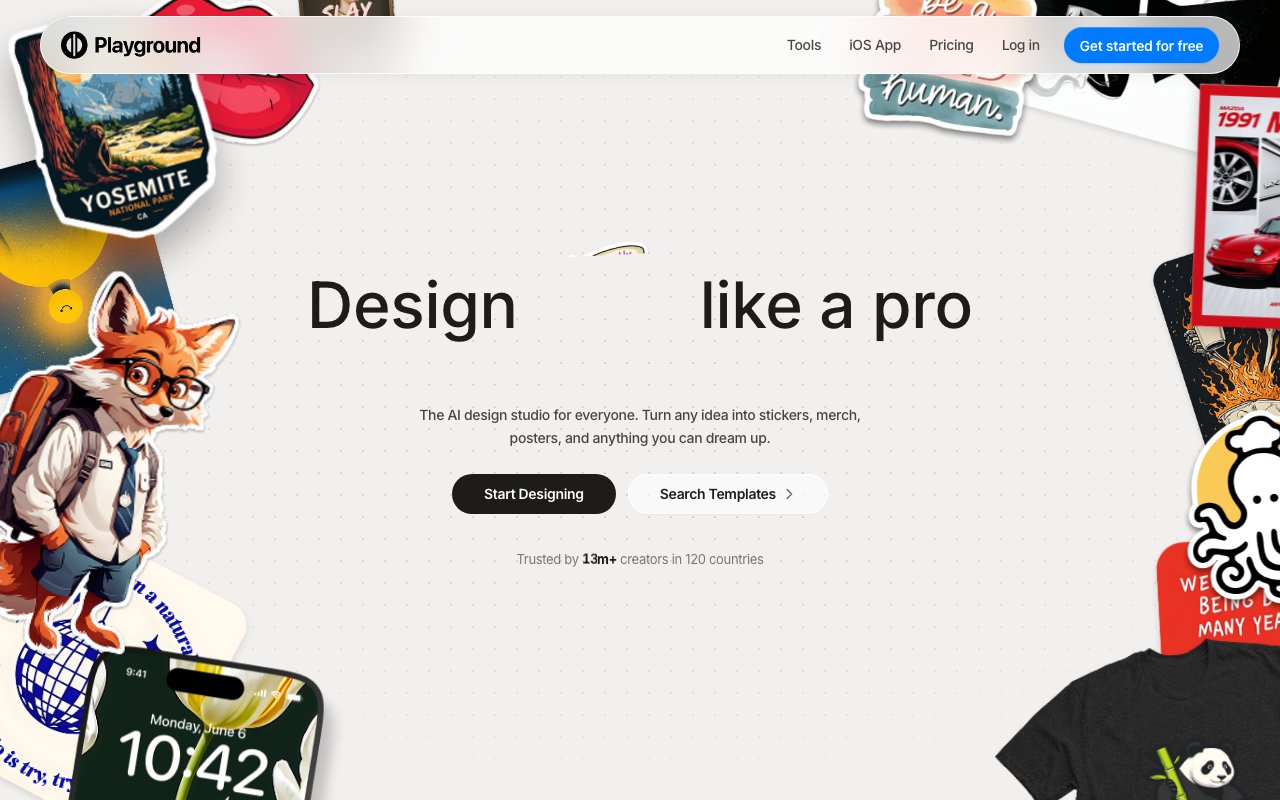
Playground AI is a browser-based design studio that uses generative AI to create graphics, illustrations, and visual content from text descriptions. It's positioned somewhere between a pure image generator like Midjourney and a traditional design tool like Canva. You describe what you want, the AI generates the visuals, and then you refine everything using built-in editing tools. The platform has attracted over 13 million users across 120 countries, which suggests it's hitting a sweet spot for people who need professional-looking graphics without the learning curve of Photoshop or Illustrator. The combination of generation and editing in one interface means you're not bouncing between separate tools to get finished work.
The core workflow starts with text prompts. You describe an image, select a style, and the AI handles color, layout, and composition. But Playground goes further than basic generation by offering multiple AI models in one interface. You can switch between GPT Image 2 for strong text and typography handling, Nano Banana Pro for photorealistic output, Seedream for stylized aesthetics, or the standard Nano Banana for general purpose work. Having multiple models available means you're not locked into one aesthetic or capability set. If one model struggles with a particular prompt, you can try another without leaving the platform or managing separate subscriptions. This multi-model approach is particularly useful when you're unsure what style will work best for a project and want to experiment quickly.
What separates Playground from pure generators is its editing layer. After generating an image, you can use swap style to change the visual treatment without regenerating from scratch, remove objects that don't fit, add smart layers for compositing, or generate mockups showing your design on products like t-shirts, mugs, or phone cases. The face styling feature lets you adjust portraits, tweaking expressions or details without regenerating the entire image. Non-destructive editing means you can iterate without losing previous versions, so experimentation doesn't risk your earlier work. The undo history lets you step back through changes if a particular edit direction doesn't pan out.
There's also a library of over 1,000 templates across 24 categories, covering everything from t-shirts and stickers to social media posts, e-book covers, logos, invitations, posters, wallpapers, and seamless patterns. These templates give you starting points rather than forcing you to prompt from scratch every time. If you're creating merchandise for a print-on-demand shop, you can start with a template sized for the product and fill in your design rather than calculating dimensions yourself. For social media content, templates pre-sized for Instagram stories, Facebook posts, or YouTube thumbnails eliminate the guesswork about aspect ratios and safe zones.
The target audience spans creators, small business owners, and anyone producing visual content regularly. Print-on-demand sellers designing merchandise for platforms like Redbubble, Etsy, or Amazon Merch benefit from quick iteration on product designs. Social media managers creating daily posts find value in the speed of generating and refining graphics compared to traditional design tools. Authors needing cover art for self-published books can produce professional-looking results without hiring designers. Craft sellers building product listings, marketers creating ad visuals, and hobbyists working on personal projects all fit the use case. The platform doesn't require design experience, which opens it to people who'd otherwise hire designers for every asset or struggle with professional tools that assume existing skills.
Playground offers a free tier with no credit card required, making it accessible for testing before committing to a paid plan. The free version lets you generate images and use basic editing features, which is enough to understand whether the tool fits your workflow. The platform emphasizes quick turnaround, with print-ready designs available within days for merchandise workflows where you're going from concept to physical product. There's an iOS app alongside the web version, so you can work from mobile when inspiration strikes or you need to make quick edits away from your desk. Premium options exist for heavier users who need more generations, higher resolution outputs, or priority processing. For anyone who needs a steady flow of custom graphics and finds pure image generators too limited or traditional design tools too complex, Playground sits in a useful middle ground that combines the strengths of both approaches.
Key Features
- Multiple swappable AI models including GPT Image 2, Nano Banana, Nano Banana Pro, and Seedream
- Thousands of editable templates across logos, social posts, posters, and stickers
- Product mockup generation for t-shirts, hoodies, caps, mugs, and bottles
- Background removal, upscaling, and AI resize tools
- Style swapping across photorealistic, anime, oil painting, and 3D render looks
- Web app plus a native iOS design and editor app
Pros & Cons
What we like
- Strong at text and typography in designs thanks to GPT Image 2
- Template-first workflow gets you to a finished asset fast
- Free tier is generous enough to evaluate the full studio
- Pro plan grants a royalty-free commercial license
Room for improvement
- Free tier is non-commercial only with no royalty-free license
- Free plan caps generation at 10 images every 3 hours with just 3 monthly credits
- Credits are shared across all models, so heavier models like Nano Banana Pro burn them faster
- More of a quick design tool than a deep, controllable generation studio
Frequently Asked Questions
What is Playground AI?
Is Playground AI free?
What is Playground AI best for?
Does Playground AI include a commercial license?
Best For
Featured in
Alternatives to Playground
View all
Midjourney
Create stunning AI artwork from text prompts

Pixel Painters
Unlimited graphic design subscriptions built only for churches and ministries
Krea AI
Real-time AI creative suite that aggregates 64+ image, video, and 3D models behind one canvas

Leonardo.ai
Image generation suite with fine-tuned models for game and product art
Reviews (10)
Pulled its weight from week one
Started using Playground casually, now it is pinned in my dock. The product mockup generation for t-shirts, hoodies, caps, mugs, and bottles is more useful than I expected. The defaults are sensible, so I was not fighting settings on day one. Mostly using it for designing logos and brand assets without a designer. Glad I made the switch.
Three months in, mixed but positive
Hadn't planned on switching, but Playground was hard to ignore. It has shaved real time off my week. I expected to churn off it in a week and I am still here. My only gripe is free tier is non-commercial only with no royalty-free license. No regrets so far.
Finally something that fits
Picked Playground for the price, stayed for the quality. Nothing flashy, it simply pulls its weight every day. It has shaved real time off my week. Found it works best for producing social media graphics and ad creative at volume. Hard to imagine going back to my old setup.
Worth the price of admission
Found Playground on a Reddit thread and I am glad I clicked. The free tier is generous enough to evaluate the full studio is more useful than I expected. It earns its place in my stack.
Three months in, mixed but positive
Onboarded the whole team to Playground in an afternoon. Where it really wins is style swapping across photorealistic, anime, oil painting, and 3d render looks. My only gripe is free tier is non-commercial only with no royalty-free license. Glad I made the switch.
Pulled its weight from week one
Tried Playground on a side project first, then rolled it out everywhere. It does what it says, which is rarer than it should be.
Bought it for one feature, stayed for ten
Onboarded the whole team to Playground in an afternoon. Got real value out of template-first workflow gets you to a finished asset fast. Found it works best for cleaning up images with background removal and upscaling. Would sign up again without thinking twice.
Two months in, no regrets
Three months of Playground later, here is what holds up. The core workflow is smooth once you are set up. It earns its place in my stack.
Genuinely impressed
Found Playground on a Reddit thread and I am glad I clicked. The core workflow is smooth once you are set up. Setup was painless and I was productive the same day.
Bought it for one feature, stayed for ten
Playground has quietly become part of my daily flow. The product mockup generation for t-shirts, hoodies, caps, mugs, and bottles is more useful than I expected. Recommending it to people in a similar spot.
Badge builder
Add Playground to your website
Choose a badge style and size, preview it here, then copy the generated HTML. Badge images are self-contained SVGs and do not require an external script.

<a href="https://toolindex.net/tools/playground-ai?ref=badge" target="_blank" rel="noopener">
  <img src="https://toolindex.net/badge/playground-ai/medium.svg" alt="Playground - Listed on Tool Index" width="180" height="50" />
</a>How to use the badge
- 1. Pick the style, size, and theme that fit your layout.
- 2. Copy the generated HTML from the code block.
- 3. Paste it into your footer, homepage, or press page.
Standard badge available
The standard listing badge is available now. Score and circle badges are limited to tools currently ranked in the top 10 of a category.
Badge clicks return visitors to this profile with a referral tag so the source remains identifiable.
Related Tools

HairstylesPro
Try hundreds of hairstyles on your own photo before you commit to a cut

Recraft
AI image generator built around vector output and brand styles

AIMakeTattoo
Turn text descriptions into visual tattoo concepts with style and placement options
Flux by Black Forest Labs
Open and hosted image models that power half the AI art stack
Work on Playground? Request listing access or correction