Recipe Card Creator
Design personalized, double-sided recipe cards and print them as PDFs
Gallery
About Recipe Card Creator
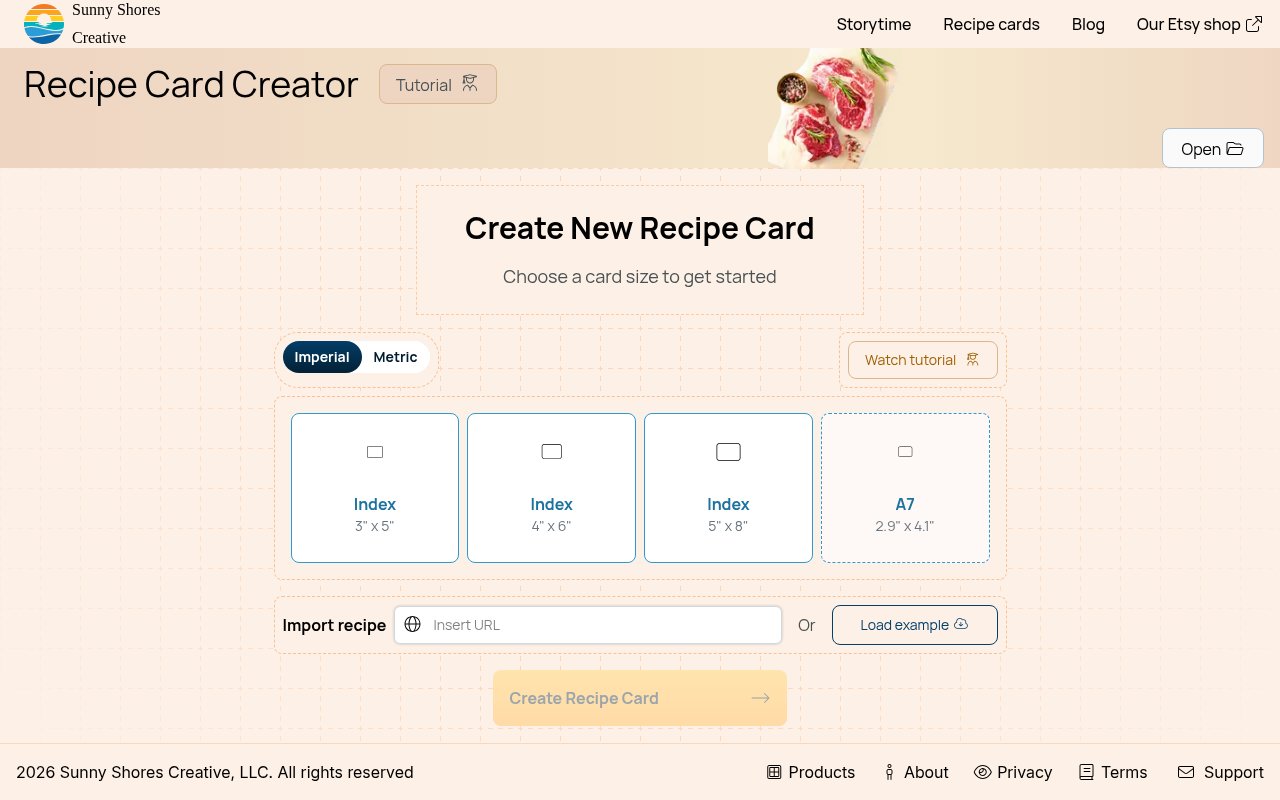
Recipe Card Creator is a free browser tool from Sunny Shores Creative for turning recipes into polished cards that can be printed, shared, given as gifts, or kept in a family collection. It replaces the awkward mix of notes, copied web pages, and improvised document templates with a focused editor made for recipes. A user enters the content, chooses a visual style, and generates a PDF that is ready for a home printer or local print shop. There is no account requirement, so someone with one treasured recipe can make a finished card without committing to a broader recipe management system.
The editor covers far more than a title and ingredient list. A card can include a description, preparation and cooking times, servings, ingredients, method steps, the source URL, common allergens, and nutritional information. Font controls help the text fit the occasion and the selected design. Thousands of combinations span geometric, wavy, nature, culture, food, game, and activity themes, while a single-color option keeps things restrained. The cards are double-sided by design. The front holds the title and timing information, while the back gives ingredients and directions room to breathe. That fixed structure helps a printed set feel consistent even when the recipes come from several people.
Printing is treated as a core workflow instead of an afterthought. Recipe Card Creator supports card formats of 3 by 5 inches, 4 by 6 inches, 5 by 8 inches, and A7. The classic 3 by 5 format suits short recipes and traditional index boxes, while the larger choices make space for detailed ingredients or longer methods. It can lay those cards out for letter, legal, tabloid, A6, A5, A4, and A3 paper. When the content is ready, the print action creates a PDF. That file can go straight to a home printer or travel to a print shop, which is useful when thicker paper, cleaner cutting, or a more durable finish matters.
It fits home cooks who want a physical backup of recipes they use often, as well as families preserving dishes that would otherwise live in scattered notebooks or phone notes. The presentation choices also make it practical for bridal showers, weddings, housewarmings, holidays, and recipe exchanges. A group can collect contributions, standardize them in the same layout, and give the resulting set as a personal gift. People moving into a first home or leaving for college can receive usable kitchen instructions without needing access to somebody else's app account. The tool stays narrow, which is an advantage when the goal is a card rather than meal planning, grocery lists, or a social recipe library.
An import option can pull an existing recipe from another website when that source supports the required recipe data. It can save retyping, but compatibility depends on how the original site publishes its recipe. Manual entry remains available when import doesn't work or when the recipe comes from handwriting. Photo placement is not currently supported, so the visual character comes from pattern, color, type, and layout rather than food photography. Sunny Shores Creative also says the designs were created and curated by people rather than generated with AI. That gives the product a different posture from general design generators that ask for a prompt and produce a less predictable layout.
The range of content fields also helps when a card needs to stand alone away from the original cookbook or website. Servings and timing provide useful context before cooking starts, allergens and nutrition preserve information that might otherwise be lost, and the source URL leaves a path back to the original recipe. On the reverse side, ingredients and method steps remain together in the layout intended for actual cooking. Users can choose a compact card for a concise dish or move to a larger format when detail matters more than matching a traditional index box. Since the output is a PDF, the same finished layout can be printed again for another relative or occasion without redesigning the visual structure.
The creator itself is completely free and doesn't require registration. That makes it easy to test a design, produce one card, or build an entire printable set without a subscription or a locked export. The company separately offers help for people who want a handwritten collection digitized, but that service is handled through direct contact and isn't needed to use the browser editor. Recipe Card Creator is best understood as a purpose-built print designer. It won't replace a searchable cooking database, and its lack of photos will matter to some users, but it provides unusually specific control over recipe fields, card sizes, paper sizes, and double-sided output for anyone who wants recipes to become physical keepsakes.
Key Features
- Double-sided recipe card layouts
- Thousands of design combinations
- Detailed recipe field editor
- Multiple card and paper sizes
- Recipe import from supported sites
- Printable PDF generation
Pros & Cons
What we like
- Works without an account
- Covers both metric and US paper sizes
- Keeps recipe collections visually consistent
- Exports files for home or shop printing
Room for improvement
- Doesn't currently support recipe photos
- Imports depend on the source website
- Focuses on print rather than meal planning
- Long recipes may need larger card formats
Frequently Asked Questions
What is Recipe Card Creator?
Is Recipe Card Creator free?
Which card sizes can it make?
Can it import or add photos to a recipe?
Best For
Featured in
Alternatives to Recipe Card Creator

Framer
Visual website builder that lets designers ship production-grade marketing sites with real CMS, SEO controls, and code components.
Webflow
Visual website builder that produces clean, semantic HTML and CSS, with a CMS, e-commerce, and a Webflow-hosted CDN.

Apatero Studio
Creator studio for AI image, video, audio, 3D, and avatars. Every model worth using, in one workspace.

Pixel Painters
Unlimited graphic design subscriptions built only for churches and ministries
Reviews (0)
No reviews yet
Be the first to share your experience with Recipe Card Creator
Sign in to write a reviewBadge builder
Add Recipe Card Creator to your website
Choose a badge style and size, preview it here, then copy the generated HTML. Badge images are self-contained SVGs and do not require an external script.

<a href="https://toolindex.net/tools/recipe-card-creator?ref=badge" target="_blank" rel="noopener">
  <img src="https://toolindex.net/badge/recipe-card-creator/medium.svg" alt="Recipe Card Creator - Listed on Tool Index" width="180" height="50" />
</a>How to use the badge
- 1. Pick the style, size, and theme that fit your layout.
- 2. Copy the generated HTML from the code block.
- 3. Paste it into your footer, homepage, or press page.
Standard badge available
The standard listing badge is available now. Score and circle badges are limited to tools currently ranked in the top 10 of a category.
Badge clicks return visitors to this profile with a referral tag so the source remains identifiable.
Related Tools
Apatero Studio
Creator studio for AI image, video, audio, 3D, and avatars. Every model worth using, in one workspace.

Tailwind CSS
Rapidly build custom designs without leaving your HTML

Figma
Collaborative interface design tool

Marvel
Lightweight prototyping platform for turning images and screens into clickable mobile and web prototypes.
Work on Recipe Card Creator? Request listing access or correction