
Resend
Email API built for developers with React Email support
Gallery

About Resend
Resend is the modern email API built for developers, with first-class React Email support and a UI that doesn't feel like it was designed in 2009. It's the new kid in transactional email and it's gaining ground fast.
The pitch is simple: email APIs should be as nice to work with as Stripe. Resend ships docs, SDKs, and a dashboard that fit the way modern teams build software.
If you've used SendGrid and felt the legacy weight, Resend is the alternative people switch to. Same job, completely different vibe.
What Resend actually does
Resend sends emails via API. You write a template (often as a React component using React Email), call the API, and Resend handles the SMTP, the deliverability, and the logging.
The dashboard shows opens, clicks, bounces, and per-message logs. Domains and DNS setup happen in the UI with copy-paste records. It's familiar but cleaner than the alternatives.
React Email integration
Resend's killer feature is treating React components as the source of truth for email templates. You write JSX, render to HTML, and send. Versioning emails in git becomes trivial.
Who Resend is for
Modern web teams using React, Next.js, or similar stacks. Indie devs who want a clean SDK. Startups that don't want to inherit SendGrid's legacy UX.
It's less mature than the older players for niche edge cases. If you have decade-old email infrastructure with weird routing, you'll miss some features.
The "I just shipped my SaaS this weekend" user
Resend's onboarding is fast. You can go from signup to sending verified email in under fifteen minutes. That's the kind of friction reduction that matters when you're shipping fast.
Pricing breakdown
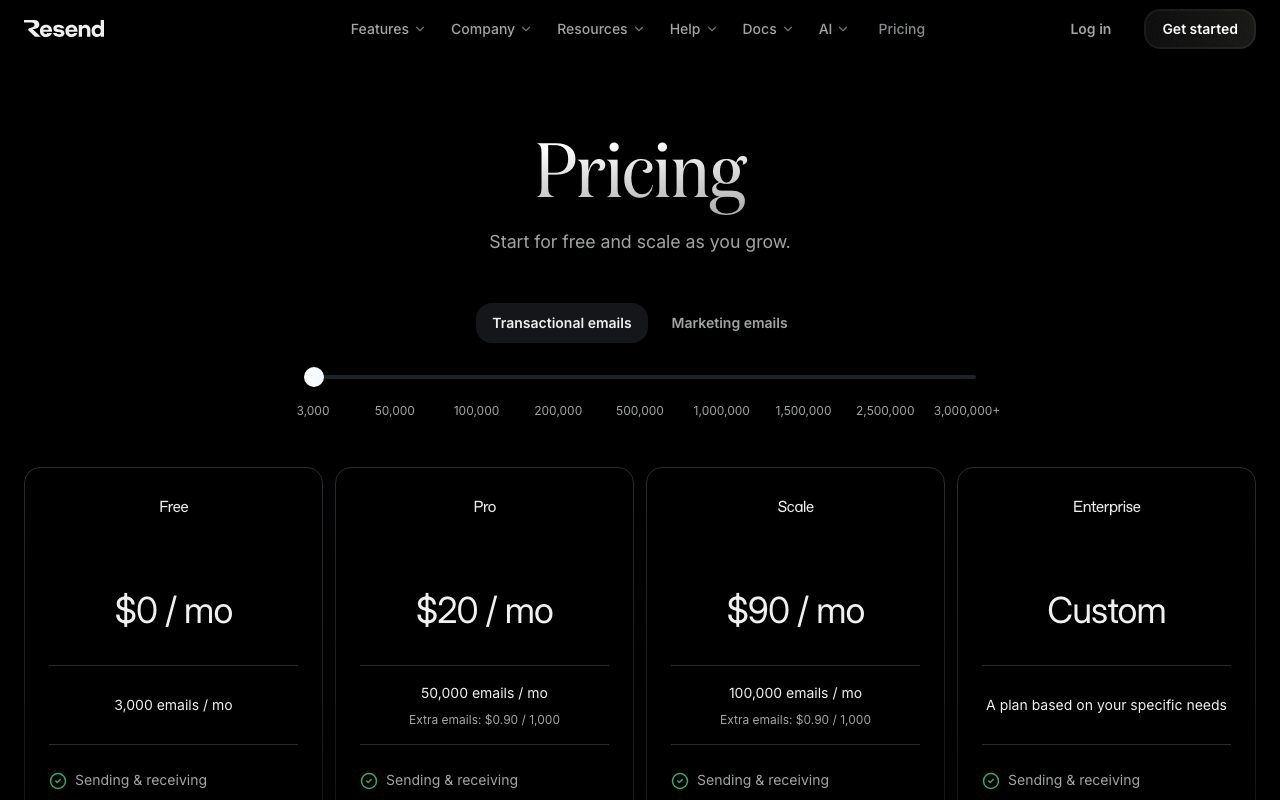
Generous free tier, then volume-based pricing as you scale. The pricing tiers are clean and predictable. No "contact sales" tax to unlock basic features.
It's competitive with Postmark and cheaper than SendGrid for similar volumes. The free tier is one of the most usable in the space.
What you pay for
Email volume, dedicated IPs at higher tiers, and team features. Most teams stay on the lower tiers comfortably.
Standout features of Resend
React Email. Already mentioned. It's the headline. Nobody else treats components as templates this elegantly.
The dashboard. Modern, fast, and informative. Logs are accessible, deliverability is visible, and you don't fight the UI.
Webhooks and events
Resend's webhook system is solid. Bounce, complaint, open, click, delivery events all flow cleanly. You can wire up Slack alerts or pipe events into your own analytics.
Honest tradeoffs with Resend
It's young. The track record is shorter than the established players. Some enterprise customers want more years of uptime data before committing.
Inbound email handling is less mature than Postmark or Mailgun. If parsing inbound mail is a requirement, double-check coverage.
Resend is what happens when someone looks at the email API space, sees that nothing's been delightful in a decade, and ships a product that fixes that.
Resend vs alternatives
Resend vs SendGrid: SendGrid is the legacy giant. Resend is the modern challenger. SendGrid wins on volume and feature breadth, Resend wins on developer experience.
Resend vs Postmark: Postmark is more proven for deliverability. Resend is more modern in DX. Both are solid for transactional.
Resend vs Loops: Loops is more product-focused, more onboarding-flow-shaped. Resend is more raw API.
For the broader category, see the best transactional email services or check SendGrid alternatives and Resend vs Postmark.
When Resend wins
You're a modern web team. You use React. You want a clean API.
Bottom line on Resend
Resend is the email API for teams that grew up on Stripe's docs and expect everything to feel like that now. The bet on developer experience is paying off.
If you have decade-old infrastructure, Postmark or SendGrid may suit better. For new builds, Resend is hard to beat. See tools for developers for adjacent picks.
Why React Email changes the game
Email templates have always been HTML hell. Tables, inline styles, MSO conditionals, and a thousand client-specific quirks. React Email abstracts all of that. You write a component, you get a working email.
Resend's first-class support for React Email means your templates live in your codebase. They version with your app. They review in your PRs. They test in your CI. This is how email templates should have always worked.
The DX difference
Resend's docs feel modern. The SDK feels modern. The dashboard feels modern. None of this should be revolutionary, but the email API space is full of products that haven't been redesigned since 2014. Resend stands out by simply not being old.
Resend for different team types
Indie SaaS founders pick it because the onboarding is fast. Larger teams pick it because their devs already use React Email. Agencies pick it because clients can self-serve with the cleaner UI.
The common thread is teams that grew up on modern frontend tooling and expect everything else to keep up. Resend is the email API for those teams.
Webhooks and events
Bounce, complaint, open, click, and delivery events all flow as webhooks. The schema is clean. You can wire up Slack alerts, push to your CRM, or trigger downstream automations. The integration feels first-class.
Common Resend questions
Is Resend production-ready? Yes, but the track record is shorter than legacy players. Does it support marketing emails? Yes, with separate streams. How does it compare on deliverability? Solid, though Postmark's reputation for the absolute top tier is older.
For more, see tools for Next.js developers and Resend vs SendGrid.
Final take on Resend
Resend is the email API that finally feels like it was built for the way modern teams work. The React Email integration alone is worth the consideration. For new builds, it should be on every team's shortlist.
React Email in production
React Email started as an open-source project and Resend supports it natively. You write JSX components for your emails. The library renders them to HTML that survives across mail clients. The DX is the closest email development has gotten to feeling like normal frontend work.
Components compose. Templates inherit layouts. Styles use familiar JSX patterns. You version emails in git, review them in PRs, test them in your existing toolchain. This is how it should always have worked.
The component library
React Email ships pre-built components for common email elements: headers, footers, buttons, sections, dividers. You can compose these into your designs without reinventing each piece. The components handle the cross-client rendering quirks.
Resend's domain and authentication setup
Adding a sending domain involves DNS records: SPF, DKIM, and a tracking domain. Resend gives you the records, you paste them into your DNS provider, verification happens automatically. The flow is one of the cleanest in the email API space.
The DMARC support pushes teams toward proper email authentication, which improves deliverability. Resend's documentation explains DMARC clearly without assuming you've already lived through email auth wars.
Resend for serverless apps
The HTTP-only API plays nicely with serverless runtimes: Vercel functions, Cloudflare Workers, AWS Lambda. There's no SMTP requirement, no persistent connections needed. Send an email by making an HTTP call, get a response, done.
This matters for the modern stack. Many email providers assume long-running processes. Resend assumes serverless from the ground up, which fits how new apps are built.
Audience features
Resend Audiences let you manage subscriber lists for newsletters and broadcast campaigns. The product is newer than the transactional API but it's evolving fast. For teams that want one tool for both transactional and broadcast, this matters.
Webhooks and event handling
Bounce, complaint, open, click, and delivery events fire as webhooks. The schema is clean and consistent. You can pipe events into Slack, your database, or your analytics tool. The reliability is solid.
For automated bounce handling, the webhook pattern means you can clean your list automatically. Hard bounces flow into a "do not send" table. Complaints add unsubscribes. The whole loop runs without manual intervention.
The DX bar Resend set
Resend's docs are clear, the SDK is small, the API is consistent, the dashboard is fast. None of this should be revolutionary, but the email API space has been so neglected that Resend feels fresh just by being modern. The bar wasn't high.
Resend's growth signals
The platform has been adding regions, features, and integrations consistently. The team is responsive on community channels. The roadmap is visible. These are the signs of a tool worth betting on, especially for new builds.
For teams already on legacy providers, the migration question is real. New apps should start on Resend. Existing apps should migrate when the bill or pain justifies it.
Resend wrap-up
The platform's positioning as the modern email API for modern teams is honest and accurate. The DX is genuinely better than legacy alternatives. The React Email integration is genuinely transformative for how teams build email templates. Both bets are paying off.
For new builds in modern stacks, Resend should be the default. Start there unless you have a specific reason to use something else. The friction is so low that the trial doesn't even feel like a trial. You're shipping production emails within an hour of signup.
The Resend trajectory
Watch the platform's roadmap and feature shipping cadence. Resend has been adding capabilities consistently: regions, audiences, integrations, deliverability infrastructure. The trajectory suggests the platform will keep closing gaps with established players while keeping its DX advantage. For most modern teams, that's the right tool to bet on for the next several years.
Tutorial / Demo
Key Features
- Clean REST API with SDKs for Node, Python, Go, and more
- React Email integration for building templates
- Email analytics and delivery tracking
- Custom domain and DKIM authentication
- Webhook events for delivery status
- Batch sending support
- Audience management for marketing emails
Pros & Cons
What we like
- Developer experience is best in class
- React Email templates are a game changer
- Generous free tier of 3,000 emails per month
- Simple pricing that scales predictably
- Excellent documentation and examples
Room for improvement
- Relatively new compared to SendGrid or Mailgun
- Fewer integrations than established providers
- Marketing email features still maturing
Frequently Asked Questions
What is Resend used for?
Is Resend free to use?
What are the pros and cons of Resend?
Who should use Resend?
Best For
Featured in
Tags
Alternatives to Resend

Loops
Modern email platform built for SaaS teams, combining transactional, marketing, and lifecycle messages with a clean API.

Customer.io
Event-driven messaging platform for product teams that want to send email, push, SMS, and in-app messages from real user behavior.

Postmark
Transactional email service obsessed with deliverability, fast inbox arrival, and clean per-message logs for app teams.

Mailgun
Developer-focused email infrastructure with APIs, SMTP, validation, and analytics for high-volume transactional sending.
Our take
Tool Index Editorial · May 2026· 4.6/5
Resend positions itself as email api built for developers with react email support, and on the whole it earns the framing.
Worth highlighting: Developer experience is best in class, React Email templates are a game changer, and Generous free tier of 3,000 emails per month. The friction points: Relatively new compared to SendGrid or Mailgun and Fewer integrations than established providers.
Recommendation: this is a strong default when you need sending transactional emails like password resets and receipts. If relatively new compared to SendGrid or Mailgun would be a dealbreaker, the alternatives section below is worth a scroll.
Editorial opinion from the Tool Index team, written from the public product pages. Not a user review.
Reviews (3)
Bought it for one feature, stayed for ten
Started using Resend casually, now it's pinned in my dock. Genuine strength: excellent documentation and examples. Mostly using it for automating email notifications in web applications.
Pros
- Simple pricing that scales predictably
- Developer experience is best in class
Hoped for more honestly
Found Resend on a Reddit thread, glad I clicked. Where it really wins is simple pricing that scales predictably. Their take on email analytics and delivery tracking is solid. Wish they'd address how fewer integrations than established providers. Might revisit when they iterate further.
Pros
- Simple pricing that scales predictably
- React Email templates are a game changer
- Excellent documentation and examples
Cons
- Relatively new compared to SendGrid or Mailgun
Worth the price of admission
Started using Resend casually, now it's pinned in my dock. Real selling point: react Email templates are a game changer. Their take on batch sending support is solid. It fits well for replacing legacy email providers with a modern API. Still recommending it to people in similar setups.
Pros
- Generous free tier of 3,000 emails per month
- React Email templates are a game changer
- Developer experience is best in class
Badge builder
Add Resend to your website
Choose a badge style and size, preview it here, then copy the generated HTML. Badge images are self-contained SVGs and do not require an external script.

<a href="https://toolindex.net/tools/resend?ref=badge" target="_blank" rel="noopener">
  <img src="https://toolindex.net/badge/resend/medium.svg" alt="Resend - Listed on Tool Index" width="180" height="50" />
</a>How to use the badge
- 1. Pick the style, size, and theme that fit your layout.
- 2. Copy the generated HTML from the code block.
- 3. Paste it into your footer, homepage, or press page.
Standard badge available
The standard listing badge is available now. Score and circle badges are limited to tools currently ranked in the top 10 of a category.
Badge clicks return visitors to this profile with a referral tag so the source remains identifiable.
Related Tools

Kevin Gabeci
Solo developer building web apps, cozy browser games, and AI creator toolkits.

Coolify
Self-hostable, open source alternative to Heroku and Netlify

Warp
The modern terminal reimagined with AI and collaboration

Bolt.new
Prompt-to-deployed full-stack app inside the browser
Work on Resend? Request listing access or correction