
Saerskriven
Model software threats in a browser and keep the security reasoning with the code
Gallery
About Saerskriven
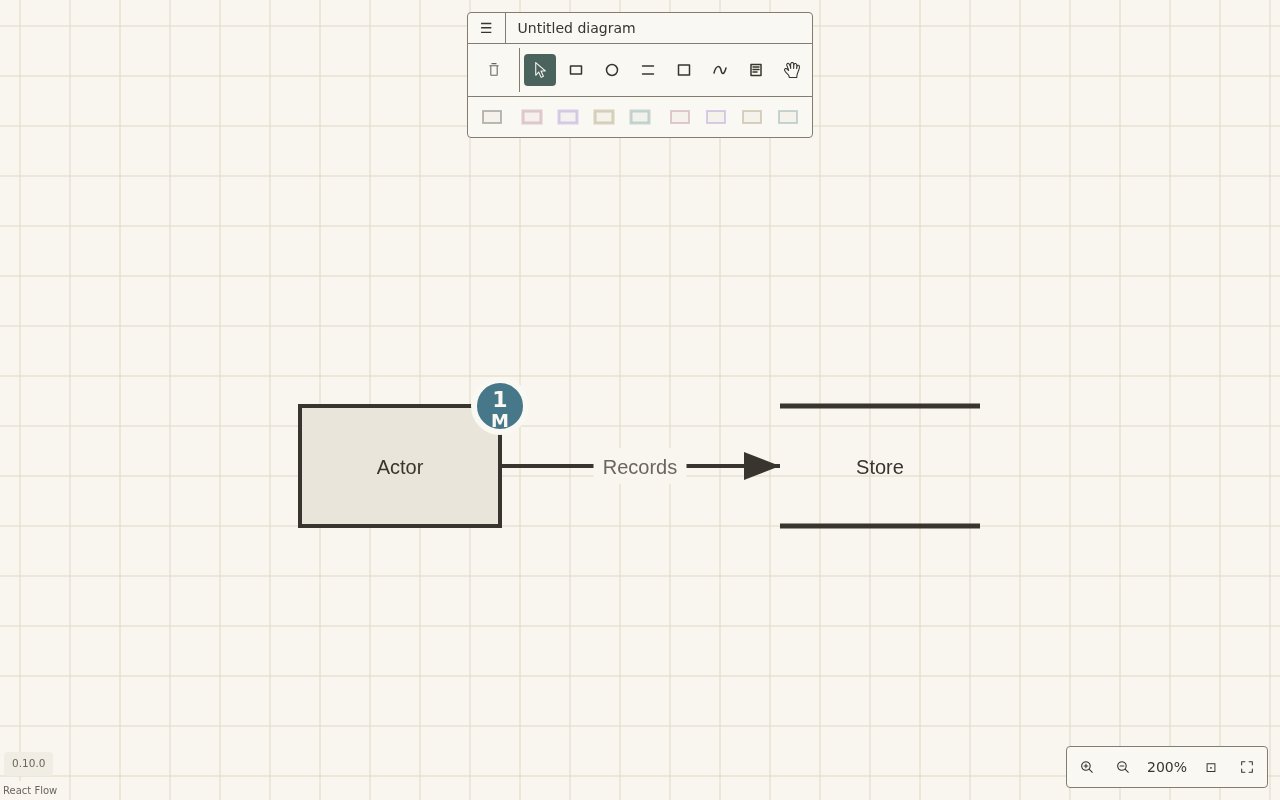
Saerskriven is an open-source threat modelling studio for developers who want the model to evolve with the software it describes. Its browser editor centers the work on a data-flow diagram, where threats and mitigations are attached to the relevant elements instead of living in a separate report. The same model can be saved as a file beside the application code and reviewed through the team's usual version control process. That makes threat modelling part of design and development rather than a one-time compliance exercise that quickly drifts away from the system.
The internal model is typed and records diagrams, threats, mitigations, assumptions, and the relationships among them. Saerskriven has its own YAML format and can read and write OWASP Threat Dragon v2 JSON, so teams don't have to abandon an existing Threat Dragon model to try it. It can also read OTM and TM-BOM inputs, though those two formats aren't write targets. The browser canvas is the editor itself, with threat records managed in the context of the system elements they describe. Because the file in Git remains the source of truth, changes to security reasoning can travel with the design or code change that prompted them. The format layer calls out information that doesn't map exactly instead of silently ignoring it, which helps reviewers see what a conversion may not preserve.
A companion command-line tool named saer brings the same model into automated and headless workflows. It validates model files, converts between the native YAML and Threat Dragon formats, and renders outputs for people who need a document rather than an editor. Supported projections include SVG and PNG diagrams, a Markdown threat register, and a PDF containing diagrams followed by the register. Markdown output can include Mermaid versions of the diagrams, while the PDF gathers every diagram and the full register into one reviewable file. The executable carries the components needed to build PDF and PNG output, so those renders don't require a browser, Typst installation, or network connection. Releases provide executables for Linux on x64 and Arm, macOS on Apple silicon, and Windows on x64, while Intel Mac support ended after version 0.8.3.
Saerskriven is also designed for work with AI coding agents. Running the CLI as an MCP server lets a compatible agent host inspect and update the same model a developer opens in the browser. That gives an agent a concrete inventory for exploring risks around a new component, changed data flow, or trust boundary, while the human can review resulting file changes alongside the code. A share command can compress the entire model into the fragment of a hosted studio link. The fragment isn't sent to the server by the browser, which fits the project's local-first posture, though anyone who receives the link can read the model and a sent link can't be revoked. If a model would create a link beyond the supported browser length, the CLI refuses and tells the user to send the file instead.
The tool is a particularly good fit for application security work inside product engineering teams. It favors living technical reasoning, version control, command-line validation, and documentation builds over dashboards for organization-wide compliance programs. Compatibility with Threat Dragon lowers migration friction, while the diagram-first editor gives security and development teammates a common visual surface. The tradeoff is maturity. Saerskriven is a young project with a very small public community, its desktop packaging is still limited, and teams need to bring their own review process around agent-made changes. The CLI installation also asks users to verify and place a platform executable rather than installing from a mainstream package store. Its narrow focus is a strength for developer workflows, but it won't replace governance tooling for organization-wide evidence collection or policy management.
Saerskriven is free and released under the Apache License 2.0. The hosted site opens the interactive browser studio, and the public repository provides the source, documentation, release files, and CLI. There isn't a paid tier or hosted account requirement. The project reports that the studio has no server and doesn't store user information, while model sharing works by putting compressed data in the link itself. That access posture makes it easy to test on a small service or architecture review without procurement. Teams choosing it should be comfortable with an actively developing open-source tool and should treat model files and shared links as sensitive security material, but they gain a workflow that can stay close to code instead of becoming another isolated document.
Key Features
- Diagram first browser editor
- Git friendly YAML models
- Threat Dragon format compatibility
- CLI validation and rendering
- MCP support for coding agents
- PDF, Markdown, PNG, and SVG exports
Pros & Cons
What we like
- Keeps threat models beside application code
- Combines visual editing with headless automation
- Works with existing Threat Dragon models
- Free under the Apache 2.0 license
Room for improvement
- Young project with a tiny public community
- No current Intel Mac release
- Shared model links cannot be revoked
- Focused on development rather than compliance management
Frequently Asked Questions
What is Saerskriven?
Is Saerskriven free?
Does Saerskriven work with Threat Dragon?
What can the Saerskriven CLI do?
Best For
Featured in
Alternatives to Saerskriven
View all
1Password
Password and secrets manager for individuals, families, and developer teams with strong CLI and SSH agent support.
Clerk
Drop-in authentication and user management for modern apps

Tailscale
WireGuard-based mesh VPN that connects your devices, servers, and cloud resources into one private network in minutes.

BackPedal
UK bike theft protection that sends recovery agents after your stolen bike
Reviews (0)
Badge builder
Add Saerskriven to your website
Choose a badge style and size, preview it here, then copy the generated HTML. Badge images are self-contained SVGs and do not require an external script.

<a href="https://toolindex.net/tools/saerskriven?ref=badge" target="_blank" rel="noopener">
  <img src="https://toolindex.net/badge/saerskriven/medium.svg" alt="Saerskriven - Listed on Tool Index" width="180" height="50" />
</a>How to use the badge
- 1. Pick the style, size, and theme that fit your layout.
- 2. Copy the generated HTML from the code block.
- 3. Paste it into your footer, homepage, or press page.
Standard badge available
The standard listing badge is available now. Score and circle badges are limited to tools currently ranked in the top 10 of a category.
Badge clicks return visitors to this profile with a referral tag so the source remains identifiable.
Related Tools
Clerk
Drop-in authentication and user management for modern apps

DomeSOC
Autonomous SOC that grades every AI claim against evidence before it reaches an analyst
Reel
Forensic evidence capture for regulated Kubernetes, plus a free open-source VEX hub

HeimWall
Menu bar app that catches secrets and PII before you paste them into AI coding tools
Work on Saerskriven? Request listing access or correction