
Sentrint
Security scanner that grades your codebase and generates AI-ready fix prompts
Gallery
About Sentrint
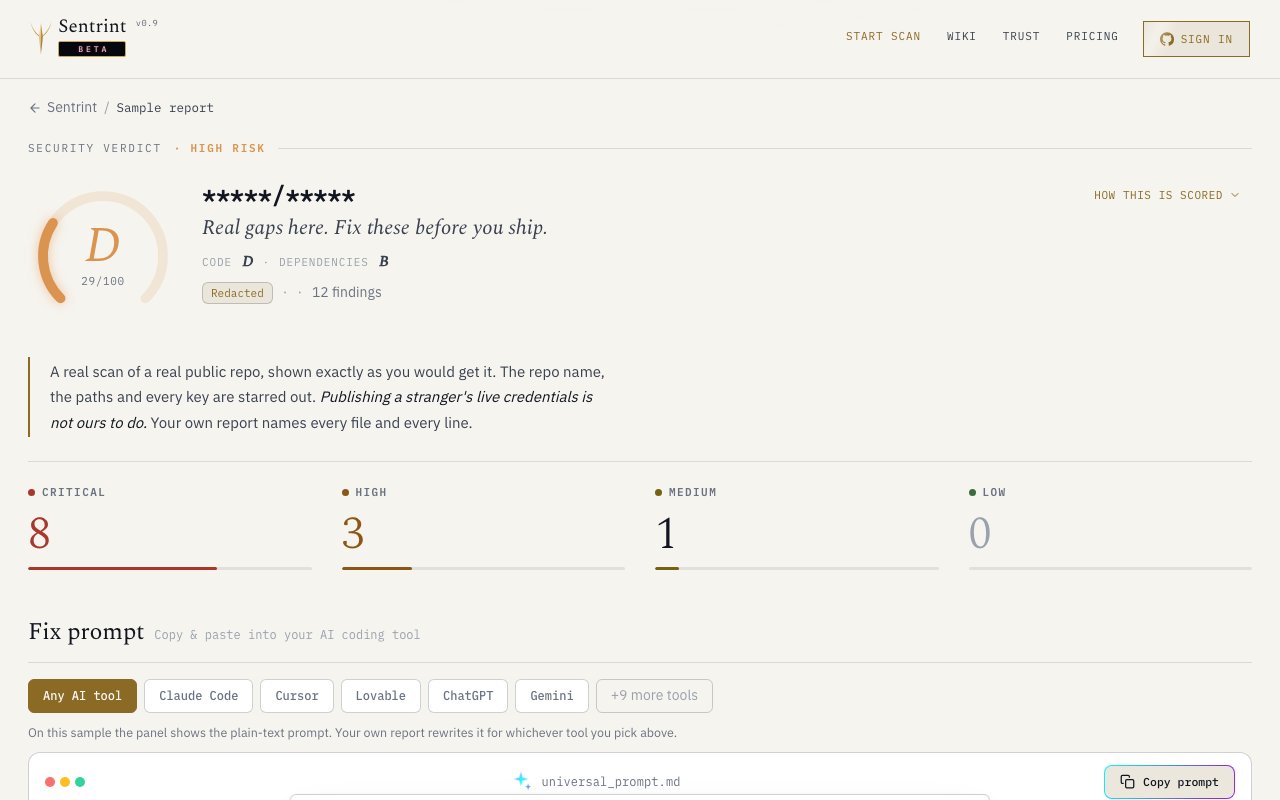
Sentrint is a security scanning platform that analyzes code repositories for vulnerabilities and generates a letter grade based on what it finds. It scans your codebase, checks dependencies against known CVE databases, hunts for leaked credentials, and produces a report that tells you exactly what to fix before you ship. The output includes AI generated remediation prompts formatted for Claude Code, Cursor, ChatGPT, Gemini, Lovable, v0, and nine other coding assistants, so you can copy a fix directly into your IDE rather than translating a security warning into code yourself. The platform supports Python, JavaScript, and other languages, with package manager awareness for npm, pnpm, pip, uv, poetry, Cargo, and Go modules. The scanning covers common vulnerability categories including command injection, path traversal, hardcoded secrets, weak cryptographic practices like fast hashing algorithms, and plain text password comparisons.
The problem it addresses is the gap between knowing you have a vulnerability and actually fixing it. Traditional scanners dump a list of findings, maybe with severity ratings, and leave you to figure out the remediation. Sentrint goes a step further by generating prompts that explain what the vulnerability is, why it matters, and how to patch it in context. If you already use an AI coding assistant, the workflow becomes scan, copy prompt, apply fix, rescan. The prompts are tailored per platform rather than generic, so what you paste into Claude Code looks different from what you'd paste into Cursor or Gemini, each formatted for how that tool expects input. This saves the translation step that normally happens when you read a security advisory and then have to explain it to your AI assistant from scratch.
The grading system runs from A to F using a weighted formula that accounts for severity. Critical findings multiply by ten, high by five, medium by two, and low by one. The final score maps to letter grades where A requires ninety or above and F sits below twenty five. Reports show separate grades for your own code and for dependencies, then blend them into an overall grade. Each finding links to the specific file and line, so you're not guessing where the problem lives. The report also surfaces credential leaks with specific rotation guidance, distinguishing between third party API keys that need regeneration at the provider, application secrets like Django's SECRET_KEY that need replacement in your config, and hardcoded passwords that need removal from version control history. The credential detection looks for AWS credentials, Django secrets, API keys, and similar patterns that commonly slip into repositories by accident.
An AI review layer filters likely false positives before the findings hit your screen. Each vulnerability gets a confidence rating of high, medium, or low, with reasoning visible in the report. High confidence means trust it and fix it. Low confidence means it's probably noise, which helps you prioritize instead of wading through dozens of warnings that don't apply to your setup. This is especially useful for static analysis findings where context matters, like an eval() call that's actually safe because the input is hardcoded. The reasoning is shown alongside each finding, so you can understand why the scanner flagged something and make your own judgment call.
The interface includes a few thoughtful touches. A privacy mode masks sensitive data during screen shares, so you can review findings on a call without exposing credentials. Keyboard navigation with j and k keys lets you move through findings quickly, and arrow keys handle file traversal. There's light and dark theme support with system preference detection, and reduced motion for users who need it. The sticky action bar floats above the viewport after scrolling, keeping the grade and main buttons accessible without scrolling back up. Findings are grouped by severity with collapsible sections, and minor issues are tucked behind toggles by default so the report focuses on what matters most. Deep linking lets you share a URL that jumps directly to a specific finding with its parent groups automatically expanded.
It fits development teams that want security sign off before deployment and individual developers who want to catch issues early. If your workflow already includes AI assistants, Sentrint's prompt generation slots in without extra translation. If you're preparing for a compliance audit or just want to prove to stakeholders that the codebase is clean, the letter grade and embeddable badge give you something concrete to show. The badge is earned at grade C and above, reads the live grade on every page load, and comes in Markdown and HTML formats for READMEs and documentation. The badge pulls the current grade dynamically, so it always reflects the latest scan rather than a stale snapshot.
The pricing model is freemium. A free tier gives you one scan per month with no credit card required. The Founder plan unlocks CSV and JSON export, more frequent scans, additional platform targets for AI prompts, and locked features not available on free. The sample report on the site shows real findings against a real codebase, not hypothetical examples, which suggests the scanner is production ready rather than a demo. If you've been meaning to audit your codebase but dread the manual triage, Sentrint compresses that loop into something you can act on in an afternoon.
Key Features
- Automated vulnerability scanning for code
- A to F security grading system
- AI-generated remediation prompts
- Credential and secret leak detection
- Dependency CVE vulnerability tracking
- Embeddable security badge for repos
Pros & Cons
What we like
- Fix prompts copy directly into AI coding assistants
- Letter grade gives a clear summary for stakeholders
- Free tier available with no credit card
- Covers credentials, dependencies, and code in one scan
Room for improvement
- One free scan per month may not suit active projects
- Focused on code repos, not infrastructure or runtime
- Newer product with limited track record
- Export features require a paid plan
Frequently Asked Questions
What is Sentrint?
Is Sentrint free?
How do the AI fix prompts work?
Who is Sentrint for?
Best For
Featured in
Alternatives to Sentrint

1Password
Password and secrets manager for individuals, families, and developer teams with strong CLI and SSH agent support.
Clerk
Drop-in authentication and user management for modern apps

Tailscale
WireGuard-based mesh VPN that connects your devices, servers, and cloud resources into one private network in minutes.

BackPedal
UK bike theft protection that sends recovery agents after your stolen bike
Reviews (0)
Badge builder
Add Sentrint to your website
Choose a badge style and size, preview it here, then copy the generated HTML. Badge images are self-contained SVGs and do not require an external script.

<a href="https://toolindex.net/tools/sentrint?ref=badge" target="_blank" rel="noopener">
  <img src="https://toolindex.net/badge/sentrint/medium.svg" alt="Sentrint - Listed on Tool Index" width="180" height="50" />
</a>How to use the badge
- 1. Pick the style, size, and theme that fit your layout.
- 2. Copy the generated HTML from the code block.
- 3. Paste it into your footer, homepage, or press page.
Standard badge available
The standard listing badge is available now. Score and circle badges are limited to tools currently ranked in the top 10 of a category.
Badge clicks return visitors to this profile with a referral tag so the source remains identifiable.
Related Tools
Clerk
Drop-in authentication and user management for modern apps

DomeSOC
Autonomous SOC that grades every AI claim against evidence before it reaches an analyst
Reel
Forensic evidence capture for regulated Kubernetes, plus a free open-source VEX hub

HeimWall
Menu bar app that catches secrets and PII before you paste them into AI coding tools
Work on Sentrint? Request listing access or correction